oxidizer
Simple & Extensible Dotfile Manager That Unifies Your Terminal Operations
 ivaquero
git clone https://github.com/ivaquero/oxidizer.gitivaquero/oxidizeroxidizer

A Simple & Extensible Dotfile and Computing Environments Manager That Facilitates Your Terminal Operations
一个简单 & 可扩展的,用于简化操作的 dotfile 和计算环境管理工具
1. Motivation 动机
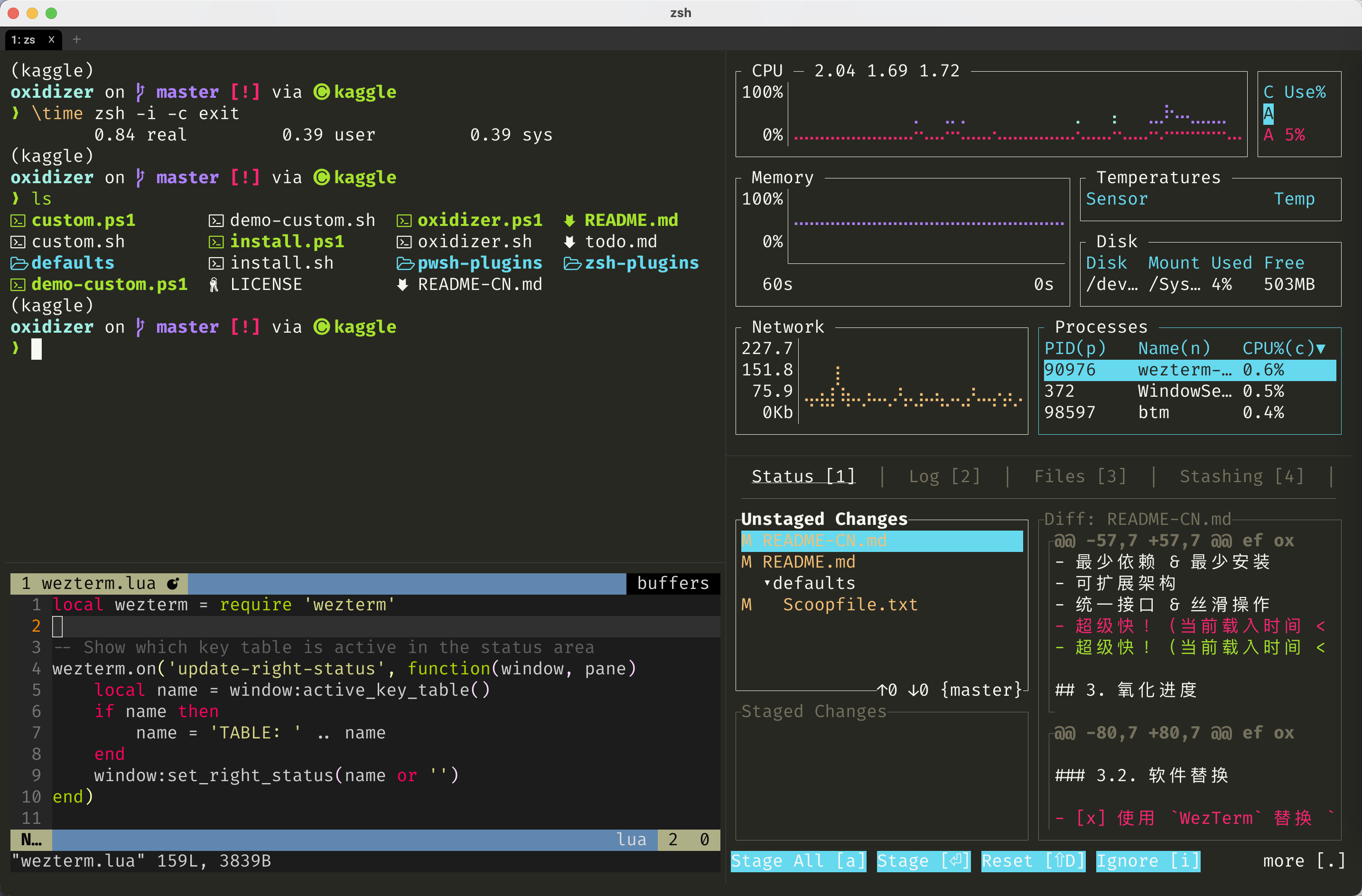
oxidizer is originally designed for non-administrator users. It saves your time from repetitive and tedious setups of coding environments, and it aims to provide with following features:
- Cross-Platform (mainly Rust toolchains)
- Minimal Dependencies & Minimal Installation
- Extensible Architecture
- Unified Interface & Smooth Usage
- Barely affect loading (loading time < 1 s)
oxidizer 起初主要为非管理员用户设计(在实验室的不同计算机上反复搭建环境真的很烦),用于快速搭建跨平台统一的工作环境,避免重复和繁琐的环境配置劳动,其具有特点
- 跨平台(主要基于 Rust 工具链)
- 最少依赖 & 最少安装
- 可扩展架构
- 统一接口 & 丝滑操作
- 几乎不影响加载!(载入时间 < 1 秒)
Although this toy program uses a lot of rust-based CLI, its name just came out of the pattern "element-oxidizer-oxide" when I was a student in biochemistry.
虽然这个玩具程序使用了很多基于 rust 的 CLI,但它的名字只是在我还是生化专业的学生时从模式"单质 - 氧化剂 - 氧化物"中冒出来的。
2. File Management 文件管理
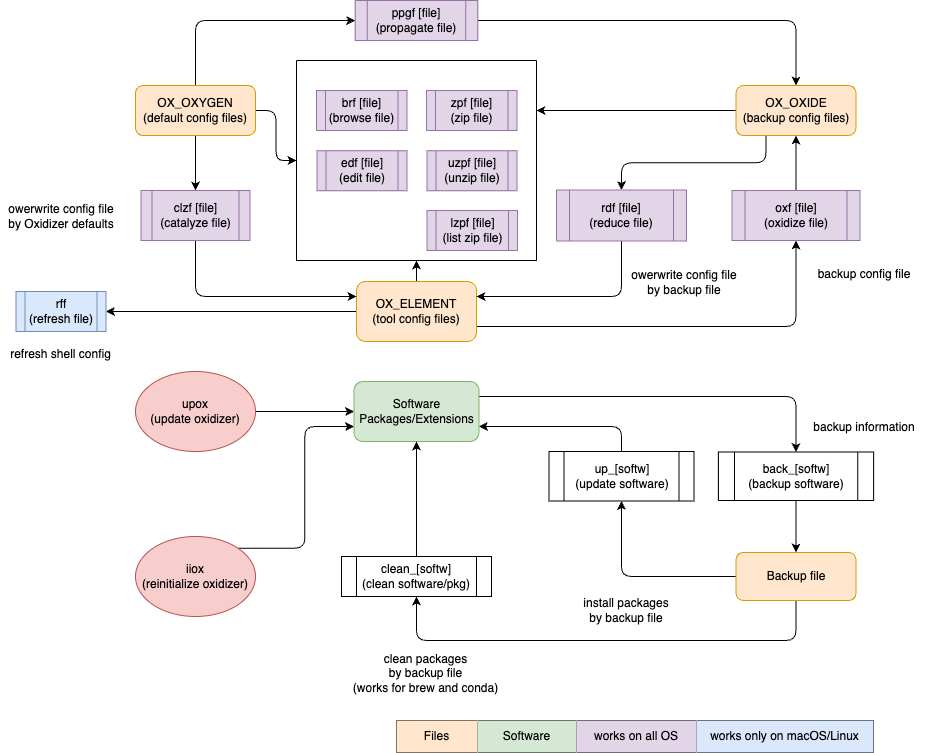
Based on the name origin of the program, the program creates 3 main variables
- OX_ELEMENT: config files of softwares
- OX_OXIDE: backup of the config files
- OX_OXYGEN: config files in
oxidizer
根据程序的名称起源,程序会创建 3 个主要变量
-
OX_ELEMENT: 软件的配置文件
-
OX_OXIDE: 配置文件的备份
-
OX_OXYGEN:
oxidizer自带的配置文件 -
rff- refresh file by
source
- refresh file by
-
edf- edit file by
$EDITOR(default: VSCode)
- edit file by
-
brf- file: browse by
bat/cat - folder: browse by
lsd/ls
- file: browse by
-
ipf(import file, alias:rdf)- reduce file: overwrite configuration file by backup (customized) file
-
epf(export file, alias:oxf)- oxidize file: backup configuration file to backup folder
-
iif(initialize file, alias:clzf)- catalyze file: overwrite configuration file by
oxidizerdefaults
- catalyze file: overwrite configuration file by
-
ppgf- propagate file: backup
oxidizerdefaults to backup folder
- propagate file: backup
For example, if you want to edit ~/.zshrc, you can type edf zs.
When you epf zs (export file), ~/.zshrc will be copied and save in folder backup folder
As mentioned in Get Started, you can open custom.json simply by edf ox.
In the custom.json, edit the oxides map to predefine the specific backup path, where oxide_folder is the backup root path relative to $HOME. Note that the key should be set as bk + [key in OX_ELEMENT].
{
 "oxide_folder": "Documents",
 "oxides": {
        "bkox": "shell/custom.json",
        "bkoxw": "shell/custom.json",
        "bkoxj": "shell/custom.json",
        "bkb": "unix/Brewfile",
        "bkvi": "shell/.vimrc",
        "bkss": "shell/starship.toml",
        "bkg": "../notes/.gitconfig",
        "bkzs": "shell/.zshrc",
        "bkbs": "shell/.bash_profile"
    }
}
The table below lists the information of specific configuration files:
_denotes a folder, and you can check these abbreviations closely bybrf [Plugin Abbr.]|edf [Plugin Abbr.].
oxidizer uses ouch to deal with compression and decompression, and provides with 3 shortcuts
zpf: compress filezpfr: decompress filezpfls: list items in the compressed file
3. Installation 安装
For macOS / Linux (Intel)
export OXIDIZER=$HOME/oxidizer
git clone --depth=1 https://github.com/ivaquero/oxidizer.git $OXIDIZER && bash oxidizer/install.sh
Note that Homebrew is an essential dependency for oxidizer on macOS / Linux.
- 对中国大陆用户,可设置
BREW_CN变量来下载安装 Homebrew:
export BREW_CN=1
For Windows
$env:OXIDIZER = "$HOME\oxidizer"
git clone --depth=1 https://github.com/ivaquero/oxidizer.git $env:OXIDIZER; . oxidizer\install.ps1
- 对中国大陆用户,可设置
SCOOP_CN变量来下载安装
$env:scoop_mirror = 1
For Cmderrs, you need to remove the
-Options ReadOnlyfromSet-Item -Path function:\prompt -Value $Prompt -Options ReadOnlyin the last line of%CMDER_ROOT%\vendor\profile.ps1.对于 Cmder 用户,你需要删除
%CMDER_ROOT%\vendor\profile.ps1的最后一行Set-Item -Path function:\prompt -Value $Prompt -Options ReadOnly中的-Options ReadOnly。
After installation, you might personalize your preference in custom.json, check defaults.json. Open custom.json by following command
安装之后,您可以在custom.json中个性化您的系统环境(请参考defaults.json,通过一下命令打开
edf ox
To keep up the updates, simply upox function.
可使用 upox 命令来更新 oxidizer
2. Motivation 动机
Oxidizer 的主要目标
Oxidizer is originally designed for non-administrator users. It saves your time from repetitive and tedious setups of coding environments, and it aims to provide with following features:
- Cross-Platform (mainly Rust toolchains)
- Minimal Dependencies & Minimal Installation
- Extensible Architecture
- Unified Interface & Smooth Usage
- Super-Fast! (loading time < 1 s)
Oxidizer 起初主要为非管理员用户设计,用于快速搭建跨平台统一的工作环境,避免重复和繁琐的环境配置劳动,其具有特点
- 跨平台(主要基于 Rust 工具链)
- 最少依赖 & 最少安装
- 可扩展架构
- 统一接口 & 丝滑操作
- 超级快!(载入时间 < 1 秒)
3. Tool Chains 工具链
4.1. CLI Tools Replacement
☑️ means required in the installation.
- coreutils
- bat ⟶
cat - lsd ⟶
ls - uutils-coreutils ⟶
coreutils
- bat ⟶
- non-coreutils
4.2. GUI Tools Replacement
WezTermis more recommended because it has a built-in multiplexer.
4.3. Otherful Rust Tools
- fresh-editor: A terminal text editor you can just use.
- ouch: Painless compression and decompression tool
4.4. Summary of Plugins
oxidizer is designed to be extensible, you can personalize plugin_load in config.json to load the plugins by your need.
Of course, you are allowed to write your own plugins, see Writing A Plugin for details.
The plugins are hosted in oxplugins as well as oxplugins-powershell.
插件位于 oxplugins 和 oxplugins-powershell
To load a plugin, simply add its abbreviation into the OX_PLUGINS array of ~/oxidizer/config.json, like
{
    "plugin_load": [
        "cli_espanso",
        "cli_ollama",
        "cli_vscode",
        "lang_julia",
        "lang_rust",
        "pkg_conda",
        "pkg_npm",
        "pkg_tlmgr"
    ]
}
You can check available builtin plugins by function lsox.
| Filename | Category | Support |
|---|---|---|
os_macos |
OS Shortcuts | macOS |
os_debian |
OS Shortcuts | Debian-Based Systems |
os_redhat |
OS Shortcuts | RedHat-Based Systems |
os_windows |
OS Shortcuts | Windows (include winget) |
pkg_brew |
Package Manager | Homebrew (macOS & Linux) |
pkg_scoop |
Package Manager | Scoop (Windows) |
pkg_conda |
Package Manager | Conda (Multi-Languages) |
pkg_npm |
Package Manager | NPM + PNPM (JavaScript) |
pkg_tlmgr |
Package Manager | tlmgr (TeXLive) |
cli_bitwarden |
App CLI | Bitwarden |
cli_espanso |
App CLI | Espanso |
cli_ollama |
App CLI | Ollama |
cli_vscode |
App CLI | VSCode |
cli_multiplex |
App Utils | Zellij & TMux |
lang_julia |
Language | Julia |
lang_rust |
Language | Rust (include cargo, rustup) |
utils_files |
System Utils | File Operation |
utils_formats |
System Utils | Formats Conversion |
utils_networks |
System Utils | Network Configuration |
5. Package Management 包管理
oxidizer aims to provide a unified interface for all package manager-related commands to reduce typing and memory burden of command-liners.
| Suffix | Action | brew b |
scoop s |
conda c |
npm n |
cargo cg |
rustup rs |
julia jl |
pixi px |
gem rb |
tlmgr tl |
|---|---|---|---|---|---|---|---|---|---|---|---|
*h |
help | ✅ | ✅ | ✅ | ✅ | ✅ | ✅ | ✅ | ✅ | ✅ | |
*cf |
config | ✅ | ✅ | ✅ | ✅ | ||||||
*is |
install | ✅ | ✅ | ✅ | ✅ | ✅ | ✅ | ✅ | ✅ | ✅ | ✅ |
*us |
uninstall | ✅ | ✅ | ✅ | ✅ | ✅ | ✅ | ✅ | ✅ | ✅ | ✅ |
*up |
update | ✅ | ✅ | ✅ | ✅ | ✅ | ✅ | ✅ | ✅ | ✅ | ✅ |
*ups |
update self | ✅ | ✅ | ✅ | |||||||
*ls |
list | ✅ | ✅ | ✅ | ✅ | ✅ | ✅ | ✅ | ✅ | ✅ | ✅ |
*lv |
leaves | ✅ | ✅ | ✅ | ✅ | ✅ | ✅ | ✅ | |||
*sc |
search | ✅ | ✅ | ✅ | ✅ | ✅ | ✅ | ✅ | |||
*cl |
clean | ✅ | ✅ | ✅ | ✅ | ✅ | ✅ | ✅ | ✅ | ||
*if |
info | ✅ | ✅ | ✅ | ✅ | ✅ | ✅ | ||||
*st |
status | ✅ | ✅ | ✅ | ✅ | ||||||
*ck |
check | ✅ | ✅ | ✅ | ✅ | ✅ | ✅ | ✅ | ✅ | ||
*pn |
pin | ✅ | ✅ | ✅ | |||||||
*upn |
unpin | ✅ | ✅ | ✅ | |||||||
*dp |
depends | ✅ | ✅ | ✅ | ✅ | ✅ | ✅ | ||||
*dpr |
needs | ✅ | ✅ | ||||||||
*xa |
add repo | ✅ | ✅ | ✅ | |||||||
*xrm |
remove repo | ✅ | ✅ | ✅ | |||||||
*xls |
list repo | ✅ |
Some package managers also have functionality of project management
| Suffix | Action | brew b |
scoop s |
conda c |
npm n |
cargo cg |
rustup rs |
julia jl |
pixi px |
gem rb |
|---|---|---|---|---|---|---|---|---|---|---|
*ii |
init | ✅ | ✅ | ✅ | ✅ | |||||
*cr |
create | ✅ | ✅ | ✅ | ✅ | |||||
*b |
build | ✅ | ✅ | ✅ | ||||||
*r |
run | ✅ | ✅ | ✅ | ✅ | ✅ | ✅ | |||
*ed |
edit | ✅ | ||||||||
*ct |
cat | ✅ | ✅ | ✅ | ||||||
*ln |
link | ✅ | ||||||||
*ts |
test | ✅ | ✅ | ✅ | ✅ | |||||
*au |
audit | ✅ | ✅ | |||||||
*fx |
fix | ✅ | ✅ | ✅ | ||||||
*pb |
publish | ✅ | ✅ |
Some of the package managers shortcuts are included in corresponding system plugins.
ox-os-macos: auto-loaded, contains alias and functions formasox-os-debians: auto-loaded, contains alias and functions foraptox-os-windows: auto-loaded, contains alias and functions forwingetandwsl
| Suffix | Action | mas m |
apt a |
winget w |
wsl wl |
|---|---|---|---|---|---|
*h |
help | ✅ | ✅ | ✅ | ✅ |
*is |
install | ✅ | ✅ | ✅ | ✅ |
*us |
uninstall | ✅ | ✅ | ✅ | ✅ |
*up |
update | ✅ | ✅ | ✅ | ✅ |
*ups |
update self | ✅ | ✅ | ✅ | |
*ls |
list | ✅ | ✅ | ✅ | |
*lv |
leaves | ||||
*sc |
search | ✅ | ✅ | ||
*cl |
clean | ✅ | ✅ | ✅ | |
*if |
info | ✅ | ✅ | ✅ | |
*st |
status | ✅ | |||
*ck |
check | ✅ | |||
*dp |
depends | ✅ | |||
*xa |
add repo | ✅ | ✅ | ||
*xrm |
remove repo | ✅ | ✅ | ||
*xls |
list repo | ✅ | ✅ |
5.1. Homebrew
bis: brew installbris: brew reinstall
suffix c is a flag to specify brew commands only work on casks
-
bisc: brew install --cask -
brisc: brew reinstall --cask -
bupc: brew upgrade --cask -
brp [cask]: replace brew cache file by pre-downloaded file
5.2. Conda
Note that some shortcuts of the ox-conda plugin is based on the package conda-tree that you need to install
conda install -c conda-forge conda-tree
Besides the shortcuts mentioned above in Package Management, the conda plugin also provides with Conda environment management shortcuts which start with ce
ceat: activate environment$1length = 0: activatebaseenv$1length = 1 | 2: activate predefined envOX_CONDA_ENV$1length > 2: activate new env
OX_CONDA_ENV can be personalized in custom.json
For example, assume your environment's name is hello, you can set
# macOS / Linux
OX_CONDA_ENV[h]="hello"
# Windows
$Global:OX_CONDA_ENV.h = "hello"
then, you will be able to manipulate the environment by
# create environment
cecr h
# remove environment
cerm h
# update all packages in the specific environment
cup h
# list all packages in the specific environment
cls h
cerat: reactivate environment, works liveceatceq: quit environment (qis forkill/quit)cecr: createcerm: remove environment, works liveceatbut won't removebaseenvcels: environment listcedf: compare packages between conda environmentscern: renames an existing environmentcesd: change environment'sconda-forge subdiri: forosx-64|linux-64|win-64a: forosx-arm64|linux-aarch64|win-arm64p: forppc64les: forlinux-s390x
ceep: export environment
6. Software Information Management
back_* and up_* work for brew, scoop, conda, vscode (only for windows), julia, tlmgr, npm. clean_* works for brew and conda.
back_*- file: export package/extension info into
$OX_BACKUPfolder
- file: export package/extension info into
up_*- file: install packages/extensions by predefined files in
$OX_BACKUP
- file: install packages/extensions by predefined files in
clean_*- file: clean package/extension info by predefined files in
$OX_BACKUPfolder
- file: clean package/extension info by predefined files in
7. Project Management 工程管理
7.1. Git
-
gclhs: delete commit history
for aliases, check .gitconfig in defaults folder by edf oxg
8. Further Reading
9. Credits 致谢
10. License 许可
This work is released under the GPL-v3 license.
这个项目在 GPL-v3 许可下发布
more like this
r2
Free open-source Cloudflare R2 desktop client and S3 GUI for macOS, Windows, and Linux. Manage Cloudflare R2, AWS S3, M…