
agentlytics
Comprehensive analytics dashboard for AI coding agents — Cursor, Windsurf, Claude Code, VS Code Copilot, Zed, Antigravi…
JavaScript★ 555
The one dashboard you’ve been looking for — track spend and usage across Claude, Cursor, OpenRouter, Copilot, Gemini, C…
 janekbaraniewski

OpenUsage.sh: terminal-first local quota and usage tracking for Claude Code, Codex CLI, Cursor, Copilot, and OpenRouter.
Install · Providers · Config · Keybindings · Development
OpenUsage is the terminal-first local dashboard published at openusage.sh. Publicly, the clearest brand reference is OpenUsage.sh. It auto-detects AI coding tools and API keys on your workstation and shows live quota, usage, spend, resets, rate limits, and model data in your terminal. It is built for mixed-tool workflows across Claude Code, Codex CLI, Cursor, Copilot, Gemini CLI, OpenRouter, OpenAI, Anthropic, and more. Zero config required — just run openusage.
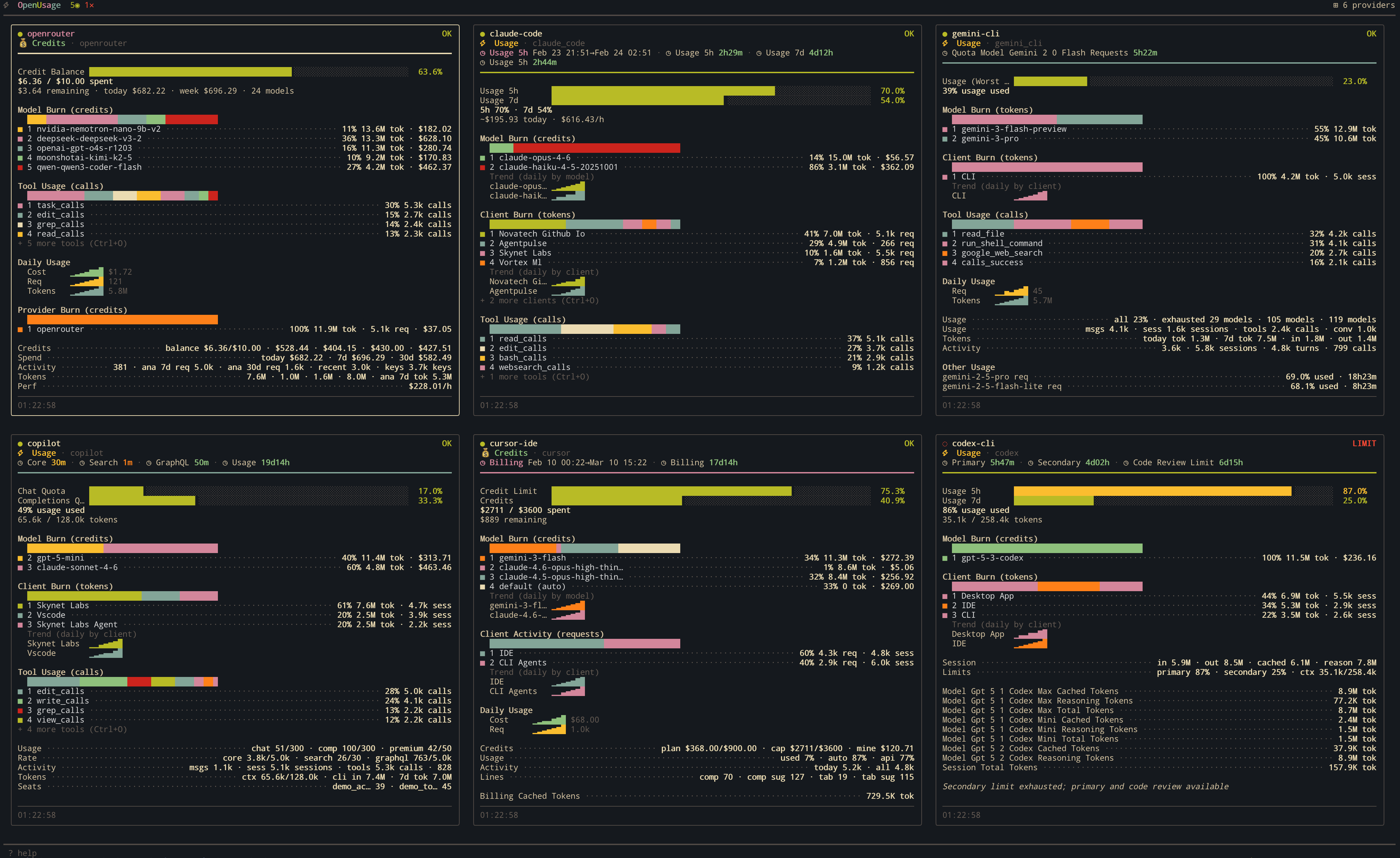
Run it side-by-side with your coding agent:
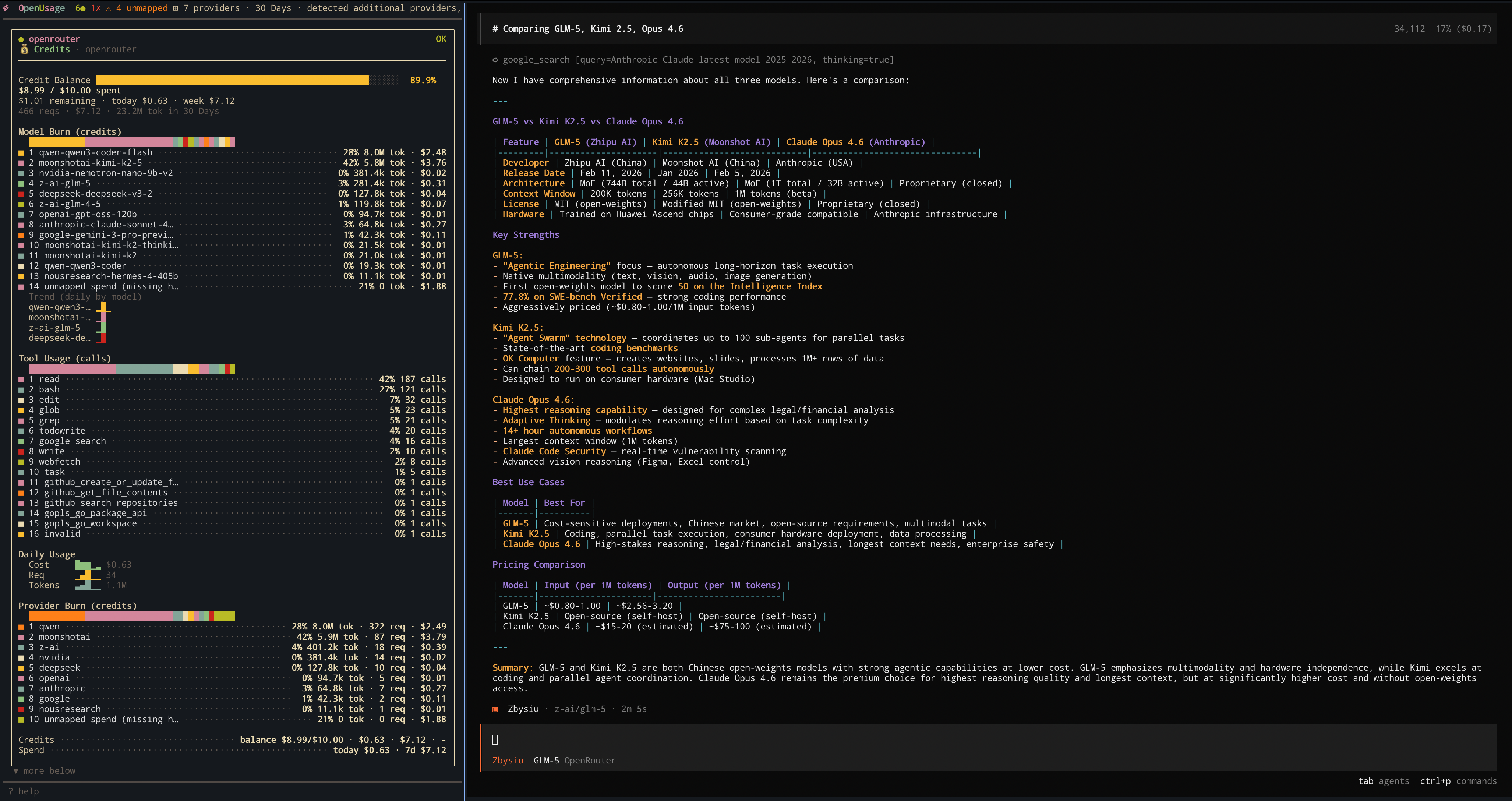
OpenUsage running alongside OpenCode monitoring live OpenRouter usage.
brew install janekbaraniewski/tap/openusage
curl -fsSL https://github.com/janekbaraniewski/openusage/releases/latest/download/install.sh | bash
go install github.com/janekbaraniewski/openusage/cmd/openusage@latest
Requires CGO (CGO_ENABLED=1). Pre-built binaries are also available on the Releases page.
openusage
Auto-detection picks up local tools and common API key env vars. No config needed.
Besides the live dashboard, OpenUsage has headless subcommands that reuse the same parsing and pricing — handy for scripts, CI, and quick checks:
openusage daily                # usage & cost by day (also: weekly, monthly)
openusage session              # grouped by session
openusage blocks               # by 5-hour billing block, with burn rate + projection
openusage daily --json         # machine-readable output for scripts/CI
openusage statusline install   # one-line status bar for Claude Code
What each report can show, by provider:
| Report | Providers |
|---|---|
daily / weekly / monthly |
every provider that reports cost or tokens |
session / blocks |
Claude Code, Codex, Gemini CLI, Copilot, Cursor, OpenCode, Ollama, Amp, Codebuff, OpenClaw, Roo Code, Kilo Code, Crush, Goose, Hermes, Zed, Droid, Kiro |
statusline |
Claude Code |
Remote API platforms (OpenAI, Anthropic, OpenRouter, …) appear in the periodic reports only — they expose no per-turn data. See the headless reports & statusline guide for the full matrix and flags.
|
Show your Claude Code, Codex, Cursor, Copilot, and OpenRouter usage — cost, quota, burn rate, and the active tool — right in your tmux status bar. It tracks whichever tool you're actively using and renders its real, brand-colored logo. |
|
One command to set it up. Tweak the layout and segments live, then reload:
openusage tmux install                         # interactive setup
tmux source-file ~/.config/tmux/tmux.conf      # reload
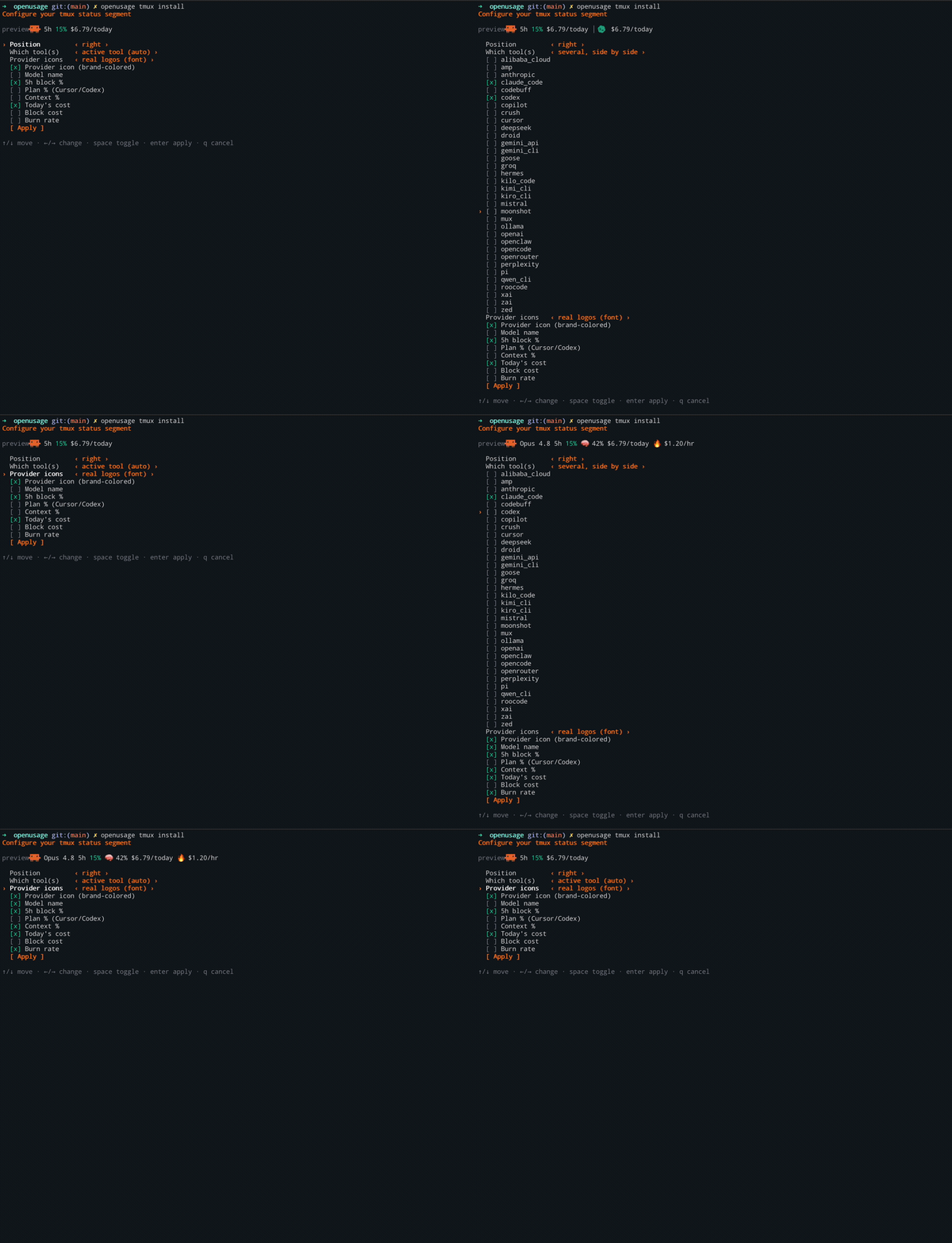
Want real provider logos instead of emoji? The installer can drop in a bundled icon font and wire up your terminal. See provider icons.
openusage tmux install --write                 # non-interactive (scripting): just write the snippet
openusage tmux --preset claude-focused         # preview other presets (12 built-in)
openusage tmux font setup                       # configure icons for kitty/Ghostty/WezTerm
openusage tmux doctor                          # diagnose if something is off
See the tmux integration guide for the format grammar, theming, the icon font, and watch-mode alerts.
Your cost, burn rate, how much of the 5-hour limit you've used, and how full the context window is. Right in the Claude Code status bar:
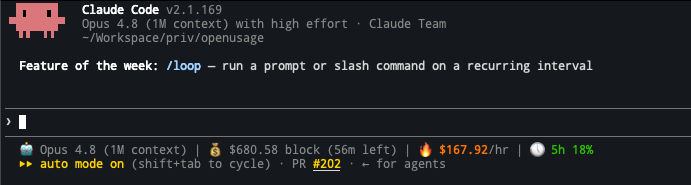
Same deal as tmux: one command, pick your segments, apply.
openusage statusline install
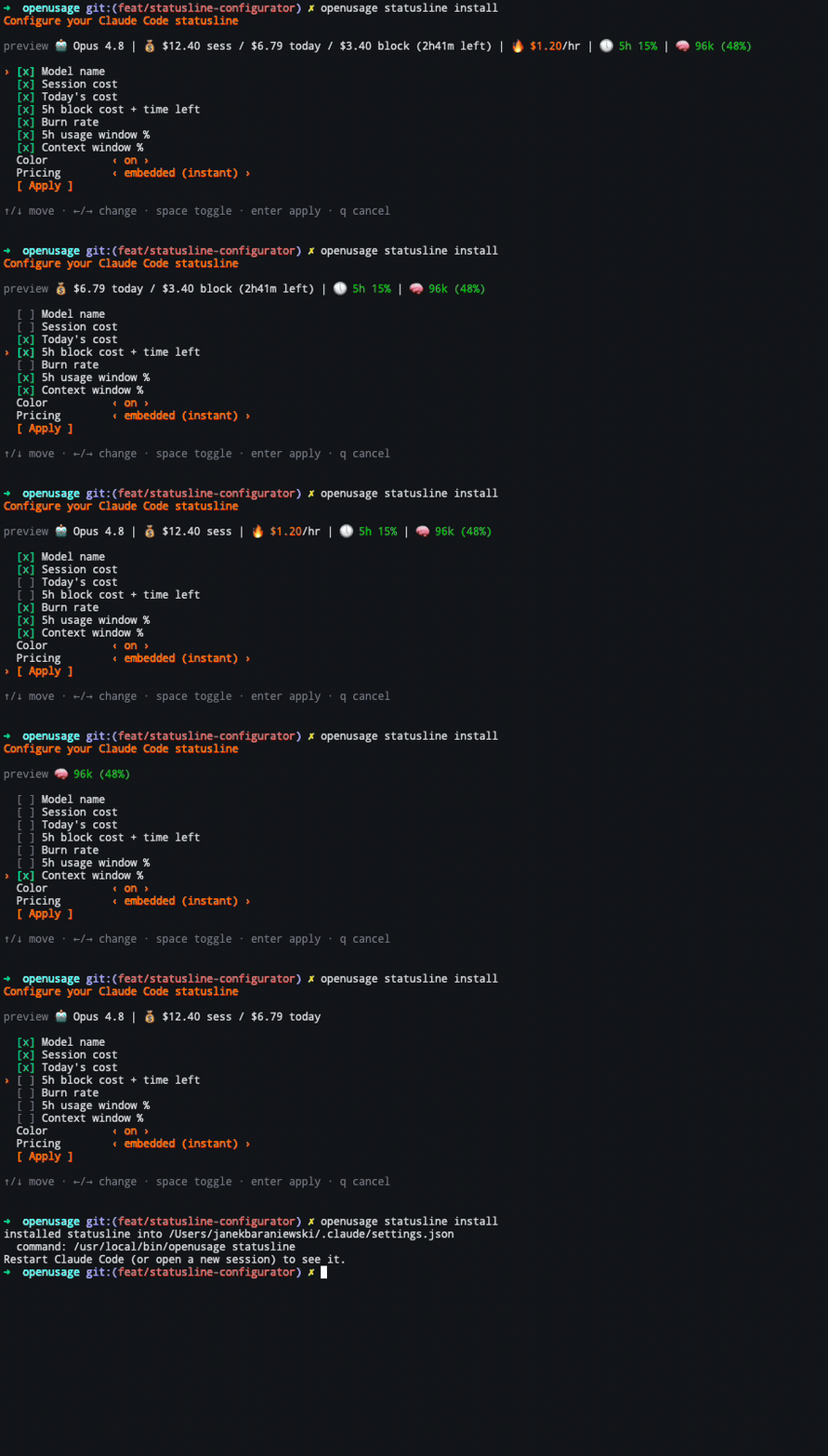
Restart Claude Code and it's there.
See the statusline guide for customization and manual setup.
Native dashboards show one provider at a time. OpenUsage gives you one local-first view across coding agents, API platforms, and local runtimes so you can answer:
It is built for end-user tool tracking, not for instrumenting a separate AI app with tracing SDKs or a billing backend.
If you want the full positioning argument, read the guide: best way to track coding agent usage and quotas across providers.
If the question is whether this is the right fit versus a simpler local limits tracker, use:
daily, weekly, monthly, session, and blocks reports in table or JSON35 provider integrations covering coding agents, CLIs, IDE tools, API platforms, and local runtimes. See docs/providers.md for all providers with detailed descriptions and screenshots.
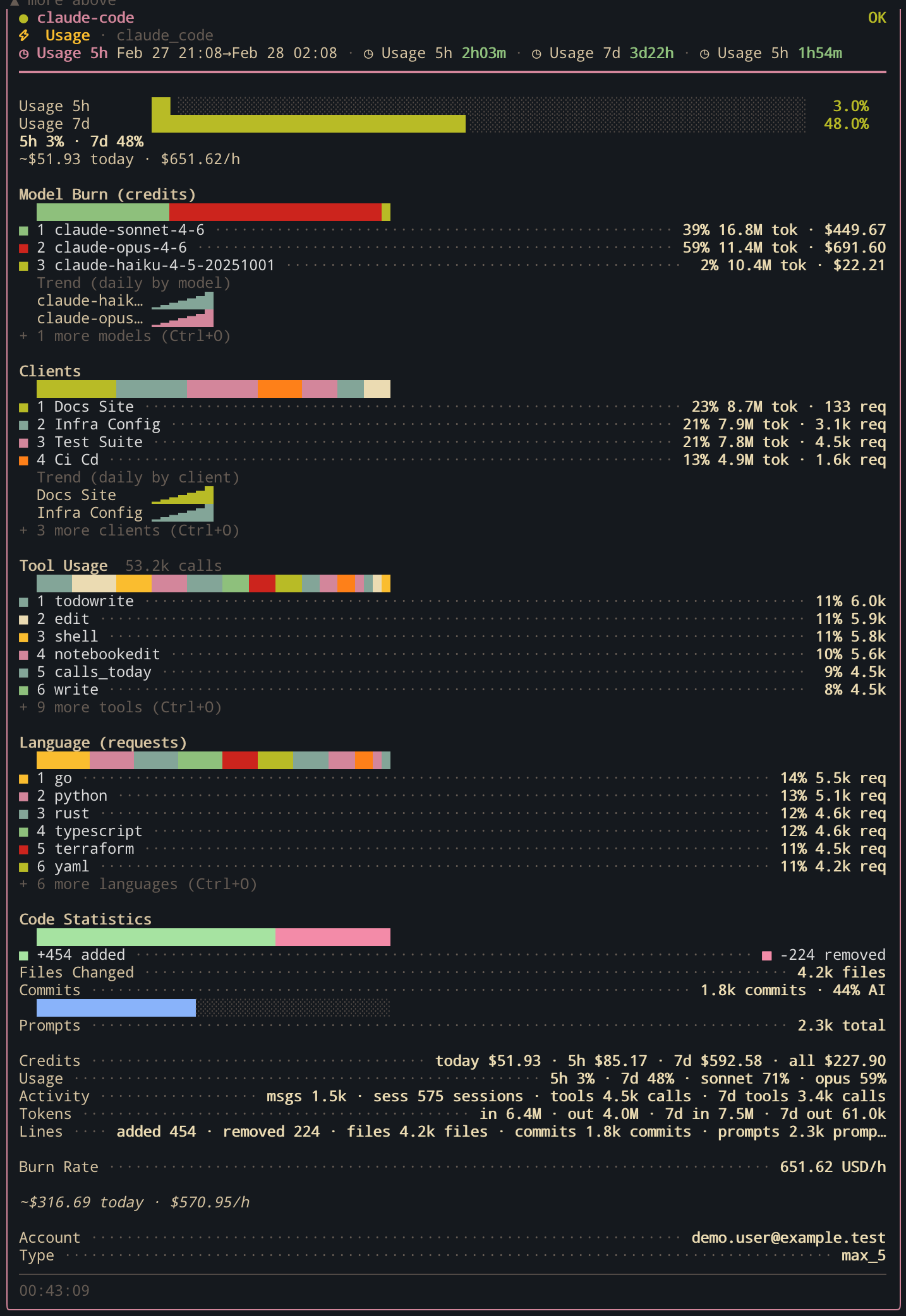
Detection: claude binary + ~/.claude directory
Tracks daily activity, per-model token usage, 5-hour billing block computation, burn rate, and cost estimation.
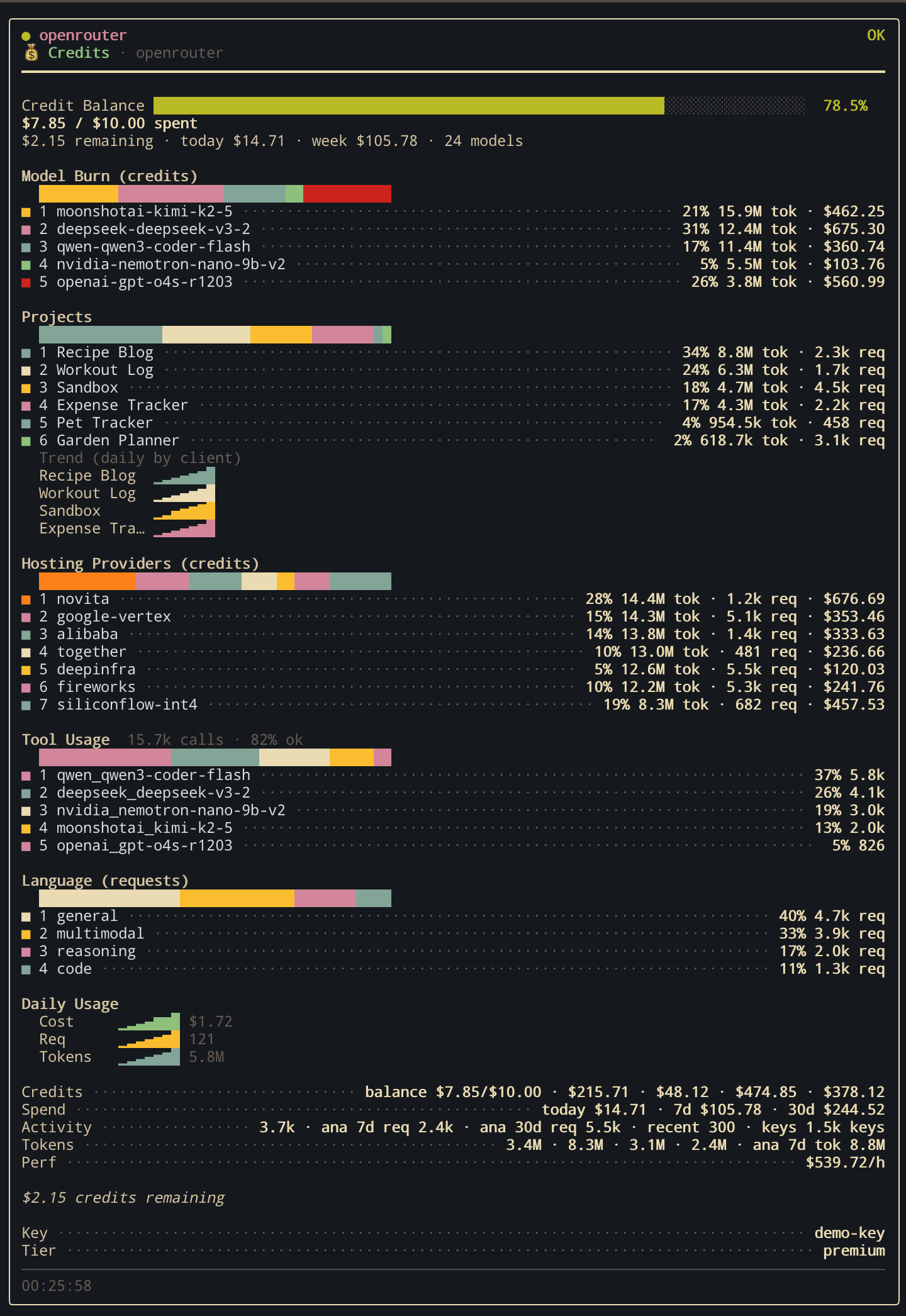
Detection: OPENROUTER_API_KEY environment variable
Tracks credits, activity, generation stats, and per-model breakdown across multiple API endpoints.
| Provider | Detection | What it tracks |
|---|---|---|
| Claude Code | claude binary + ~/.claude |
Daily activity, per-model tokens, billing blocks, burn rate |
| Cursor | cursor binary + local SQLite DBs |
Plan spend & limits, per-model aggregation, Composer sessions |
| GitHub Copilot | gh CLI + Copilot extension |
Chat & completions quota, org billing, session tracking |
| Codex CLI | codex binary + ~/.codex |
Session tokens, per-model breakdown, credits, rate limits |
| Gemini CLI | gemini binary + ~/.gemini |
OAuth status, conversation count, per-model tokens |
| OpenCode | OPENCODE_API_KEY / ZEN_API_KEY |
Credits, activity, generation stats |
| Ollama | OLLAMA_HOST / binary |
Local models, per-model usage |
| Provider | Detection | What it tracks |
|---|---|---|
| OpenAI | OPENAI_API_KEY |
Rate limits via header probing |
| Anthropic | ANTHROPIC_API_KEY |
Rate limits via header probing |
| Azure OpenAI | AZURE_OPENAI_API_KEY + AZURE_OPENAI_ENDPOINT |
Rate limits via header probing on the resource endpoint |
| OpenRouter | OPENROUTER_API_KEY |
Credits, activity, per-model breakdown |
| Groq | GROQ_API_KEY |
Rate limits, daily usage windows |
| Mistral AI | MISTRAL_API_KEY |
Subscription, usage endpoints |
| DeepSeek | DEEPSEEK_API_KEY |
Rate limits, account balance |
| Moonshot (Kimi) | MOONSHOT_API_KEY |
Balance breakdown (cash + voucher), org limits, tier; supports api.moonshot.ai (default) and api.moonshot.cn |
| Perplexity | Browser session at console.perplexity.ai | Tier, balance, lifetime spend, auto-reload, 30d usage analytics |
| OpenCode (Zen + Console) | OPENCODE_API_KEY / ZEN_API_KEY + browser session at opencode.ai |
Zen models (API key) + balance, monthly limit/usage, subscription, payment method (cookie) |
| xAI (Grok) | XAI_API_KEY |
Rate limits, API key info |
| Z.AI Coding Plan | ZAI_API_KEY / ZHIPUAI_API_KEY |
Coding plan quotas, model/tool usage, daily trends |
| Google Gemini API | GEMINI_API_KEY / GOOGLE_API_KEY |
Rate limits, model limits |
| Alibaba Cloud | ALIBABA_CLOUD_API_KEY |
Quotas, credits, per-model tracking |
No config file needed — auto-detection handles everything. Override or extend via:
~/.config/openusage/settings.json%APPDATA%\openusage\settings.json{
"auto_detect": true,
"ui": { "refresh_interval_seconds": 30 },
"accounts": [
{
"id": "openai-personal",
"provider": "openai",
"api_key_env": "OPENAI_API_KEY",
"probe_model": "gpt-4.1-mini"
}
]
}
Full reference: configs/example_settings.json
You can define custom themes as JSON files loaded at startup from:
~/.config/openusage/themes/*.json (macOS/Linux)%APPDATA%\\openusage\\themes\\*.json (Windows)OPENUSAGE_THEME_DIR (path-list separated)Theme files use the same color token fields as built-ins. Browse the bundled examples for reference shapes — every shipped theme lives at internal/tui/bundled_themes/.
Background data collection, even when the dashboard isn't open:
openusage telemetry daemon                # Run in foreground
openusage telemetry daemon install        # Install as system service (launchd / systemd)
openusage telemetry daemon status         # Check status
openusage telemetry daemon uninstall      # Uninstall
Installed services snapshot the provider env vars currently set in your shell.
If you change API key env vars later, rerun openusage telemetry daemon install
to refresh the service environment.
Manage tool integrations:
openusage integrations list [--all]       # List integration statuses
openusage integrations install <id>       # Install hook/plugin
openusage integrations uninstall <id>     # Remove
| Key | Action |
|---|---|
Tab |
Switch views |
j / k, Up / Down |
Move cursor |
h / l, Left / Right |
Navigate panels |
Enter / Esc |
Open detail / back |
PgUp / PgDn |
Scroll tile |
[ ] |
Switch detail tabs |
r |
Refresh all |
/ |
Filter providers |
t |
Cycle theme |
w |
Cycle time window |
c |
Cycle cost visibility for focused tile (auto → hide → show → auto, persists per-account) |
, |
Open settings |
Shift+J / Shift+K |
Reorder providers |
? |
Help |
q |
Quit |
make build    # Build binary to ./bin/openusage
make test     # Run tests with -race and coverage
make lint     # golangci-lint
make run      # go run cmd/openusage/main.go
make demo     # Preview with simulated data (no API keys needed)
Debug mode: OPENUSAGE_DEBUG=1 openusage
more like this
Comprehensive analytics dashboard for AI coding agents — Cursor, Windsurf, Claude Code, VS Code Copilot, Zed, Antigravi…
Skill Claude Code de veille tech francophone. Agrège les flux RSS (Journal du Hacker, Human Coders News…) et produit un…
A to-do list that runs your Claude Code agents — capture anywhere, dispatch in parallel, review from your phone.
本地优先的 macOS AI Agent 信号灯:状态栏 + 桌面悬浮信号灯,自动监控 Codex / Claude Code。Local menu bar and floating desktop status lights for A…
search projects, people, and tags