chinese-hershey-font
Convert Chinese Characters to Single-Line Fonts using Computer Vision
Python★ 161
Fix AI pixel art and vector images right in your browser
 jenissimo
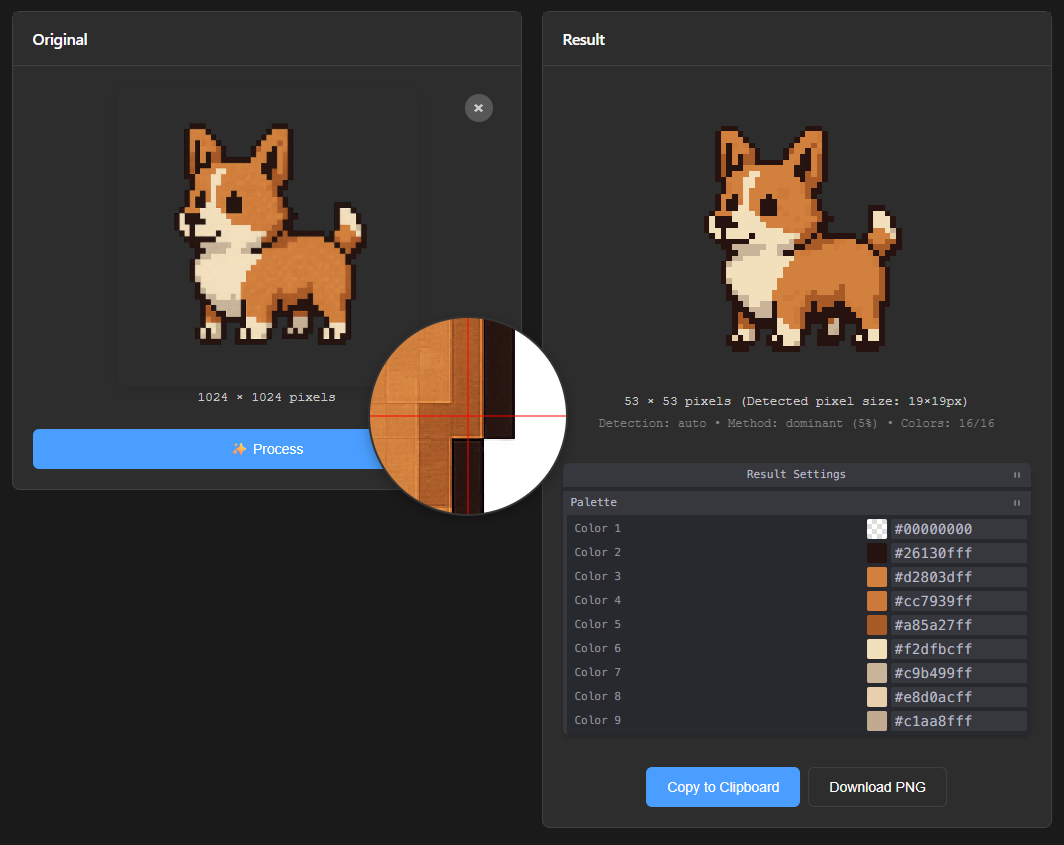
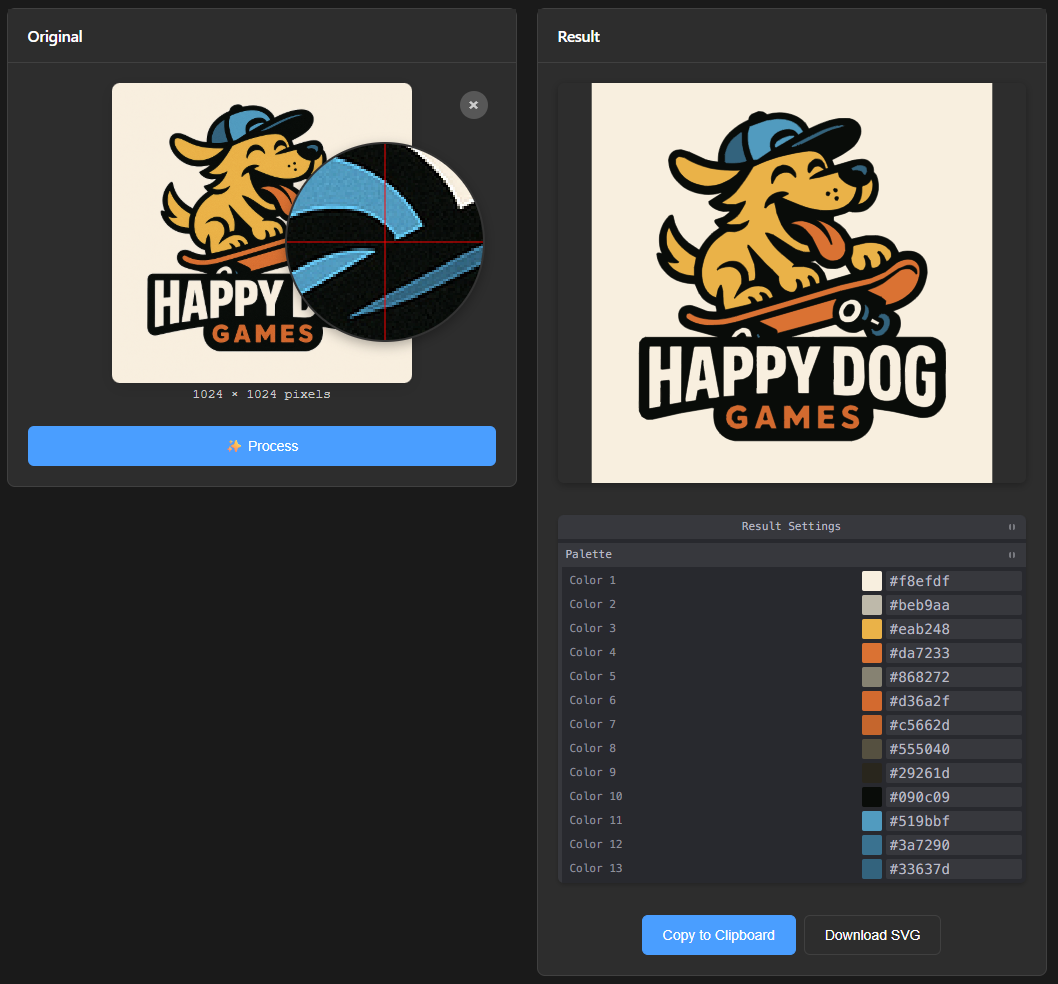
unfake.js is a versatile JavaScript library designed to bridge the gap between AI-generated images and clean, usable assets. It offers two primary modes of operation: a powerful Pixel Art Processor and a sophisticated Image Vectorizer. The library is bundled with a feature-rich browser-based tool for easy, interactive use.
Deep-Dive Articles
Want to learn more about how it works under the hood?
Check out these in-depth articles on the pixel art cleanup pipeline:
Integrations & Online Demo
Try it online: unfaker on itch.io — browser-based demo, no install required.
ComfyUI Node: ComfyUI-Unfake-Pixels — use unfake.js directly in your ComfyUI workflows.
Python Port: unfake.py — A blazing fast Python implementation with Rust-accelerated quantization, offering a 10-20% speedup over the JS version.
This mode is tailored for cleaning up pixel art, especially pieces generated by AI that often suffer from inconsistent pixel sizes, color bleeding, and other artifacts.
runs-based or edge-aware algorithms. It can also accept a manual scale factor.dominant, median, content-adaptive, etc.) to reduce the image to its native 1x scale without introducing new colors or blurriness.imagequant (libimagequant) in the WASM core, with support for fixed custom palettes.This mode converts raster images (PNG, JPG) into clean, scalable SVG files. It's an intelligent wrapper around imagetracer.js with extensive pre- and post-processing capabilities powered by the unfake-core WASM filters.
Bilateral or Median blur before vectorization to reduce noise and create smoother outlines.imagetracer.js options for fine-grained control over the final vector output.The project includes a browser-based tool (/browser-tool) that provides a user-friendly interface for all of the library's features.
Tweakpane panel to adjust all processing parameters in real-time..png for pixel art, .svg for vector) or copy it directly to the clipboard.⚠️ You need a local server!
Modern browsers do not allow ES module imports (importmap, type="module") from local files (
file://). To use the browser tool, you must run it via a local http(s) server.
Quick ways to start a server:
Python 3.x (from the project root):
python -m http.server 8080
# or
python3 -m http.server 8080
Then open: http://localhost:8080/browser-tool/
Node.js (http-server):
npx http-server -p 8080
Then open: http://localhost:8080/browser-tool/
VSCode Live Server:
Click "Go Live" at the bottom of VSCode and select the browser-tool folder.
http://localhost:8080/browser-tool/ in your browser (or the port you chose).unfake.js) in Your Own ProjectThe library is written as ES modules. You can import and use its core functions processImage and vectorizeImage.
1. Pixel Processing Example:
import unfake from './lib/index.js';

const fileInput = document.getElementById('my-file-input');
const file = fileInput.files[0];

const options = {
    file: file,
    maxColors: 32,
    detectMethod: 'auto', // 'auto', 'runs', 'edge'
    downscaleMethod: 'dominant',
    snapGrid: true,
    cleanup: {
        morph: true,
        jaggy: true
    }
};

try {
    const { png, imageData, palette, manifest } = await unfake.processImage(options);

    // `png` is a Uint8Array of the final PNG file
    const blob = new Blob([png], { type: 'image/png' });
    const url = URL.createObjectURL(blob);

    // Now you can use the URL for an <img> tag or download link
    document.getElementById('result-image').src = url;

} catch (error) {
    console.error("Pixel processing failed:", error);
}
2. Vectorization Example:
import unfake from './lib/index.js';

const fileInput = document.getElementById('my-file-input');
const file = fileInput.files[0];

const options = {
    file: file,
    preProcess: {
        enabled: true,
        filter: 'bilateral',
        value: 15
    },
    quantize: {
        enabled: true,
        maxColors: 'auto' // or a number like 16
    },
    // imagetracer.js options
    ltres: 1,
    qtres: 1,
};

try {
    const { svg, palette, manifest } = await unfake.vectorizeImage(options);

    // `svg` is a string containing the SVG markup
    document.getElementById('result-container').innerHTML = svg;

} catch (error) {
    console.error("Vectorization failed:", error);
}
The image-processing core lives in unfake-core, a headless Rust crate compiled to WebAssembly for the browser tool and to a native binary for the CLI (crates/; unfake detect / snap / downscale / quantize, with fixed palettes, a reserved chroma color, and a JSON pipeline manifest). It owns scale detection, grid snapping, downscaling (dominant / median / mode / mean / qvote), morphological cleanup, color quantization (imagequant), content-adaptive downscaling, the vector pre/post filters, and PNG encoding — no OpenCV. The JavaScript layer in browser-tool/ is a thin interface: file I/O, canvas, the Tweakpane UI, and calls into the WASM core.
bun run core:wasm   # build the WASM core into browser-tool/vendor/unfake-core/
bun run core:test   # cargo test
bun run core:eval   # CLI scale-detection eval on the bghira corpus
imagequant for quantization and the png crate for encoding.This project is licensed under the MIT License. See the LICENSE file for details.
more like this
Convert Chinese Characters to Single-Line Fonts using Computer Vision
🎥🤟 8 minimalistic templates for tfjs mediapipe handpose and facemesh
TachiSnap — Pixel Snapper for animation pixel artists. Rust + WebAssembly client-side tool for cleaning up AI-generated…
search projects, people, and tags