dragontoothmg
A fast Go chess library. Legal move generation, move/board types, apply/unapply, FEN parsing, Zobrist hashing.
Go★ 51
A terminal dashboard with stats from Google Analytics, GitHub, Travis CI, and Jenkins. Very much built specific to me.
 jessfraz
git clone https://github.com/jessfraz/tdash.gitjessfraz/tdash

A terminal dashboard with stats from Google Analytics, GitHub, Travis CI, and Jenkins. Very much built specific to me.
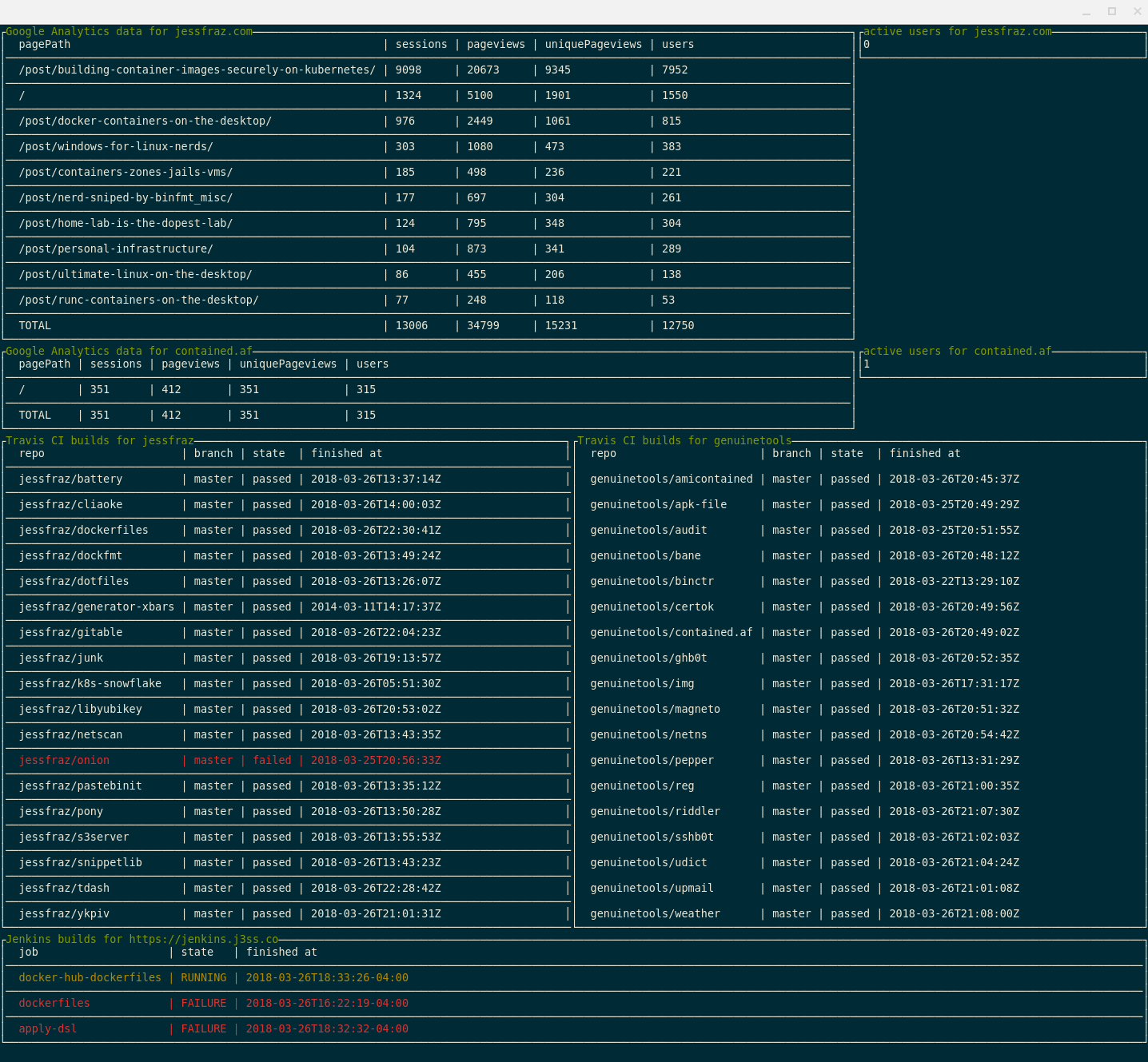
Table of Contents
For installation instructions from binaries please visit the Releases Page.
$ go get github.com/jessfraz/tdash
$ docker run --rm -it \
    --name tdash \
    --volume /home/user/.tdash:/root/.tdash:ro \ # for the  Google Analytics key file
    r.j3ss.co/tdash
$ tdash -h
tdash -  A terminal dashboard with stats from Google Analytics, GitHub, Travis CI, and Jenkins.

Usage: tdash <command>

Flags:

  --travis-owner      Travis owner name for builds (can have more than one) (default: [])
  -d                  enable debug logging (default: false)
  --ga-viewid         Google Analytics view IDs (can have more than one) (default: [])
  --interval          update interval (ex. 5ms, 10s, 1m, 3h) (default: 2m0s)
  --jenkins-password  Jenkins password for authentication (or env var JENKINS_PASSWORD)
  --jenkins-uri       Jenkins base URI (or env var JENKINS_BASE_URI)
  --jenkins-username  Jenkins username for authentication (or env var JENKINS_USERNAME)
  --all               Show all builds even successful ones, defaults to only showing failures (default: false)
  --ga-keyfile        Path to Google Analytics keyfile (default: ~/.tdash/ga.json)
  --travis-token      Travis CI API token (or env var TRAVISCI_API_TOKEN)

Commands:

  version  Show the version information.
Enable the API: To get started using Analytics Reporting API v4, you need to first create a project in the Google API Console, enable the API, and create credentials.
Follow the instructions for step enabling the API here.
Add the new service account to the Google Analytics account with Read & Analyze permission.
The newly created service account will have an email address that looks
similar to: quickstart@PROJECT-ID.iam.gserviceaccount.com.
Use this email address to add a user to the Google Analytics view you want to access via the API.
more like this
A fast Go chess library. Legal move generation, move/board types, apply/unapply, FEN parsing, Zobrist hashing.
YiMao · 云海求片助手 — 双核心 Telegram 影视求片机器人。订阅模式:TMDB 智能搜索一键订阅 / 趣味求片模式:AI 生成五层地狱闯关,通关解锁优先求片。深度集成 MoviePilot + Emby/Jellyfin。…
search projects, people, and tags