meine
meine 🌒 - A CLI file manager and system utility built with Textual. It combines intuitive command parsing with rich t…
Python★ 50
Command-line tool for looking up colors and palettes.
 joowani
Colorpedia is a command-line tool for looking up colors, shades and palettes.
Supported color models: HEX, RGB, HSL, HSV, CMYK.
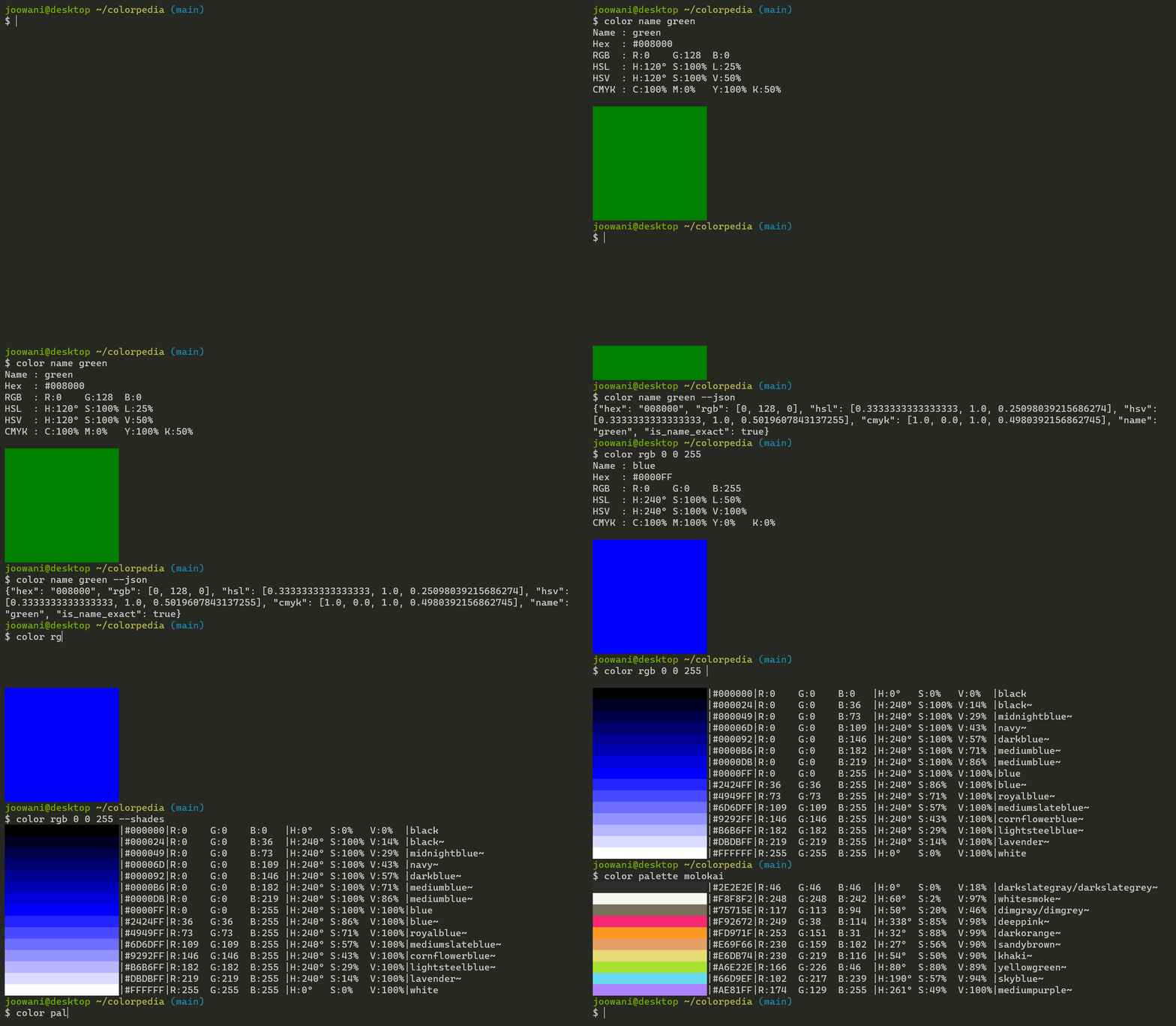


Install via pip:
pip install colorpedia
For conda users:
conda install colorpedia -c conda-forge
You can then use the color command:
color --help
If you have a name collision on Windows, use colorpedia instead:
colorpedia --help
Look up colors using various color models:
color name green            # CSS3 color name
color hex FFFFFF            # hex code without the hash (#) prefix
color rgb 255 255 255       # RGB (Red Green Blue)
color hsl 360 100 100       # HSL (Hue Saturation Lightness)
color hsv 360 100 100       # HSV (Hue Saturation Brightness)
color cmyk 100 100 100 100  # CMYK (Cyan Magenta Yellow Black)
Use --shades to display shades of a color:
color name green --shades    # Display 15 colors by default
color hex FFFFFF --shades=5  # Display 5 shades
Look up color palettes:
color palette molokai
color palette facebook
color palette zenburn
Control the output with global flags:
color name yellow --all      # Display all details
color name yellow --json     # Display in JSON format
color name yellow --units    # Display unit symbols
color name yellow --nojson   # Do not display in JSON
color name yellow --nounits  # Do not display unit symbols
Combine with other command-line tools like jq:
color palette molokai | cut -d'|' -f 2,3,4
color name blue --range --json | jq .[0].name
Use --help to display more information on each subcommand:
color name --help
color rgb --help
color palette --help
For Bash, add the following line in ~/.bashrc or ~/.bash_profile:
source <(color -- --completion)
For Zsh, add the following lines in ~/.zshrc:
autoload -U +X compinit && compinit
autoload -U +X bashcompinit && bashcompinit

source <(color -- --completion | sed "s/:/: /g")
Replace color with colorpedia if you are using the latter.
Initialize the configuration file to customize CLI behavior:
color config init
The command above creates ~/.config/colorpedia/config.json with default settings:
{
  // Always display in JSON format. Use with --nojson global flag.
  "always_output_json": false,

  // Suffix for approximate color names (e.g. "green~").
  "approx_name_suffix": "~",

  // Default number of shades displayed when --shades is used without a count.
  "default_shades_count": 15,

  // Display degrees angle (°) symbol. Use with --nounits global flag.
  "display_degree_symbol": false,

  // Display percentage (%) symbol. Use with --nounits global flag.
  "display_percent_symbol": false,

  // Height of the color box displayed in single-color (get) view.
  "get_view_color_height": 10,

  // Width of the color box displayed in single-color (get) view.
  "get_view_color_width": 20,

  // Keys displayed in single-color (get) view.
  "get_view_keys": ["name", "hex", "rgb", "color", "hsl", "hsv", "cmyk"],

  // Keys displayed in JSON view.
  "json_keys": ["name", "is_name_exact", "hex", "rgb", "hsl", "hsv", "cmyk"],

  // Width of the color box displayed in multi-color (list) view.
  "list_view_color_width": 20,

  // Keys displayed in multi-color (list) view.
  "list_view_keys": ["name", "hex", "rgb", "color", "hsl", "hsv", "cmyk"],

  // Always uppercase hex codes if set to true, lowercase if set to false.
  "uppercase_hex_codes": true
}
Display or edit the configuration file:
color config show  # Display configuration
color config edit  # Edit configuration via a text editor
delta = (R1 - R2) ^ 2 + (G1 - G2) ^ 2 + (B1 - B2) ^ 2
more like this
meine 🌒 - A CLI file manager and system utility built with Textual. It combines intuitive command parsing with rich t…
Create and add progress bars, Office365 Files and Dropbox Paper papers by labels and link them to your Todoist tasks.
search projects, people, and tags