perplexity-cli
🧠 A simple command-line client for the Perplexity API. Ask questions and receive answers directly from the terminal! 🚀🚀🚀
Python★ 176
Command-line tool for tagging directories.
 joowani
git clone https://github.com/joowani/dtags.gitjoowani/dtags

Dtags is a command-line tool that lets you tag directories for faster filesystem navigation and command execution.
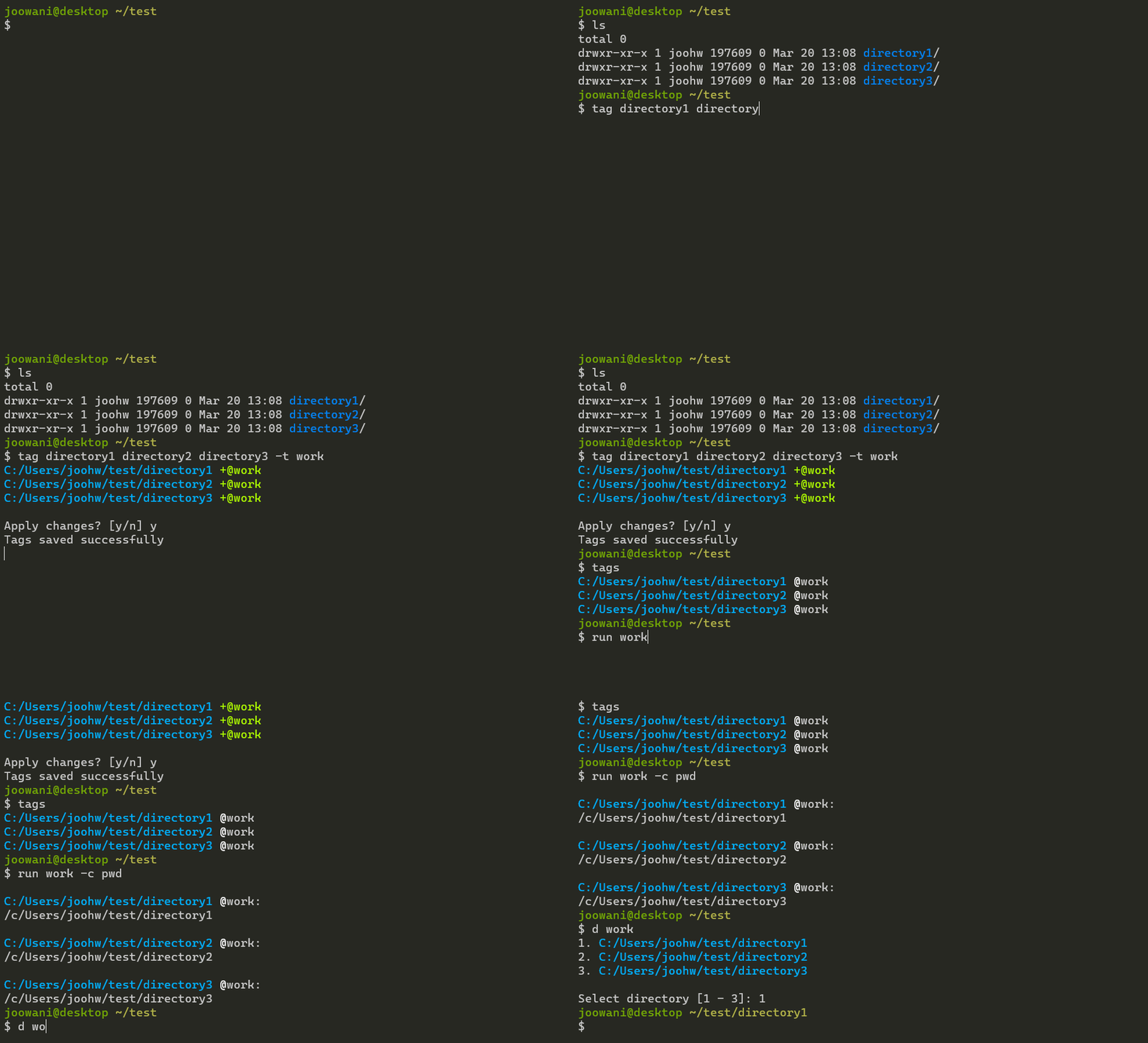
Install via pip:
pip install dtags
For Bash, add the following line in ~/.bashrc:
source <(dtags-activate)
For Zsh, add the following line in ~/.zshrc:
autoload -U +X compinit && compinit
autoload -U +X bashcompinit && bashcompinit

source <(dtags-activate)
For Fish, add the following line in ~/.config/fish/config.fish:
dtags-activate fish | source
For Git Bash on Windows, add the following lines
in ~/.bashrc:
export DTAGS_GIT_BASH=1
source <(dtags-activate)
Restart your shell. The following commands will be available after:
tag --help
untag --help
tags --help
d --help
run --help
Tab-completion should work out-of-the-box.
Tag directories with tag:
# Tag directory ~/foo with "work" (tags are indicated with the "@" prefix)
$ tag ~/foo -t work
/home/user/foo +@work

# If tag names are not specified, directory basenames are used instead
$ tag ~/foo
/home/user/foo +@foo

# Tag directories ~/bar and ~/baz with "app" and "work" (many-to-many)
$ tag ~/bar ~/baz -t app work
/home/user/bar +@app +@work
/home/user/baz +@app +@work
Execute commands in one or more directories with run:
# Run "git status" in all directories tagged "work"
$ run work -c git status

# Run "git status" in directories ~/foo and ~/bar
$ run ~/foo ~/bar -c git status

# Mix tags and directory paths
$ run work ~/foo -c git status
Change directories by path or tag with d:
# Go to directory tagged "work"
# If there are multiple directories, a selection prompt is displayed
$ d work

# Go to directory ~/foo (works just like cd)
$ d ~/foo

# Use -t/--tag to always assume the argument is a tag
$ d -t foo
Untag directories with untag:
# Remove tags "app" and "work" from directory ~/foo and ~/bar
$ untag ~/foo ~/bar -t app work

# Remove all tags from directory ~/foo
$ untag ~/foo

# Remove tag "app" from all directories
$ untag -t app
Manage tags with tags:
# List all tags
$ tags

# List all tags in JSON format
$ tags --json

# Clean invalid directories
$ tags --clean

# Remove all tags
$ tags --purge
Use --help to see more information on each command.
~/.dtags directory (created when a dtags command is first run).~/.dtags are not meant to be edited manually.Run the following commands to completely uninstall dtags:
$ pip uninstall dtags
$ rm -rf ~/.dtags
Then remove the dtags-activate line from your shell runtime configuration.
more like this
🧠 A simple command-line client for the Perplexity API. Ask questions and receive answers directly from the terminal! 🚀🚀🚀
meine 🌒 - A CLI file manager and system utility built with Textual. It combines intuitive command parsing with rich t…
search projects, people, and tags