simple-weather-card
Minimalistic weather card for Home Assistant
 kalkih
git clone https://github.com/kalkih/simple-weather-card.gitkalkih/simple-weather-cardSimple Weather Card
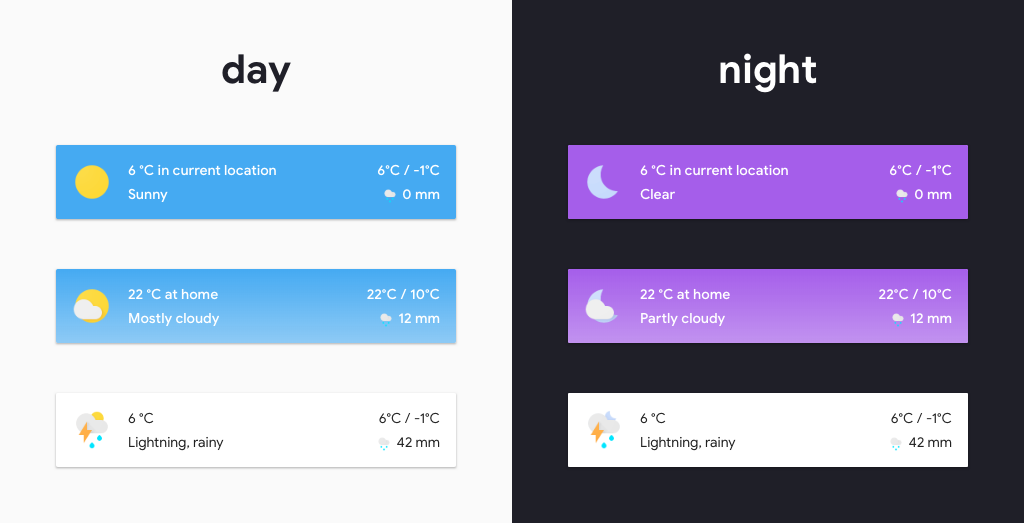
A minimalistic weather card for Home Assistant Lovelace UI, inspired by Google Material Design.
Install
This card is available in HACS (Home Assistant Community Store)
Manual install
-
Download and copy
simple-weather-card-bundle.jsfrom the latest release into yourconfig/wwwdirectory. -
Add a reference to
simple-weather-card-bundle.jsinside yourui-lovelace.yamlor through the raw config editor interface.resources: - url: /local/simple-weather-card-bundle.js?v=0.8.5 type: module
CLI install
-
Move into your
config/wwwdirectory -
Download
simple-weather-card-bundle.js$ wget https://github.com/kalkih/simple-weather-card/releases/download/v0.8.5/simple-weather-card-bundle.js
-
Add a reference to
simple-weather-card-bundle.jsinside yourui-lovelace.yamlor through the raw config editor gui.resources: - url: /local/simple-weather-card-bundle.js?v=0.8.5 type: module
Updating
-
Find your
simple-weather-card-bundle.jsfile inconfig/wwwor wherever you ended up storing it. -
Replace the local file with the one found in the latest release.
-
Add the new version number to the end of the card reference url in your
ui-lovelace.yaml. This will prevent the browser from loading the old version from cache.resources: - url: /local/simple-weather-card-bundle.js?v=0.8.5 type: module
Using the card
Options
Card options
| Name | Type | Default | Since | Description |
|---|---|---|---|---|
| type | string | required | v0.1.0 | custom:simple-weather-card |
| entity | string | required | v0.1.0 | The entity_id from an entity within the weather domain. |
| name | string | optional | v0.1.0 | Set a custom name. |
| primary_info | array/string | extrema |
v0.7.0 | Primary card information, one or more weather attributes |
| secondary_info | array/string | precipitation |
v0.2.0 | Secondary card information, one or more weather attributes |
| backdrop | boolean/object | false |
v0.1.0 | Colored background, accepts true/false or a Backdrop object. |
| custom | array | optional | v0.4.0 | Override weather information with custom sensors, see Custom option. |
| tap_action | action object | optional | v0.5.0 | Action on click/tap. |
Weather attributes
| Name | Description |
|---|---|
| extrema | Forecast high and low temperature |
| precipitation | Forecast precipitation |
| precipitation_probability | Probability of precipitation |
| humidity | Current humidity |
| wind_speed | Current wind speed |
| wind_bearing | Current wind direction |
| pressure | Current air pressure |
Backdrop object options
See Backdrop example for example usage.
| Name | Type | Default | Description |
|---|---|---|---|
| fade | boolean | false |
Faded background. |
| day | string | '#45aaf2' | Background color (Day). |
| night | string | '#a55eea' | Background color (Night). |
| text | string | 'var(--text-dark-color)' | Text color. |
Custom option array
See Custom example for example usage.
Possible entries are: temp, high, low, state, precipitation, humidity, icon-state, wind_speed, wind_bearing, pressure & precipitation_probability.
custom:
  - temp: sensor.home_temp
  - high: sensor.home_high_temp
  - low: sensor.home_low_temp
Action object options
| Name | Type | Default | Options | Description |
|---|---|---|---|---|
| action | string | more-info |
more-info, navigate, call-service, none |
Action to perform |
| service | string | none | Any service | Service to call (e.g. media_player.toggle) when action is defined as call-service |
| service_data | object | none | Any service data | Service data to include with the service call (e.g. entity_id: media_player.office) |
| navigation_path | string | none | Any path | Path to navigate to (e.g. /lovelace/0/) when action is defined as navigate |
| entity | string | none | Any entity id | Override default entity of more-info, when action is defined as more-info |
Example usage
Standard card

- type: custom:simple-weather-card
  entity: weather.smhi
  name: in current location
Backdrop example
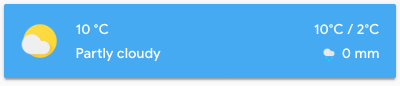
- type: custom:simple-weather-card
  entity: weather.smhi
  name: " "
  backdrop: true
Custom backdrop example

- type: custom:simple-weather-card
  entity: weather.smhi
  name: at home
  backdrop:
    day: "var(--primary-color)"
    night: "#40445a"
Customize weather information example
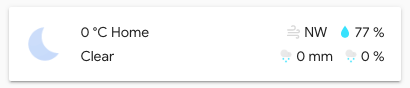
- type: custom:simple-weather-card
  entity: weather.smhi
  primary_info:
    - wind_bearing
    - humidity
  secondary_info:
    - precipitation
    - precipitation_probability
Custom sensors example
- type: custom:simple-weather-card
  entity: weather.smhi
  custom:
    - temp: sensor.home_temp
    - high: sensor.home_high_temp
    - low: sensor.home_low_temp
Problems?
Make sure you have javascript_version: latest set in your configuration.yaml under frontend:.
Make sure you got the latest version of simple-weather-card-bundle.js.
If you have issues after updating the card, try clearing the browser cache manually.
If you are getting "Custom element doesn't exist: simple-weather-card", or are running an older browser try replacing type: module with type: js in the resource reference in ui-lovelace.yaml or in the raw config editor.
License
This project is under the MIT license.
more like this
eeweather
Fetch NCDC ISD, TMY3, or CZ2010 weather data that corresponds to ZIP Code Tabulation Areas or Latitude/Longitude.