lottery
🎉🌟✨🎈年会抽奖程序,基于 Express + Three.js的 3D 球体抽奖程序,奖品🧧🎁,文字,图片,抽奖规则均可配置,😜抽奖人员信息Excel一键导入😍,抽奖结果Excel导出😎,给你的抽奖活动带来全新酷炫体验🚀🚀🚀
JavaScript★ 4.6k
A custom element for rendering inline 3D models in a HTML document and allowing them to be transformed with CSS.
 keithclark
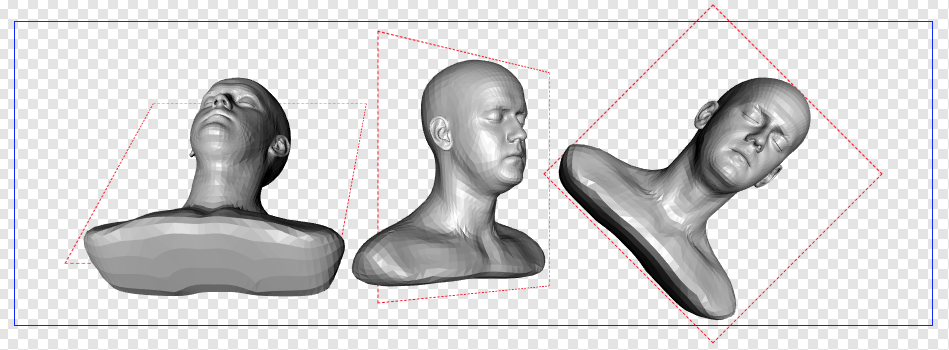
git clone https://github.com/keithclark/3d-model-element.gitkeithclark/3d-model-elementThis is a experimental custom element that allows 3D objects (currently, OBJ and gLTF format) to be loaded into a document and rendered inline, just like any other external resource. Additionally, any CSS transforms applied to the element will be passed on to the 3D model, allowing complex objects to be placed and maniplulated using just CSS.
.obj for OBJ and .gltf/.glb for gLTF).scrollTop.transform-style: flat isn't supported yet.To use this custom element you'll need to include the three.js library (r102+), its accompanying OBJ loader and/or gLTF loader along with the custom element script:
<script src="js/three.min.js"></script>
<script src="js/three-obj-loader.js"></script>
<script src="js/model-element.min.js"></script>
To bolster up browser support, you can also include a web components polyfill.
<x-model> elementAdding a model to a page is as simple as adding the element and setting its src attribute:
<x-model src="/path/to/my-model.obj"></x-model>
Here's a cut-and-paste example:
<!DOCTYPE html>
<html>
<head>
  <style>
    .model {
      width: 400px;
      height: 400px;
    }
  </style>
</head>

<body>
  <x-model class="model" src="/path/to/my-model.obj"></x-model>

  <script src="js/three.min.js"></script>
  <script src="js/three-obj-loader.min.js"></script>
  <script src="js/model-element.min.js"></script>
</body>
</html>
Models can be positioned and rotated using CSS transforms. Any transforms applied to a model element will also be applied to the model.
.model {
  transform: translateZ(-200px) rotateY(45deg);
}
If a model element has an ancestor with a valid perspective / perspective-origin style property, the model will be renderered using perspective projection. Omitting perspective (or setting it to zero) will result in objects being rendered with orthographic projection.
The model-element script creates a camera, scene, light source and a WebGL renderer. The DOM node returned by the renderer (a <canvas> element) is added to the document and configured to fill the viewport and sit above all other content. Additionally, pointer-events: none is set, allowing elements below to be interacted with.
Adding <x-model> elements to the DOM results in the model being loaded and added to the underlying scene. Removing an element from the DOM will remove it from the scene.
The scene is re-rendered every frame. For each object in the scene, the renderer finds it's host node and walks up the DOM tree resolving any transforms, positions and scroll offsets. The resulting transform matrix is then applied to the object in the scene. Once all objects are updated the renderer repaints the scene to the layer. Objects now appear on-screen, synchronised with their host DOM node.
npm installnpm run devnpm run dist - builds the both the unminified and minified distribution files to the /dist/ folder.more like this
🎉🌟✨🎈年会抽奖程序,基于 Express + Three.js的 3D 球体抽奖程序,奖品🧧🎁,文字,图片,抽奖规则均可配置,😜抽奖人员信息Excel一键导入😍,抽奖结果Excel导出😎,给你的抽奖活动带来全新酷炫体验🚀🚀🚀
🎥🤟 8 minimalistic templates for tfjs mediapipe handpose and facemesh
A repository about starting from scratch for monorepo, fastify, Phaser, colyseus, and threejs.
search projects, people, and tags