agentlytics
Comprehensive analytics dashboard for AI coding agents — Cursor, Windsurf, Claude Code, VS Code Copilot, Zed, Antigravi…
JavaScript★ 555
An open-source, cross OS, community-driven launcher. A lightweight alternative to Spotlight and Raycast. Made with ❤️ f…
 kunkka19xx
A keyboard-first, local-first launcher for macOS, Windows, and Linux. Open apps, files, folders, clipboard history, and quick commands without leaving the keyboard.
📘 Docs · 🎬 Demo video · 📖 User guide
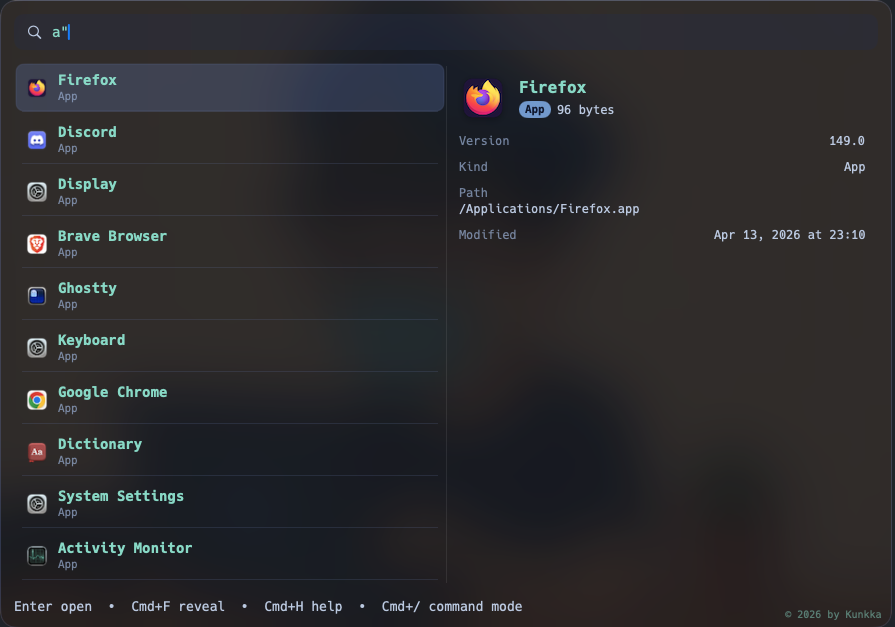
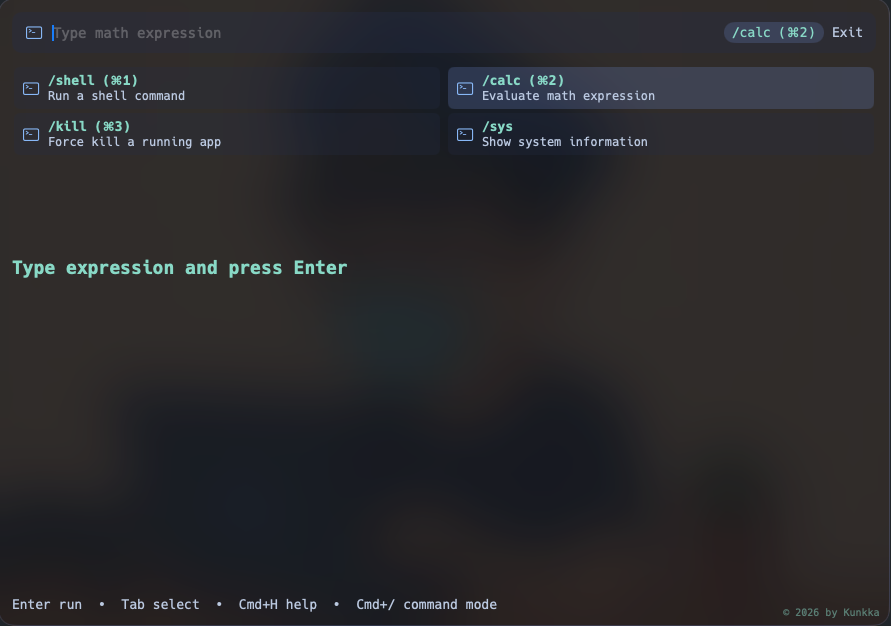
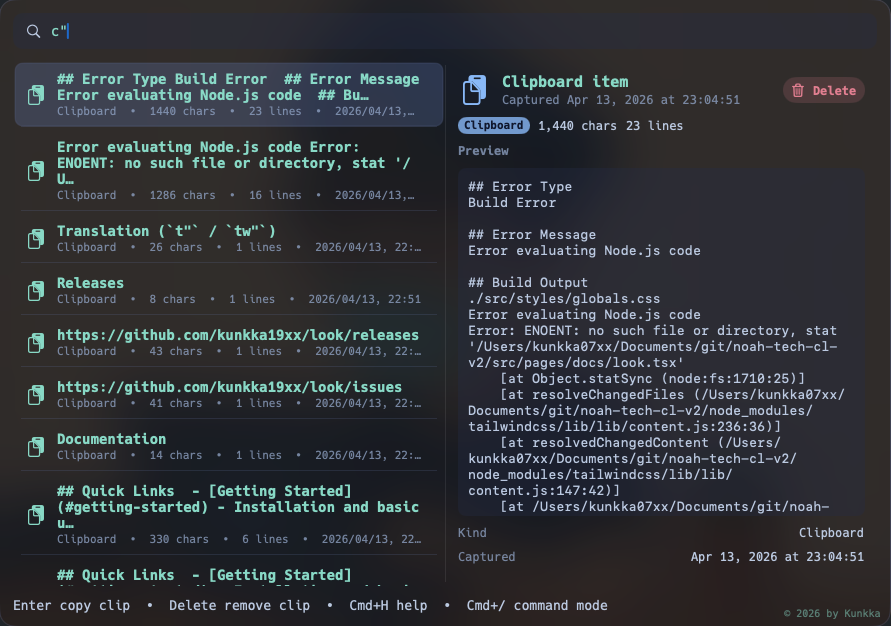
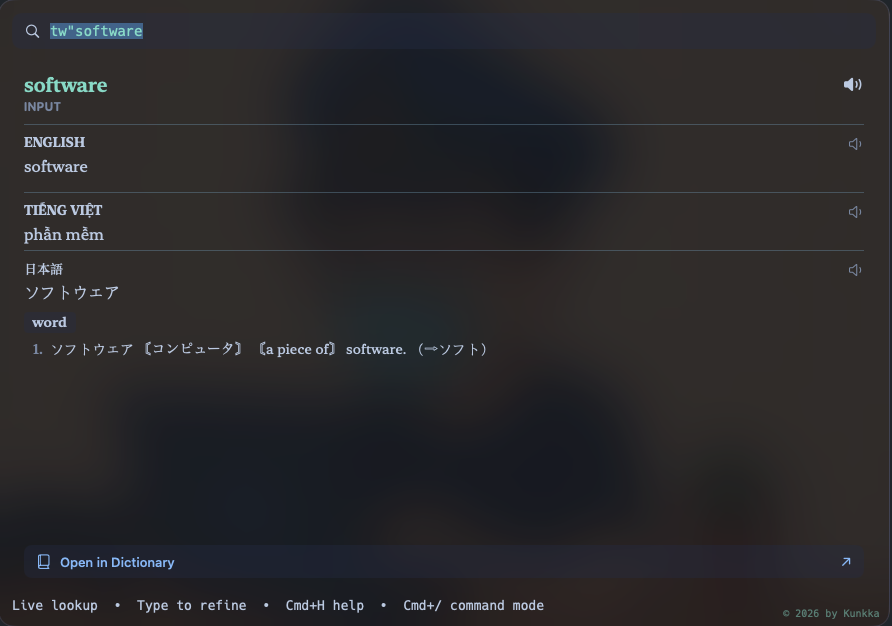
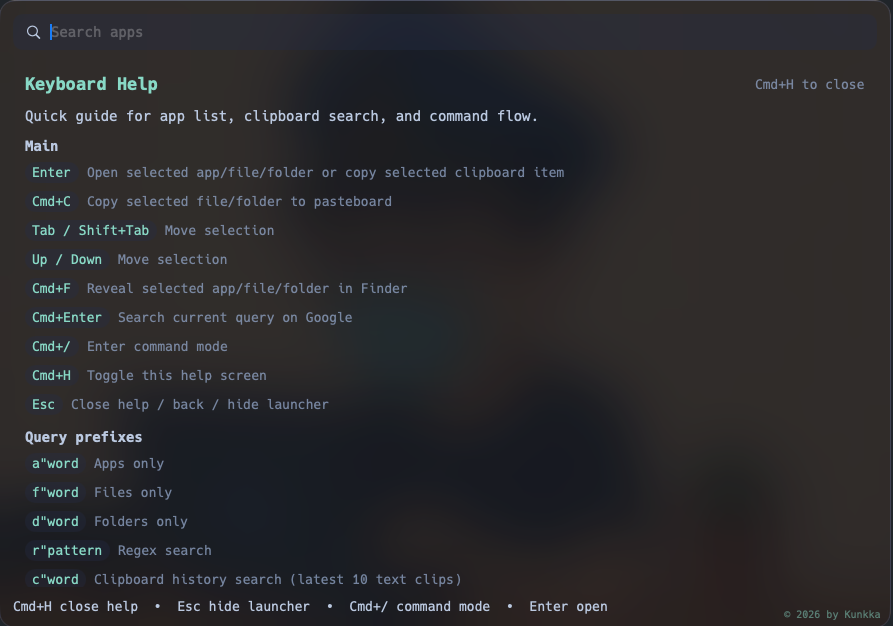
2^10, 4!, 200*15%, sqrt(2), 2*pi. No command mode needed.Cmd+/ then kill :3000. Confirms before killing.:todo groups tasks by day with overdue badges, a done-today stat in the footer, and a Stats page (streak, 30-day trend, year heatmap).c"meeting finds the snippet you copied an hour ago.t"hello for quick translation, tw"word for a definition panel.r"^Visual.*, git/project/readme, a"safari, f"note, d"documents.rc" lists what you most recently opened and what recently landed on disk (downloads, screenshots), newest first; rc"word filters. macOS for now.Cmd+1..Cmd+9 on macOS / Alt+1..Alt+9 on Linux+Windows jumps to a running app. Toggle on/off in Settings > Appearance > Running Apps.Cmd+B / Alt+B for Bluetooth). Toggle the strip in Settings > Appearance > Super Actions.sir alex ferguson) shows an answer card from DuckDuckGo/Wikipedia, alongside Google search suggestions. On macOS it can also fall back to the on-device Apple Intelligence model (macOS-only; Linux/Windows use web sources). On by default; turn it off in Settings.No account. No telemetry. No plugin marketplace to manage. Local-first by default - the optional AI/web features (macOS, Linux, Windows) are the only things that reach the network, and you can switch them off.
t", tw", and Cmd+Enter web search, plus the optional AI features (macOS, Linux, Windows): Google search suggestions and DuckDuckGo/Wikipedia answer cards, which you can disable in Settings (ai_enabled). The on-device Apple Intelligence model (macOS-only) itself runs locally.alias_note, alias_code, alias_term, alias_chat, alias_music, alias_brow). Configure more via ~/.look.config when you want to.If you want a launcher that stays out of your way and does exactly what you asked, that's the pitch.
| look | Spotlight | Raycast | Alfred | ulauncher | rofi | |
|---|---|---|---|---|---|---|
| Platform | macOS · Windows · Linux | macOS only | macOS · Win (beta) | macOS only | Linux only | Linux only |
| Open source | ✅ GPLv3 | ❌ | ❌ | ❌ | ✅ | ✅ |
| Local-first | ✅ | ✅ | ❌ cloud sync | ✅ | ✅ | ✅ |
| No Electron | ✅ | ✅ | ❌ | ✅ | ✅ | ✅ |
| No plugin store | ✅ | ✅ | ❌ | ❌ Powerpack | ✅ | ✅ |
If this is useful, ⭐ star the repo - it's the single biggest signal that helps the project keep shipping.
brew tap kunkka19xx/tap
brew install --cask look
Then bind Cmd+Space to Look (disable Spotlight's shortcut in System Settings > Keyboard > Keyboard Shortcuts > Spotlight). Release builds are signed and notarized - no Gatekeeper bypass needed.
Released artifacts are x86_64 only. ARM builds aren't published; if you need one, please open an issue.
Arch Linux (AUR):
yay -S look-bin
# or
paru -S look-bin
Or without an AUR helper:
git clone https://aur.archlinux.org/look-bin.git
cd look-bin
makepkg -si
Ubuntu/Debian:
curl -fsSL https://raw.githubusercontent.com/kunkka19xx/look/main/scripts/linux/install-look.sh | bash
Or download the .deb manually from Releases and run sudo dpkg -i Look_*.deb.
Any distro (AppImage):
chmod +x Look_*.AppImage
./Look_*.AppImage
After installing, launch with lookapp from a terminal, or search "Look" in your app launcher. Press Alt+Space to toggle the window at any time. Look autostarts on login by default (on full DEs like GNOME/KDE).
Uninstall:
# Arch
yay -R look-bin

# Ubuntu/Debian
sudo dpkg -r look

# AppImage - just delete the file
rm Look_*.AppImage
NixOS (flake):
# Run directly
nix run 'github:kunkka19xx/look?dir=apps/linows'

# Install to profile
nix profile install 'github:kunkka19xx/look?dir=apps/linows'
Declarative (NixOS):
# flake.nix - add input and cachix config
{
  nixConfig = {
    extra-substituters = [ "https://look.cachix.org" ];
    extra-trusted-public-keys = [ "look.cachix.org-1:8elPCeSVBzlDZXqIRKBK9GyLIK/Hoe1xiWZF0ir7uX4=" ];
  };

  inputs.look.url = "github:kunkka19xx/look?dir=apps/linows";
  # ... your other inputs
}

# configuration.nix - add package
{ pkgs, inputs, ... }:
{
  environment.systemPackages = [
    inputs.look.packages.${pkgs.system}.default
  ];
}
Pre-built binaries are served via Cachix. On first rebuild, nix will ask to trust the cache - say yes. No source compilation needed.
Update to latest release:
nix flake update look --flake /path/to/your/flake
sudo nixos-rebuild switch --flake /path/to/your/flake#hostname
Note: On GNOME desktops, log out and log back in after the first install so the GNOME Shell extension (used for window focusing and hotkey on Wayland) can load.
Window manager users (i3, sway, Hyprland, etc.): Autostart via .desktop files only works on full DEs (GNOME, KDE). On standalone WMs, add Look to your config manually. The Alt+Space hotkey and window rules (float, no border) are registered automatically at runtime - you only need the autostart line:
# i3: ~/.config/i3/config
exec --no-startup-id lookapp
# (Alt+Space works via X11 global shortcut plugin)

# sway: ~/.config/sway/config
exec lookapp
# (Alt+Space, float, and border rules are injected automatically via swaymsg)

# Hyprland: ~/.config/hypr/hyprland.conf
exec-once = lookapp
# (Alt+Space, float, and border rules are injected automatically via hyprctl)
Hyprland 0.55+ only. Focus-existing-window uses the
wlr-foreign-toplevel-managementprotocol. Older Hyprland versions relied on the legacyhyprctl dispatch focuswindowsyntax which was deprecated in 0.55; selecting an already-running app on <0.55 may launch a second instance instead of focusing. Upgrade to 0.55+ for correct behavior.
To build from source, see apps/linows/BUILDING.md.
Released artifacts are x86_64 only. Windows on ARM (Surface Pro X / Snapdragon X) can run the x64 build under emulation; native ARM builds aren't published - open an issue if you need one.
One PowerShell line, no admin required:
iex "& { $(irm https://raw.githubusercontent.com/kunkka19xx/look/main/scripts/windows/install-look.ps1) }"
The script resolves the latest release, downloads the NSIS installer, verifies its SHA256 against the published checksums, and runs it silently into %LOCALAPPDATA%\Programs\Look. SmartScreen will warn on the first download while reputation builds - click "More info → Run anyway" if Windows blocks the script itself.
Uninstall:
iex "& { $(irm https://raw.githubusercontent.com/kunkka19xx/look/main/scripts/windows/install-look.ps1) } -Uninstall"
The launcher's global hotkey is Alt+Space (not user-configurable yet - if it conflicts with another app you use, remap that one). For a manual install: download Look_<version>_x64-setup.exe from Releases, verify the SHA256 against the published Look-<version>-windows-checksums.txt, then run. Uninstall via Settings → Apps or %LOCALAPPDATA%\Programs\Look\uninstall.exe. To wipe user data: Remove-Item -Recurse "$env:LOCALAPPDATA\look".
macOS - Homebrew update / uninstall:
# update
brew upgrade --cask kunkka19xx/tap/look

# uninstall
brew uninstall --cask look
macOS - curl installer:
curl -fsSL https://raw.githubusercontent.com/kunkka19xx/look/main/scripts/install-look.sh | bash
Pin a specific version or repo fork:
curl -fsSL https://raw.githubusercontent.com/kunkka19xx/look/main/scripts/install-look.sh | bash -s -- --version <version> --repo kunkka19xx/look
Direct URL:
curl -fsSL https://raw.githubusercontent.com/kunkka19xx/look/main/scripts/install-look.sh | bash -s -- --url "https://github.com/kunkka19xx/look/releases/download/v<version>/Look-<version>-macOS.zip"
CLI naming note: macOS ships /usr/bin/look, so terminal command examples use lookapp.
If Look is fully quit and Spotlight is still unbound, relaunch from Launchpad, or via:
open "/Applications/Look.app"
| Action | macOS | Windows | Linux |
|---|---|---|---|
| Toggle launcher | Cmd+Space |
Alt+Space |
Alt+Space |
| Open / run | Enter |
Enter |
Enter |
| Web search | Cmd+Enter |
Ctrl+Enter |
Ctrl+Enter |
| Reveal in file manager | Cmd+F (Finder) |
Ctrl+F (Explorer) |
Ctrl+F (Files) |
| Move to Trash (or empty the Trash folder) | Cmd+D |
n/a | n/a |
Command mode (calc, pomo, todo, kill, shell, sys) |
Cmd+/ |
Ctrl+/ |
Ctrl+/ |
| Settings | Cmd+Shift+, |
Ctrl+Shift+, |
Ctrl+Shift+, |
| Back / hide | Escape |
Escape |
Escape |
| Switch to running app N (home screen) | Cmd+1..Cmd+9 |
Alt+1..Alt+9 |
Alt+1..Alt+9 |
| Hide selected app from Look | Cmd+Shift+H |
Ctrl+Shift+H |
Ctrl+Shift+H |
| Run selected app as admin | n/a | Ctrl+Shift+Enter |
n/a |
| Fire a super action (empty home screen) | Cmd+<letter> |
Alt+<letter> |
Alt+<letter> |
(Throughout the rest of the docs, Cmd+X on macOS maps to Ctrl+X on Windows and Linux; the launcher-toggle hotkey uses Alt+Space on Windows/Linux instead of Cmd+Space because Win+Space / Super+Space are typically reserved by the OS or desktop environment.)
Full reference: docs/user-guide.md.
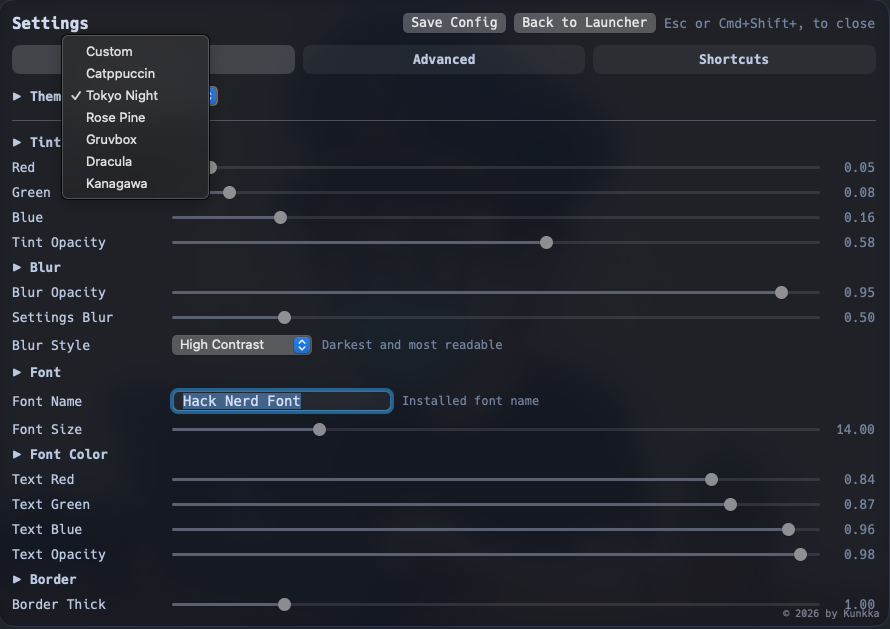
Built-in: Catppuccin, Tokyo Night, Rose Pine, Gruvbox, Dracula, Kanagawa, plus Custom. Switch in Settings > Appearance.
Copyright (C) 2026 kunkka19xx
This program is free software: you can redistribute it and/or modify it under the terms of the GNU General Public License as published by the Free Software Foundation, either version 3 of the License, or (at your option) any later version. See LICENSE for the full text.
Thanks to everyone who has contributed - see the contributor graph.
more like this
Comprehensive analytics dashboard for AI coding agents — Cursor, Windsurf, Claude Code, VS Code Copilot, Zed, Antigravi…
XMB for Plasma BigScreen, console-like fullscreen launcher for living room gamepad users
Free open-source Cloudflare R2 desktop client and S3 GUI for macOS, Windows, and Linux. Manage Cloudflare R2, AWS S3, M…
search projects, people, and tags