lottery
🎉🌟✨🎈年会抽奖程序,基于 Express + Three.js的 3D 球体抽奖程序,奖品🧧🎁,文字,图片,抽奖规则均可配置,😜抽奖人员信息Excel一键导入😍,抽奖结果Excel导出😎,给你的抽奖活动带来全新酷炫体验🚀🚀🚀
JavaScript★ 4.6k
incredible 3D developer portfolio website with awesome graphics - built with React & Three.js 🪄
 ladunjexa
git clone https://github.com/ladunjexa/reactjs18-3d-portfolio.gitladunjexa/reactjs18-3d-portfolio
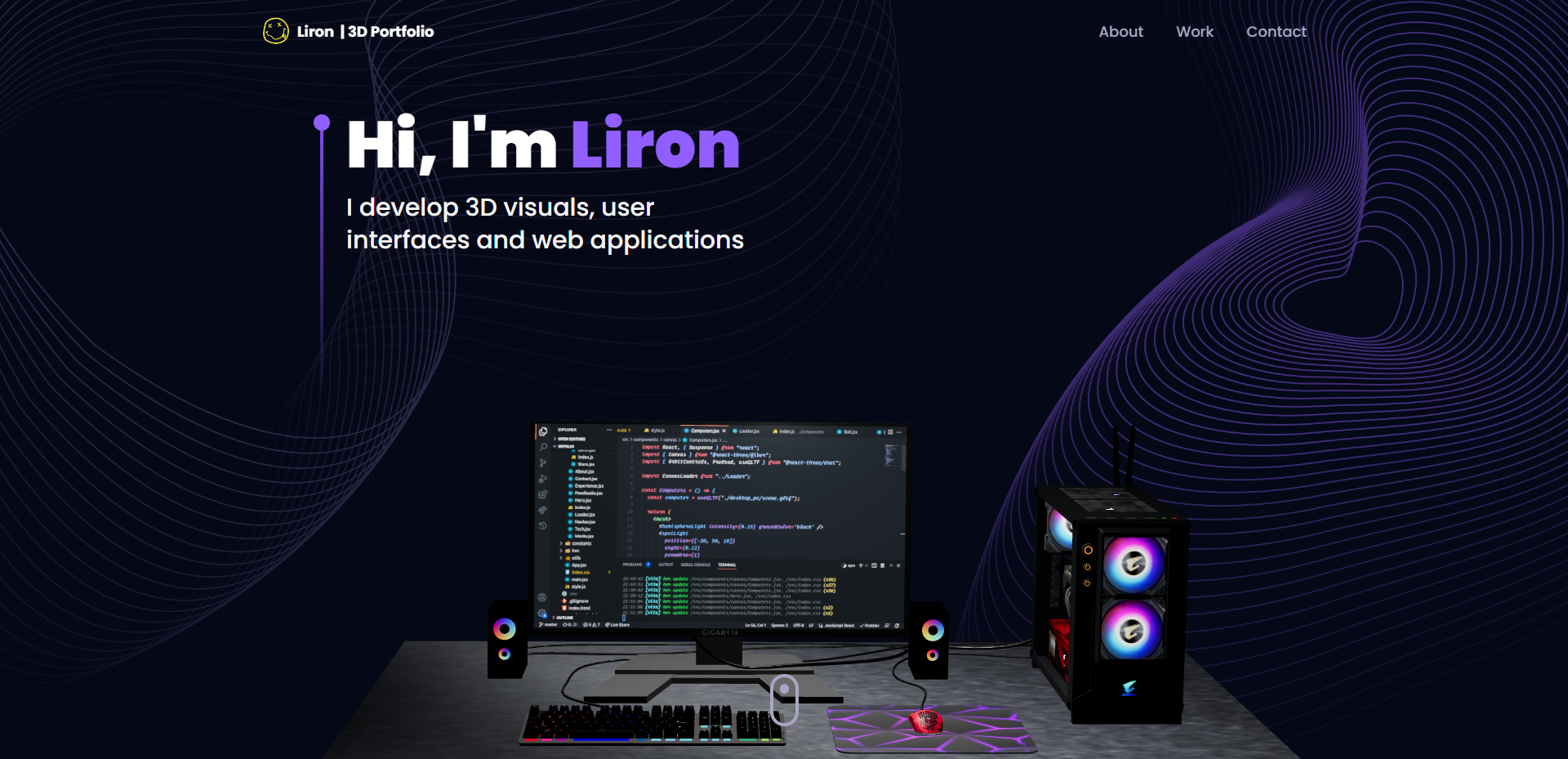
Explore the live demonstration of the project: reactjs18-3d-portfolio
3D Portfolio is a well-designed and fully functional portfolio website that is built with React.js and Three.js. It is a fully responsive website that works well on all devices.
reactjs18-3d-portfolio/
├── src/
├   ├── App.tsx
├   ├── globals.css
├   ├── main.tsx
├   ├── vite.env.d.ts
├   ├── components/
├   ├   ├── atoms/
├   ├   ├   └── Header.tsx
├   ├   ├── canvas/
├   ├   ├   ├── Ball.tsx
├   ├   ├   ├── Computers.tsx
├   ├   ├   ├── Earth.tsx
├   ├   ├   ├── Stars.tsx
├   ├   ├   └── index.ts
├   ├   ├── layout/
├   ├   ├   ├── Loader.tsx
├   ├   ├   └── Navbar.tsx
├   ├   ├── sections/
├   ├   ├   ├── About.tsx
├   ├   ├   ├── Contact.tsx
├   ├   ├   ├── Experience.tsx
├   ├   ├   ├── Feedbacks.tsx
├   ├   ├   ├── Hero.tsx
├   ├   ├   ├── Tech.tsx
├   ├   ├   ├── Works.tsx
├   ├   ├   └── page.tsx
├   ├   └── index.ts
├   ├── constants/
├   ├   ├── config.ts
├   ├   ├── styles.ts
├   ├   └── index.ts
├   ├── hoc/
├   ├   ├── SectionWrapper.tsx
├   ├   └── index.ts
├   ├── utils/
├   ├   └── motion.ts
├   ├── types/
├   ├   └── index.d.ts
├   └── assets/
├       ├── company/
├       ├   └── [[...]].{svg,png}
├       ├── tech/
├       ├   └── [[...]].{svg,png}
├       ├── [[...]].{svg,png}
├       └── index.ts
├── public/
├   ├── desktop_pc
├   ├   ├── textures/[[...]].png
├   ├   ├── license.txt
├   ├   ├── scene.bin
├   ├   └── scene.gltf
├   ├── planet
├   ├   ├── textures/[[...]].png
├   ├   ├── license.txt
├   ├   ├── scene.bin
├   ├   └── scene.gltf
├   ├── logo.png
├   └── logo.svg
├── .env
├── .eslintignore
├── .eslintrc.cjs
├── .gitignore
├── .prettierignore
├── .prettierrc.cjs
├── index.html
├── LICENSE
├── README.md
├── package.json
├── postcss.config.cjs
├── tailwind.config.cjs
├── tsconfig.json
├── tsconfig.node.json
└── vite.config.js
To get this project up and running in your development environment, follow these step-by-step instructions.
In order to install and run this project locally, you would need to have the following installed on your local machine.
Step 0:
Note ‼️ the application uses EmailJS in order to send emails using client-side, therefore,
you need to create EmailJS account here and sets the
VITE_EMAILJS_SERVICE_ID, VITE_EMAILJS_TEMPLATE_ID, and VITE_EMAIL_JS_ACCESS_TOKEN environment
variables in .env file.
Step 1:
Download or clone this repo by using the link below:
git clone https://github.com/ladunjexa/reactjs18-3d-portfolio.git
Step 2:
Execute the following command in the root directory of the downloaded repo in order to install dependencies:
npm install
Step 3:
Execute the following command in order to run the development server locally:
npm run dev
Step 4:
Open http://localhost:5173 with your browser to see the result.
All scripts are defined in the package.json file. Here is a list of all scripts:
| Script | Action |
|---|---|
npm install |
Installs dependencies |
npm run dev |
Starts local dev server at localhost:5137 |
npm run build |
Build your production site to ./dist/ |
npm run preview |
Boot up a local static web server |
npm run lint |
Run ESLint |
npm run ts:check |
Perform type-checking |
Environment variables[^3] can be used for configuration. They must be set before running the app.
Environment variables are variables that are set in the operating system or shell, typically used to configure programs.
React.js 18 3D Portfolio uses EmailJS as external service. You need to create an account and get the required credentials to run the app.
Create a .env file in the root directory of the project and add the following environment
variables:
VITE_EMAILJS_SERVICE_ID=<VITE_EMAILJS_SERVICE_ID>
VITE_EMAILJS_TEMPLATE_ID=<VITE_EMAILJS_TEMPLATE_ID>
VITE_EMAIL_JS_ACCESS_TOKEN=<VITE_EMAIL_JS_ACCESS_TOKEN>
You can create an optimized production build with the following command:
npm run build
The easiest way to deploy this Next.js app is to use the Vercel Platform.
You can also deploy this Next.js app with Netlify.
Check out Next.js deployment documentation for more details.
Contributions are what make the open source community such an amazing place to learn, inspire, and create. Any contributions you make are greatly appreciated.
To fix a bug or enhance an existing module, follow these steps:
git checkout -b improve-feature)git commit -am 'Improve feature')git push origin improve-feature)If you find a bug (failure of a module to execute its intended function), kindly open an issue here by including the issue with a title and clear description.
If you'd like to request a new function, feel free to do so by opening an issue here. Please include sample queries and their corresponding results.
I'd like to express my gratitude to the following people who helped me with this project and made it possible:
Three.js 3D Portfolio is open source software licensed as MIT and is free to use — See LICENSE for more details.
more like this
🎉🌟✨🎈年会抽奖程序,基于 Express + Three.js的 3D 球体抽奖程序,奖品🧧🎁,文字,图片,抽奖规则均可配置,😜抽奖人员信息Excel一键导入😍,抽奖结果Excel导出😎,给你的抽奖活动带来全新酷炫体验🚀🚀🚀
🎥🤟 8 minimalistic templates for tfjs mediapipe handpose and facemesh
A repository about starting from scratch for monorepo, fastify, Phaser, colyseus, and threejs.
search projects, people, and tags