 lchsk
lchskxmb-bigscreen
XMB for Plasma BigScreen, console-like fullscreen launcher for living room gamepad users
QML★ 50
xstarter is an application launcher for Linux
It lives in terminal and works well with tiling window managers (e.g. xmonad, i3 etc).
Current version: 0.8.2
| Branch | Build |
|---|---|
master |
|
dev |
Check out Emacs interface for xstarter
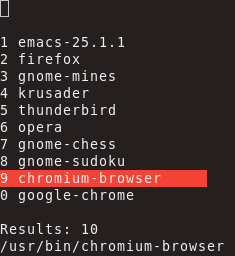
$PATH) and user-provided list of directoriesxstarter -e firefox)xstarter -P)xstarter needs to be launched from a terminal ($ xstarter). It is useful to run it using a key binding, preferably by binding your preferred key to a command starting xstarter from a terminal of your choice, e.g. xterm -e xstarter. Alternatively, you can simply bind it to xstarter in which case xstarter will open itself in a terminal.
You can also create an alias in your shell (e.g. bash, zsh): alias xs=xstarter.
It should run on any modern terminal. It is tested on: xterm, rxvt, gnome-terminal, xfce4-terminal, konsole. In case of any problems please report it.
Configuration file is available and includes comments that explain configuration variables. It is located in the ~/.xstarter.d/ directory.
You can provide arguments to applications you wish to open.
surf gnu.orgemacs -nw -QUse numbers 1..9 and 0 to open an application from the list.
By default, the following shortcuts are available:
| Shortcut | Action |
|---|---|
| Return (enter) | Open selected application |
| C-o | Open selected application in terminal (defined by "terminal" variable in the config file, xterm by default) |
| C-n | Move down the list |
| C-p | Move up the list |
| C-g | Quit |
| C-d | Delete entered character |
| C-w | Delete entire query |
| Tab | Auto-complete using current selection; allow to provide arguments |
GPL
more like this
XMB for Plasma BigScreen, console-like fullscreen launcher for living room gamepad users
search projects, people, and tags