agentlytics
Comprehensive analytics dashboard for AI coding agents — Cursor, Windsurf, Claude Code, VS Code Copilot, Zed, Antigravi…
JavaScript★ 555
Redis RDB CLI: A command-line tool to parse, filter, split, and merge Redis RDB files, and to analyze memory usage offl…
 leonchen83
git clone https://github.com/leonchen83/redis-rdb-cli.gitleonchen83/redis-rdb-cli
A tool that can parse, filter, split, and merge RDB files, as well as analyze memory usage offline. It can also sync data between two Redis instances and allows users to define their own sink services to migrate Redis data to custom destinations.

JDK 1.8 or later
$ wget https://github.com/leonchen83/redis-rdb-cli/releases/latest/download/redis-rdb-cli-release.zip
$ unzip redis-rdb-cli-release.zip
$ ./redis-rdb-cli/bin/rct -h

# MacOS homebrew installation
$ brew tap leonchen83/redis-rdb-cli
$ brew install redis-rdb-cli
$ rct -h
JDK 1.8 or later
Maven 3.3.1 or later
$ git clone https://github.com/leonchen83/redis-rdb-cli.git
$ cd redis-rdb-cli
$ mvn clean install -Dmaven.test.skip=true
$ ./target/redis-rdb-cli-release/redis-rdb-cli/bin/rct -h
$ docker run -it --rm redisrdbcli/redis-rdb-cli:latest
$ rct -V
To run the commands from any directory, add the /path/to/redis-rdb-cli/bin directory to your system's Path environment variable.
$ rct -f dump -s /path/to/dump.rdb -o /path/to/dump.aof -r
$ cat /path/to/dump.aof | /redis/src/redis-cli -p 6379 --pipe
$ rct -f dump -s /path/to/dump.rdb -o /path/to/dump.aof
$ rct -f json -s /path/to/dump.rdb -o /path/to/dump.json
$ rct -f count -s /path/to/dump.rdb -o /path/to/dump.csv
$ rct -f mem -s /path/to/dump.rdb -o /path/to/dump.mem -l 50
$ rct -f diff -s /path/to/dump1.rdb -o /path/to/dump1.diff
$ rct -f diff -s /path/to/dump2.rdb -o /path/to/dump2.diff
$ diff /path/to/dump1.diff /path/to/dump2.diff
$ rct -f resp -s /path/to/dump.rdb -o /path/to/appendonly.aof
$ rst -s redis://127.0.0.1:6379 -m redis://127.0.0.1:6380 -r
$ rst -s redis://127.0.0.1:6379 -m redis://127.0.0.1:30001 -r -d 0
rst# Set client-output-buffer-limit in the source Redis instance $ redis-cli config set client-output-buffer-limit "slave 0 0 0" $ rst -s redis://127.0.0.1:6379 -m redis://127.0.0.1:6380 -r
$ rmt -s /path/to/dump.rdb -m redis://192.168.1.105:6379 -r
# Migrate data from Redis 7 to Redis 6
# For `dump_rdb_version`, please see the comments in redis-rdb-cli.conf
$ sed -i 's/dump_rdb_version=-1/dump_rdb_version=9/g' /path/to/redis-rdb-cli/conf/redis-rdb-cli.conf
$ rmt -s redis://com.redis7:6379 -m redis://com.redis6:6379 -r
# Set proto-max-bulk-len in the target Redis instance
$ redis-cli -h ${host} -p 6380 -a ${pwd} config set proto-max-bulk-len 2048mb

# Set Xms and Xmx for the redis-rdb-cli node
$ export JAVA_TOOL_OPTIONS="-Xms8g -Xmx8g"

# Execute migration
$ rmt -s redis://127.0.0.1:6379 -m redis://127.0.0.1:6380 -r
Using nodes.conf:
$ rmt -s /path/to/dump.rdb -c ./nodes-30001.conf -r
Alternatively, you can connect to one of the cluster nodes directly:
$ rmt -s /path/to/dump.rdb -m redis://127.0.0.1:30001 -r
$ rdt -b redis://192.168.1.105:6379 -o /path/to/dump.rdb
$ rdt -b redis://192.168.1.105:6379 -o /path/to/dump.rdb --goal 3
$ rdt -b /path/to/dump.rdb -o /path/to/filtered-dump.rdb -d 0 -t string
nodes.conf$ rdt -s ./dump.rdb -c ./nodes.conf -o /path/to/folder -d 0
$ rdt -m ./dump1.rdb ./dump2.rdb -o ./dump.rdb -t hash
$ rcut -s ./aof-use-rdb-preamble.aof -r ./dump.rdb -a ./appendonly.aof
Additional configuration parameters can be modified in /path/to/redis-rdb-cli/conf/redis-rdb-cli.conf.
The rct, rdt, and rmt commands support filtering by data type, db index, and key (using Java-style regular expressions). The rst command supports filtering by db index only.
For example:
$ rct -f dump -s /path/to/dump.rdb -o /path/to/dump.aof -d 0
$ rct -f dump -s /path/to/dump.rdb -o /path/to/dump.aof -t string hash
$ rmt -s /path/to/dump.rdb -m redis://192.168.1.105:6379 -r -d 0 1 -t list
$ rst -s redis://127.0.0.1:6379 -m redis://127.0.0.1:6380 -d 0
# Step 1:
# Open `/path/to/redis-rdb-cli/conf/redis-rdb-cli.conf`
# and change the `metric_gateway` property from `none` to `influxdb`.
#
# Step 2:
$ cd /path/to/redis-rdb-cli/dashboard
$ docker-compose up -d
#
# Step 3:
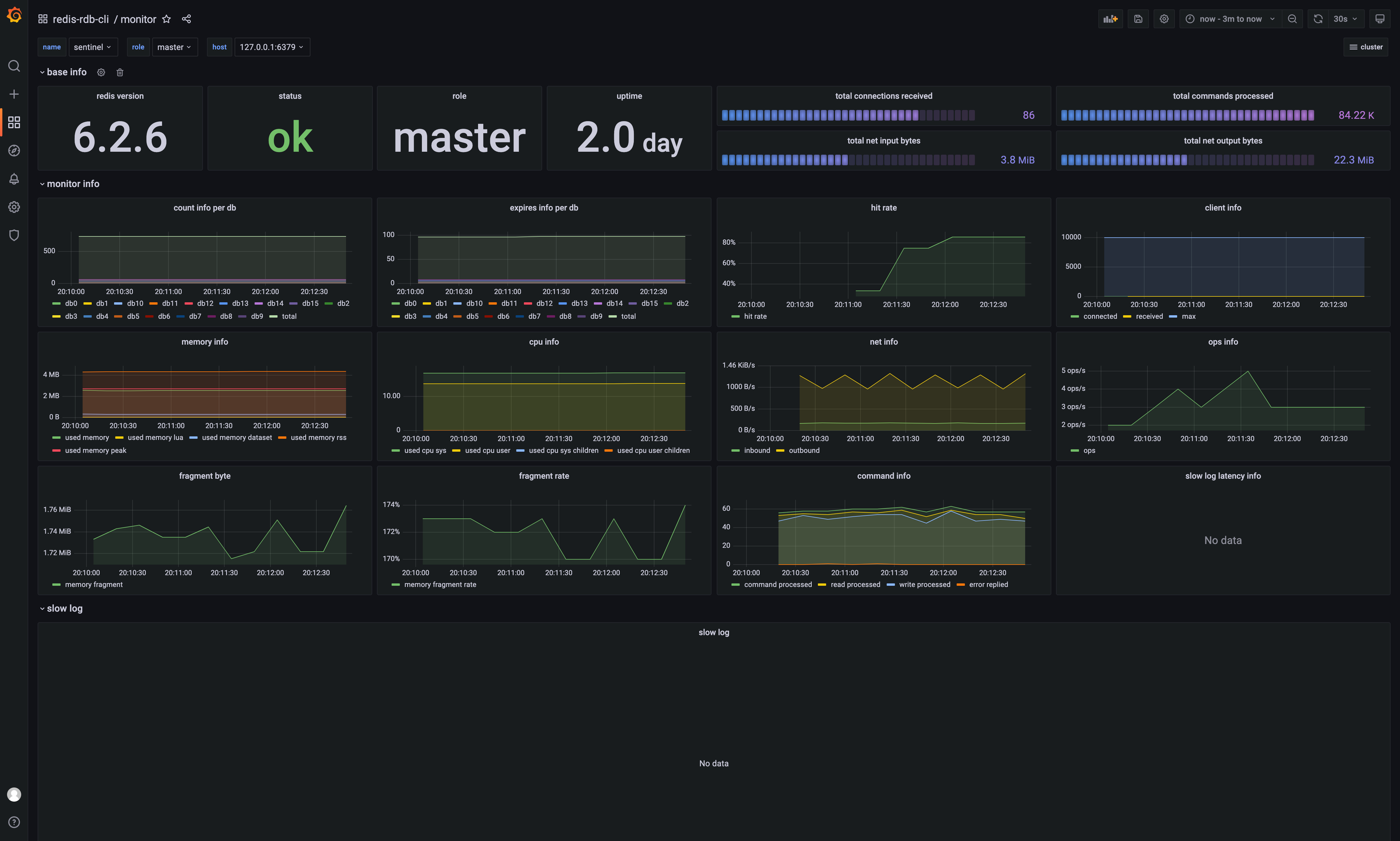
$ rmonitor -s redis://127.0.0.1:6379 -n standalone
$ rmonitor -s redis://127.0.0.1:30001 -n cluster
$ rmonitor -s redis-sentinel://sntnl-usr:sntnl-pwd@127.0.0.1:26379?master=mymaster&authUser=usr&authPassword=pwd -n sentinel
#
# Step 4:
# Open `http://localhost:3000/d/monitor/monitor` in your browser.
# Log in to Grafana with username `admin` and password `admin` to view the dashboard.
rmt and rstrmt: When rmt starts, the source Redis instance first performs a BGSAVE to generate an RDB snapshot. The rmt command migrates this snapshot file to the target Redis instance. The command terminates after the migration is complete.rst: In addition to migrating the initial RDB snapshot, rst also syncs incremental data changes from the source to the target. It runs continuously until manually stopped (e.g., with CTRL+C). Note that rst only supports filtering by db index. For more details, see Limitations of Migration.Since v0.1.9, the rct -f mem command supports visualizing its output on a Grafana dashboard.
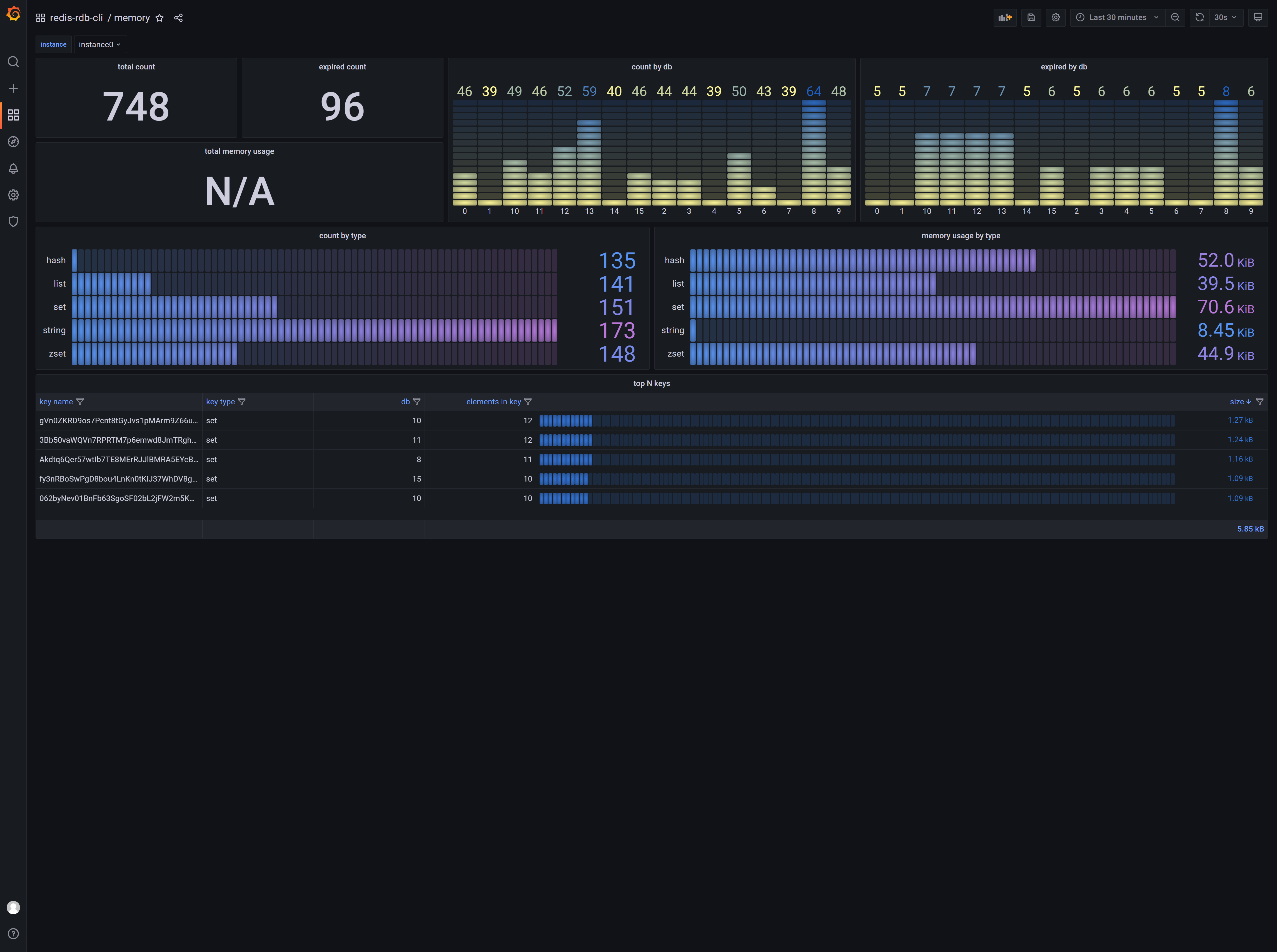
To enable this feature, you must have Docker and Docker Compose installed. Please refer to the official Docker documentation for installation instructions. Then, run the following command:
$ cd /path/to/redis-rdb-cli/dashboard

# Start
$ docker-compose up -d

# Stop
$ docker-compose down
Next, open /path/to/redis-rdb-cli/conf/redis-rdb-cli.conf and change the metric_gateway parameter from none to influxdb.
Open http://localhost:3000 in your browser to view the results from rct -f mem.
If you are deploying this tool across multiple instances, ensure that the metric_instance parameter is set to a unique value for each instance.
$ cd /path/to/redis-6.0-rc1
$ ./utils/gen-test-certs.sh
$ cd tests/tls
$ openssl pkcs12 -export -CAfile ca.crt -in redis.crt -inkey redis.key -out redis.p12
If the source and target Redis instances use the same keystore, configure the following parameters in redis-rdb-cli.conf:
source_keystore_path and target_keystore_path should point to /path/to/redis-6.0-rc1/tests/tls/redis.p12.
Set source_keystore_pass and target_keystore_pass.
After configuring the SSL parameters, use the rediss:// protocol in your commands to enable SSL, for example: rst -s rediss://127.0.0.1:6379 -m rediss://127.0.0.1:30001 -r -d 0
$ rst -s redis://user:pass@127.0.0.1:6379 -m redis://user:pass@127.0.0.1:6380 -r -d 0
user MUST have +@all permissions to execute the necessary commands.rmtrmt Threading ModelThe rmt command uses the following four parameters from redis-rdb-cli.conf to manage data migration:
migrate_batch_size=4096
migrate_threads=4
migrate_flush=yes
migrate_retries=1
The most important parameter is migrate_threads. A value of 4, for example, means that the following threading model is used for migration:
single redis ----> single redis

+--------------+         +----------+     thread 1      +--------------+
|              |    +----| Endpoint |-------------------|              |
|              |    |    +----------+                   |              |
|              |    |                                   |              |
|              |    |    +----------+     thread 2      |              |
|              |    |----| Endpoint |-------------------|              |
|              |    |    +----------+                   |              |
| Source Redis |----|                                   | Target Redis |
|              |    |    +----------+     thread 3      |              |
|              |    |----| Endpoint |-------------------|              |
|              |    |    +----------+                   |              |
|              |    |                                   |              |
|              |    |    +----------+     thread 4      |              |
|              |    +----| Endpoint |-------------------|              |
+--------------+         +----------+                   +--------------+
single redis ----> redis cluster

+--------------+         +----------+     thread 1      +--------------+
|              |    +----| Endpoints|-------------------|              |
|              |    |    +----------+                   |              |
|              |    |                                   |              |
|              |    |    +----------+     thread 2      |              |
|              |    |----| Endpoints|-------------------|              |
|              |    |    +----------+                   |              |
| Source Redis |----|                                   | Redis cluster|
|              |    |    +----------+     thread 3      |              |
|              |    |----| Endpoints|-------------------|              |
|              |    |    +----------+                   |              |
|              |    |                                   |              |
|              |    |    +----------+     thread 4      |              |
|              |    +----| Endpoints|-------------------|              |
+--------------+         +----------+                   +--------------+
The key difference between migrating to a single instance versus a cluster lies in the use of Endpoint versus Endpoints. For cluster migrations, Endpoints represents a collection of Endpoint objects, each pointing to a master instance in the cluster. For example, in a Redis cluster with 3 masters and 3 replicas, if migrate_threads is set to 4, the tool will establish a total of 3 * 4 = 12 connections to the master instances.
The following three parameters affect migration performance:
migrate_batch_size=4096
migrate_retries=1
migrate_flush=yes
migrate_batch_size: By default, data is migrated using Redis pipelining. This parameter sets the batch size for the pipeline. If set to 1, pipelining is effectively disabled, and each command is sent individually.migrate_retries: If a socket error occurs, the tool will recreate the socket and retry the failed command. This parameter specifies the number of retry attempts.migrate_flush: If set to yes, the output stream is flushed after every command. If set to no, the stream is flushed every 64KB. Note: Retries (migrate_retries) only take effect when migrate_flush is set to yes.+---------------+ +-------------------+ restore +---------------+
| | | redis dump format |---------------->| |
| | |-------------------| restore | |
| | convert | redis dump format |---------------->| |
| Dump rdb |------------>|-------------------| restore | Target Redis |
| | | redis dump format |---------------->| |
| | |-------------------| restore | |
| | | redis dump format |---------------->| |
+---------------+ +-------------------+ +---------------+
nodes.conf file and does not handle MOVED or ASK redirections. Therefore, a key limitation is that the cluster MUST be in a stable state during the migration. This means there should be no slots in a migrating or importing state, and no failovers (promoting a replica to master) should occur.rst to migrate data to a cluster, the following commands are not supported: PUBLISH, SWAPDB, MOVE, FLUSHALL, FLUSHDB, MULTI, EXEC, SCRIPT FLUSH, SCRIPT LOAD, EVAL, EVALSHA.del {user}:1 {user}:2): RPOPLPUSH, SDIFFSTORE, SINTERSTORE, SMOVE, ZINTERSTORE, ZUNIONSTORE, DEL, UNLINK, RENAME, RENAMENX, PFMERGE, PFCOUNT, MSETNX, BRPOPLPUSH, BITOP, MSET, COPY, BLMOVE, LMOVE, ZDIFFSTORE, GEOSEARCHSTORE, MSETEX.retret Command Doesret command allows users to define their own sink services to send Redis data to other systems, such as MySQL or MongoDB.Follow the steps below to implement your own sink service.
<?xml version="1.0" encoding="UTF-8"?>
<project xmlns="http://maven.apache.org/POM/4.0.0"
         xmlns:xsi="http://www.w3.org/2001/XMLSchema-instance"
         xsi:schemaLocation="http://maven.apache.org/POM/4.0.0 http://maven.apache.org/xsd/maven-4.0.0.xsd">
    <modelVersion>4.0.0</modelVersion>

    <groupId>com.your.company</groupId>
    <artifactId>your-sink-service</artifactId>
    <version>1.0.0</version>

    <properties>
        <project.build.sourceEncoding>UTF-8</project.build.sourceEncoding>
        <maven.compiler.source>1.8</maven.compiler.source>
        <maven.compiler.target>1.8</maven.compiler.target>
    </properties>

    <dependencies>
        <dependency>
            <groupId>com.moilioncircle</groupId>
            <artifactId>redis-rdb-cli-api</artifactId>
            <version>1.9.0</version>
            <scope>provided</scope>
        </dependency>
        <dependency>
            <groupId>com.moilioncircle</groupId>
            <artifactId>redis-replicator</artifactId>
            <version>[3.9.0, )</version>
            <scope>provided</scope>
        </dependency>
        <dependency>
            <groupId>org.slf4j</groupId>
            <artifactId>slf4j-api</artifactId>
            <version>1.7.25</version>
            <scope>provided</scope>
        </dependency>

        <!--
        <dependency>
            other dependencies
        </dependency>
        -->

    </dependencies>

    <build>
        <plugins>
            <plugin>
                <artifactId>maven-assembly-plugin</artifactId>
                <version>3.1.0</version>
                <configuration>
                    <descriptorRefs>
                        <descriptorRef>jar-with-dependencies</descriptorRef>
                    </descriptorRefs>
                </configuration>
                <executions>
                    <execution>
                        <id>make-assembly</id>
                        <phase>package</phase>
                        <goals>
                            <goal>single</goal>
                        </goals>
                    </execution>
                </executions>
            </plugin>
            <plugin>
                <groupId>org.apache.maven.plugins</groupId>
                <artifactId>maven-compiler-plugin</artifactId>
                <version>3.8.1</version>
                <configuration>
                    <source>${maven.compiler.source}</source>
                    <target>${maven.compiler.target}</target>
                    <encoding>${project.build.sourceEncoding}</encoding>
                </configuration>
            </plugin>
        </plugins>
    </build>
</project>
SinkService interface:public class YourSinkService implements SinkService {
@Override
public String sink() {
return "your-sink-service";
}
@Override
public void init(File config) throws IOException {
// Parse your external sink config
}
@Override
public void onEvent(Replicator replicator, Event event) {
// Your sink business logic
}
}
src/main/resources/META-INF/services/com.moilioncircle.redis.rdb.cli.api.sink.SinkService with the following content:your.package.YourSinkService
$ mvn clean install
$ cp ./target/your-sink-service-1.0.0-jar-with-dependencies.jar /path/to/redis-rdb-cli/lib
$ ret -s redis://127.0.0.1:6379 -c config.conf -n your-sink-service
    public static void main(String[] args) throws Exception {
        Replicator replicator = new RedisReplicator("redis://127.0.0.1:6379");
        Runtime.getRuntime().addShutdownHook(new Thread(() -> {
            Replicators.closeQuietly(replicator);
        }));
        replicator.addExceptionListener((rep, tx, e) -> {
            throw new RuntimeException(tx.getMessage(), tx);
        });
        SinkService sink = new YourSinkService();
        sink.init(new File("/path/to/your-sink.conf"));
        replicator.addEventListener(new AsyncEventListener(sink, replicator, 4, Executors.defaultThreadFactory()));
        replicator.open();
    }
YourFormatterService that extends AbstractFormatterService:public class YourFormatterService extends AbstractFormatterService {
@Override
public String format() {
return "test";
}
@Override
public Event applyString(Replicator replicator, RedisInputStream in, int version, byte[] key, int type, ContextKeyValuePair context) throws IOException {
byte[] val = new DefaultRdbValueVisitor(replicator).applyString(in, version);
getEscaper().encode(key, getOutputStream());
getEscaper().encode(val, getOutputStream());
getOutputStream().write('\n');
return context;
}
}
src/main/resources/META-INF/services/com.moilioncircle.redis.rdb.cli.api.format.FormatterService with the following content:your.package.YourFormatterService
$ mvn clean install
$ cp ./target/your-service-1.0.0-jar-with-dependencies.jar /path/to/redis-rdb-cli/lib
$ rct -f test -s redis://127.0.0.1:6379 -o ./out.csv -t string -d 0 -e json
Commercial support for redis-rdb-cli is available. The following services are currently offered:
You may also contact Baoyi Chen directly at chen.bao.yi@gmail.com.
27 January 2023 was a sad day; I lost my mother, 宁文君. She was encouraging and supported me in developing this tool. Every time a company used this tool, she got excited like a child and encouraged me to keep going. Without her, I couldn't have maintained this tool for so many years. Even though I didn't achieve much, she was still proud of me. R.I.P and may God bless her.
IntelliJ IDEA is a Java integrated development environment (IDE) for developing computer software. It is developed by JetBrains (formerly known as IntelliJ), and is available as an Apache 2 Licensed community edition, and in a proprietary commercial edition. Both can be used for commercial development.
more like this
Comprehensive analytics dashboard for AI coding agents — Cursor, Windsurf, Claude Code, VS Code Copilot, Zed, Antigravi…
meine 🌒 - A CLI file manager and system utility built with Textual. It combines intuitive command parsing with rich t…
search projects, people, and tags