wordclock_esp8266
Software for a Wordclock based on ESP8266 and Neopixel LEDs with PONG, TETRIS, SNAKE game modes
C++★ 50
Serial Bridge for Bentel Kyo Alarm System.
 lorenzo-deluca
git clone https://github.com/lorenzo-deluca/espkyogate.gitlorenzo-deluca/espkyogate
Complete ESPHome component for Bentel Security KYO alarm panels, based on ESP32 and communicating over RS-232 serial via a MAX3232 level shifter.
Warning
BREAKING CHANGE (v2026.4.13): The project has been completely overhauled and migrated into a native ESPHome component! If you were using the previous version with the custom esphome.espkyogate_* services, please note that those are no longer compatible. You will need to update your ESPHome YAML and Home Assistant package configuration to use the new native alarm_control_panel, button, and binary_sensor entities.
⚠️ Warning This software was developed by analyzing serial messages from/to central, it was not sponsored or officially supported by Bentel If someone from Bentel would like to contribute or collaborate please contact me at me@lorenzodeluca.dev
For discussions, questions, and community support, you can join the conversation on the official Home Assistant Community forum.
➡️ Join the discussion here: Bentel KYO32 Alarm System Integration
I strongly recommend using an ESP32 Based board, like this one https://it.aliexpress.com/item/4001340660273.html.
Model detection is automatic via firmware version query on first connection.
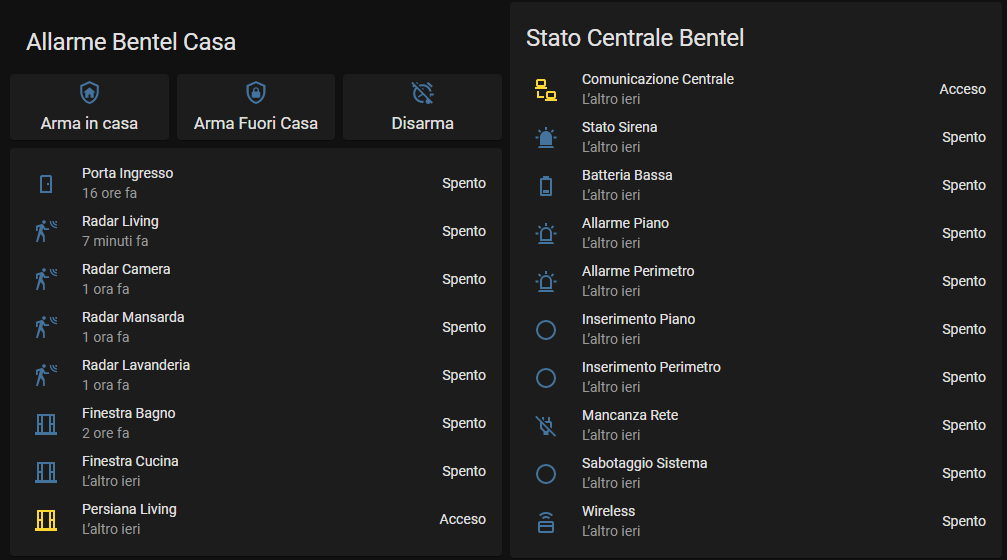
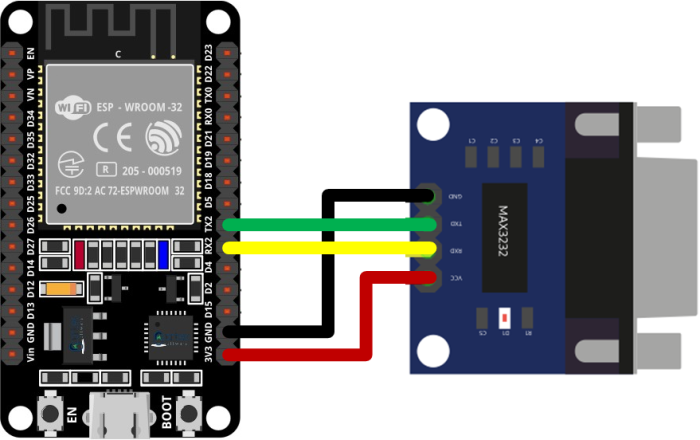
| ESP32 Pin | MAX3232 | KYO Panel |
|---|---|---|
| GPIO17 (TX) | TX | RS-232 RX |
| GPIO16 (RX) | RX | RS-232 TX |
| 5V | VCC | - |
| GND | GND | GND |
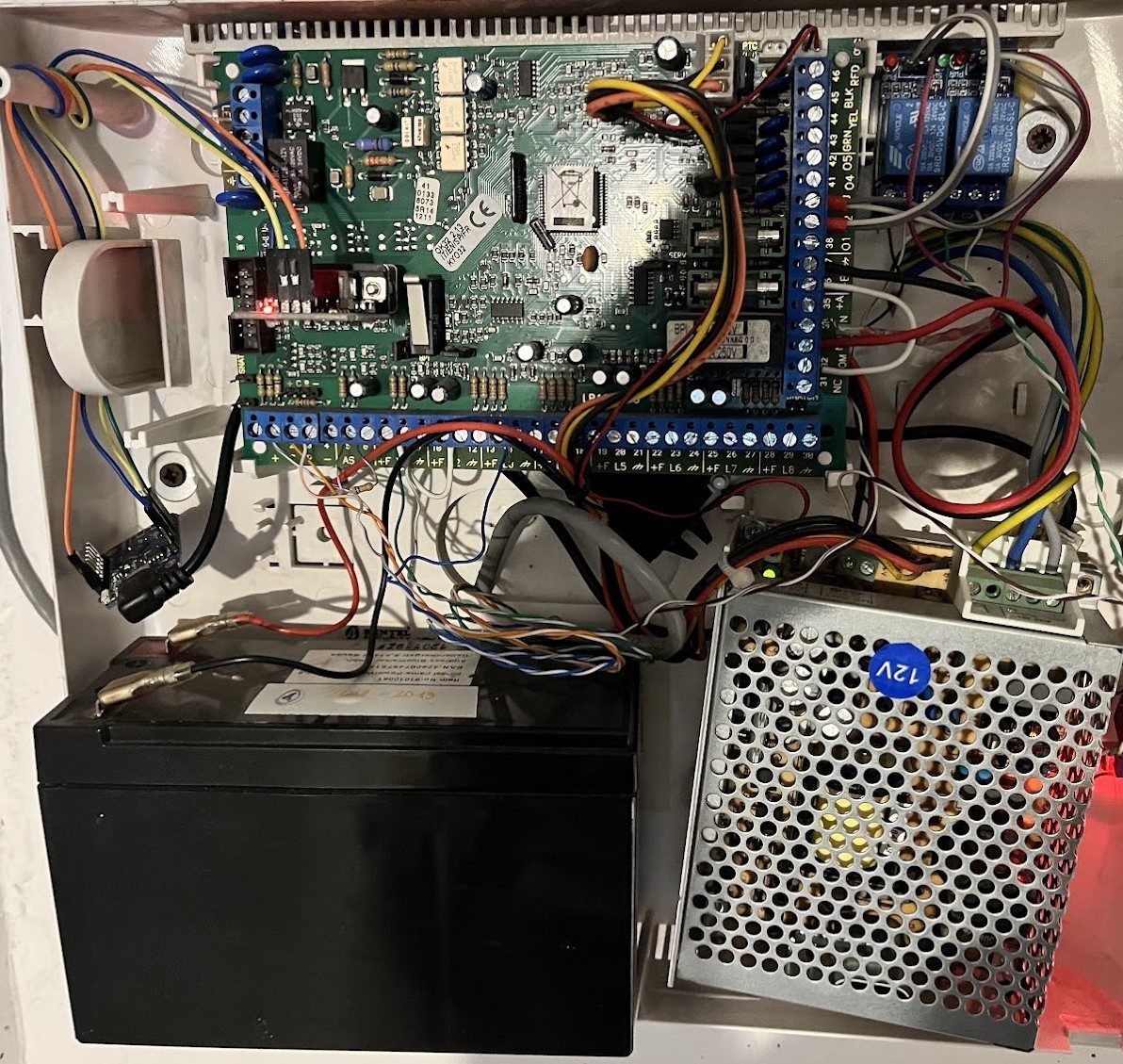
Power the ESP32 from the panel's +B/AUX 12V output via a 12V-to-USB converter. This ensures the ESP32 stays powered during mains failures (panel battery backup).
Add to your ESPHome YAML:
external_components:
  - source: github://lorenzo-deluca/espkyogate
    components: [bentel_kyo]
Clone this repository and reference the components directory:
external_components:
  - source:
      type: local
      path: path/to/espkyogate/components
    components: [bentel_kyo]
external_components:
  - source: github://lorenzo-deluca/espkyogate
    components: [bentel_kyo]

uart:
  id: uart_bus
  tx_pin: GPIO17
  rx_pin: GPIO16
  baud_rate: 9600
  data_bits: 8
  parity: EVEN

bentel_kyo:
  id: kyo
  uart_id: uart_bus

alarm_control_panel:
  - platform: bentel_kyo
    bentel_kyo_id: kyo
    name: "House"
    partition: 1
external_components:
  - source: github://lorenzo-deluca/espkyogate
    components: [bentel_kyo]

esp32:
  board: lolin32
  framework:
    type: esp-idf

uart:
  id: uart_bus
  tx_pin: GPIO17
  rx_pin: GPIO16
  baud_rate: 9600
  data_bits: 8
  parity: EVEN

# ========================================
# Bentel KYO Hub
# ========================================

bentel_kyo:
  id: kyo
  uart_id: uart_bus

# NTP time source (required for sync_datetime button)
time:
  - platform: sntp
    id: sntp_time

# ========================================
# Alarm Control Panel (one per partition)
# ========================================

# Alarm Control Panel — one per partition (up to 8)
# Maps to Home Assistant alarm_control_panel entities with arm/disarm controls

alarm_control_panel:
  - platform: bentel_kyo
    bentel_kyo_id: kyo
    name: "Ground Floor"
    partition: 1
    entry_delay:
      name: "Ground Floor Entry Delay"
    exit_delay:
      name: "Ground Floor Exit Delay"
    siren_timer:
      name: "Ground Floor Siren Timer"

  - platform: bentel_kyo
    bentel_kyo_id: kyo
    name: "First Floor"
    partition: 2

  - platform: bentel_kyo
    bentel_kyo_id: kyo
    name: "Basement"
    partition: 3

# ========================================
# Binary Sensors
# ========================================

# Binary Sensors — zones, warnings, tamper, siren, outputs
binary_sensor:
  - platform: bentel_kyo
    bentel_kyo_id: kyo

    # Zones (1-32) — zone status with optional diagnostic text sensors
    zones:
      - zone: 1
        name: "Front Door"
        device_class: door
        zone_type:
          name: "Front Door Zone Type"
        panel_name:
          name: "Front Door Panel Name"
        zone_partition:
          name: "Front Door Partition"
        serial_number:
          name: "Front Door Serial Number"
        # The integration overrides the dynamic HA class icons with a static "mdi:shield-home" icon
        # Uncomment the next line and copy it to any zone you like to restore the dynamic HA icons
        # You can use the same statement to use any icon you like
        # icon: ""
      - zone: 2
        name: "Living Room PIR"
        device_class: motion
      - zone: 3
        name: "Kitchen PIR"
        device_class: motion

    # Zone tamper (per-zone tamper detection)
    zone_tamper:
      - zone: 1
        name: "Front Door Tamper"
      - zone: 2
        name: "Living Room Tamper"

    # Zone bypass (per-zone exclusion status)
    zone_bypass:
      - zone: 1
        name: "Front Door Bypassed"

    # Zone alarm memory
    zone_alarm_memory:
      - zone: 1
        name: "Front Door Alarm Memory"

    # Zone tamper memory
    zone_tamper_memory:
      - zone: 1
        name: "Front Door Tamper Memory"

    # Warning flags
    warnings:
      mains_failure:
        name: "Mains Power Failure"
      bpi_missing:
        name: "BPI Module Missing"
      fuse_fault:
        name: "Fuse Fault"
      low_battery:
        name: "Low Battery"
      phone_line_fault:
        name: "Phone Line Fault"
      default_codes:
        name: "Default Codes Warning"
      wireless_fault:
        name: "Wireless Fault"

    # Tamper flags
    tamper:
      tamper_zone:
        name: "Zone Tamper"
      tamper_false_key:
        name: "False Key Tamper"
      tamper_bpi:
        name: "BPI Tamper"
      tamper_system:
        name: "System Tamper"
      tamper_rf_jam:
        name: "RF Jam Detected"
      tamper_wireless:
        name: "Wireless Tamper"

    # Communication status (connectivity to panel)
    communication:
      name: "Panel Communication"

    # Siren status
    siren:
      name: "Siren"

    # OC output states (1-8)
    output_state:
      - output_number: 1
        name: "Output 1"
        panel_name:
          name: "Output 1 Panel Name"
      - output_number: 2
        name: "Output 2"

# Text Sensors — firmware, model, keyfobs

text_sensor:
  - platform: bentel_kyo
    bentel_kyo_id: kyo
    firmware_version:
      name: "Firmware Version"
    alarm_model:
      name: "Alarm Model"
    keyfobs:
      - slot: 1
        name: "Keyfob 1"
      - slot: 2
        name: "Keyfob 2"
    partitions:
      - partition: 1
        name: "Partition 1 Name"
      - partition: 2
        name: "Partition 2 Name"
    codes:
      - code: 1
        name: "Code 1 Name"
      - code: 2
        name: "Code 2 Name"

# ========================================
# Switches
# ========================================

switch:
  - platform: safe_mode
    name: "ESPKyoGate (Safe Mode)"

  # Polling control — enable/disable panel communication at runtime
  - platform: bentel_kyo
    bentel_kyo_id: kyo
    type: polling
    name: "Panel Polling"

  # Serial trace — log raw TX/RX hex bytes for serial debugging
  - platform: bentel_kyo
    bentel_kyo_id: kyo
    type: serial_trace
    name: "Serial Trace Log"

  # Log trace — log state changes (zone, partition, output) for debugging
  - platform: bentel_kyo
    bentel_kyo_id: kyo
    type: log_trace
    name: "State Change Log"

# ========================================
# Buttons
# ========================================

# Buttons — reread config, reset alarms, event log, arm presets
button:
  # Panel management buttons
  - platform: bentel_kyo
    bentel_kyo_id: kyo
    type: reread_config
    name: "Reread Panel Config"
  - platform: bentel_kyo
    bentel_kyo_id: kyo
    type: reset_alarms
    name: "Reset Alarms"
  - platform: bentel_kyo
    bentel_kyo_id: kyo
    type: read_event_log
    name: "Read Event Log"

  # Datetime sync — sends current NTP time to the alarm panel
  - platform: bentel_kyo
    bentel_kyo_id: kyo
    type: sync_datetime
    name: "Sync Panel Clock"

  # Output control buttons
  - platform: bentel_kyo
    bentel_kyo_id: kyo
    type: activate_output
    output_number: 1
    name: "Activate Output 1"
  - platform: bentel_kyo
    bentel_kyo_id: kyo
    type: deactivate_output
    output_number: 1
    name: "Deactivate Output 1"
  - platform: bentel_kyo
    bentel_kyo_id: kyo
    type: pulse_output
    output_number: 1
    pulse_time: 1000ms
    name: "Pulse Output 1 (1s)"

  # Zone control buttons
  - platform: bentel_kyo
    bentel_kyo_id: kyo
    type: include_zone
    zone_number: 1
    name: "Include Zone 1"
  - platform: bentel_kyo
    bentel_kyo_id: kyo
    type: exclude_zone
    zone_number: 1
    name: "Exclude Zone 1"

sensor:
  - platform: uptime
    name: "Uptime"
Each alarm_control_panel entry creates a proper Home Assistant alarm panel entity for a partition:
| HA Action | KYO Command | Description |
|---|---|---|
| Arm Away | Total arm | Full perimeter + interior protection |
| Arm Home | Partial arm | Bypasses zones with the "Internal" attribute |
| Arm Night | Partial arm delay 0 | Bypasses "Internal" zones AND removes entry delay |
| Disarm | Disarm | Disarm the partition |
The partition state is read from the panel every 500ms and mapped to:
| Panel State | HA State |
|---|---|
| Disarmed | disarmed |
| Partition alarm | triggered |
| Armed total | armed_away |
| Armed partial | armed_home |
| Armed partial delay 0 | armed_night |
Note: Disarmed takes priority over triggered. The panel's alarm bit persists after disarming until the alarm memory is explicitly reset. Once the partition is disarmed, the alarm has been acknowledged and the state shows
disarmed.
Optional diagnostic text sensors for each partition:
entry_delay — entry delay timer (seconds)exit_delay — exit delay timer (seconds)siren_timer — siren duration timerYou can require a PIN code to arm or disarm from Home Assistant. The code is validated by the ESP32 before the command is sent to the panel — it does not need to match the panel's own installer/user code.
alarm_control_panel:
  - platform: bentel_kyo
    bentel_kyo_id: kyo
    name: "House"
    partition: 1
    codes:
      - !secret alarm_code
    requires_code_to_arm: false
| Option | Default | Description |
|---|---|---|
codes |
(none) | List of valid PIN codes (strings). Use !secret to avoid plaintext in YAML |
requires_code_to_arm |
false |
Require code entry to arm the partition |
When codes are configured, disarm always requires a valid code. HA automatically shows a numeric keypad on the alarm panel card. Arming does not require a code by default — set requires_code_to_arm: true to also require it for arm actions.
Note: Code protection only applies to the
alarm_control_panelentities in HA. Arm preset buttons bypass code validation — they call the hub directly.
The KYO panel supports three arming modes per partition (from the Bentel user manual, Table 6):
| Mode | Panel Letter | Behavior |
|---|---|---|
| Away | A | Monitors all zones in the partition |
| Stay (Home) | S | Bypasses zones with the Internal attribute (called "Interna" in KyoUnit Italian, "Stay" in the English user manual) |
| Stay-0-Delay (Night) | I | Same as Stay, but also removes the entry delay — all zones fire instantly |
The Internal attribute is configured per-zone in KyoUnit (or via keypad parameter 164-192). Only zones with this attribute checked are bypassed during Stay/Night modes. Away mode always monitors all zones regardless of the attribute.
If no zones have the Internal attribute set, then Stay and Night modes behave identically to Away — the only difference being that Night removes the entry delay. This is useful when you want full protection with instant response (e.g., arming at night and using a keyfob to disarm before moving).
| Type | KyoUnit (Italian) | Behavior |
|---|---|---|
| Instant | Immediata | Triggers alarm immediately |
| Path | Percorso | Starts the partition's entry delay timer |
| Delayed | Ritardata | Follows an active entry delay (if a Path zone triggered first); otherwise instant |
| 24h | 24h | Always active, even when disarmed |
Path zones are typically used on entry/exit routes (e.g., the hallway from the main door to the keypad). In Night mode, the entry delay is removed, so Path zones fire instantly like all other zones.
button:
  - platform: bentel_kyo
    bentel_kyo_id: kyo
    type: reread_config
    name: "Reread Panel Config"
| Type | Description |
|---|---|
reread_config |
Re-read zone configuration, names, serial numbers from panel |
reset_alarms |
Reset alarm memory on the panel |
read_event_log |
Read panel event log (256 entries) with decoded event names and dump to ESPHome logs |
memory_scan |
Debug: dump the panel's configuration memory to the ESPHome log for protocol mapping |
dump_config |
Debug: re-print the component's config block (model, firmware, source commit, entity counts) to the ESPHome log on demand |
arm_all_away |
Arm all registered partitions in Away mode |
arm_all_home |
Arm all registered partitions in Home/Stay mode |
arm_all_night |
Arm all registered partitions in Night mode |
disarm_all |
Disarm all registered partitions |
arm_preset |
Arm/disarm specific partitions with per-partition mode selection |
The read_event_log button reads the panel's circular event log (256 slots of 7 bytes each) and outputs decoded entries to the ESPHome log. Each entry includes a timestamp and a human-readable event description.
Decoded event types:
| Event | Entity |
|---|---|
| Alarm Partition | Partition 1-8 |
| Alarm Zone | Zone 1-32 |
| Recognized Code | Code 1-24 |
| Arm Partition | Partition 1-8 |
| Disarm Partition | Partition 1-8 |
| Special Arming Partition | Partition 1-8 |
| Special Disarming Partition | Partition 1-8 |
| Reset Memory Partition | Partition 1-8 |
| Restore Zone | Zone 1-32 |
| Remote Command | — |
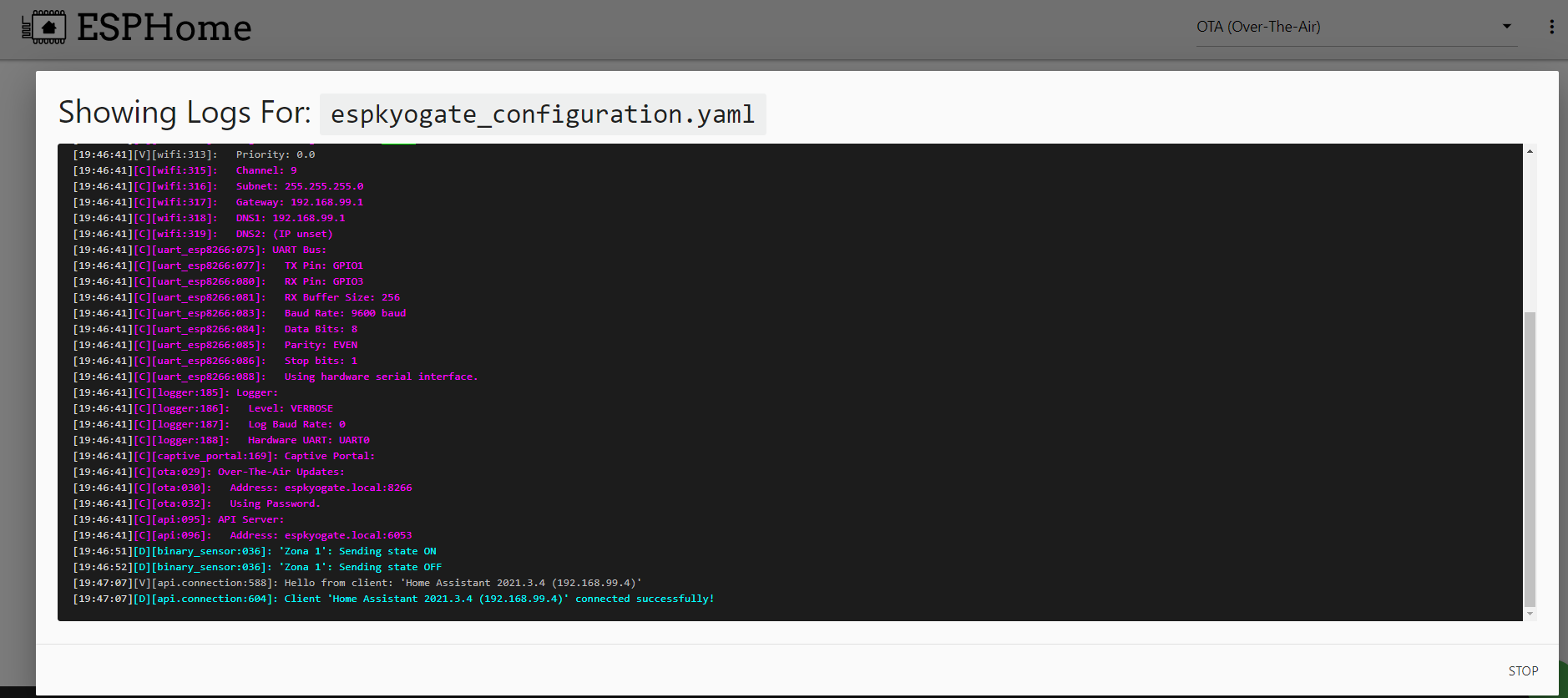
Example log output:
Event [246]: 01-03-2026 11:35  Recognized Code n.23
Event [247]: 01-03-2026 11:35  Arm Partition n.1
Event [248]: 01-03-2026 11:35  Arm Partition n.2
Event [250]: 01-03-2026 11:35  Alarm Zone n.5
Event [252]: 01-03-2026 11:36  Recognized Code n.2
Event [253]: 01-03-2026 11:36  Disarm Partition n.1
The memory_scan button is a protocol-mapping aid: it reads the documented
configuration address ranges (92 x 64-byte chunks, about one minute at the
default 500ms polling) and dumps them to the ESPHome log as hex+ASCII SCAN
lines. It only issues the same 0xF0 read command used for normal
configuration reads — nothing is written to the panel, and status polling keeps
running between chunks, so the panel stays reachable throughout.
button:
  - platform: bentel_kyo
    bentel_kyo_id: kyo
    type: memory_scan
    name: "Memory Scan (Debug)"
Press the button once with the panel idle, then copy the SCAN 0x.... lines
from the log. Typical use is comparing two dumps taken before and after
changing a single panel setting to locate the register it lives in
(see docs/PROTOCOL.md).
The dump contains personal data — the event log, code and phone-book names, access PINs and phone numbers. Redact those lines before attaching a scan to a public issue (the log prints a reminder at scan start and end).
Notes:
0x0000) is not readable and logs a warning — this
is expected and harmless.dump_config() (model, firmware, source commit, entity counts) normally
prints only once at boot, then again for each new log client that connects.
If Home Assistant already had a persistent connection open before you opened
the log view, you'll miss that boot-time block entirely and see nothing from
it afterwards. The dump_config button re-runs it on demand, no reboot
required — press it and the block appears immediately in the log:
button:
  - platform: bentel_kyo
    bentel_kyo_id: kyo
    type: dump_config
    name: "Dump Config (Debug)"
The source commit line is especially useful when reporting a bug: it pins down the exact revision of the component you're running without having to bisect versions.
The arm_preset button type lets you define a per-partition arming configuration that executes as a single command. This is the recommended way to implement arming scenes — one button press, one command, no race conditions.
button:
  # Everyone leaves the house — arm everything
  - platform: bentel_kyo
    bentel_kyo_id: kyo
    type: arm_preset
    name: "Everyone Out"
    icon: "mdi:shield-lock"
    partitions:
      1: away
      2: away
      3: away

  # Going to sleep — disarm upstairs, arm ground floor + basement
  - platform: bentel_kyo
    bentel_kyo_id: kyo
    type: arm_preset
    name: "Sleeping Rooms Free"
    icon: "mdi:shield-home"
    partitions:
      1: disarm
      2: away
      3: away

  # Going to sleep — everything instant, disarm via keyfob before leaving room
  - platform: bentel_kyo
    bentel_kyo_id: kyo
    type: arm_preset
    name: "Sleeping Instant"
    icon: "mdi:shield-moon"
    partitions:
      1: night
      2: night
      3: night

  # Disarm everything
  - platform: bentel_kyo
    bentel_kyo_id: kyo
    type: arm_preset
    name: "Disarm All"
    icon: "mdi:shield-off"
    partitions:
      1: disarm
      2: disarm
      3: disarm
Available modes per partition:
| Mode | Description |
|---|---|
away |
Full arm — monitors all zones |
home / stay |
Partial arm — bypasses Internal zones |
night |
Partial arm with no entry delay — bypasses Internal zones, all zones instant |
disarm |
Disarm the partition |
Partitions not listed in the config are sent as disarm (all mask bits not explicitly set remain 0). Use this when you want a full deterministic preset that sets all partitions in one command.
Preset buttons are the recommended way to create arming automations — they send a single command with all partition modes set simultaneously:
# Home Assistant automation example
automation:
  - alias: "Arm when everyone leaves"
    trigger:
      - platform: state
        entity_id: group.family
        to: "not_home"
    action:
      - service: button.press
        target:
          entity_id: button.everyone_out
The alarm_control_panel entities control one partition at a time. To arm 3 partitions, you'd need 3 separate service calls, each sending a command to the panel. This creates race conditions — the second command may overwrite the first before the panel processes it.
Preset buttons send one command with all partition modes simultaneously. Use the alarm control panel entities for viewing partition state on dashboards and for occasional per-partition ad-hoc control.
The polling switch enables or disables the component's serial polling loop:
switch:
  - platform: bentel_kyo
    bentel_kyo_id: kyo
    name: "Panel Polling"
When disabled, the component stops querying the panel. Useful for temporarily freeing the serial port (e.g., when connecting KyoUnit for programming).
zones)| Key | Required | Description |
|---|---|---|
zone |
Yes | Zone number (1-32) |
name |
Yes | Entity name |
device_class |
No | HA device class (motion, door, window, etc.) |
zone_type |
No | Text sensor: zone type (Instant, Delayed, Path) |
panel_name |
No | Text sensor: zone name configured on the panel |
zone_partition |
No | Text sensor: which partition(s) the zone belongs to |
serial_number |
No | Text sensor: wireless sensor serial number |
zone_tamper)Per-zone tamper detection. Uses device_class: tamper by default.
zone_bypass)Per-zone exclusion/bypass status.
zone_alarm_memory)Per-zone alarm memory (set after alarm, cleared on reset).
zone_tamper_memory)Per-zone tamper memory.
warnings)| Key | Device Class | Description |
|---|---|---|
mains_failure |
power | Mains power lost |
bpi_missing |
problem | BPI bus module missing |
fuse_fault |
problem | Fuse blown |
low_battery |
battery | Panel battery low |
phone_line_fault |
problem | Telephone line fault |
default_codes |
problem | Default codes still active |
wireless_fault |
problem | Wireless module fault |
tamper)| Key | Description |
|---|---|
tamper_zone |
Zone tamper detected |
tamper_false_key |
False key attempt |
tamper_bpi |
BPI bus tamper |
tamper_system |
System tamper |
tamper_rf_jam |
RF jamming detected |
tamper_wireless |
Wireless tamper |
| Key | Description |
|---|---|
communication |
Panel serial communication status |
siren |
Siren active status |
output_state |
OC output state (1-8), with optional panel_name text sensor |
| Key | Description |
|---|---|
firmware_version |
Panel firmware version string |
alarm_model |
Detected alarm model (KYO4, KYO8, KYO32, etc.) |
keyfobs |
Keyfob serial numbers and names (slot 1-16) |
partitions |
Partition names as configured on the panel (partition 1-8) |
codes |
User code names as configured on the panel (code 1-24) |
| Feature | KYO32G | KYO32 (non-G) |
|---|---|---|
| Output readback | Real state | Always reads 0xFF |
| Max outputs | 8 | 3 |
| Wireless | Yes | Varies by sub-model |
On KYO32 non-G, output state sensors will not reflect the actual output state. Activate/deactivate commands still work correctly.
logger: level: DEBUG for detailed serial communication logsFor discussions and support, visit the Home Assistant Community forum.
GNU AGPLv3 - Lorenzo De Luca, Rui Marinho
Original project by Lorenzo De Luca. A special and huge public THANK YOU to @ruimarinho for his precious contribution and hard work on the migration to the native ESPHome component! Also thanks to @dario81 for initial porting to ESPHome and @lcavalli for code refactor inspiration.
more like this
Software for a Wordclock based on ESP8266 and Neopixel LEDs with PONG, TETRIS, SNAKE game modes
A small display for ESPHome and Home Assistant to retrieve the current house consumption and energy price via a sensor…
search projects, people, and tags