xmb-bigscreen
XMB for Plasma BigScreen, console-like fullscreen launcher for living room gamepad users
QML★ 50
A React Native library for building custom Android home screen launchers. Get installed apps, launch apps with intents,…
 louaySleman
git clone https://github.com/louaySleman/react-native-launcher-kit.gitlouaySleman/react-native-launcher-kitA React Native library for building custom Android home screen launchers. Get installed apps, launch apps with intents, monitor battery, request default launcher status, and listen for app installs/removals. Fully supports React Native New Architecture (TurboModules) and Legacy Bridge. Works with Expo (dev client) and bare React Native projects.
| React Native | Architecture | Supported |
|---|---|---|
| 0.82+ | New Architecture (always enabled) | Yes |
| 0.71 - 0.81 | New Architecture (newArchEnabled=true) |
Yes |
| 0.71 - 0.81 | Legacy Architecture (newArchEnabled=false) |
Yes |
| 0.60 - 0.70 | Legacy (auto-linking) | Yes |
npm install react-native-launcher-kit
or
yarn add react-native-launcher-kit
React Native 0.60+ automatically links the package. For older versions, manual linking is required.
Starting with Android 11 (API level 30), add the following permission to your app's AndroidManifest.xml to query installed packages:
<uses-permission android:name="android.permission.QUERY_ALL_PACKAGES"/>
Google Play Note: The
QUERY_ALL_PACKAGESpermission requires justification during app review. Your app must have a core feature that requires querying installed apps (e.g., a launcher, app manager, or device management tool).
This permission is required for:
If your app is a launcher and you want to use requestDefaultLauncher(), you must declare your activity as a home app:
<activity android:name=".MainActivity" ...>
    <intent-filter>
        <action android:name="android.intent.action.MAIN" />
        <category android:name="android.intent.category.HOME" />
        <category android:name="android.intent.category.DEFAULT" />
    </intent-filter>
</activity>
Important: Without this declaration, the system will not show your app as an option in the default launcher picker dialog.
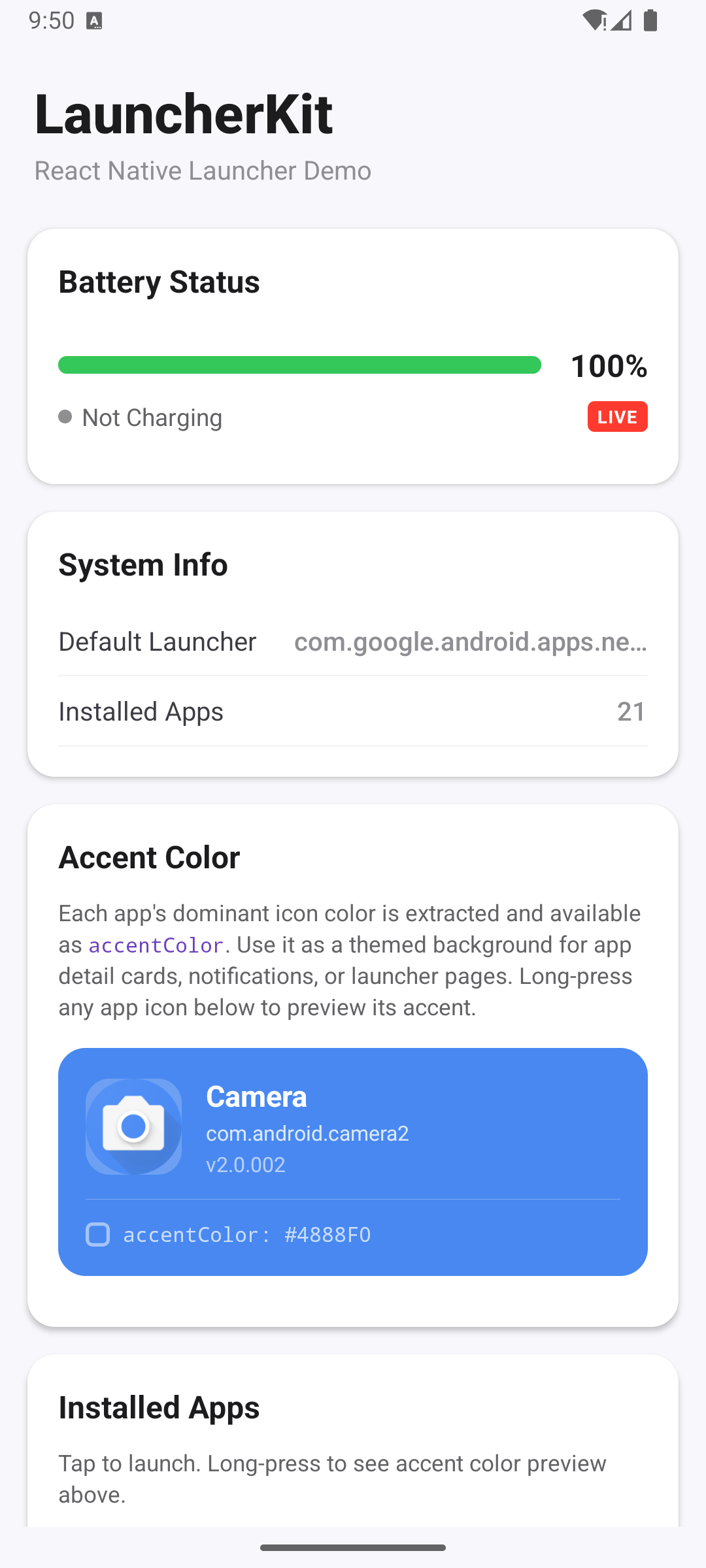
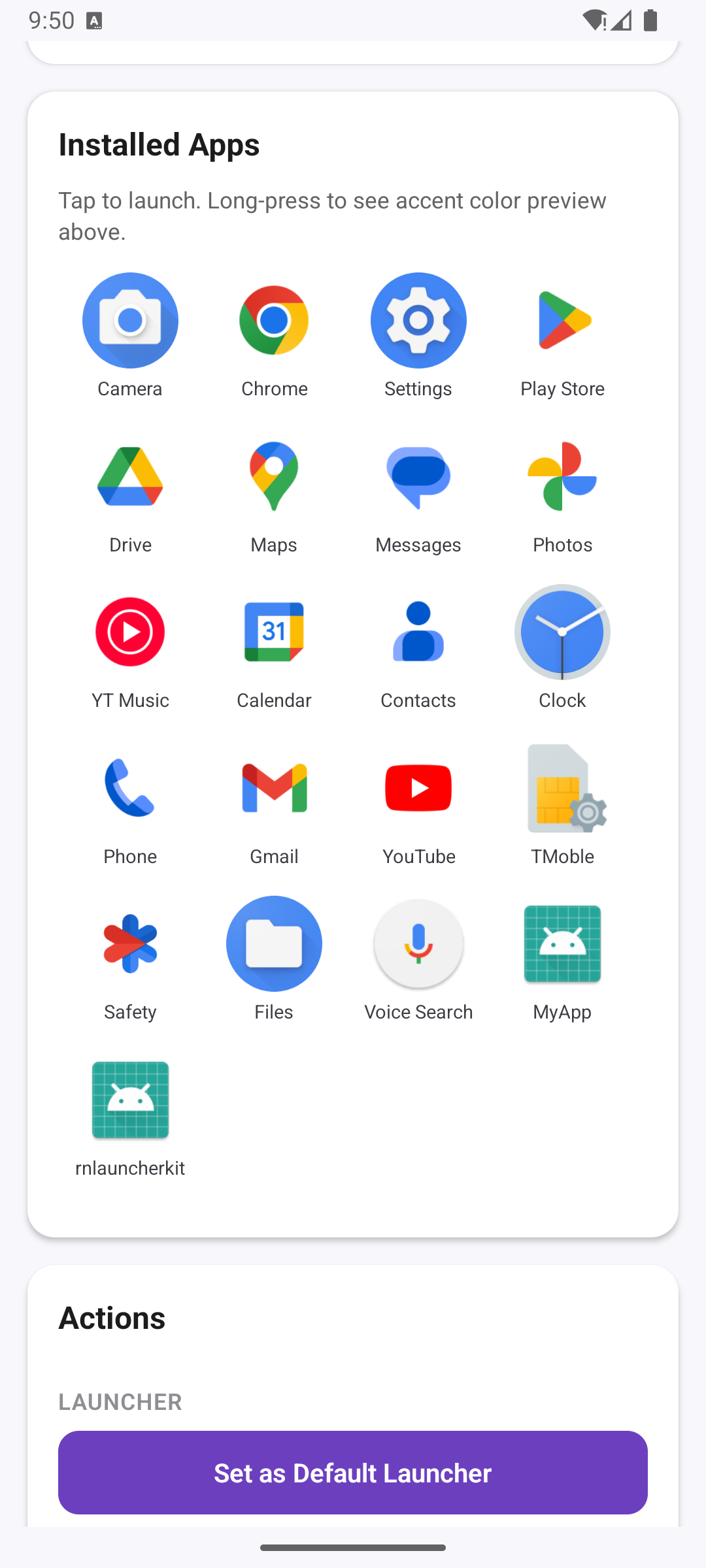
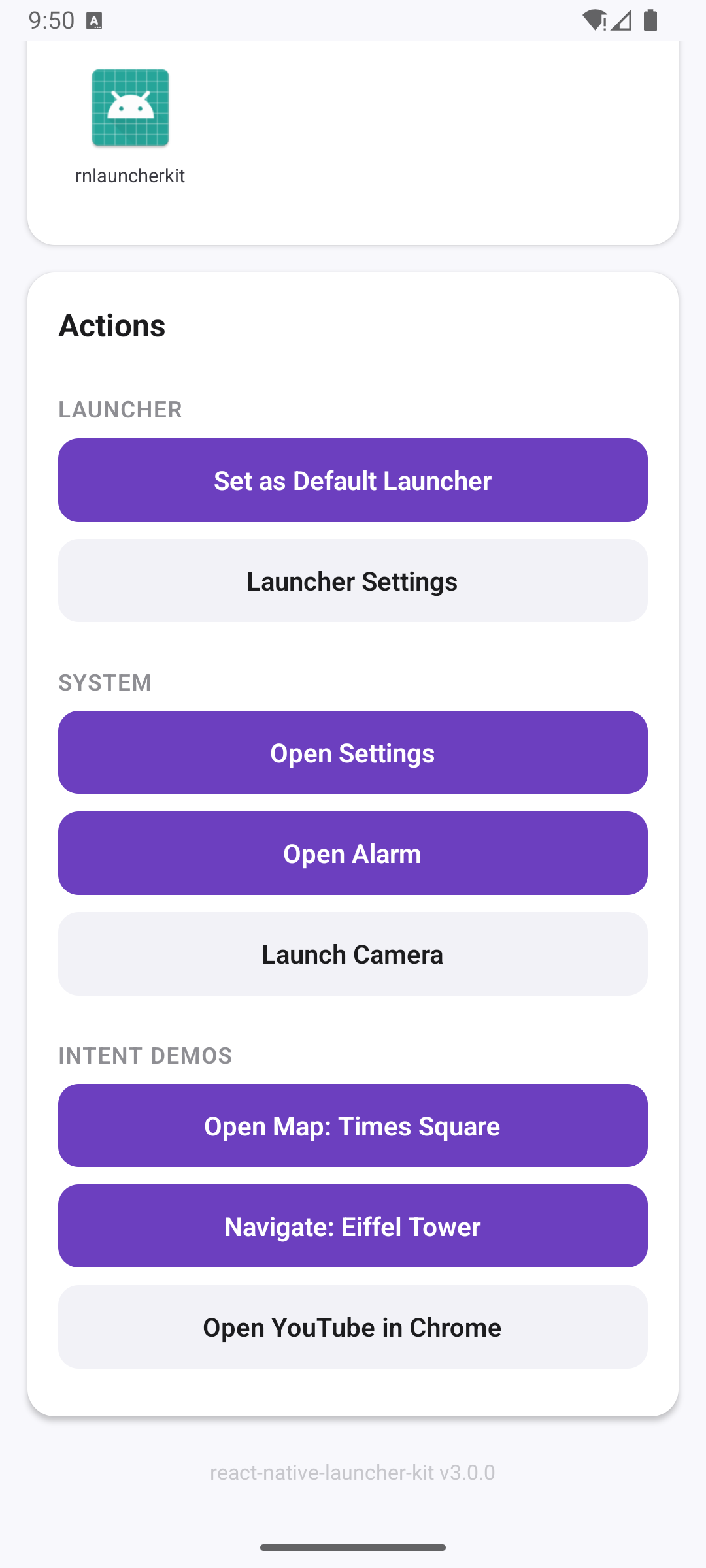
InstalledApps.getApps(options): Promise<AppDetail[]>Returns all installed apps with optional version and accent color.
import { InstalledApps } from 'react-native-launcher-kit';

const apps = await InstalledApps.getApps({
  includeVersion: true,
  includeAccentColor: true,
});
InstalledApps.getSortedApps(options): Promise<AppDetail[]>Same as getApps but sorted alphabetically by label.
const apps = await InstalledApps.getSortedApps({
  includeVersion: true,
  includeAccentColor: true,
});
interface AppDetail {
  label: string;
  packageName: string;
  icon: string;        // File path to icon image
  version?: string;
  accentColor?: string; // Dominant color of the app icon
}

interface GetAppsOptions {
  includeVersion: boolean;
  includeAccentColor: boolean;
}
RNLauncherKitHelper.launchApplication(bundleId, params?)Launch an app by package name, optionally with intent parameters.
import { RNLauncherKitHelper, IntentAction } from 'react-native-launcher-kit';

// Simple launch
RNLauncherKitHelper.launchApplication('com.example.app');

// Launch with parameters (e.g., open a map location)
RNLauncherKitHelper.launchApplication('com.google.android.apps.maps', {
  action: IntentAction.VIEW,
  data: 'geo:40.7580,-73.9855?q=40.7580,-73.9855(Times Square)&z=16',
});

// Open a URL in Chrome
RNLauncherKitHelper.launchApplication('com.android.chrome', {
  action: IntentAction.VIEW,
  data: 'https://www.youtube.com',
});

// Start navigation
RNLauncherKitHelper.launchApplication('com.google.android.apps.maps', {
  action: IntentAction.VIEW,
  data: 'google.navigation:q=48.8584,2.2945&mode=driving',
});
interface LaunchParams {
  action?: IntentAction | string;
  data?: string;
  type?: MimeType | string;
  extras?: Record<string, string>;
}

enum IntentAction {
  MAIN = 'android.intent.action.MAIN',
  VIEW = 'android.intent.action.VIEW',
  SEND = 'android.intent.action.SEND',
}

enum MimeType {
  ALL = '*/*',
  PDF = 'application/pdf',
  TEXT = 'text/plain',
  HTML = 'text/html',
}
RNLauncherKitHelper.checkIfPackageInstalled(bundleId): Promise<boolean>const isInstalled = await RNLauncherKitHelper.checkIfPackageInstalled('com.android.settings');
RNLauncherKitHelper.getDefaultLauncherPackageName(): Promise<string>const launcher = await RNLauncherKitHelper.getDefaultLauncherPackageName();
RNLauncherKitHelper.requestDefaultLauncher(): Promise<boolean>Shows a system dialog for the user to pick the default launcher. This is the recommended way to request becoming the default launcher.
RoleManager to show the system picker modalawait RNLauncherKitHelper.requestDefaultLauncher();
Important: Your app must declare the
CATEGORY_HOMEintent filter inAndroidManifest.xmlfor the system to show it as an option. See Launcher Activity Declaration.
RNLauncherKitHelper.openSetDefaultLauncher(): Promise<boolean>Opens the system "Set Default Launcher" settings page.
await RNLauncherKitHelper.openSetDefaultLauncher();
RNLauncherKitHelper.getBatteryStatus(): Promise<BatteryStatus>One-shot battery status query.
const battery = await RNLauncherKitHelper.getBatteryStatus();
// { level: 85, isCharging: false }
interface BatteryStatus {
  level: number;
  isCharging: boolean;
}
RNLauncherKitHelper.startListeningForBatteryChanges(callback)Event-driven battery monitoring. The callback fires only when the battery level or charging state actually changes -- no polling needed.
import { RNLauncherKitHelper } from 'react-native-launcher-kit';

// Start listening
RNLauncherKitHelper.startListeningForBatteryChanges((status) => {
  console.log(`Battery: ${status.level}%, Charging: ${status.isCharging}`);
});

// Stop listening (e.g., on component unmount)
RNLauncherKitHelper.stopListeningForBatteryChanges();
import { useEffect, useState } from 'react';
import { RNLauncherKitHelper } from 'react-native-launcher-kit';
import type { BatteryStatus } from 'react-native-launcher-kit/lib/typescript/interfaces/battery';

const useBattery = () => {
  const [battery, setBattery] = useState<BatteryStatus>({ level: 0, isCharging: false });

  useEffect(() => {
    // Get initial status
    RNLauncherKitHelper.getBatteryStatus().then(setBattery);

    // Listen for changes
    RNLauncherKitHelper.startListeningForBatteryChanges(setBattery);

    return () => {
      RNLauncherKitHelper.stopListeningForBatteryChanges();
    };
  }, []);

  return battery;
};
RNLauncherKitHelper.openAlarmApp()Opens the default alarm/clock app. Supports standard Android, Xiaomi (MIUI), Samsung, and Google Clock.
RNLauncherKitHelper.openAlarmApp();
RNLauncherKitHelper.goToSettings()Opens the device settings screen.
RNLauncherKitHelper.goToSettings();
import { InstalledApps } from 'react-native-launcher-kit';

// Start listening
InstalledApps.startListeningForAppInstallations((app) => {
  console.log('New app installed:', app);
});

// Stop listening
InstalledApps.stopListeningForAppInstallations();
import { InstalledApps } from 'react-native-launcher-kit';

// Start listening
InstalledApps.startListeningForAppRemovals((packageName) => {
  console.log('App removed:', packageName);
});

// Stop listening
InstalledApps.stopListeningForAppRemovals();
Two example apps are included for testing both architectures:
example/ - React Native 0.85 (New Architecture)example-0.80/ - React Native 0.80 (Legacy Architecture)Both examples install from the built dist/ folder (same as what npm consumers get). Running npm install in either example automatically builds the library first via preinstall hook.
# Run the RN 0.85 example
cd example && npm install && npm run android

# Run the RN 0.80 example
cd example-0.80 && npm install && npm run android
After making changes to the library source, just run
npm installinside the example to rebuilddist/and pick up changes.
BatteryEventManager with event-driven updatesRoleManager API@react-native/babel-preset@0.85)src/ module folders renamed to lowercase (helper/, installedApps/, interfaces/, utils/) for cross-platform consistency. If you import from internal paths, update them accordingly.This library contains native Android code and cannot run in Expo Go. However, it works with Expo projects using development builds (via expo-dev-client).
npx expo install react-native-launcher-kit expo-dev-client
app.json or app.config.js:{
"expo": {
"android": {
"permissions": ["android.permission.QUERY_ALL_PACKAGES"]
}
}
}
expo-build-properties plugin or a config plugin in app.json:{
"expo": {
"android": {
"intentFilters": [
{
"action": "MAIN",
"category": ["HOME", "DEFAULT"]
}
]
}
}
}
npx expo prebuild
npx expo run:android
Note: Since this is an Android-only library, iOS builds will not include any functionality from this package. All API calls are no-ops or will throw on iOS.
startListeningForBatteryChangesrequestDefaultLauncher() using Android RoleManager APIIntentAction and MimeType enumsLaunchParams interfacegetApps/getSortedApps to return Promises (on-demand loading)QUERY_ALL_PACKAGES permission to user's AndroidManifest.xmlFirst release.
No. This is an Android-only library. iOS does not allow custom launchers or querying installed apps.
Yes, with Expo development builds (expo-dev-client). It does not work in Expo Go since it requires native code.
Use InstalledApps.getApps() or InstalledApps.getSortedApps() from this package. Both return app label, package name, icon path, and optionally version and accent color.
Call RNLauncherKitHelper.requestDefaultLauncher() and declare the CATEGORY_HOME intent filter in your AndroidManifest.xml. See the setup instructions.
Yes. Version 3.0.0 has full TurboModule support. It also works on the Legacy Bridge for RN 0.60+.
If you find this project helpful, consider supporting its development:
MIT
more like this
XMB for Plasma BigScreen, console-like fullscreen launcher for living room gamepad users
Launcher and management utility for running an Astroneer Dedicated Server on Linux using WINE
search projects, people, and tags