r2
Free open-source Cloudflare R2 desktop client and S3 GUI for macOS, Windows, and Linux. Manage Cloudflare R2, AWS S3, M…
TypeScript★ 50
Yazelix Nova is a Nix-packaged, popup-oriented terminal workspace for local use and SSH. It combines Mars (a Rio-derive…
 luccahuguet
git clone https://github.com/luccahuguet/yazelix.gitluccahuguet/yazelix
Yazelix Nova is a Nix-packaged terminal workspace built around
Mars (a Rio-derived fork), a thin
Yazelix-owned Zellij fork,
Yazi, Nushell (with packaged Bash, Zsh, and Fish alternatives), a lazygit popup (but you can configure other git clients!), and
an optional coding agent popup. It uses the
Yazelix Helix fork by default
(but editor.command can select your preferred terminal editor). yzx launch
opens the desktop workspace through Mars, while yzx enter will open Yazelix in any capable terminal emulator (Mars
provides tighter Yazelix integration, though) or over SSH. Great defaults out of the box!
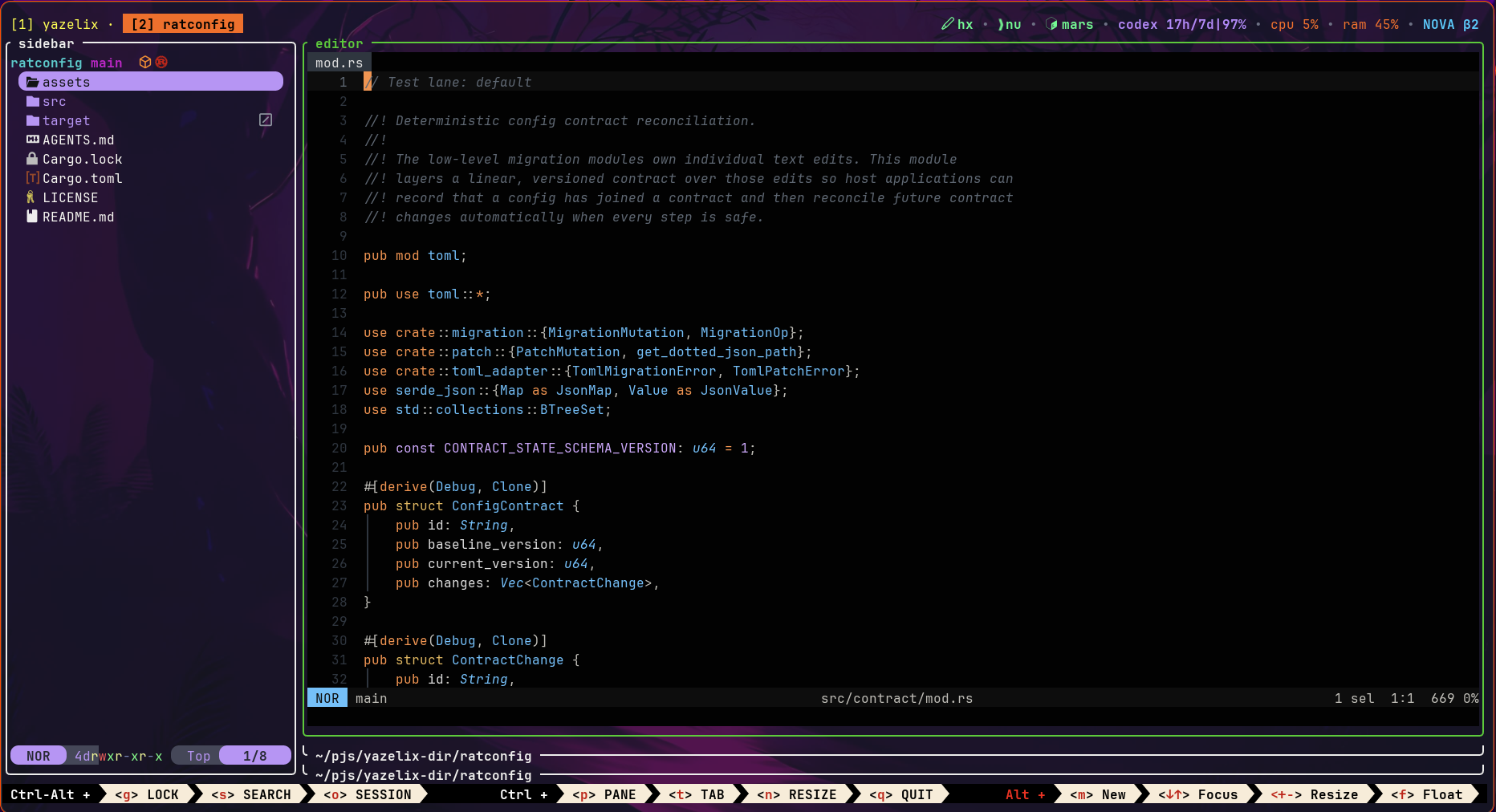
Classic was bloated and built on the wrong ownership model. Its main repository acted as the product runtime, component control plane, configuration repair system, compatibility layer, and maintainer toolbox.
Classic's child repositories did not create firm boundaries. The main repo still carried their maintenance machinery and overlapping runtime logic. Nova gives first-party Yazelix components firm package boundaries. Each component owns its implementation and contract. Nova pins and composes their package outputs.
| Measure | Nova | Classic |
|---|---|---|
| Code and configuration (Rust, Nix, shell, TOML, etc.) | 21,716 LOC | 91,545 LOC |
| Rust | 18,601 LOC | 80,957 LOC |
| Ownership model | One owner per concern | Overlapping responsibilities across layers |
| Yazelix component boundaries | Independent, versioned packages | Child repos mixed with main-repo ownership |
| Product experience | More features, stronger defaults, tighter integration, and polished UX | Fewer features and a less cohesive workspace |
| Status | Recommended | Frozen migration and rollback path |
Nova owns 69,829 fewer lines, a 76% reduction. Classic's Rust code alone is 3.7 times larger than Nova's entire code and configuration surface.
Nova delivers more features in 24% of the code. It has a clearer configuration model, tighter editor and Yazi integration, stronger diagnostics, and a coherent popup-oriented interface. The smaller architecture makes Yazelix easier to improve and better to use.
Classic proved the idea. Nova is the better product and the architecture Yazelix should have had from the start.
Yazelix requires Nix with flakes enabled. launch opens the packaged Mars window
in a graphical session, while enter starts the same workspace in the current
terminal or over SSH.
The stable branch advances from a checked
and dogfooded main revision at most once per week. Use main for more constant updates or an
immutable nova-v* tag for an exact release.
Linux is the dogfooded platform. CI builds all packages and a Home Manager
activation on aarch64-darwin. Sustained interactive macOS beta use has found
no known regression; the earlier per-command checklist and Mars GUI remain
unverified.
nix run github:luccahuguet/yazelix/stable -- launch
nix run github:luccahuguet/yazelix/stable#yazelix-no-mars -- enter
If the one-off launch fails, inspect the owned runtime setup with:
nix run github:luccahuguet/yazelix/stable -- doctor
nix profile add --refresh github:luccahuguet/yazelix/stable
yzx launch
Use the Home Manager module for a declarative install.
Classic v17.12 translates mutable Classic settings.jsonc or config.toml
files into Nova configuration. It does not rewrite Home Manager declarations
or Home Manager-owned files. Run the bridge once when you need to preserve
mutable Classic settings:
nix run github:luccahuguet/yazelix/v17.12#yazelix -- launch
If your Classic settings match packaged defaults, start with Nova's packaged
defaults and move straight to stable. Home Manager users must replace
Classic-only options with Nova's narrow module surface before switching.
After switching, yzx doctor reports recognized Classic configs/ and
sessions/ state, generated Nushell extern artifacts, and migration backups in
the active Yazelix roots. These are read-only warnings: nova=unused means Nova
did not load the path, while ownership=ambiguous means its contents or owner
cannot be proven from the pathname alone. Nova does not archive or remove the
reported paths, and external scripts may still reference them.
The Nova cutover intentionally replaces the old main history. Existing Git
clones should be replaced with a fresh clone rather than updated with an
ordinary pull. Classic remains available at the frozen classic branch, while
the immutable v17.12 tag remains the migration and rollback bridge.
Start the guided tour after launching Yazelix:
yzx tutor begin
yzx help lists every command. yzx doctor checks the owned runtime setup
without opening Mars or Zellij. Inside Yazelix, press Alt Shift M to open the
command palette, which includes both help and tutor entries.
Press Alt Shift K to open Ratconfig:
| Key | Action |
|---|---|
1-9 |
Jump to a tab |
Tab / Shift-Tab, h / l |
Change tabs |
j / k, / |
Move through rows or search All settings |
a |
Switch between Overview and All when the tab has a meaningful reduced view |
e, Enter, Space |
Run the selected row's contextual action |
u, q |
Remove the selected explicit override or quit |
The footer lists the selected row's controls.
Yazelix extends Helix/Vim's h/j/k/l motion model into a workspace key grid.
The Alt and Ctrl Alt layers move focus, tabs, or panes, while Alt Shift
groups four workspace surfaces:
| Layer | h |
j |
k |
l |
|---|---|---|---|---|
Alt |
Focus left or previous tab | Focus down | Focus up | Focus right or next tab |
Ctrl Alt |
Move tab left | Move pane down | Move pane up | Move tab right |
Alt Shift |
Sidebar | Git | Ratconfig | Agent |
Yazi and the menu use their initials:
Alt Shift Y toggles the full Yazi popup.Alt Shift M toggles the command menu.Alt Shift S opens a transient full-screen random visual. Press any ordinary
screen input to return to the unchanged workspace; this is not a session lock.
Set keybindings.screen to remap it for newly launched sessions.Press a popup's key again to close or hide it and return to the tiled workspace. Other floating panes keep running until explicitly shown again. Other useful bindings are:
| Scope | Key | Action |
|---|---|---|
| Workspace | Ctrl q |
Quit the Yazelix session |
| Workspace | Alt m |
Open a new pane |
| Workspace | Alt Shift F |
Toggle the focused pane fullscreen |
| Workspace | Alt Shift S |
Show a random full-screen visual |
| Workspace | Ctrl y |
Toggle focus between the editor and Yazi sidebar |
| Workspace | Alt 1-9 |
Go directly to tab 1-9 |
| Editor | Alt r |
Reveal the current editor file in Yazi |
| Yazi | Alt z |
Retarget the tab workspace with zoxide |
Managed Helix supplies the editor binding. Terminal editors can bind the same
yzx reveal command; see Configuration
for Neovim and terminal Emacs examples.
Ratconfig's Keys tab is the complete packaged reference, and
defaults/zellij/config.kdl remains the runtime source.
| Command | Purpose |
|---|---|
yzx, yzx help |
Print command help |
yzx --version |
Print the exact package-owned Yazelix version |
yzx launch [zellij-args...] |
Open Mars first, then start managed Zellij |
yzx enter [zellij-args...] |
Start managed Zellij in the current terminal |
yzx run <program> [args...] |
Run exact argv inside the prepared Yazelix environment |
yzx config |
Open the Ratconfig-backed config UI |
yzx yazi-config materialize --user-config-dir <path> --state-dir <path> |
Materialize and print the effective Yazi config directory for automation |
yzx menu |
Open the command palette |
yzx doctor |
Check owned runtime setup without launching Mars or Zellij |
yzx status |
Print config/runtime paths and selected settings |
yzx status --json |
Print the versioned machine-readable status record |
yzx env |
Open the managed shell without launching the UI |
yzx tutor [lesson] |
Print guided Yazelix lessons |
yzx screen [style] |
Show a terminal welcome screen |
yzx reveal <target> |
Reveal a file or directory in the managed Yazi sidebar |
The materializer uses the selected Yazelix package's config and does not start Yazi or prepare the interactive runtime. See Runtime Notes for its output, validation, and exit-status contract.
Package names follow yazelix[-no-mars][-no-helix][-no-yazi]. Each suffix
removes that managed package while retaining the integration around it.
no-helix uses the configured host editor; no-yazi requires matching host
yazi and ya commands.
| Package | Mars | Managed Helix | Managed Yazi |
|---|---|---|---|
yazelix |
Yes | Yes | Yes |
yazelix-no-helix |
Yes | No | Yes |
yazelix-no-yazi |
Yes | Yes | No |
yazelix-no-helix-no-yazi |
Yes | No | No |
yazelix-no-mars |
No | Yes | Yes |
yazelix-no-mars-no-helix |
No | No | Yes |
yazelix-no-mars-no-yazi |
No | Yes | No |
yazelix-no-mars-no-helix-no-yazi |
No | No | No |
See Installation and packages for package variants, platform support, SSH use, measured sizes, Home Manager, and updates.
Yazelix assembles focused first-party forks, plugins, libraries, and commands:
| Component | Yazelix role |
|---|---|
| Mars | GUI terminal used by yzx launch, with Kitty graphics, cursor shaders, and Yazelix session integration |
| Yazelix Zellij | Multiplexer fork with Kitty graphics passthrough and managed runtime appearance switching |
| Yazelix Helix | Steel-enabled editor fork with isolated configuration and explicit workspace bridge hooks |
| Yazelix Zellij Pane Orchestrator | Zellij plugin that owns tab-local workspace roots and coordinates panes, focus, popups, the editor, and agent activity |
| Yazelix Zellij Popup | Zellij plugin that opens, focuses, hides, and closes configured floating TUI panes |
| Yazelix Zellij Bar | Zellij plugin package for the compact top bar, tabs, modes, session details, and status widgets |
| Ratconfig | Reusable Ratatui configuration editor and TOML patching and migration library |
| Yazelix Screen | Terminal welcome animations and the separately packaged GPL aquarium exposed through yzx screen |
| Yazelix Cursors | Shared cursor presets and validation for Ratconfig, plus palettes and shader assets for Mars |
| Yazi Bistro | Curated complete Yazi flavors with pinned provenance, licenses, and explicit dark/light classification |
| auto-layout.yazi | Yazi plugin that changes the column layout to match the available pane width |
| zjstatus | Fork that gives the bar activity-aware tab markers without changing native Zellij tab names |
yzx config opens Ratconfig over the managed tree at
~/.config/yazelix/. Yazelix inherits packaged defaults and persists only
explicit overrides. Overview combines recommended settings with every explicit,
invalid, externally managed, or diagnosed field. All includes the complete
inventory. Tabs whose Overview would hide fewer than three fields or less than
one quarter of their inventory simply show All.
The Cursors inventory comes from the pinned Yazelix Cursors package. It exposes
every finite setting and its owner-defined choices, while custom definition
tables remain searchable and read-only with an exact cursors.toml action.
The Mars tab consumes the complete public inventory from the pinned Mars
revision. Overview recommends 15 common window, font, input, and bell settings;
All exposes the other specialist and platform settings, and search spans that
complete inventory. Scalar and finite-choice controls with a safe sparse write
path are editable; platform-restricted choices appear only on their matching
platform. Structured settings remain read-only and do not invent a second Mars
schema or native-file action. mars.appearance.preset is omitted because root
appearance.mode is the product appearance control.
The Yazi tab consumes the native presets and official schemas paired with the packaged Yazi version. Overview recommends ten common manager, preview, and flavor controls. All exposes 204 base settings plus the five exact native-file actions; search includes schema settings absent from both packaged and user TOML. Owner-validated booleans, choices, and unconstrained strings are editable. Numeric, structured, dynamic, and otherwise incompletely validated values open their native file instead.
appearance.mode selects dark or light for managed Yazelix components and
also controls Ratconfig's palette. In packages with Mars, Yazelix projects that
value to only mars.appearance.preset when its native config is a writable
regular file; the rest of mars/config.toml remains native Mars configuration.
Read-only or symlinked config is left untouched and receives the mode on the
next launch. A manual edit may temporarily diverge Mars until the next global
appearance save or yzx launch.
Zellij stores one dark theme and one light theme over its pinned packaged
inventory. Ratconfig inherits ansi and gruvbox-light, lets either field
retain a custom native name, and saves only explicit overrides. Legacy static
theme assignments remain in the user sidecar for recovery but are ignored by
the managed runtime. Yazelix passes root appearance at launch and Zellij
resolves the matching pair member. Saving root appearance inside a managed
session calls Zellij's native action for that session. Zellij sends the same
mode to the top bar, which switches between its internal dark and light
palettes. Bars loaded by new tabs immediately inherit the session's current
mode, including after a live switch.
Each new managed Yazi reads the same root mode. Ratconfig offers separate
packaged dark and light flavor pools from Yazi Bistro; user-installed
unclassified flavors appear in both. default is the first dark choice and
uses Yazi's native preset by leaving flavor.dark unset. Light mode inherits
Bluloco Light. Explicit native flavor.dark and flavor.light selections
win. Yazelix projects the selected side into generated runtime config without
modifying the user or Home Manager theme.toml; already-running Yazi processes
stay as they are.
Set shell.program in Ratconfig or config.toml to choose packaged Nushell
(default), Bash, Zsh, or Fish for new panes and sessions.
Yazelix initializes Starship, Carapace completions, and zoxide for managed
Nushell. Bash, Zsh, and Fish use their normal interactive startup files.
See Configuration for settings, popups, native files, Yazi plugins, cursor ownership, and editor behavior.
From a local checkout, use:
nix run .#yazelix -- launch
nix run .#yazelix-no-mars -- enter
See Development for CI and local checks, Architecture for ownership boundaries, and Runtime Notes for launch and integration contracts.
Yazelix owns 24,730 lines of tracked text project files. The reproducible scorecard excludes Beads, lockfiles, and binary assets.
more like this
Free open-source Cloudflare R2 desktop client and S3 GUI for macOS, Windows, and Linux. Manage Cloudflare R2, AWS S3, M…
SCYTHE is a lightweight, C#-based game engine focused on modifiability and rapid iteration using Raylib.
meine 🌒 - A CLI file manager and system utility built with Textual. It combines intuitive command parsing with rich t…
search projects, people, and tags