lottery
🎉🌟✨🎈年会抽奖程序,基于 Express + Three.js的 3D 球体抽奖程序,奖品🧧🎁,文字,图片,抽奖规则均可配置,😜抽奖人员信息Excel一键导入😍,抽奖结果Excel导出😎,给你的抽奖活动带来全新酷炫体验🚀🚀🚀
JavaScript★ 4.6k
Self-hosted media streaming server designed as an alternative to Plex, allowing you to monitor and manage your movie an…
 lunarr-app
Lunarr is a self-hosted media server for movie and TV libraries on local disks, SFTP, or WebDAV. It scans your files, matches them with TMDb metadata, and plays them with direct streaming or on-the-fly HLS transcoding. Chromecast and AirPlay are supported for remote playback.
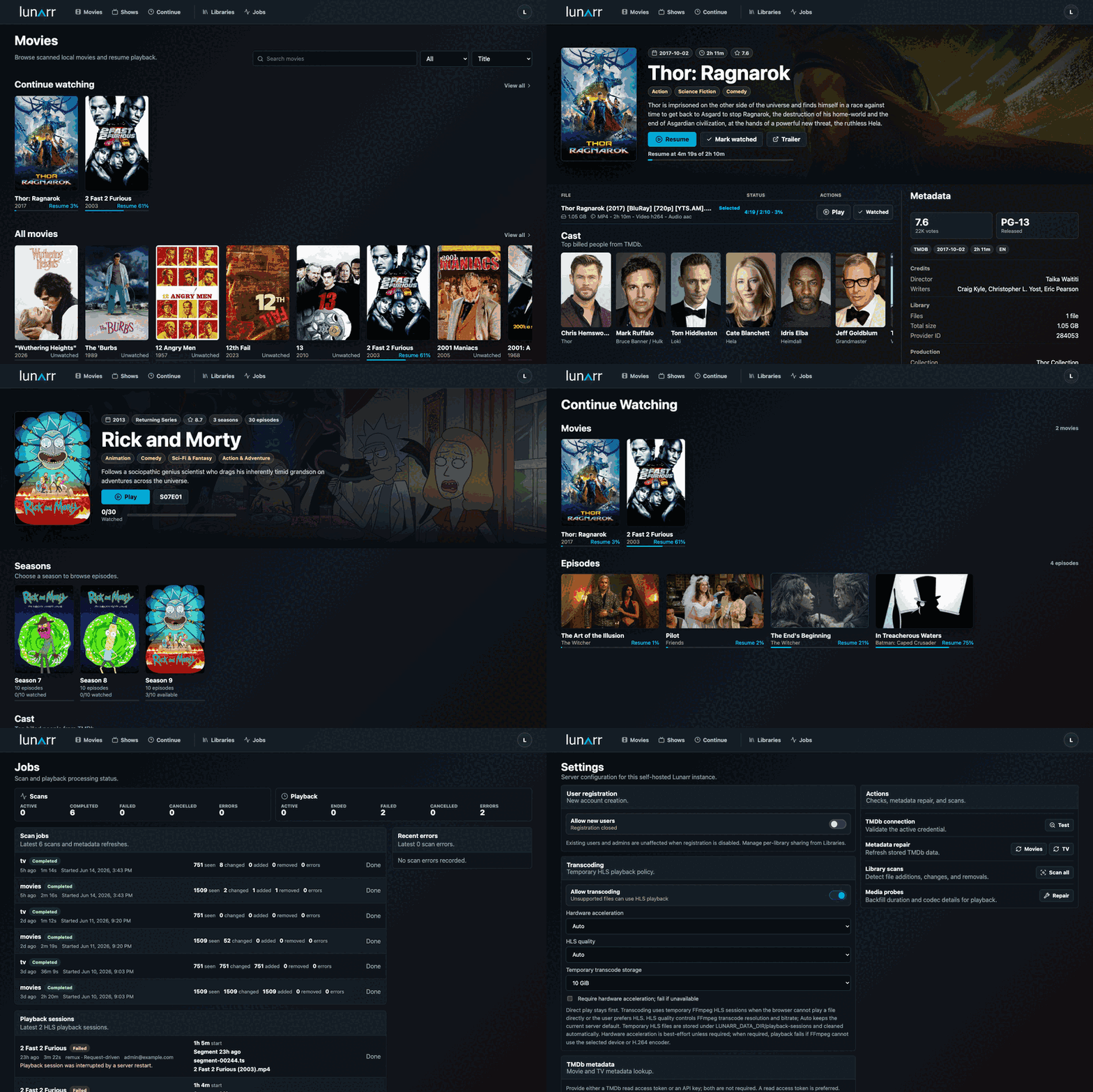
.vtt and .srt, normalized to WebVTT), FFmpeg transcoding, and intro/recap/credits skip markers via TheIntroDBRun Lunarr with persistent app data. The /mnt/media:/media:ro mount is optional for local media libraries, replace /mnt/media with your host media path or remove that line if you only use remote libraries.
The published Docker image includes system FFmpeg for HLS playback and verifies the baseline FFmpeg requirements during image build.
docker run -d \
  --name lunarr \
  --restart unless-stopped \
  -p 3000:3000 \
  -e AUTH_SECRET=replace-with-a-random-secret-at-least-32-chars \
  -e ORIGIN=http://127.0.0.1:3000 \
  -v lunarr-data:/data \
  -v /mnt/media:/media:ro \
  sayem314/lunarr:latest
Open http://127.0.0.1:3000, create the first admin account, add a movie or TV library, then run a scan from Libraries. For mounted local media, add the container path, such as /media.
Docker Compose users can start from docker-compose.yml.
yay -S lunarr
sudo systemctl enable --now lunarr
Open http://127.0.0.1:3000 and create the first admin account.
brew install lunarr
brew services start lunarr
Open http://127.0.0.1:3000 and create the first admin account.
Install dependencies and create a local environment file:
bun install
cp .env.example .env
Set AUTH_SECRET in .env to a stable random value with at least 32 characters, then start the dev server:
bun run dev
Open http://127.0.0.1:5173, create the first admin account, add a library, and scan it.
Lunarr supports local, SFTP, and WebDAV libraries. Local libraries can watch file changes, remote libraries use manual or scheduled rescans.
Common TV layouts:
Show Name/Season 01/Show Name - S01E02 - Episode Title.mkv
Show.Name.S01E02.mkv
Show Name/Show Name 1x02.mkv
Show Name/Season 1/02 - Episode Title.mkv
Show Name/Specials/S00E01.mkv
Common movie layouts (title with optional release year in parentheses or brackets):
Movie Name (2024).mkv
Movie.Name.2024.1080p.mkv
The Movie (2024)/The Movie (2024).mkv
Movies/Movie Name (2024)/Movie Name.mkv
Common sidecar subtitle layouts (same base name as the video, with an optional language or label suffix):
Movie Name (2024).en.vtt
Movie Name (2024).srt
Movie Name (2024).english.srt
Show Name - S01E02 - Episode Title.es.vtt
Subtitles are matched to their video by base name and an optional .language or .label suffix (for example .en, .spanish). The first track, or a track with no suffix, is treated as the default.
Supported video extensions are .mp4, .mkv, .mov, .avi, and .webm. Sidecar .vtt and .srt subtitles are detected during scans (.srt files are normalized to WebVTT for playback).
bun run check
bun run build
bun run test
bun run verify:ffmpeg
bun run verify:nodeav
bun run verify:runtime
bun run smoke:transcode
To verify live TMDb connectivity and poster metadata once credentials are configured:
bun run verify:tmdb
AUTH_SECRET must stay stable between restarts.LUNARR_DATA_DIR stores the SQLite database, per-session HLS playlists, and shared HLS cache segments. Keep it on persistent storage.more like this
🎉🌟✨🎈年会抽奖程序,基于 Express + Three.js的 3D 球体抽奖程序,奖品🧧🎁,文字,图片,抽奖规则均可配置,😜抽奖人员信息Excel一键导入😍,抽奖结果Excel导出😎,给你的抽奖活动带来全新酷炫体验🚀🚀🚀
A synchronized watch party application for Emby media servers. Watch videos together with friends in real-time, no matt…
YiMao · 云海求片助手 — 双核心 Telegram 影视求片机器人。订阅模式:TMDB 智能搜索一键订阅 / 趣味求片模式:AI 生成五层地狱闯关,通关解锁优先求片。深度集成 MoviePilot + Emby/Jellyfin。…
search projects, people, and tags