wordclock_esp8266
Software for a Wordclock based on ESP8266 and Neopixel LEDs with PONG, TETRIS, SNAKE game modes
C++★ 50
A simple web / node application for controlling WS2812 LED strips from a Raspberry Pi.
 luxdvie
git clone https://github.com/luxdvie/WS2812Controller.gitluxdvie/WS2812ControllerA very basic app to control WS2812 LED strips with a Raspberry Pi.
This consists of a Node app which serves a simple HTML page to manage the strip and includes libraries to control the strip.
You can use it for WS2812 (NeoPixel) christmas lights, or other simple DIY applications. I used it for a couple applications, including Christmas Tree Lights and an artistic decorative dodecahedron.

I found the great rpi-ws281x-native NPM package which alllows the Raspberry Pi to communicate with WS2812x strips. You should check it out 😄
It led me to follow these easy instructions on Adafruit.
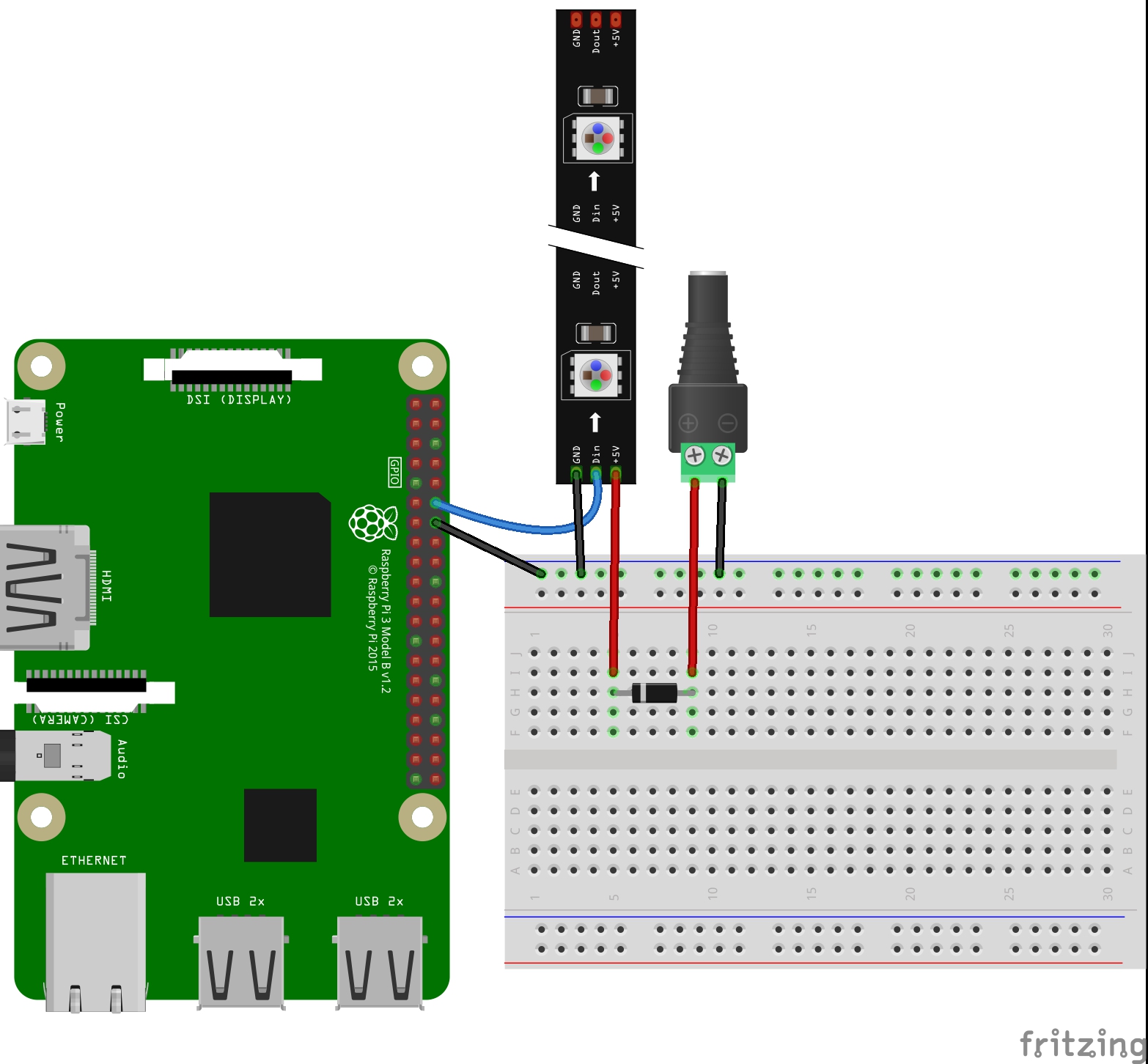
Connect your raspi according to those instructions. I have been using my Pi's with a diode instead of the level converter, and they work well.
Tested working on:
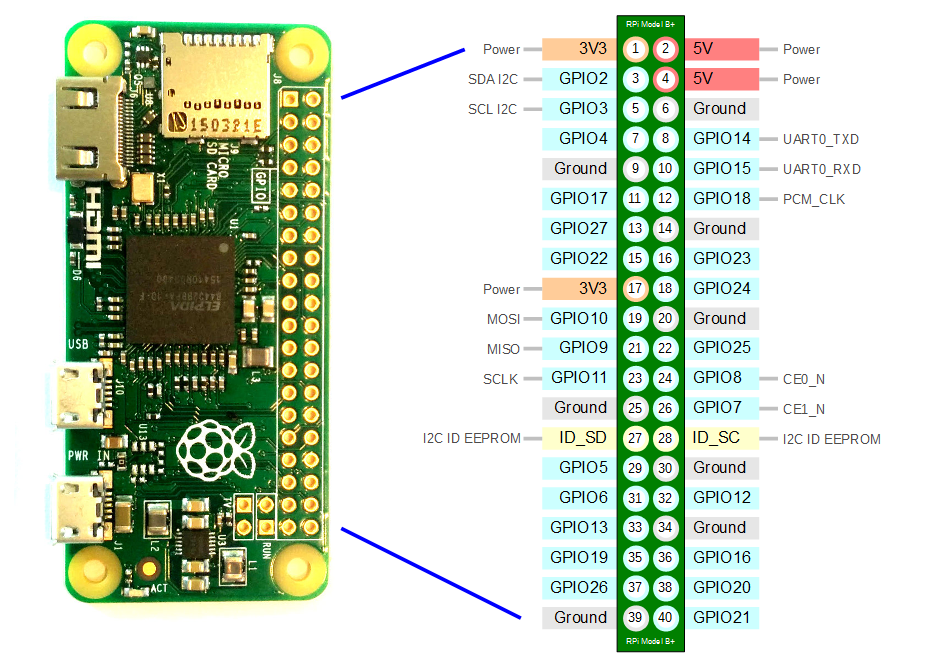
sudo apt install gitgit clone https://github.com/luxdvie/WS2812Controller.gitrpi-ws281x-native package on my pi zero. I performed these steps:
~/.bashrc after installing npm:
 npm set prefix ~/.npm
 PATH="$HOME/.npm/bin:$PATH"
 PATH="./node_modules/.bin:$PATH"
source ~/.bashrcnpm i -g node-gypnpm install in the root of this project to install all dependencies
package-lock.json and node_modules directory, and trying npm install again. Avoid using sudo for npm install if you can!strip.js to match the number of LEDs you have connected
var NUM_LEDS = <YOUR_LEDS_HERE>;
var HTTP_PORT = <YOUR_PORT_HERE>;
node /path/to/me/app.js
http://<YOUR_IP_ADDRESS_HERE>:<YOUR_PORT_HERE>/
There are many ways to accomplish this, but the one I went with was this:
su pi -c 'sudo node /home/pi/code/github.com/WS2812Controller/app.js'/etc/rc.local file
sudo nano /etc/rc.local#!/bin/sh -e
#
# rc.local
#
# This script is executed at the end of each multiuser runlevel.
# Make sure that the script will "exit 0" on success or any other
# value on error.
#
# In order to enable or disable this script just change the execution
# bits.
#
# By default this script does nothing.
# Print the IP address
_IP=$(hostname -I) || true
if [ "$_IP" ]; then
printf "My IP address is %s\n" "$_IP"
fi
su pi -c 'sudo node /home/pi/code/github.com/WS2812Controller/app.js'
exit 0
Disclaimer The rpi-ws281x-native package requires root access, so you have to run the app.js with sudo or as root... Do this at your own risk :) I never expose my Pi to the internet, so I'm not as concerned about this, but definitely I would not recommend you ever expose this service to the internet, especially when configured this way!
Austin Brown
GitHub
austinbrown2500@gmail.com
more like this
Software for a Wordclock based on ESP8266 and Neopixel LEDs with PONG, TETRIS, SNAKE game modes
search projects, people, and tags