perplexity-cli
🧠 A simple command-line client for the Perplexity API. Ask questions and receive answers directly from the terminal! 🚀🚀🚀
Python★ 176
⚙️ My configuration files for macOS ricing
 marsdevx
git clone https://github.com/marsdevx/macOS-config.gitmarsdevx/macOS-config
macOS Config is an open-source project designed to streamline the setup of your MacBook with custom settings, program installations, and wallpapers. Built using shell scripts, this tool automates the process of configuring your macOS environment for productivity and ricing.
.sh scripts to install all programs you need for work.Transform your MacBook into a fully customized workspace with this powerful and efficient tool!
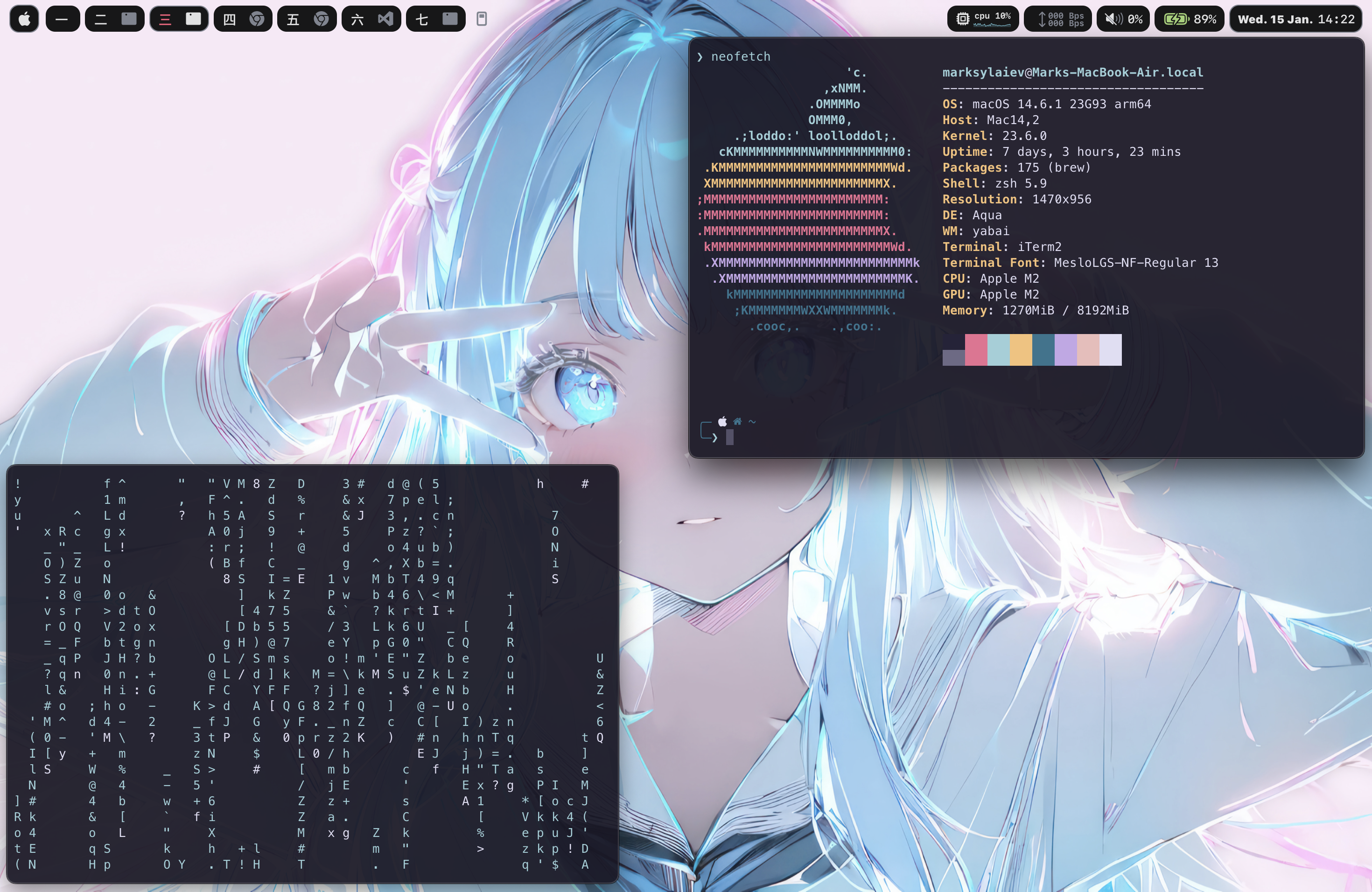
To install this project, Launch the Terminal app on your system, and run the commands below.
git clone https://github.com/marsdevx/macOS-config.git ~/Downloads/macOS-config
/bin/bash -c "$(curl -fsSL https://raw.githubusercontent.com/Homebrew/install/HEAD/install.sh)"
echo 'eval "$(/opt/homebrew/bin/brew shellenv)"' >> ~/.zshrc
eval "$(/opt/homebrew/bin/brew shellenv)"
defaults write com.apple.finder CreateDesktop false; killall Finder
mkdir -p ~/.config
Accessibility and Control Centre
Desktop & Dock
Keyboard
Window manager
zsh ~/Downloads/macOS-config/loop.sh
Launching applications
zsh ~/Downloads/macOS-config/raycast.sh
Customizable top bar
zsh ~/Downloads/macOS-config/sketchybar.sh
Reinstall SbarLua (only if SketchyBar is broken)
[WARNING] Use this if SketchyBar starts but shows only a gray line, no items appear, or config stops working after a reboot or update.
rm -f ~/.local/share/sketchybar_lua/sketchybar.so
rm -rf /tmp/SbarLua
git clone https://github.com/FelixKratz/SbarLua.git /tmp/SbarLua
cd /tmp/SbarLua
make install
brew services restart sketchybar
Hotkey manager
zsh ~/Downloads/macOS-config/skhd.sh
Window manager for multiple workspaces
zsh ~/Downloads/macOS-config/yabai.sh
Terminal app
sh -c "$(curl -fsSL https://raw.githubusercontent.com/ohmyzsh/ohmyzsh/master/tools/install.sh)"
git clone https://github.com/romkatv/powerlevel10k.git $ZSH_CUSTOM/themes/powerlevel10k
zsh ~/Downloads/macOS-config/iterm.sh
source ~/.zshrc
Configure Powerlevel10k
Configure iTerm2
My Wallpapers Configuration
All the code contained in this repo is licensed under the MIT License
MIT License

Copyright (c) 2025 marsdevx

Permission is hereby granted, free of charge, to any person obtaining a copy
of this software and associated documentation files (the "Software"), to deal
in the Software without restriction, including without limitation the rights
to use, copy, modify, merge, publish, distribute, sublicense, and/or sell
copies of the Software, and to permit persons to whom the Software is
furnished to do so, subject to the following conditions:

The above copyright notice and this permission notice shall be included in all
copies or substantial portions of the Software.

THE SOFTWARE IS PROVIDED "AS IS", WITHOUT WARRANTY OF ANY KIND, EXPRESS OR
IMPLIED, INCLUDING BUT NOT LIMITED TO THE WARRANTIES OF MERCHANTABILITY,
FITNESS FOR A PARTICULAR PURPOSE AND NONINFRINGEMENT. IN NO EVENT SHALL THE
AUTHORS OR COPYRIGHT HOLDERS BE LIABLE FOR ANY CLAIM, DAMAGES OR OTHER
LIABILITY, WHETHER IN AN ACTION OF CONTRACT, TORT OR OTHERWISE, ARISING FROM,
OUT OF OR IN CONNECTION WITH THE SOFTWARE OR THE USE OR OTHER DEALINGS IN THE
SOFTWARE.
If you like this project, don’t forget to ⭐ star it and follow me!
Your support helps me create more projects. 🚀
🔗 Explore more of my work on GitHub and discover other exciting projects!
more like this
🧠 A simple command-line client for the Perplexity API. Ask questions and receive answers directly from the terminal! 🚀🚀🚀
Comprehensive analytics dashboard for AI coding agents — Cursor, Windsurf, Claude Code, VS Code Copilot, Zed, Antigravi…
Free open-source Cloudflare R2 desktop client and S3 GUI for macOS, Windows, and Linux. Manage Cloudflare R2, AWS S3, M…
SCYTHE is a lightweight, C#-based game engine focused on modifiability and rapid iteration using Raylib.
search projects, people, and tags