agentlytics
Comprehensive analytics dashboard for AI coding agents — Cursor, Windsurf, Claude Code, VS Code Copilot, Zed, Antigravi…
JavaScript★ 555
A modern, easy-to-use and performant custom Home Assistant dashboard
 matt8707
git clone https://github.com/matt8707/ha-fusion.gitmatt8707/ha-fusionA modern, easy-to-use and performant custom Home Assistant dashboard
https://www.youtube.com/watch?v=D8mWruSuPOM
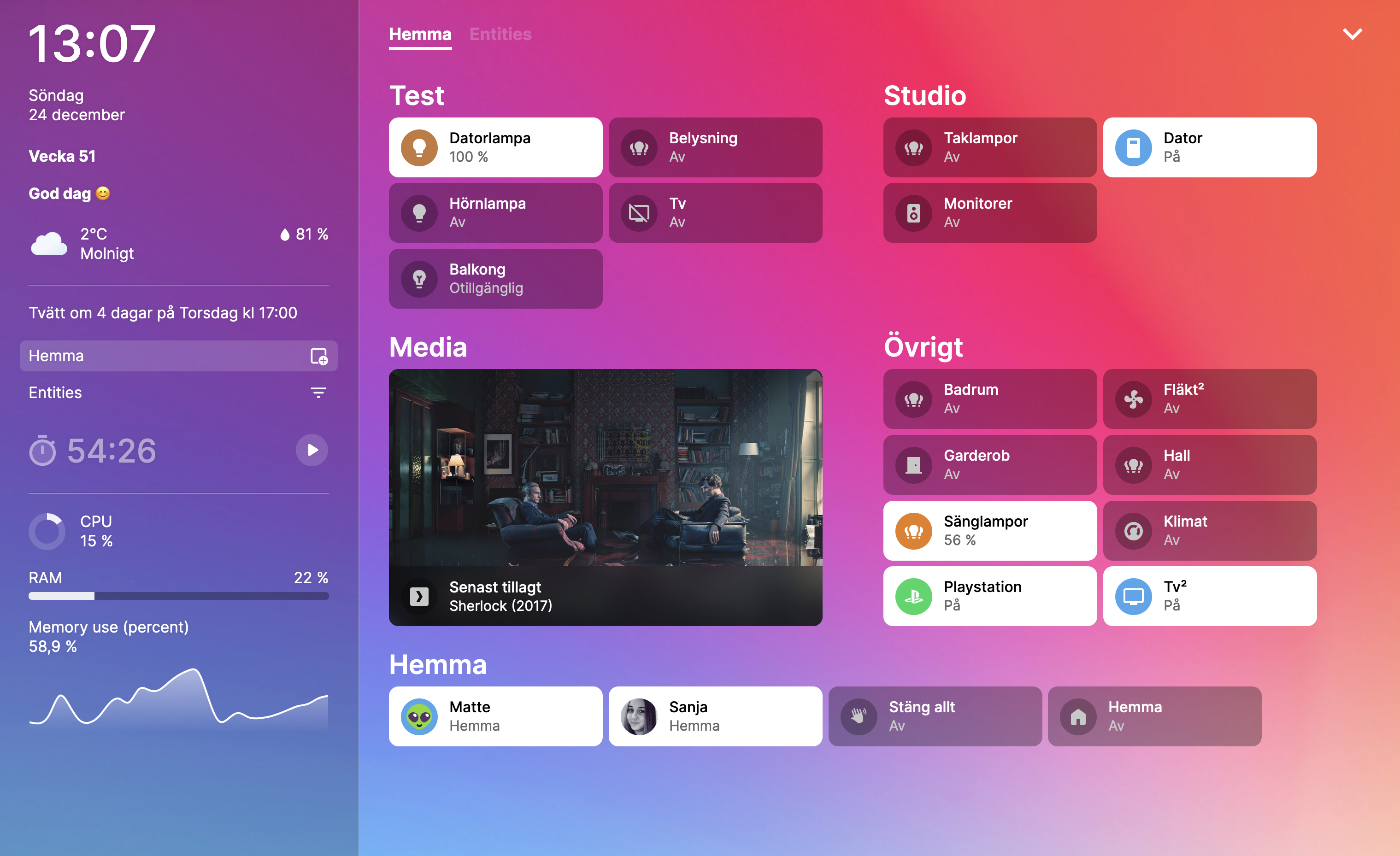
If you find this project useful, be sure to 🌟 this repository! If you love it, please consider donating! ❤️ https://www.paypal.com/paypalme/matt8707
This repository is no longer actively maintained. Development continues in a maintained fork: knowald/ha-fusion (Svelte 5, ongoing fixes and new features). The matching add-on repository is knowald/addon-ha-fusion, and the fork's README has a short migration guide.
For "Operating System" or "Supervised" installation methods, you can install ha-fusion as an add-on:
Add Repository: To begin, add the ha-fusion add-on repository to your Home Assistant instance. Click the button below or manually add the repository using this URL: https://github.com/matt8707/addon-ha-fusion.
Install Add-on: After adding the repository, refresh the add-on store page. Locate ha-fusion in the list and proceed with the installation.
If you're using the "Container" or "Core" installation methods, ha-fusion can be installed via Docker:
Docker Compose File: Place your edited copy of the docker-compose.yml file in a suitable directory.
Create Container: Run the following commands in your terminal to start the container:
cd path/to/docker-compose.yml
docker-compose up -d ha-fusion
To update to the latest version of ha-fusion, run the following commands:
docker-compose pull ha-fusion
docker-compose up -d ha-fusion
Without docker-compose, updating the container involves additional steps. For each update, it's necessary to first stop the current container, remove it, pull the new image, and then execute the docker run command again.
docker run -d \
  --name ha-fusion \
  --network bridge \
  -p 5050:5050 \
  -v /path/to/ha-fusion:/app/data \
  -e TZ=Europe/Stockholm \
  -e HASS_URL=http://192.168.1.241:8123 \
  --restart always \
  ghcr.io/matt8707/ha-fusion
If you prefer to use Kubernetes, see Chart README.md
...
These will only function if you have exposed a port in the add-on configuration or by using Docker. Note that when using Ingress, query strings cannot be read.
To set a particular view when the page loads, add the "view" parameter. For example, if you have a "Bedroom" view, append the query string ?view=Bedroom to the URL.
To disable the menu button, append the query string ?menu=false to the URL. This is useful when you want to avoid unwanted changes to your dashboard, such as on wall-mounted tablets.
| Key | Description |
|---|---|
| f | filter |
| esc | exit |
| cmd + s | save |
| cmd + z | undo |
| cmd + shift + z | redo |
To debug any errors, check the "Log" tab if you're using the addon, or use docker logs ha-fusion for Docker setups. To inspect frontend issues, open the browser's console.
To begin contributing to the project, you'll first need to install node. It's also recommended to install pnpm. If you're unfamiliar with Svelte, consider doing the tutorial at https://learn.svelte.dev
# prerequisites (macos)
brew install node pnpm

# install
git clone https://github.com/matt8707/ha-fusion.git
cd ha-fusion
pnpm install

# environment
cp .env.example .env
code .env

# server
npm run dev -- --open

# dependencies
pnpm outdated
pnpm update

# lint
npm run check
npm run lint
npm run format
more like this
Comprehensive analytics dashboard for AI coding agents — Cursor, Windsurf, Claude Code, VS Code Copilot, Zed, Antigravi…
A specialized swipe card for todo lists in Home Assistant with custom styling
ESPHome Modbus TCP↔RTU Bridge – Transparent bridge for ESP8266/ESP32 that lets multiple Modbus TCP clients communicate…
search projects, people, and tags