agentlytics
Comprehensive analytics dashboard for AI coding agents — Cursor, Windsurf, Claude Code, VS Code Copilot, Zed, Antigravi…
JavaScript★ 555
Worktrunk is a CLI for Git worktree management, designed for parallel AI agent workflows
 max-sixty
 Worktrunk
July 2026: Worktrunk was released at the start of the year, and has quickly become the most popular git worktree manager. It's built with love (there's no slop!). Please let me know any frictions at all; I'm intensely focused on continuing to make Worktrunk excellent, and the biggest help is folks posting problems they perceive.
Worktrunk is a CLI for git worktree management, designed for running AI agents in parallel.
Worktrunk's three core commands make worktrees as easy as branches. Plus, Worktrunk has a bunch of quality-of-life features to simplify working with many parallel changes, including hooks to automate local workflows.
A quick demo:
📚 Full documentation at worktrunk.dev 📚
AI agents like Claude Code and Codex can handle longer tasks without supervision, such that it's possible to manage 5-10+ in parallel. Git's native worktree feature give each agent its own working directory, so they don't step on each other's changes.
But the git worktree UX is clunky. Even a task as small as starting a new
worktree requires typing the branch name three times: git worktree add -b feat ../repo.feat, then cd ../repo.feat.
Worktrees are addressed by branch name; paths are computed from a configurable template. Commands that take a branch also accept the path of the worktree it is checked out in.
Start with the core commands
Core commands:
| Task | Worktrunk | Plain git |
|---|---|---|
| Switch worktrees | wt switch feat |
cd ../repo.feat |
| Create + start Claude | wt switch -c -x claude feat |
git worktree add -b feat ../repo.feat && \ cd ../repo.feat && \ claude |
| Clean up | wt remove |
cd ../repo && \ git worktree remove ../repo.feat && \ git branch -d feat |
| List with status | wt list |
git worktree list(paths only) |
Expand into the more advanced commands as needed
Workflow automation:
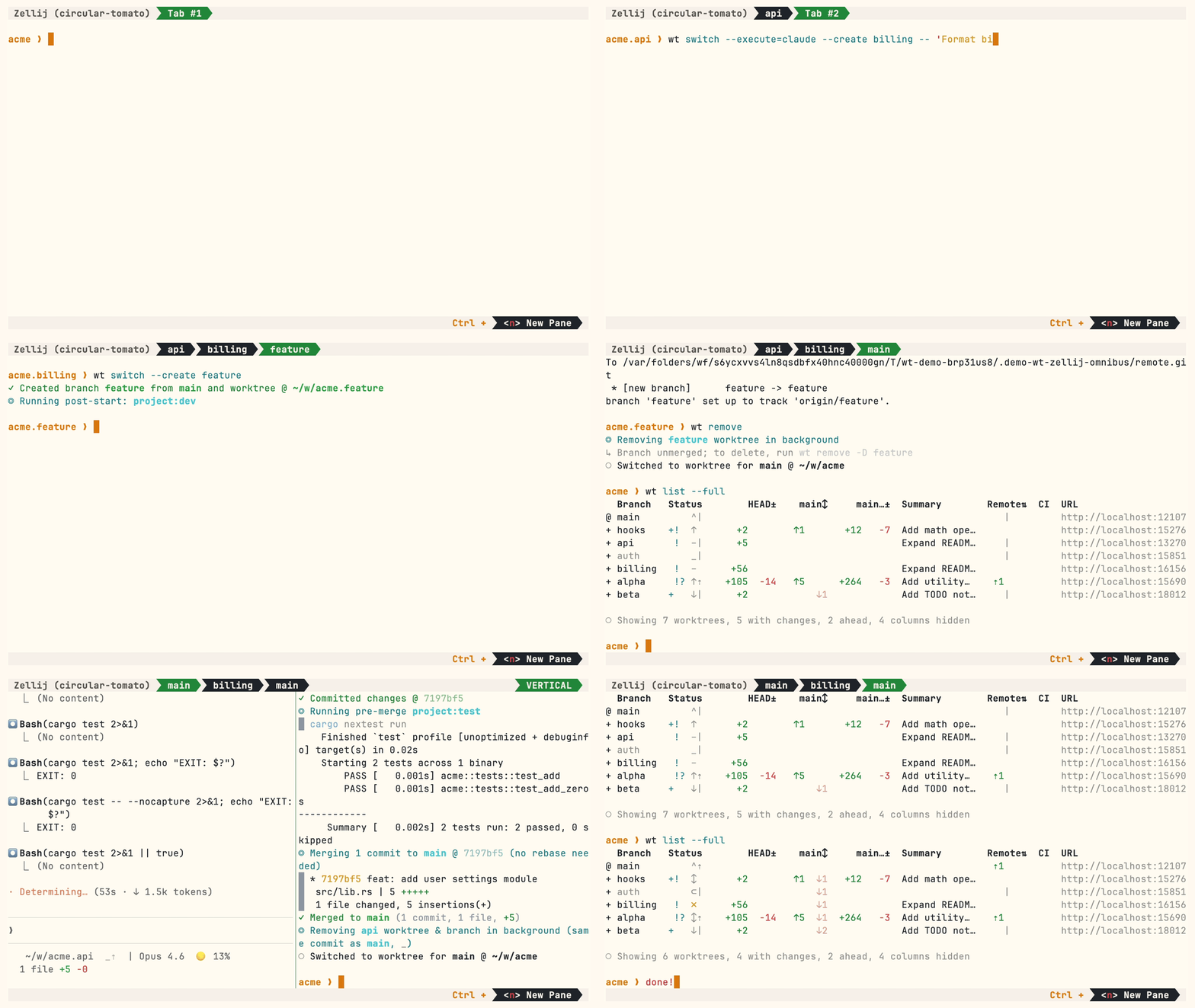
target/, node_modules/, etc between worktreeswt list --full — CI status and AI-generated summaries per branchwt switch pr:123 to jump straight to a PR's branchhash_port template filter gives each worktree a unique portwt <name> commands and branch-scoped state for hook templatesMultiple parallel agents, same simple commands:
Homebrew (macOS & Linux):
brew install worktrunk && wt config shell install
Shell integration allows commands to change directories.
Cargo:
cargo install worktrunk && wt config shell install
Windows. wt defaults to Windows Terminal's command, so Winget additionally installs Worktrunk as git-wt to avoid the conflict:
winget install max-sixty.worktrunk
git-wt config shell install
Alternatively, disable Windows Terminal's alias (Settings → Apps → Advanced app settings → App execution aliases → "Terminal"/"Terminal Preview") to use wt directly.
Arch Linux:
sudo pacman -S worktrunk && wt config shell install
Conda / Pixi (community-maintained feedstock):
conda install -c conda-forge worktrunk && wt config shell install
Or with Pixi: pixi global install worktrunk && wt config shell install.
Create a worktree for a new feature:
$ wt switch --create feature-auth
✓ Created branch feature-auth from main and worktree @ ~/repo.feature-auth
This creates a new branch and worktree, then switches to it. Do your work, then check all worktrees with wt list:
$ wt list
  Branch        Status        HEAD±    main↕     main…±  Remote⇅  Commit   Age   Message
@ feature-auth  +   ↑      +27   -8   ↑1       +31                4bc72dc  2h    Add authenticati…
^ main              ^⇡                                    ⇡1      0e631ad  1d    Initial commit

○ Showing 2 worktrees, 1 with changes, 1 ahead, 1 column hidden
The @ marks the current worktree. + means staged changes, ↑1 means 1 commit ahead of main, ⇡ means unpushed commits.
When done, either:
PR workflow — commit, push, open a PR, merge via GitHub/GitLab, then clean up:
wt step commit                    # commit staged changes
gh pr create                      # or glab mr create
wt remove                         # after PR is merged
Local merge — squash, rebase onto main, fast-forward merge, clean up:
$ wt merge main
◎ Generating commit message and committing changes... (2 files, +53, no squashing needed)
  Add authentication module
✓ Committed changes @ a1b2c3d
◎ Merging 1 commit to main @ a1b2c3d (no rebase needed)
  * a1b2c3d Add authentication module
   auth.rs | 51 +++++++++++++++++++++++++++++++++++++++++++++++++++
   lib.rs  |  2 ++
   2 files changed, 53 insertions(+)
✓ Merged to main (1 commit, 2 files, +53)
◎ Removing feature-auth worktree & branch in background (same commit as main, _)
○ Switched to worktree for main @ ~/repo
For parallel agents, create multiple worktrees and launch an agent in each:
wt switch -x claude -c feature-a -- 'Add user authentication'
wt switch -x claude -c feature-b -- 'Fix the pagination bug'
wt switch -x claude -c feature-c -- 'Write tests for the API'
The -x flag runs a command after switching; arguments after -- are passed to it. Configure post-start hooks to automate setup (install deps, start dev servers).
wt switch, wt list, wt merge, wt removewt --help or wt <command> --help for quick CLI reference📚 Full documentation at worktrunk.dev 📚
more like this
Comprehensive analytics dashboard for AI coding agents — Cursor, Windsurf, Claude Code, VS Code Copilot, Zed, Antigravi…
Skill Claude Code de veille tech francophone. Agrège les flux RSS (Journal du Hacker, Human Coders News…) et produit un…
A to-do list that runs your Claude Code agents — capture anywhere, dispatch in parallel, review from your phone.
MTT File Manager is a Rust-based Windows file manager with tabbed navigation, rich media previews, deep system integrat…
search projects, people, and tags