perplexity-cli
🧠 A simple command-line client for the Perplexity API. Ask questions and receive answers directly from the terminal! 🚀🚀🚀
Python★ 176
🍅 Pomodoro timer using figlet, cowsay, and optionally lolcat 🐮
 meribold
git clone https://github.com/meribold/muccadoro.gitmeribold/muccadoro
🍅 Implementation of the Pomodoro Technique using figlet(6),
cowsay(1), and optionally lolcat 🐮
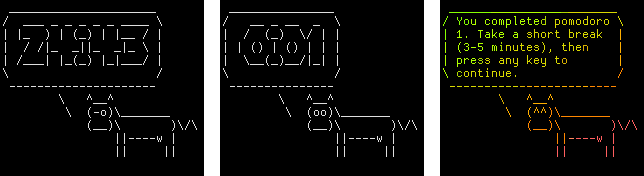
-s (can be specified multiple times).clear so the terminal doesn't flash.Muccadoro is available in the AUR: https://aur.archlinux.org/packages/muccadoro.
Put muccadoro inside some directory in your PATH, e.g. ~/bin/ (or ~/.local/bin/):
curl -fLo ~/bin/muccadoro https://raw.githubusercontent.com/meribold/muccadoro/master/muccadoro
sudo snap install muccadoro
I recommend creating an alias such as
alias pomo='muccadoro | tee -ai ~/pomodoros.txt'
See "Saving summaries to a file" for details.
The first positional argument is the amount of minutes one pomodoro should take (default:
25). If you want 20-minute pomodoros, use muccadoro 20, for example. The program exits
after four pomodoros have been completed and a longer break should be taken.
You may want to keep a record of how many pomodoros you did and when (and for how long) you took breaks. This is supported by simply redirecting stdout:
muccadoro >> ~/pomodoros.txt
If you want to save the summary but also have it printed to stdout, use:
muccadoro | tee -ai ~/pomodoros.txt
The -i (--ignore-interrupts) flag of tee makes sure the summary is correctly
processed in case the pipeline was killed with Ctrl-C (which is the
intended way to quit when doing less than four pomodoros).
more like this
🧠 A simple command-line client for the Perplexity API. Ask questions and receive answers directly from the terminal! 🚀🚀🚀
meine 🌒 - A CLI file manager and system utility built with Textual. It combines intuitive command parsing with rich t…
search projects, people, and tags