Raspberry-Pi-Guide
Raspberry Pi Guide. Learn all about the Raspberry Pi and other cool tools such as Tailscale, WireGuard, Home Assistant,…
 mikeroyal
git clone https://github.com/mikeroyal/Raspberry-Pi-Guide.gitmikeroyal/Raspberry-Pi-Guide

Raspberry Pi Guide
A guide covering Raspberry Pi devices such as the Raspberry Pi 4 Model B and Raspberry Pi 400. Along with a wide variety of operating systems that you can install on your Raspberry Pi device. Also, learn about cool projects that you can build with your Raspberry Pi device.
Note: You can easily convert this markdown file to a PDF in VSCode using this handy extension Markdown PDF.

Table of Contents
Models of Raspberry Pi boards
Raspberry Pi 5

Raspberry Pi 5 board. Image credit: Raspberry Pi
- Raspberry Pi Approved Resellers
- Get your Raspberry Pi 5 first | HackSpace
- Priority Boarding - get your Raspberry Pi 5 first | The MagPi
The Raspberry Pi 5 has a 16nm Broadcom BCM2712 (Arm Cortex-A76 quad-core 64-bit CPU @ 2.4 GHz), which is 2-3 times faster than the Raspberry Pi 4 (Arm Cortex A72—a). The GPU is a Broadcom VideoCore VII, capable of driving dual 4K/60 Hz HDMI displays, and it comes with open source Mesa drivers.
| Raspberry Pi 5 Full Hardware Specs | |
|---|---|
| ISA | ARMv8.2-A (64-bit) |
| Microarchitecture | Cortex-A76 |
| Core name | Cortex-A76 |
| Family | BCM |
| Part number(s), S-Spec | BCM2712 |
| Lithography | 16 nm |
| Cores | 4 |
| Threads | 4 |
| Base frequency | 1.5 GHz |
| Turbo frequency | 2.4 GHz |
| Details | 4x ARM Cortex-A76 @ 1.5 / 2.4 GHz |
| Cache memory | 2 MB |
| Max memory | 8 GB |
| Memory types | LPDDR4X-4267 SDRAM (4GB and 8GB SKUs available at launch) |
| Max memory bandwidth | 13.7 GB/s |
| Max PCIe lanes | 1 |
| TDP | 12 W |
| GPU integrated graphics | Broadcom VideoCore VII, supporting OpenGL ES 3.1, Vulkan 1.2 |
| GPU execution units | 4 |
| GPU shading units | 64 |
| GPU clock | 800 MHz |
| GPU FP32 floating point | 51.2 GFLOPS |
| Socket | SoC |
| Drystone MIPS | 110,880 DMIPS |
| Max display resolution | Dual 4Kp60 HDMI® display output with HDR support |
| Video decoding | H.265 4K@60fps, H.264 1080p@60fps |
| Video encoding | - |
| Max video capture | MIPI CSI |
| Modem | Gigabit Ethernet Broadcom BCM54213PE |
| Connectivity | USB 2.0, USB 3.0, HDMI 2.0 |
| Wi-Fi | Wi-Fi 5 802.11 ac |
| Bluetooth | Bluetooth 5.0, LE |
| Audio | I2S |
Raspberry Pi 5 Benchmarks

Raspberry Pi 5 Benchmark score. Image Credit: GadgetVersus
Raspberry Pi 4 Model B

Raspberry Pi 4 Model B Hardware Specifications
- Broadcom BCM2711, Quad core Cortex-A72 (ARM v8) 64-bit SoC @ 1.5GHz
- 2GB, 4GB or 8GB LPDDR4-3200 SDRAM (depending on model)
- 2.4 GHz and 5.0 GHz IEEE 802.11ac wireless
- Bluetooth 5.0, BLE
- Gigabit Ethernet
- 2 USB 3.0 ports; 2 USB 2.0 ports.
- Raspberry Pi standard 40 pin GPIO header (fully backwards compatible with previous Pi boards)
- 2 × micro-HDMI ports (up to 4kp60 supported)
- OpenGL ES 3.0 graphics
Raspberry Pi 400 Personal Computer Kit

Check out the Raspberry Pi 400 Personal Computer Kit
Raspberry Pi 400 Hardware Specifications
- Broadcom BCM2711, Quad core Cortex-A72 (ARM v8) 64-bit SoC @ 1.8GHz
- 4GB LPDDR4-3200 SDRAM
- 2.4 GHz and 5.0 GHz IEEE 802.11ac wireless
- Bluetooth 5.0, BLE
- Gigabit Ethernet
- 2 USB 3.0 ports; 2 USB 2.0 ports.
- Raspberry Pi standard 40 pin GPIO header
- 2 × micro-HDMI ports (up to 4kp60 supported)
- OpenGL ES 3.0 graphics
Raspberry Pi Zero 2 W
Raspberry Pi Zero 2 W is RP3A0, a custom-built system-in-package designed by Raspberry Pi in the UK. With a quad-core 64-bit ARM Cortex-A53 processor clocked at 1GHz and 512MB of SDRAM, Zero 2 is up to five times as fast as the original Raspberry Pi Zero.

Check out the Raspberry Pi Zero 2 W
Raspberry Pi Zero 2 W Hardware Specifications:
- 1GHz quad-core 64-bit Arm Cortex-A53 CPU
- 512MB SDRAM
- 2.4GHz 802.11 b/g/n wireless LAN
- Bluetooth 4.2, Bluetooth Low Energy (BLE), onboard antenna
- Mini HDMI port and micro USB On-The-Go (OTG) port
- microSD card slot
- CSI-2 camera connector
- HAT-compatible 40-pin header footprint (unpopulated)
- H.264, MPEG-4 decode (1080p30); H.264 encode (1080p30)
- OpenGL ES 1.1, 2.0 graphics
- Micro USB power
Raspberry Pi Pico Microcontroller

Check out the Raspberry Pi Pico
Raspberry Pi Pico Hardware Specifications
- RP2040 microcontroller chip designed by Raspberry Pi in the UK
- Dual-core Arm Cortex-M0+ processor, flexible clock running up to 133 MHz
- 264KB on-chip SRAM
- 2MB on-board QSPI Flash
- 26 multifunction GPIO pins, including 3 analogue inputs
- 2 × UART, 2 × SPI controllers, 2 × I2C controllers, 16 × PWM channels
- 1 × USB 1.1 controller and PHY, with host and device support
- 8 × Programmable I/O (PIO) state machines for custom peripheral support
- Castellated module allows soldering direct to carrier boards
- Drag-and-drop programming using mass storage over USB
- Low-power sleep and dormant modes
- Accurate on-chip clock
- Temperature sensor
- Accelerated integer and floating-point libraries on-chip
Raspberry Pi Pico W
Raspberry Pi Pico W is just like the classic Pico but adds on-board single-band 2.4GHz wireless interfaces (802.11n) using the Infineon CYW4343 while retaining the Pico form factor.

Checkout the Raspberry Pi Pico W
Raspberry Pi Pico W Hardware Specifications:
- Dual-core Arm Cortex-M0+ processor, flexible clock running up to 133 MHz
- 264kB on-chip SRAM
- 2 × UART, 2 × SPI controllers, 2 × I2C controllers, 16 × PWM channels
- 1 × USB 1.1 controller and PHY, with host and device support
- 8 × Programmable I/O (PIO) state machines for custom peripheral support
- Supported input power 1.8–5.5V DC
- Operating temperature -40°C to +85°C
- Drag-and-drop programming using mass storage over USB
- Low-power sleep and dormant modes
- Accurate on-chip clock
- Temperature sensor
Raspberry Pi Pico H
Raspberry Pi Pico H is just like the classic Pico but now comes with pre-soldered headers. A 3-pin JTAG connector is now pre-soldered for debugging.

Checkout the Raspberry Pi Pico H
Raspberry Pi Pico H Hardware Specifications:
- Dual-core Arm Cortex-M0+ processor, flexible clock running up to 133 MHz
- 264kB on-chip SRAM
- 2 × UART, 2 × SPI controllers, 2 × I2C controllers, 16 × PWM channels
- 1 × USB 1.1 controller and PHY, with host and device support
- 8 × Programmable I/O (PIO) state machines for custom peripheral support
- Supported input power 1.8–5.5V DC
- Operating temperature -40°C to +85°C
- Drag-and-drop programming using mass storage over USB
- Low-power sleep and dormant modes
- Accurate on-chip clock
- Temperature sensor
Raspberry Pi RP2040
RP2040 is a microcontroller chip designed by Raspberry Pi.

Raspberry Pi RP2040 Hardware Specifications:
- Dual-core Arm Cortex-M0+ processor, flexible clock running up to 133 MHz
- 264kB on-chip SRAM
- 2 × UART, 2 × SPI controllers, 2 × I2C controllers, 16 × PWM channels
- 1 × USB 1.1 controller and PHY, with host and device support
- 8 × Programmable I/O (PIO) state machines for custom peripheral support
- Supported input power 1.8–5.5V DC
- Operating temperature -40°C to +85°C
- Drag-and-drop programming using mass storage over USB
- Low-power sleep and dormant modes
- Accurate on-chip clock
- Temperature sensor
Raspberry Pi OS. The default Operating System for every Raspberry Pi device

Raspberry Pi Learning Resources
Raspberry Pi is an ARM powered single board computer(SBC) that is the size of a credit card and costs around $35.
Raspberry Pi Foundation is a UK-based charity that works to put the power of computing and digital making into the hands of people all over the world.
Getting Started with Raspberry Pi Projects
Online learning for the Raspberry Pi
Raspberry Pi Online Courses on Udemy
Raspberry Pi Online Courses on Coursera
The Raspberry Pi Platform and Python Programming course on Coursera
Learning Raspberry Pi with Online Courses on edX
Raspberry Pi Online Training Courses on LinkedIn Learning
Getting Started with Raspberry Pi course on FutureLearn
Home Assistant on Raspberry Pi
PiSwitch: Build your own Nintendo Switch-style console
How to set Watchdog Timer on Raspberry Pi | IoT Assistant
Writing to file on RAM Disk on Raspberry Pi | IoT Assistant
Books
Podcasts
YouTube Channels
Raspberry Pi Operating Systems
OmniROM(Android 11) based on ASOP
Ubuntu Desktop for Raspberry Pi
Kali Linux for the Raspberry Pi
Raspberry Pi Tools
Raspberry Pi Imager is the quick and easy way to install Raspberry Pi OS and other operating systems to a microSD card, ready to use with your Raspberry Pi.
Raspberry Pi Locator is a website to track Raspberry Pi 4 model B, Compute Module 4, Pi Zero 2 W, and Pico availability across multiple retailers in different countries.
Raspberry Pi Network Install (Beta) is a feature can be used to start the Raspberry Pi Imager application directly on a Raspberry Pi 4, or a Raspberry Pi 400, by downloading it from the internet using an Ethernet cable. The Raspberry Pi Imager application, which will run in memory on your Raspberry Pi, can then be used to flash the operating system onto a blank SD Card or USB disk, just like normal.
Raspberry Pi Bootloader is a feature, which is now available in beta, that utilize an EEPROM(Electrically Erasable Programmable Read-Only Memory) to store the system’s bootloader. This EEPROM is persistent storage that is located on the Pi’s mainboard. The advantage of using the EEPROM instead is that the Raspberry Pi 4 can perform tasks without needing any storage to be attached.
Pi-Apps is a Raspberry Pi App Store for Open Source Projects.
Backup Raspberry Pi Server is an Ansible configuration to set up a Raspberry Pi as a backup server for storing backups of data from other servers (e.g. webroots, files, and databases). This project is developed and maintained by Jeff Geerling.
RaspiBackup is a tool that backups and restores your running Raspberry.
Proxmox VE is an open-source server virtualization environment.
Pimox is a port of Proxmox to the Raspberry Pi allowing you to build a Proxmox cluster of Rapberry Pi's or even a hybrid cluster of Pis and x86 hardware.
PiKVM is a very simple and fully functional Raspberry Pi-based KVM over IP.
Pi-hole is a DNS sinkhole that protects your devices from unwanted content, without installing any client-side software, intended for use on a private network. It is designed for use on embedded devices with network capability, such as the Raspberry Pi, but it can be used on other machines running Linux and cloud implementations.
Kubernetes on ARM is a tool to get your ARM device up and running Kubernetes in less than ten minutes.
Uptime Kuma is a self-hosted monitoring tool like "Uptime Robot".
k8sup is a tool that uses ssh to install k3s to a remote Linux host. You can also use it to join existing Linux hosts into a k3s cluster as agents.
arkade is an Open Source Marketplace For Kubernetes letting developers install the latest versions of their favourite tools and Kubernetes apps.
Etcher is an open source, cross-platform software that makes it easy to flash operating system images to a microSD card or USB device.
PiShrink is a bash script that automatically shrink a pi image that will then resize to the max size of the SD card on boot.
Gpiozero is a simple interface to GPIO(General-Purpose Input/Output) devices with the Raspberry Pi.
File systems
GlusterFS is a free and open source scalable network filesystem. Gluster is a scalable network filesystem. Using common off-the-shelf hardware, you can create large, distributed storage solutions for media streaming, data analysis, and other data- and bandwidth-intensive tasks.
Ceph is a software-defined storage solution designed to address the object, block, and file storage needs of data centers adopting open source as the new norm for high-growth block storage, object stores and data lakes. Ceph provides enterprise scalable storage while keeping CAPEX and OPEX costs in line with underlying bulk commodity disk prices.
Hadoop Distributed File System (HDFS) is a distributed file system that handles large data sets running on commodity hardware. It is used to scale a single Apache Hadoop cluster to hundreds (and even thousands) of nodes. HDFS is one of the major components of Apache Hadoop, the others being MapReduce and YARN.
ZFS is an enterprise-ready open source file system and volume manager with unprecedented flexibility and an uncompromising commitment to data integrity.
OpenZFS is an open-source storage platform. It includes the functionality of both traditional file systems and volume manager. It has many advanced features including:
- Protection against data corruption.
- Integrity checking for both data and metadata.
- Continuous integrity verification and automatic "self-healing" repair.
Btrfs is a modern copy on write (CoW) filesystem for Linux aimed at implementing advanced features while also focusing on fault tolerance, repair and easy administration. Its main features and benefits are:
- Snapshots which do not make the full copy of files
- RAID - support for software-based RAID 0, RAID 1, RAID 10
- Self-healing - checksums for data and metadata, automatic detection of silent data corruptions
MergerFS is a union filesystem geared towards simplifying storage and management of files across numerous commodity storage devices. It is similar to mhddfs, unionfs, and aufs.
MergerFS Features
- Configurable behaviors / file placement
- Ability to add or remove filesystems at will
- Resistance to individual filesystem failure
- Support for extended attributes (xattrs)
- Support for file attributes (chattr)
- Runtime configurable (via xattrs)
- Works with heterogeneous filesystem types
- Moving of file when filesystem runs out of space while writing
- Ignore read-only filesystems when creating files
- Turn read-only files into symlinks to underlying file
- Hard link copy-on-write / CoW
- Support for POSIX ACLs
Bcachefs is an advanced new filesystem for Linux, with an emphasis on reliability and robustness and the complete set of features one would expect from a modern filesystem. Scalability has been tested to 50+ TB, will eventually scale far higher.
Squashfs is a compressed read-only filesystem for Linux. It uses zlib, lz4, lzo, or xz compression to compress files, inodes and directories. Inodes in the system are very small and all blocks are packed to minimize data overhead.
NTFS(New Technology File System) is the primary file system for recent versions of Windows and Windows Server—provides a full set of features including security descriptors, encryption, disk quotas, and rich metadata, and can be used with Cluster Shared Volumes (CSV) to provide continuously available volumes that can be accessed simultaneously from multiple nodes of a failover cluster.
exFAT(Extended File Allocation Table ) is the file system that was the successor to FAT32 in the FAT family of file systems. It was optimized for flash memory such as USB flash drives and SD cards.
Tools for Home Automation
Home Assistant is an open source home automation that puts local control and privacy first. Home Assistant is powered by a worldwide community of tinkerers and DIY enthusiasts that runs great on Raspberry Pi.
ESPHome is a system to control your ESP8266/ESP32 by simple yet powerful configuration files and control them remotely through Home Automation systems. Automation systems.
Shelly Cloud is a Smart home control tool that has been perfected and provides precise monitoring of your Shelly devices no matter where you are. Shelly devices are compatible with Alexa, Google Home, Android, and iOS.
Plex media server is a application that gives you the power to add, access and share all the entertainment that matters to you, on almost any device. With 50,000+ on demand titles and hundreds of channels of live TV, plus your own personal media collection, using one powerful app.
Amazon Alexa is a smart virtual assistant software to manage Alexa-enabled devices, control music playback, view shopping lists on the go, keep track of upcoming reminders, check on active timers and much more.
Google Assistant is a smart virtual assistant software on mobile and home automation devices.
Apple HomeKit is a software framework that enables your app to coordinate and control home automation accessories from multiple vendors to present a coherent, user-focused interface. Using HomeKit, your app can: Discover HomeKit-compatible automation accessories and add them to a persistent, cross-device home configuration database.
Samsung SmartThings is a sofwtare frmaeowrk that you can connect, monitor and control multiple smart home devices quicker and easier. Connect your Samsung smart TVs, smart appliances, smart speakers and brands like Ring, Nest and Philips Hue all from one app.
Ecobee is a home automation company in Canada that makes thermostats for residential and commercial use.
Lutron Caséta is a smart lighting control system that is a great solution for giving any client smart lighting control. It was purposely built to work in homes of all ages and it works with older wiring as well as new.
Philips Hue is a smart lighting system. The smart lights, Hue Bridge, and smart controls will forever change the way you experience light.
Sonos is the wireless home sound system that fills as many rooms as you want with great-sounding music, movies, and TV.
MQTT is an OASIS standard messaging protocol for the Internet of Things (IoT). It is designed as an extremely lightweight publish/subscribe messaging transport that is ideal for connecting remote devices with a small code footprint and minimal network bandwidth.
Zigbee is the full-stack, secure, reliable, and market-proven solution used by a majority of large smart home ecosystem providers, such as Amazon's Echo Plus, Samsung SmartThings, Signify (Philips Hue), and more.
openHAB is a cross-platform software with the aim to integrate all kinds of Smart Home technologies, devices, etc.
Z-Wave is the leading wireless communications protocol behind many of the secure, trusted brands that are working to make everyone's home smarter and safer.
Gladys Assistant is a privacy-first, open-source home assistant and runs great on Raspberry Pi.
Kodi for Raspberry Pi is a free and open source media player application developed by the XBMC/Kodi Foundation.
Pi-hole is a DNS sinkhole that protects your devices from unwanted content, without installing any client-side software, intended for use on a private network. It is designed for use on embedded devices with network capability, such as the Raspberry Pi, but it can be used on other machines running Linux and cloud implementations.
AdGuard Home is a DNS relay station with ad/tracker/other blocking, IP address redirections, and DNS-over-HTTPS.
FreeRDP is a free remote desktop protocol library and clients.
Pimox is a port of Proxmox to the Raspberry Pi allowing you to build a Proxmox cluster of Rapberry Pi's or even a hybrid cluster of Pis and x86 hardware.
PiKVM is a very simple and fully functional Raspberry Pi-based KVM over IP.
Rustdesk is an open source virtual/remote desktop infrastructure for everyone. Display and control your PC (Windows, macOS, and Linux) and Android devices.
TinyPilot is a tool that enables KVM over IP letting you control any computer remotely.
PM2 is a production process manager for Node.js applications with a built-in load balancer. It allows you to keep applications alive forever, to reload them without downtime and to facilitate common system admin tasks.
authentik is an open-source Identity Provider focused on flexibility and versatility. You can use authentik in an existing environment to add support for new protocols. authentik is also a great solution for implementing signup/recovery/etc in your application, so you don't have to deal with it.
RPiPlay is an open-source implementation of an AirPlay mirroring server for the Raspberry Pi that supports iOS 9 and later.
Lightberry is a Led lighting solution dedicated for raspberry pi and your TV.
Lomorage is a Private photo cloud host on Raspberry Pi, with Android/iOS/Web client.
Balena Sound is a single or multi-room streamer for an existing audio device using a Raspberry Pi! It supports Bluetooth, Airplay and Spotify Connect.
OpenBalena is a platform to deploy and manage connected devices.
Home Assistant

Home Assistant is a container-based system for managing your Home Assistant Core installation and related applications. The system is controlled via Home Assistant which communicates with the Supervisor. The Supervisor provides an API to manage the installation. This includes changing network settings or installing and updating software.
Quick Links
- Getting Started with Home Assistant
- Home Assistant for Raspberry Pi
- Installing Home Assistant OS using Proxmox 7
Home Assistant Frontend is a frontend for Home Assistant.
Tools to write the HA image to your boot media(microSD card or USB device)
Raspberry Pi Imager is the quick and easy way to install Raspberry Pi OS and other operating systems to a microSD card, ready to use with your Raspberry Pi.

Etcher is an open source, cross-platform software that makes it easy to flash operating system images to a microSD card or USB device.

Home Assistant integrations

Home Assistant integrations. Credit: Home Assistant
ESPHome is a system to control your ESP8266/ESP32 by simple yet powerful configuration files and control them remotely through Home Automation systems.
Shelly Cloud is a Smart home control tool that has been perfected and provides precise monitoring of your Shelly devices no matter where you are. Shelly devices are compatible with Alexa, Google Home, Android, and iOS.
Plex media server is a application that gives you the power to add, access and share all the entertainment that matters to you, on almost any device. With 50,000+ on demand titles and hundreds of channels of live TV, plus your own personal media collection, using one powerful app.
Amazon Alexa is a smart virtual assistant software to manage Alexa-enabled devices, control music playback, view shopping lists on the go, keep track of upcoming reminders, check on active timers and much more.
Google Assistant is a smart virtual assistant software on mobile and home automation devices.
Apple HomeKit is a software framework that enables your app to coordinate and control home automation accessories from multiple vendors to present a coherent, user-focused interface. Using HomeKit, your app can: Discover HomeKit-compatible automation accessories and add them to a persistent, cross-device home configuration database.
Samsung SmartThings is a sofwtare frmaeowrk that you can connect, monitor and control multiple smart home devices quicker and easier. Connect your Samsung smart TVs, smart appliances, smart speakers and brands like Ring, Nest and Philips Hue all from one app.
Ecobee is a home automation company in Canada that makes thermostats for residential and commercial use.
Lutron Caséta is a smart lighting control system that is a great solution for giving any client smart lighting control. It was purposely built to work in homes of all ages and it works with older wiring as well as new.
Philips Hue is a smart lighting system. The smart lights, Hue Bridge, and smart controls will forever change the way you experience light.
Sonos is the wireless home sound system that fills as many rooms as you want with great-sounding music, movies, and TV.
MQTT is an OASIS standard messaging protocol for the Internet of Things (IoT). It is designed as an extremely lightweight publish/subscribe messaging transport that is ideal for connecting remote devices with a small code footprint and minimal network bandwidth.
Zigbee is the full-stack, secure, reliable, and market-proven solution used by a majority of large smart home ecosystem providers, such as Amazon's Echo Plus, Samsung SmartThings, Signify (Philips Hue), and more.
openHAB is a cross-platform software with the aim to integrate all kinds of Smart Home technologies, devices, etc.
Z-Wave is the leading wireless communications protocol behind many of the secure, trusted brands that are working to make everyone's home smarter and safer.
Zwavejs2Mqtt is a fully configurable Zwave to MQTT Gateway and Control Panel Web UI.
Z-Wave JS Server is a small server wrapper around Z-Wave JS to access it via a WebSocket.
Z-Wave JS Config DB Browser is the official device configuration reference to find out if your device is supported. Currently supports 387 brands, spanning at least 2075 device configurations.
Homebridge

Homebridge is a software frameowrk that allows you to integrate with smart home devices that do not natively support HomeKit. There are over 2,000 Homebridge plugins supporting thousands of different smart accessories.
- Official Homebridge Raspberry Pi Image
- Setup Homebridge on a Raspberry Pi (Raspbian)
- Setup Homebridge on Debian or Ubuntu
- Setup Homebridge on Red Hat, CentOS Stream or Fedora
- Setup Homebridge on Docker (Linux)
Tools to write the Homebridge image to your boot media(microSD card or USB device)
Raspberry Pi Imager is the quick and easy way to install Raspberry Pi OS and other operating systems to a microSD card, ready to use with your Raspberry Pi.
Etcher is an open source, cross-platform software that makes it easy to flash operating system images to a microSD card or USB device.
Homebridge UI is a tool that provides an easy to use interface to manage your Homebridge plugins, configuration and accessories.
- Install and configure Homebridge plugins.
- Monitor your Homebridge server via a fully customisable widget-based dashboard.
- View and control Homebridge accessories.
- Backup and Restore your Homebridge instance.

Homebridge UI
ESPHome

ESPHome is a system to control your ESP8266/ESP32 by simple yet powerful configuration files and control them remotely through Home Automation systems.
Quick Links
Install ESPHome using Home Assistant
In Home Assistant go to:
Configuration > Add-ons, Backups & Supervisor > Add-on Store (button in the lower right corner) or click on the My Home Assistant Link below:
Open your Home Assistant instance and show the Supervisor add-on store.

- Next, search for ESPHome, click on the result and then click on the Install button.

- When the installation is finished, the Install button will be replaced with Start button – click on it to start the ESPHome add-on.

- Wait a few seconds for the ESPHome to start and then click on the Open Web UI button.

Install ESPHome using Docker
-
First thing is to pull the ESPHome Docker image from Docker Hub (Online).
docker pull esphome/esphome -
Then, start the ESPHome wizard. This wizard will ask you about your device type, your device name, your WiFi credentials and finally will generate a yaml file containing all of the configurations for you.
docker run --rm -v "${PWD}":/config -it esphome/esphome wizard stl.yaml
- Now, connect your ESP device to the device where Docker is running (either using an USB cable or Serial-To-USB adapter) and if you are on Linux type the following command :
dmesg | grep ttyUSB
- Put your device in programming mode (if needed) and execute the next command to install the ESPHome on the device connected to the /dev/ttyUSB1 using the configuration stored in stl.yaml file
docker run --rm -v "${PWD}":/config --device=/dev/ttyUSB1 -it esphome/esphome run stl.yaml
Install ESPHome using Python
- If you are on macOS or Linux check if Python 3.8 or later is installed by executing the command.
python3 --version
- If you are on macOS, you need to install wheel and esphome packages by using the following command.
pip3 install wheel esphome
- If you are on Linux, you have to install esphome package by using the following command.
pip3 install --user esphome
- If you are on macOS or Linux you can start the ESPHome wizard using the following command.
esphome wizard stl-python.yaml
- Finally, connect your ESP device to your Computer (using USB cable or Serial-To-usb adapter) and put it in programming mode (if needed). Then, Install ESPHome using the configuration in the stl-python.yaml file.
esphome run stl-python.yaml
Turning Raspberry Pi into a Router
Software
OpenWrt Project is a Linux operating system targeting embedded devices. Instead of trying to create a single, static firmware, OpenWrt provides a fully writable filesystem with package management. It's primarily used on embedded devices to route network traffic.
Download the appropriate OpenWrt image for your Raspberry PI by going to the link above.
Tools to write the Operating System (OS) image to your boot media(microSD card)
Raspberry Pi Imager is the quick and easy way to install Raspberry Pi OS and other operating systems to a microSD card, ready to use with your Raspberry Pi.
Hardware
Raspberry Pi Router Board for CM4 module (Cost: $55 USD) is an expansion board based on the Raspberry Pi Compute Module 4. It brings Raspberry Pi CM4 two full-speed gigabit network ports and offers better performance, lower CPU usage, and higher stability for a long time work compared with a USB network card. It's compatible with Raspberry Pi OS, Ubuntu Server and other Raspberry Pi systems.

Raspberry Pi Router Board for CM4 module
Technical Specs:
- Compatible Module: Raspberry Pi Compute Module 4 series.
- BCM2711 4 core @ 1.5GHz Cortex-A72.
- Support standard Raspberry Pi HAT interface.
- Support POE HAT to supply power to the board.
- Support POE HAT for external power supply.
- Full-speed dual gigabit network interface.
- Master-slave dual USB2.0 interface.
- Micro SD card slot, used to support non-eMMC version of CM4.
- Standard HDMI video output interface.
- 0.91 inch IIC OLED display.
- 5V DC fan interface(Support controlling via PWM signal).
- Ethernet: high-performance Gigabit ethernet controller RTL8111E chip, JXD 2111x G2406s chip as isolation transformer.
- Port0: Compute Module 4 Built-In.
- Port1: PCI Express 1000BASE-T NIC.
- GPIO: 40-Pin GPIO compatible with Raspberry Pi.
Setting Watchdog Timer (WDT) on Raspberry Pi
Watchdog Timer (WDT) is a timer that monitors microcontroller (MCU) programs to see if they are out of control or have stopped operating.
Installing and enabling WDT service
To enable watchdog you have to change the boot parameters by adding dtparam=watchdog=on in /boot/config.txt using a text editor such as nano, vim, gedit, etc.. Also, install watchdog package and enable it to start at startup. Also, make sure to restart your Raspberry Pi for these settings to take effect.
pi@raspberrypi:~ $ sudo apt install watchdog
pi@raspberrypi:~ $sudo systemctl enable watchdog
Configure WDT service
Configuration file for watchdog can be found in /etc/watchdog.conf.
max-load-1 = 24
watchdog-device = /dev/watchdog
realtime = yes
priority = 1
To start the WTD service:
pi@raspberrypi:~ $ sudo systemctl start watchdog
Check watchdog status:
pi@raspberrypi:~ $ sudo systemctl status watchdog
To stop the service:
pi@raspberrypi:~ $ sudo systemctl stop watchdog
Raspberry Pi Upgrades
NexDock is an accessory with a HDMI-in port and Type-C cable NexDock that turns the Raspberry Pi 4 into a fully functional computer.

Raspberry Pi Cases from Pi-Shop US

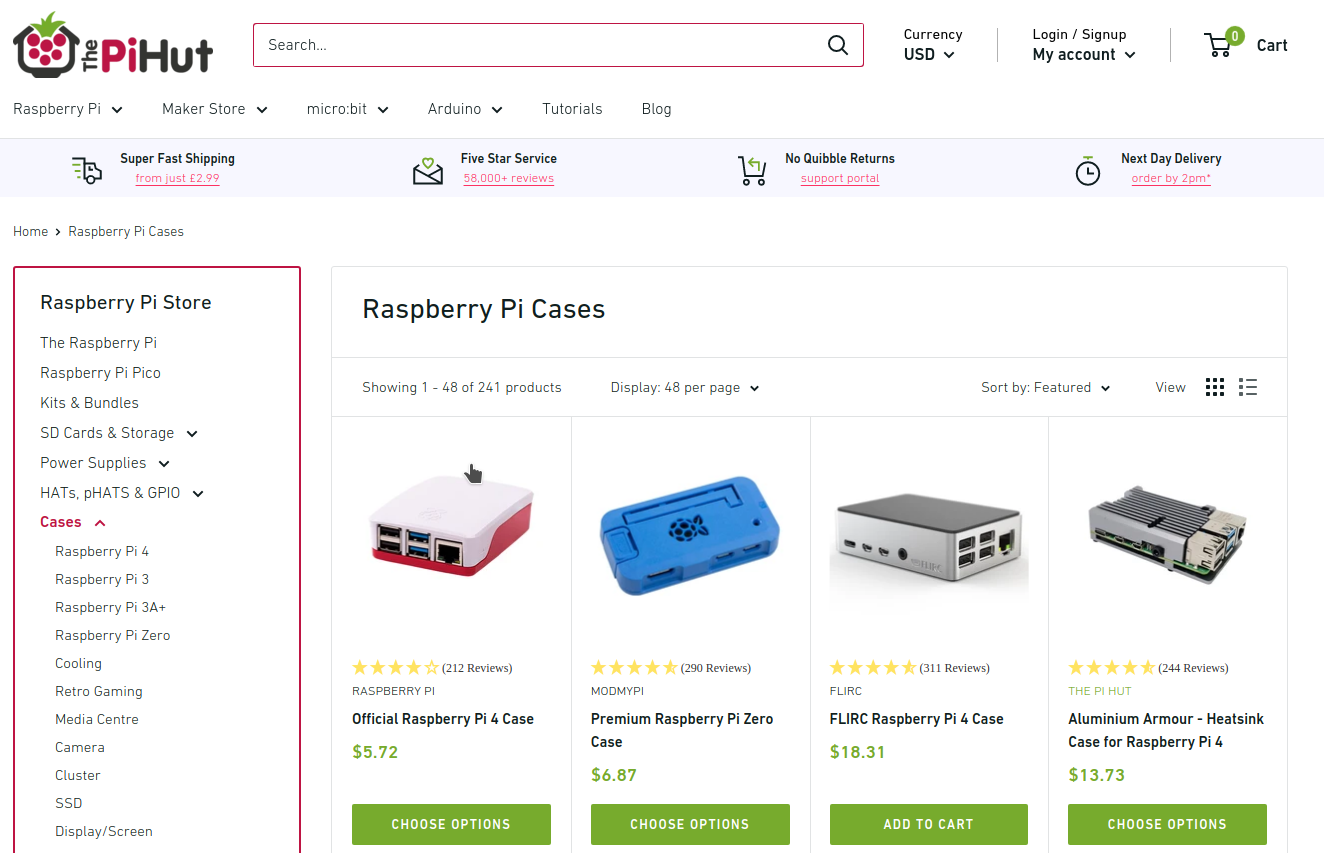
Raspberry Pi Cases from The Pi Hut
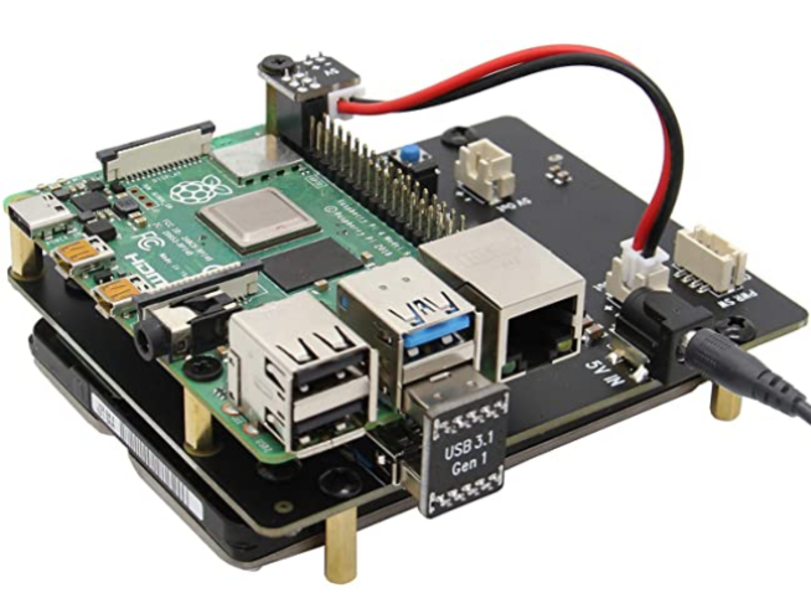
X825 expansion board provides a complete storage solution for newest Raspberry Pi 4 Model B, it supports up to 4TB 2.5-inch SATA hard disk drives (HDD) / solid-state drive (SSD).
Sabrent M.2 SSD [NGFF] to USB 3.0 / SATA III 2.5-Inch Aluminum Enclosure Adapter

Samsung 970 EVO 250GB - NVMe PCIe M.2 2280 SSD

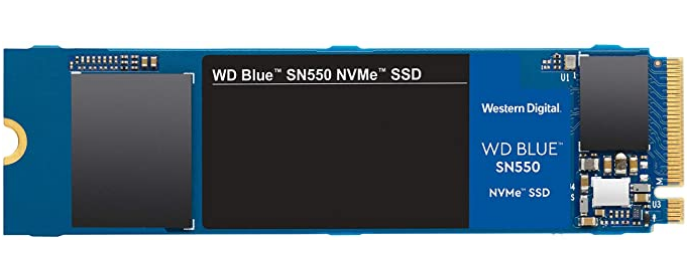
Western Digital 1TB WD Blue SN550 NVMe Internal SSD

Samsung SSD 860 EVO 250GB mSATA Internal SSD

Samsung 850 EVO 120GB SSD mSATA

Getting Software
App Outlet
App Outlet is a Universal application store(Flatpaks, Snaps, and AppImages) inspired by the Linux App Store online service.

Flatpaks
FlatHub is a build and distribution service for Flatpak applications.

Snaps
Snap Store is a build and distribution service for Snap applications.


AppImages
AppImageHub is a build and distribution service for AppImage applications.
AppImage Manager is a package manager for AppImages.

Using Android Apps on Raspberry Pi
Waydroid is a container-based approach to boot a full Android system on a regular Linux system. The Android runtime environment ships with a minimal customized Android system image based on LineageOS. The image is currently based on Android 10.

LineageOS is a free and open-source operating system for various devices, based on the Android mobile platform.

Scrcpy is an application by Genymotion that provides display and control of Android devices connected on USB (or over TCP/IP). It does not require any root access and works on GNU/Linux, Windows and macOS. The Android device requires at least API 21 (Android 5.0).

Gaming
Steam
Open the terminal and copy/paste command below
wget https://steamcdn-a.akamaihd.net/client/installer/steam.deb
Proton is a tool for use with the Steam client which allows games which are exclusive to Windows to run on the Linux operating system. It uses Wine to facilitate this.
Enable Proton in Steam
- Click on “Steam” then “Settings” to open the Settings window at the far-left corner.
- On the “Settings” window, click on “Steam Play.” Ensure you check the “Enable Steam Play for supported files” and “Enable Steam Play for all other titles” checkboxes. Lastly, select the Proton version you wish to use from the drop-down menu.

ProtonDB
ProtonDB is a collection of over 100,000 gaming reports from other gamers as they test games with Proton on Linux and provide aggregate scores of how well games perform. A growing pool of suggestions provides tweaks that you can try to get games working while Proton continues development. In addition to this, you may explore the Steam game catalog on this site to browse and discover a wide range of titles that were previously unavailable for use on Linux.


Lutris
Lutris is a gaming client for Linux. It gives you access to all your video games with the exception of the current console generation. Also, integrates nicely with other stores like GOG, Steam, Battle.net, Origin, Uplay and many other sources that allow you to import your existing game library and community maintained install scripts give you a completely automated setup.

Heroic Games Launcher
Heroic Games Launcher is a Native GUI Epic Games Launcher for Linux.

Hero Game Launcher UI. Credit: flavioislima
GameHub
GameHub is a unified library for all your games. It allows you to store your games from different platforms into one program to make it easier for you to manage your games.

GameHub supports:
-
native games for Linux
-
multiple compatibility layers:
- Wine
- Proton
- DOSBox
- RetroArch
- ScummVM
- WineWrap — a set of preconfigured wrappers for supported games;
- custom emulators
-
multiple game platforms:
Game Streaming
Steam Link app is available free of charge, streaming your Steam PC games to phones, tablets, and TV.

Geforce NOW is NVIDIA's Cloud Gaming Service.

Moonlight Game Streaming is a program that let you stream from your PC games over the Internet with no configuration required. Stream from almost any device, whether you're in another room or miles away from your gaming rig.

Chiaki is a Free and Open Source Software Client for PlayStation 4 and PlayStation 5 Remote Play for Linux, FreeBSD, OpenBSD, Android, macOS, Windows, Nintendo Switch and potentially even more platforms. Chiaki Flatpak
Xbox Cloud Gaming is Microsoft's cloud-based Xbox game-streaming technology (currently in Beta). Play games like Forza Horizon 4, Halo 5: Guardians, Gears of War 4, Sea of Thieves, Cuphead, Red Dead Redemption 2, and 100+ other games on your mobile device or Chrome web browser. Xbox Cloud Gaming does require an Xbox Game Pass Ultimate subscription.

Stadia is Google's gaming platform that lets you instantly play your favorite video games on screens you already own. Game on TVs with Chromecast with Google TV, laptops, desktops, tablets or compatible phones. Stadia Pro is a subscription($9.99 per month) that unlocks a growing collection of free games to play on Stadia.

Parsec is a video game streaming platform, which offers a wide variety of games and genres to choose from and provides a high-quality and smooth gameplay. SParsec is developed in order to provide a high-quality smooth gameplay, same time to be free of all ads and in-game purchases.

Amazon Luna is Amazon's Cloud Gaming Service. Amazon Luna is Compatible/Supported on a vartiey of Devices and Browsers.

Game Emulators
EmulationStation Desktop Edition (ES-DE) is a frontend application for browsing and launching games from your multi-platform game collection. It's available for Unix/Linux, macOS(M1 & Intel) and Windows.
RetroPie is a frontend for emulators that allows you to turn your Raspberry Pi, ODroid C1/C2, or PC into a retro-gaming machine. It builds upon Raspbian, EmulationStation, RetroArch and many other projects to enable you to play your favourite Arcade, home-console, and classic PC games with the minimum set-up.

RetroArch is a frontend for emulators, game engines and media players. It enables you to run classic games on a wide range of computers and consoles through its slick graphical interface. Settings are also unified so configuration is done once and for all. RetroArch Flatpak
Dolphin is an emulator for two recent Nintendo video game consoles: the GameCube and the Wii. It allows PC gamers to enjoy games for these two consoles in full HD (1080p) with several enhancements: compatibility with all PC controllers, turbo speed, networked multiplayer, and even more. Dolphin Flatpak
Citra is an open-source emulator for the Nintendo 3DS capable of playing many of your favorite games. Citra Flatpak
yuzu is an experimental open-source emulator for the Nintendo Switch from the creators of Citra.Yuzu Flatpak
m64p is a Nintendo 64 Emulator. It uses mupen64plus-gui, a brand new mupen64plus frontend written in Qt5. It supports all of the things you’d expect from a frontend (savestate management, pausing, screenshots). m64p Flatpak
DeSmuME is a Nintendo DS emulator. DeSmuME Flatpak
Snes9x is a portable, freeware Super Nintendo Entertainment System (SNES) emulator. Snes9x Flatpak
bsnes is a Super Nintendo (SNES) emulator focused on performance, features, and ease of use. bsnes flatpak
mGBA is a new emulator for running Game Boy Advance games. It aims to be faster and more accurate than many existing Game Boy Advance emulators, as well as adding features that other emulators lack. mGBA Flatpak
DOSBox is an open-source DOS emulator which primarily focuses on running DOS Games.
DOSBox Staging is a full x86 CPU emulator (independent of host architecture), capable of running DOS programs that require real or protected mode.DOSBox Staging Flatpak
Flycast is a multi-platform Sega Dreamcast, Naomi and Atomiswave emulator derived from reicast. Flycast Flatpak
PCSX2 is a Playstation 2 'emulator', a free program that tries to replicate the Playstation 2 console to enable you to play PS2 games on your PC. PCSX2 Flatpak
RPCS3 is an experimental open-source Sony PlayStation 3 emulator and debugger written in C++ for Windows and Linux. RPCS3 started development in May of 2011 by its founders DH and Hykem. The emulator is currently capable of running over 1800 commercial titles powered by Vulkan and OpenGL. RPCS3 Flatpak
MAME is a Arcade Machine Emulator.
xemu is an original Xbox emulator.
Xenia is an Xbox 360 Emulator.
Also checkout these subreddits for more great Game Emulators recommendations
- r/emulation
- r/emulations
- r/RetroArch
- r/RetroPie
- r/DolphinEmulator
- r/Citra
- r/cemu
- r/yuzu
- r/OpenEmu
- r/MAME
- r/EmuDev
- r/Roms
Wine
WINE(Wine Is Not an Emulator) is a compatibility layer capable of running Windows applications on several POSIX-compliant operating systems, such as Linux, macOS, & BSD. Instead of simulating internal Windows logic like a virtual machine or emulator, Wine translates Windows API calls into POSIX calls on-the-fly, eliminating the performance and memory penalties of other methods and allowing you to cleanly integrate Windows applications into your desktop.
Winetricks
Winetricks is an easy way to work around problems in Wine.
this is needed to avoid adobeair error
sudo sed -i 's|echo "\${arg%%=\*}"=\\""${arg### \*=}"\\"|echo \${arg%%=\*}=\\"\${arg### \*=}\\"|g' /usr/local/bin/winetricks
sudo apt install cabextract libncurses5:armhf
Home Media Server

ReadyMedia (previously MiniDLNA) is server software with the aim of being fully compliant with DLNA / UPnP clients. The MiniDNLA daemon serves media files (music, pictures, and video) to clients on a network.
Kodi (formerly XBMC) is a free and open source media player and entertainment hub for digital media for HTPCs (Home theater PCs) application developed by the XBMC/Kodi Foundation. It uses a 10-foot user interface designed to be a media player for the living-room, using a remote control as the primary input device.
Plex Media Server is an application that scans and organizes your media(music, videos, and other media files), then lets you stream it to all of your devices(computers, smartphones, tablets, televisions, streaming devices, and game consoles).
OpenMediaVault is the next generation network attached storage (NAS) solution based on Debian Linux. It contains services like SSH, (S)FTP, SMB/CIFS, DAAP media server, RSync, BitTorrent client and many more.
Mopidy is a free and open source application that can turn your Raspberry Pi into music player for streaming local files, Spotify, Google Music, SoundCloud, Webradio, Podcasts and other music from the cloud. Also, stream your own collection from a device in your local network.
Emby is a media server designed to organize, play, and stream audio and video to a variety of devices(Android TV, Amazon Fire TV, Chromecast, Roku, Xbox, Home Theater Computers, and more).
Jellyfin is a volunteer-built media solution that puts you in control of your media. Stream to any device from your own server, with no strings attached.
WireGuard

WireGuard® is a straight-forward, fast and modern VPN that utilizes state-of-the-art cryptography. It aims to be faster, simpler, leaner, and more useful than IPsec while avoiding the massive headache. It intends to be considerably more performant than OpenVPN. WireGuard is designed as a general-purpose VPN for running on embedded interfaces and super computers alike, fit for many circumstances. Initially released for the Linux kernel, it is now cross-platform (Windows, macOS, BSD, iOS, Android) and widely deployable. It is currently under a massive development, but it already might be regarded as the most secure, most comfortable to use, and the simplest VPN solution in the industry.
Wiretrustee is a WireGuard®-based mesh network that connects your devices into a single private network.
Wireguard Manager is a tool that enables you to build your own vpn under a minute.
Tailscale is a WireGuard-based app that makes secure, private networks easy for teams of any scale. It works like an overlay network between the computers of your networks using all kinds of NAT traversal sorcery.
Headscale is an open source, self-hosted implementation of the Tailscale coordination server.
BoringTun is an implementation of the WireGuard® protocol designed for portability and speed. It's successfully deployed on millions of iOS and Android consumer devices as well as thousands of Cloudflare Linux servers.
PiVPN is the simplest VPN installer, designed for Raspberry Pi.
Algo VPN is a set of Ansible scripts that simplify the setup of a personal WireGuard and IPsec VPN. It uses the most secure defaults available and works with common cloud providers.
Pro Custodibus is a tool for managing WireGuard with a variety of business VPN (Virtual Private Network) use cases, such as site-to-site connectivity, secure remote access from anywhere, secure access to the cloud (Amazon Web Services, Google Cloud Platform, Microsoft Azure, etc), and more.
Drago is a flexible configuration manager for WireGuard designed to make it simple to configure secure network overlays spanning heterogeneous nodes distributed across different clouds and physical locations. Drago is in active development, and we welcome contributions from the open-source community.
Netmaker is a tool that helps connect any computers together over a secure, fast, private network, and manage multiple networks from a central server.
Kilo is a multi-cloud network overlay built on WireGuard and designed for Kubernetes. Kilo connects nodes in a cluster by providing an encrypted layer 3 network that can span across data centers and public clouds. The Pod network created by Kilo is always fully connected, even when the nodes are in different networks or behind NAT. By allowing pools of nodes in different locations to communicate securely, Kilo enables the operation of multi-cloud clusters. Kilo's design allows clients to VPN to a cluster in order to securely access services running on the cluster.
Subspace is a simple WireGuard VPN server GUI.
WG UI is a basic, self-contained management service for WireGuard with a self-serve web UI.
WireHole is a combination of WireGuard, PiHole, and Unbound in a docker-compose project with the intent of enabling users to quickly and easily create and deploy a personally managed full or split-tunnel WireGuard VPN with ad blocking capabilities (via Pihole), and DNS caching with additional privacy options (via Unbound).
Gluetun is a lightwieght VPN client in a thin Docker container for multiple VPN providers, written in Go, and uses OpenVPN or Wireguard, DNS over TLS, with a few proxy servers built-in.
Ethr is a cross platform network performance measurement tool written in golang. The goal of this project is to provide a native tool for comprehensive network performance measurements of bandwidth, connections/s, packets/s, latency, loss & jitter, across multiple protocols such as TCP, UDP, HTTP, HTTPS, and across multiple platforms such as Windows, Linux and other Unix systems.
Nextcloud

Nextcloud is an industry-leading, on-premises content collaboration platform for file sync & share and communication server. It is fully open source and you can host it yourself or pay a company to do it for you. Also checkout the following links below:

Nexcloud login screen
Nextcloud Hub is a tool that allows you to share and collaborate on documents, send and receive email, manage your calendar and have video chats without data leaks. As fully on-premises solution, Nextcloud Hub provides the benefits of online collaboration without the compliance and security risks.

Nexcloud Hub
Nextcloud Desktop Client is a tool to synchronize files from Nextcloud Server with your computer.
Nextcloud Deck is a kanban style organization tool aimed at personal planning and project organization for teams integrated with Nextcloud.
Nextcloud Files is a tool tool that allows your employees have easy access to their files, photos and documents to work and can share and collaborate with team members, customers and partners. So IT knows nobody besides those they shared with has access to those files.
Nextcloud Talk is a tool that protects your communication better than other team collaboration platforms like Microsoft Teams or Slack, making sure your data stays on your servers. It also goes further than other encrypted communication technologies by keeping even metadata from leaking.
Nextcloud Home is a tool that allows you store your documents, calendar, contacts and photos on your server at home, at one of at one Nextcloud's providers or in a data center you trust.
Nextcloud Enterprise is a service that gives professional organizations software optimized and tested for mission critical environments.
Nextcloud Outlook Integration is a tool that automatically upload files to replace large attachments or integrate Calendars and Contacts in Microsoft Outlook.
Collabora Online in Nextcloud is a powerful LibreOffice-based online office suite with collaborative editing, which supports all major document, spreadsheet and presentation file formats and works in all modern browsers.
ONLYOFFICE integration in Nextcloud is a service that empowers your users to collaborate on office documents with team members in real time. It has compatibility with Microsoft Office formats means perfect documents, every time.
Nextcloud VM(virtual machine appliance) is a set of carefully crafted family of *nix scripts, which interactively guide you through a quality-controlled installation of a Nextcloud instance for Home/SME Server and scripts for Raspberry Pi 4. It is Community developed and maintained.
Grafana

Grafana Learning Resources
Grafana is an analytics platform that enables you to query and visualize data, then create and share dashboards based on your visualizations. Easily visualize metrics, logs, and traces from multiple sources such as Prometheus, Loki, Elasticsearch, InfluxDB, Postgres, Fluentd, Fluentbit, Logstash and many more.
Grafana Professional Services Training | Grafana Labs
Grafana Pro Training AWS | Grafana Labs
Grafana Online Training Courses | LinkedIn Learning
Grafana Training Courses - NobleProg
Setting Up Grafana to Visualize Our Metrics Course on Coursera
Grafana Tools
Grafana Cloud is a composable observability platform, integrating metrics, traces and logs with Grafana. Leverage the best open source observability software – including Prometheus, Loki, and Tempo – without the overhead of installing, maintaining, and scaling your observability stack.
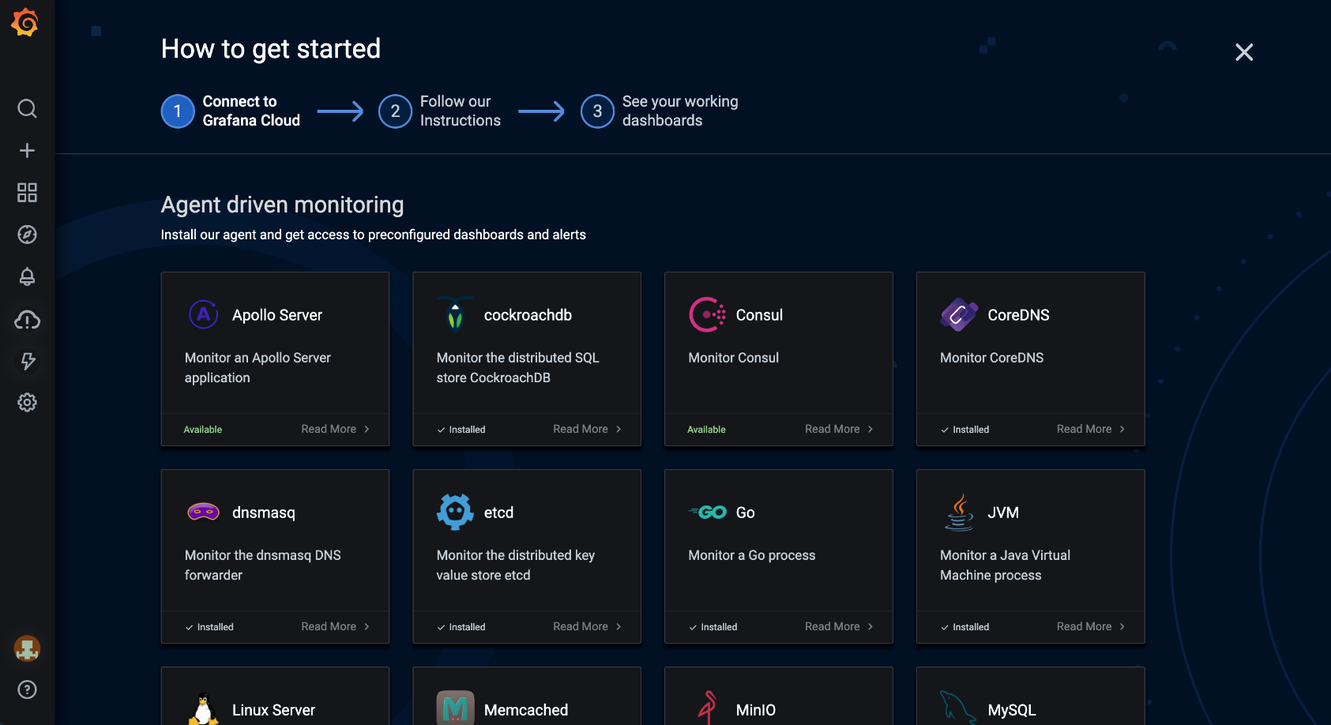
Grafana Cloud Integrations. Source: Grafana
Grafana Enterprise is a service that includes features that provide better scalability, collaboration, operations, and governance in a self-managed environment.
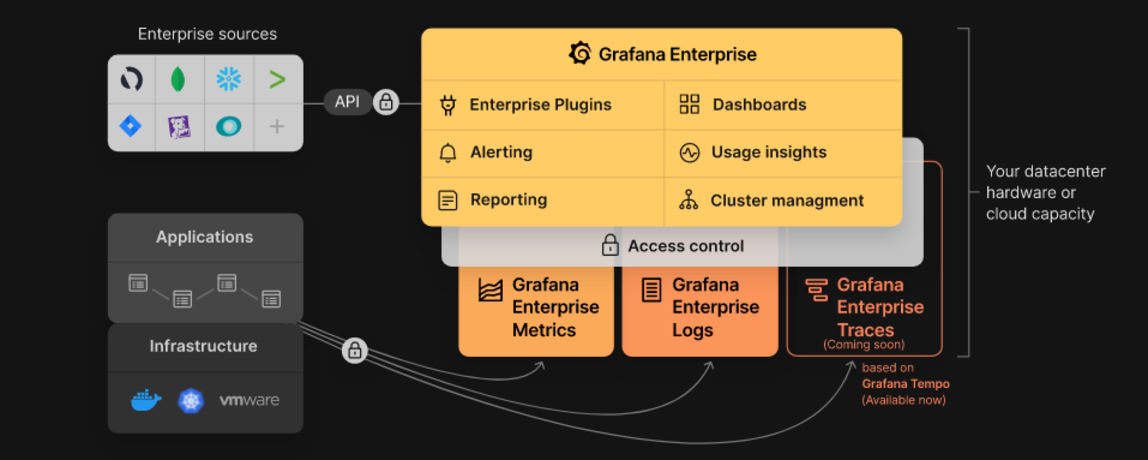
Grafana Enterprise Stack. Source: Grafana
Grafana Tempo is an open source high-scale distributed tarcing backend. Tempo is cost-efficient, requiring only object storage to operate, and is deeply integrated with Grafana, Loki, and Prometheus.
Grafana MetricTank is a multi-tenant timeseries platform for Graphite developed by Grafana Labs. MetricTank provides high-availability(HA) and efficient long-term storage, retrieval, and processing for large-scale environments.
Grafana Tanka is a robust configuration utility for your Kubernetes cluster, powered by the Jsonnet language.
Grafana Loki is a horizontally-scalable, highly-available(HA), multi-tenant log aggregation system inspired by Prometheus.
Cortex is a project that lets users query metrics from many Prometheusservers in a single place, without any gaps in the grpahs due to server failture. Also, Cortex lets you store Prometheus metrics for long term capacity planning and performance analysis.
Graphite is an open source monitoring system.
Kubernetes

Note: The recommended hardware is the Raspberry Pi 4 Model B with 8 GB of Memory
Kubernetes (K8s) is an open-source system for automating deployment, scaling, and management of containerized applications.

Building Highly-Availability(HA) Clusters with kubeadm. Source: Kubernetes.io, 2020
Google Kubernetes Engine (GKE) is a managed, production-ready environment for running containerized applications.
Azure Kubernetes Service (AKS) is serverless Kubernetes, with a integrated continuous integration and continuous delivery (CI/CD) experience, and enterprise-grade security and governance. Unite your development and operations teams on a single platform to rapidly build, deliver, and scale applications with confidence.
Amazon EKS is a tool that runs Kubernetes control plane instances across multiple Availability Zones to ensure high availability.
AWS Controllers for Kubernetes (ACK) is a new tool that lets you directly manage AWS services from Kubernetes. ACK makes it simple to build scalable and highly-available Kubernetes applications that utilize AWS services.
Container Engine for Kubernetes (OKE) is an Oracle-managed container orchestration service that can reduce the time and cost to build modern cloud native applications. Unlike most other vendors, Oracle Cloud Infrastructure provides Container Engine for Kubernetes as a free service that runs on higher-performance, lower-cost compute.
Anthos is a modern application management platform that provides a consistent development and operations experience for cloud and on-premises environments.
Red Hat Openshift is a fully managed Kubernetes platform that provides a foundation for on-premises, hybrid, and multicloud deployments.
OKD is a community distribution of Kubernetes optimized for continuous application development and multi-tenant deployment. OKD adds developer and operations-centric tools on top of Kubernetes to enable rapid application development, easy deployment and scaling, and long-term lifecycle maintenance for small and large teams.
Odo is a fast, iterative, and straightforward CLI tool for developers who write, build, and deploy applications on Kubernetes and OpenShift.
Kata Operator is an operator to perform lifecycle management (install/upgrade/uninstall) of Kata Runtime on Openshift as well as Kubernetes cluster.
Thanos is a set of components that can be composed into a highly available metric system with unlimited storage capacity, which can be added seamlessly on top of existing Prometheus deployments.
OpenShift Hive is an operator which runs as a service on top of Kubernetes/OpenShift. The Hive service can be used to provision and perform initial configuration of OpenShift 4 clusters.
Rook is a tool that turns distributed storage systems into self-managing, self-scaling, self-healing storage services. It automates the tasks of a storage administrator: deployment, bootstrapping, configuration, provisioning, scaling, upgrading, migration, disaster recovery, monitoring, and resource management.
VMware Tanzu is a centralized management platform for consistently operating and securing your Kubernetes infrastructure and modern applications across multiple teams and private/public clouds.
Kubespray is a tool that combines Kubernetes and Ansible to easily install Kubernetes clusters that can be deployed on AWS, GCE, Azure, OpenStack, vSphere, Packet (bare metal), Oracle Cloud Infrastructure (Experimental), or Baremetal.
KubeInit provides Ansible playbooks and roles for the deployment and configuration of multiple Kubernetes distributions.
Rancher is a complete software stack for teams adopting containers. It addresses the operational and security challenges of managing multiple Kubernetes clusters, while providing DevOps teams with integrated tools for running containerized workloads.
K3s is a highly available, certified Kubernetes distribution designed for production workloads in unattended, resource-constrained, remote locations or inside IoT appliances.
Helm is a Kubernetes Package Manager tool that makes it easier to install and manage Kubernetes applications.
Knative is a Kubernetes-based platform to build, deploy, and manage modern serverless workloads. Knative takes care of the operational overhead details of networking, autoscaling (even to zero), and revision tracking.
KubeFlow is a tool dedicated to making deployments of machine learning (ML) workflows on Kubernetes simple, portable and scalable.
Etcd is a distributed key-value store that provides a reliable way to store data that needs to be accessed by a distributed system or cluster of machines. Etcd is used as the backend for service discovery and stores cluster state and configuration for Kubernetes.
OpenEBS is a Kubernetes-based tool to create stateful applications using Container Attached Storage.
Container Storage Interface (CSI) is an API that lets container orchestration platforms like Kubernetes seamlessly communicate with stored data via a plug-in.
MicroK8s is a tool that delivers the full Kubernetes experience. In a Fully containerized deployment with compressed over-the-air updates for ultra-reliable operations. It is supported on Linux, Windows, and MacOS.
Charmed Kubernetes is a well integrated, turn-key, conformant Kubernetes platform, optimized for your multi-cloud environments developed by Canonical.
Grafana Kubernetes App is a toll that allows you to monitor your Kubernetes cluster's performance. It includes 4 dashboards, Cluster, Node, Pod/Container and Deployment. It allows for the automatic deployment of the required Prometheus exporters and a default scrape config to use with your in cluster Prometheus deployment.
KubeEdge is an open source system for extending native containerized application orchestration capabilities to hosts at Edge.It is built upon kubernetes and provides fundamental infrastructure support for network, app. deployment and metadata synchronization between cloud and edge.
Lens is the most powerful IDE for people who need to deal with Kubernetes clusters on a daily basis. It has support for MacOS, Windows and Linux operating systems.
kind is a tool for running local Kubernetes clusters using Docker container “nodes”. It was primarily designed for testing Kubernetes itself, but may be used for local development or CI.
Flux CD is a tool that automatically ensures that the state of your Kubernetes cluster matches the configuration you've supplied in Git. It uses an operator in the cluster to trigger deployments inside Kubernetes, which means that y
more like this
PowerDisplayESPHome
A small display for ESPHome and Home Assistant to retrieve the current house consumption and energy price via a sensor…