dont-track-me-google
Firefox and Chrome extensions to prevent Google from making links ugly.
JavaScript★ 587
JavaScript bindings for Dear ImGui. Usable with WebGL, WebGL2 and WebGPU
 mori2003
git clone https://github.com/mori2003/jsimgui.gitmori2003/jsimgui

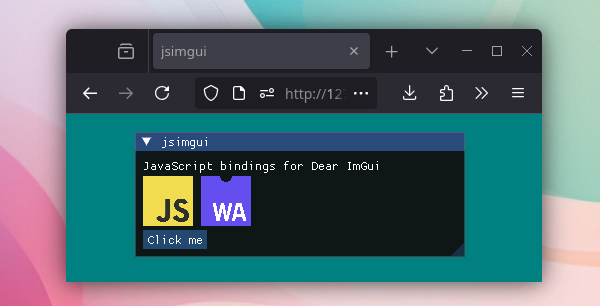
JavaScript/TypeScript bindings for the Dear ImGui library.
Note
The bindings are not 100% complete; some functionality is not supported due to differences between C++ and JavaScript, and internal Dear ImGui features (imgui_internal.h) are not exposed. However, it should cover most use cases so far.
Please open an issue if you find something.
Dear ImGui will be rendered to a <canvas> element. Here is a short single-file example. For more information, read below.
<!DOCTYPE html>
<html>
	<head>
		<style>
			body {
				margin: 0;
			}

			canvas {
				display: block;
				width: 100vw;
				height: 100vh;
			}
		</style>
		<script type="module">
			import { ImGui, ImGuiImplWeb } from "https://esm.sh/@mori2003/jsimgui";

			const canvas = document.querySelector("#render-canvas");

			await ImGuiImplWeb.Init({ canvas: canvas });

			function render() {
				canvas.width = canvas.clientWidth * window.devicePixelRatio;
				canvas.height = canvas.clientHeight * window.devicePixelRatio;

				ImGuiImplWeb.BeginRender();

				ImGui.Begin("New Window");
				ImGui.Text("Hello, World!");
				ImGui.End();
				ImGui.ShowDemoWindow();

				ImGuiImplWeb.EndRender();
				requestAnimationFrame(render);
			}
			requestAnimationFrame(render);
		</script>
	</head>
	<body>
		<canvas id="render-canvas"></canvas>
	</body>
</html>
To add the library to your project using your favorite package manager:
npm add @mori2003/jsimgui
bun add @mori2003/jsimgui
deno add npm:@mori2003/jsimgui
Packages are available on npm, JSR and GitHub Packages
Alternatively, you can import it directly from a CDN like esm.sh or esm.run:
import { ImGui, ImGuiImplWeb } from "https://esm.sh/@mori2003/jsimgui";
import { ImGui, ImGuiImplWeb } from "https://esm.run/@mori2003/jsimgui";
Tip
You can also use import aliases and maps.
In your package.json, add the alias to your dependencies and resync the packages:
  "dependencies": {
    "imgui": "npm:@mori2003/jsimgui"
  }
Or, if you are using a CDN, you can add an importmap to your HTML:
<script type="importmap">
	{
		"imports": {
			"imgui": "https://esm.sh/@mori2003/jsimgui"
		}
	}
</script>
Then you can import it as:
import { ImGui, ImGuiImplWeb } from "imgui";
Dear ImGui renders to a <canvas> element.
<!DOCTYPE html>
<html>
	<head>
		<style>
			body {
				margin: 0;
			}

			canvas {
				display: block;
				width: 100vw;
				height: 100vh;
			}
		</style>
		<script type="module" src="main.js"></script>
	</head>
	<body>
		<canvas id="imgui"></canvas>
	</body>
</html>
In your JavaScript, initialize the library and start the render loop.
// main.js
import { ImGui, ImGuiImplWeb } from "@mori2003/jsimgui";

const canvas = document.querySelector("#imgui");

await ImGuiImplWeb.Init({ canvas });

function frame() {
	// Resize canvas to fit window
	canvas.width = canvas.clientWidth;
	canvas.height = canvas.clientHeight;

	ImGuiImplWeb.BeginRender();

	ImGui.Begin("My Window");
	ImGui.Text("Hello World!");
	ImGui.End();

	ImGui.ShowDemoWindow();

	// Draw your scene...

	ImGuiImplWeb.EndRender();
	requestAnimationFrame(frame);
}
requestAnimationFrame(frame);
Note
ImGuiImplWeb.Init supports additional options:
await ImGuiImplWeb.Init({
	canvas: myCanvas,
	device: myGpuDevice, // Required for WebGPU
	backend: "webgl2", // "webgl", "webgl2", or "webgpu"
	fontLoader: "truetype", // "truetype" or "freetype"
	extensions: true, // Enable Dear ImGui extensions (imnodes, implot, ...)
});
Tip
The examples use ImGuiImplWeb helpers (BeginRender/EndRender).
For more control, you can use the backend functions directly:
function frame() {
	ImGuiImplOpenGL3.NewFrame();
	ImGui.NewFrame();

	// ...

	ImGui.Render();
	ImGuiImplOpenGL3.RenderDrawData(ImGui.GetDrawData());
}
Arrays are modified in-place when passed as arguments. Single-sized arrays are also used for references:
const color = [0.2, 0.8, 0.5];
ImGui.ColorEdit3("BackgroundColor", color); // Modifies the color array.
const isVisible = [true];
ImGui.Checkbox("Show Window", isVisible); // Modifies isVisible[0].
Images are loaded using the ImGuiImplWeb.RegisterTexture function. You pass in a WebGLTexture or GPUTexture and it returns an ImTextureRef that you can the use for Image functions like ImGui.Image.
const imgRef = ImGuiImplWeb.RegisterTexture(texture);
ImGui.Image(imgRef, new ImVec2(100, 100));
To use the new default "ProggyForever" font (since Dear ImGui v1.92.6):
const io = ImGui.GetIO();
io.Fonts.AddFontDefaultVector();
To load a font from a file (.ttf or .otf):
const fontBuf = await (await fetch("./NotoSansCJKjp-Medium.otf")).arrayBuffer();

ImGuiImplWeb.LoadFont("NotoSansCJKjp-Medium.otf", new Uint8Array(fontBuf));

const io = ImGui.GetIO();
io.Fonts.AddFontFromFileTTF("NotoSansCJKjp-Medium.otf");
You can set callbacks for saving and loading the Dear ImGui INI settings via ImGuiImplWeb.SetSaveIniSettingsFn and ImGuiImplWeb.SetLoadIniSettingsFn. The save function will be called automatically whenever Dear ImGui wants to save changes (window resizing, closing, etc.). The load function will be called by ImGuiImplWeb.Init, so it should be set before that. Alternatively you can use the normal ImGui.SaveIniSettingsToMemory and ImGui.LoadIniSettingsFromMemory functions at any time.
A short example saving to browsers localStorage:
ImGuiImplWeb.SetSaveIniSettingsFn((iniData) => {
 localStorage.setItem("imgui-ini", iniData);
});

ImGuiImplWeb.SetLoadIniSettingsFn(() => {
 return localStorage.getItem("imgui-ini");
});

await ImGuiImplWeb.Init(...);
git clone https://github.com/mori2003/jsimgui.git --recurse-submodules
cd jsimgui
docker build -t jsimgui -f .github/Dockerfile .
docker run -v "$PWD:/workspace" jsimgui bash -c "npm install && node build.ts"
Prerequisites
npm install
node build.ts
To build with extensions or freetype font loader:
node build.ts --extensions
node build.ts --freetype
node build.ts --extensions --freetype

node build.ts --help # To see all options
docs/         # Usage examples
src/          # Bindings generator source code
third_party/  # Dependencies (imgui, dear_bindings)
more like this
Firefox and Chrome extensions to prevent Google from making links ugly.
TachiSnap — Pixel Snapper for animation pixel artists. Rust + WebAssembly client-side tool for cleaning up AI-generated…
SCYTHE is a lightweight, C#-based game engine focused on modifiability and rapid iteration using Raylib.
search projects, people, and tags