
EdenExplorer


Blazing-fast, open-source file manager for Windows 10/11*.
A next-generation file explorer built with Rust and egui,
focused on performance, efficiency, and modern workflows.
A fast, open-source alternative to Windows File Explorer.


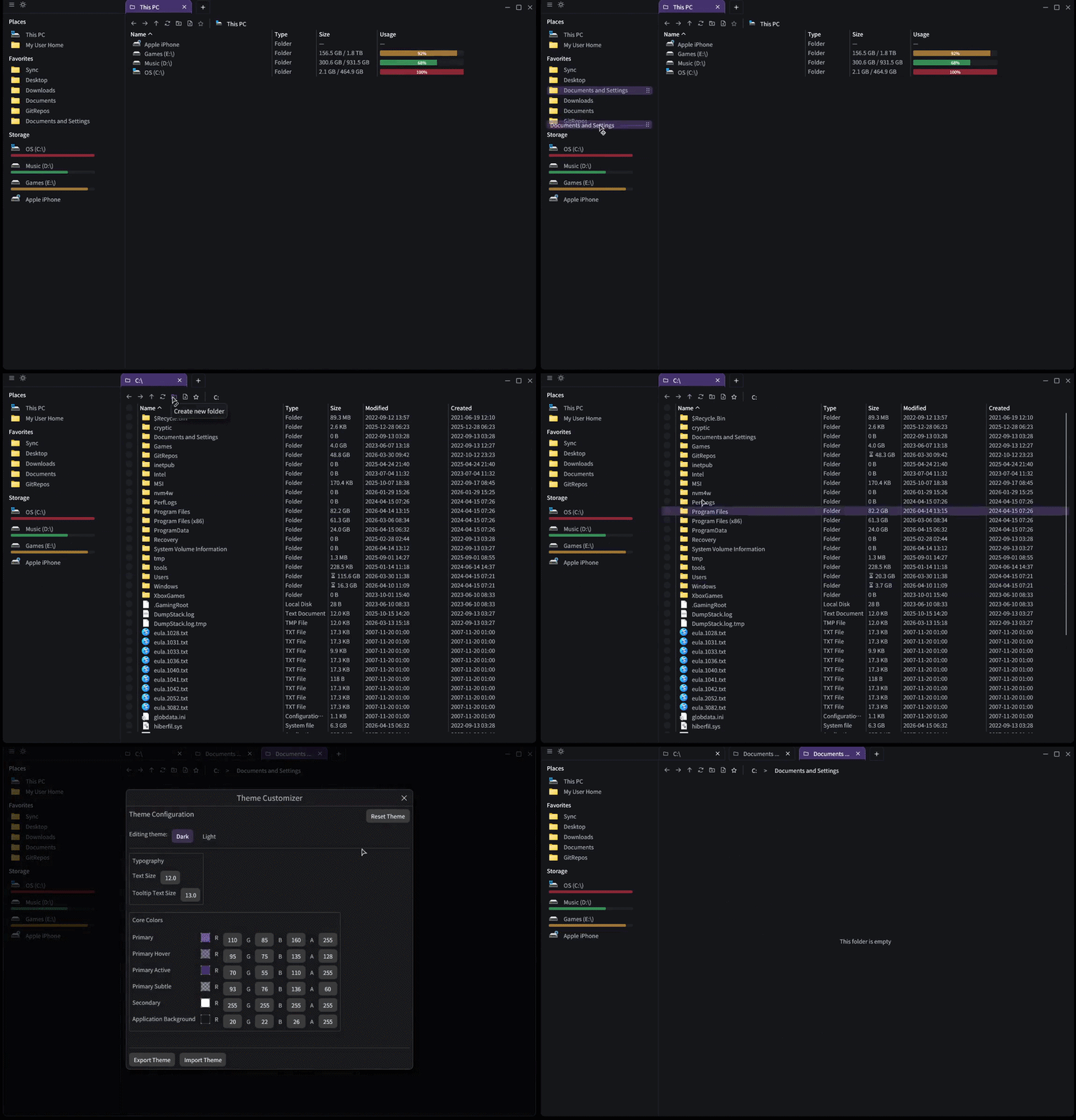
*Users reported no issues on Windows 10, but I'm cautious in declaring official support.
⭐ Support
If you like this FOSS project, consider sponsoring

⚡ Why EdenExplorer?
Windows File Explorer hasn't evolved for modern workflows.
It's slow, inefficient, and built for a different era.
EdenExplorer fixes that.
Powered by direct NT-level filesystem access for maximum performance.
⚡ Lightning-fast performance — minimal overhead
🧠 Efficient by design — Built in Rust for memory safety and speed
🎯 Minimal, modern UI — Clean, distraction-free interface that just works
🔓 100% Free & Open Source — No telemetry, no lock-in, no nonsense
🪶 Lightweight footprint — Uses a fraction of the resources of Explorer
🧰 Built for daily use — Your new go-to file manager for everything
🧩 Built With Modern Technology
🦀 Rust — Safe, fast, and reliable systems programming
🎨 egui — Immediate mode GUI for ultra-responsive interfaces
📦 egui-phosphor — Phosphor icon set for egui
⚙️ NT-level filesystem access — Maximum performance, minimal abstraction
Comparison
| Feature |
EdenExplorer |
FilePilot |
Windows Explorer |
Files.Community |
| Pricing |
✅ Free |
❌ Paid |
❌ Your Data |
✅ Free |
| Performance |
⚡ Fast |
⚡ Fast |
🐢 Slow |
🐢 Slow |
| Open Source |
✅ Yes |
❌ No |
❌ No |
✅ Yes |
| NT-level access |
✅ Yes |
✅ Yes |
❌ No |
❌ No |
| Resource Usage |
🪶 Low |
🪶 Low |
🧱 Heavy |
🧱 Medium |
| Core Technology |
🦀 Rust |
🦀 Rust |
⚙️ C++* |
💙 C# / WinUI |
🚀 Getting Started
Download
Grab the latest release from:
https://github.com/mtucciarone/EdenExplorer/releases
Just download and launch — no installation, no setup.
✨ Features
Core Functionality
- Lightning-fast GUI that starts at the root of your computer, displaying all drives with comprehensive storage types and detailed information
- Asynchronous directory scanning for ultra-fast file listing without blocking the UI
- Intuitive navigation with Back / Forward / Up controls for seamless browsing
- Smart sidebar with quick access to common folders and customizable favorites
Theme & Customization
- Dark/Light mode switching with instant toggle
- Advanced theme customization with full color palette editor
- Customizable startup directory
- Persistent settings across restarts
Search & Filtering
- Real-time file filtering as you type
- Fuzzy matching for intelligent results
- Performance-optimized filtering with cached indices
|
User Interface & Navigation
- Tabbed navigation with independent loading states
- Interactive breadcrumb navigation with inline editing
- Responsive design across window sizes
- Modern toolbar with file and folder actions
- Tag management system for organizing files and folders
Advanced Features
- Favorites system with drag-and-drop support
- Background folder size calculation with progress tracking
- Context menu operations (cut, copy, paste, rename, delete)
- Drag and drop files/folders within the viewer
- Portable device support (iPhone, Android, external devices)
- Raw/unmounted drive detection (ISO, Linux partitions)
- Multi-language Support using i18n
System Integration
- Persistent settings using efficient binary cache
- Efficient drive space queries with caching
- Windows API integration
- Custom executable icon with file association
- Improved window management
Performance Optimizations
- NT-level filesystem access via direct API calls
- Background scanning prevents UI freezing
- Efficient caching for directories and metadata
- Streaming directory enumeration
- Low memory footprint
- Built-in benchmarking system
|
🗺️ Roadmap
✅ Implemented Features
- Tabbed interface with tab management, tab pinning (automatic restore on startup), and navigation
- Search and filter engine with real-time file indexing
- Dark/Light theme switching with toggle controls
- Comprehensive navigation with back/forward/up controls
- Favorites system with drag-and-drop support
- Favorites management with reset and reorganization capabilities
- Context menu operations (cut, copy, paste, rename, delete)
- Enhanced drive caching with 30-second cache duration for improved UI performance
- Optimized icon caching with metadata-based cache keys and background loading
- Folder size scanning control with user setting to enable/disable performance-heavy operations
- Window size customization with fullscreen, half-screen, and custom dimension modes
- Portable device support for iPhone, Android, and other connected devices
- Raw/unmounted drive detection for ISO sticks and Linux partitions
- Performance benchmarking system with real-time measurement and comparison tools
- Drag and drop files/folders - Move one or more items into folders shown in the item viewer
- Window management improvements with proper maximization bounds and minimum size constraints
- File/Directory filtering - typing characters automatically start filtering items in the item viewer
- Windows environment variables PATH support - Automatically expands Windows PATHs in breadcrumb input
- Drag and drop files into breadcrumb folders and directory tabs
- Enable/Disable Windows shell integration. By enabling, the context menu will populate with default Windows registry context menu items
- New context menu command (Copy Path) with keyboard shortcut of Ctrl+Shift+C
- Column sorting saves across sessions
- Drag and drop files from EdenExplorer into native Operating System (Windows) objects (Desktop, File Explorer, applications, etc.)
- Full navigation history is saved and restored with Back/Forward/Up buttons
- Added English, Indonesian, Japanese, and multi-Chinese language support
- Add folder tags and custom folder colors
- Add toggle for display hidden explorer objects
- Support changing the application font based on the system-installed fonts
- Collapsible sidebar
- Split-pane view in the Explorer
- Explorer view displays objects that have tags applied to them based on the tag color
🚀 Upcoming Beta Features
- New Explorer view that displays pictures in medium/large format
- Support multi-column sorting
- Add a tags column in the Explorer view
- Support network devices
- Enhanced theme customization, such as custom layouts, mix/match UI elements, styles, etc
🐛 Known Bugs
- Hitting "Shift" after already shift-selecting files drops the entire file selection
Star History

Keyboard Shortcuts
- F1 - Toggle fullscreen
- Ctrl+Shift+C - Copy selected path
- Ctrl+W - Close current Tab
- Ctrl+T - New Tab
- Ctrl+Tab - Next Tab
- Ctrl+Shift+Tab - Previous Tab
- Ctrl+Shift+N - Create new folder in current directory
- Ctrl+R (F5) - Refresh current directory
- Alt+D - Select the address bar / current directory path
- F2 - Rename current selected file (if any is selected inside the explorer)
- Alt-Enter - Open current properties of current selected file (if any is selected inside the explorer)
- Home/End - Scroll to the top or bottom of the current explorer directory and select the first/last object
- Alt + Left Arrow (Backspace) - Navigate backwards
- Alt + Right Arrow (Mouse Button 4) - Navigate forwards
- Alt + Up Arrow (Mouse Button 5) - Navigate upwards
- Enter - If a file is selected, runs the default program
License
This project is FOSS, released under the MIT License.
 mtucciarone