svelte-audio-waveform
Generate stunning audio waveforms with Svelte 5 and Canvas. Transform an array of peak data into beautifully rendered,…
Svelte★ 51
Multitrack Web Audio editor and player with canvas waveform preview. Set cues, fades and shift multiple tracks in time.…
 naomiaro
A multi-track audio editor and player built with React, Tone.js, and the Web Audio API. Features canvas-based waveform visualization, drag-and-drop clip editing, and professional audio effects.
npm install @waveform-playlist/browser tone @dnd-kit/react
Note:
toneand@dnd-kit/reactare peer dependencies and must be installed separately.@dnd-kit/domand@dnd-kit/abstractare transitive dependencies of@dnd-kit/react.
v14: the playout engines are optional peers. Install the one(s) you use:
- WebAudio/Tone path:
npm install @waveform-playlist/browser @waveform-playlist/playout tone- MediaElement path:
npm install @waveform-playlist/browser @waveform-playlist/media-element-playout- Custom adapter:
npm install @waveform-playlist/browserand passcreateAdapter(notone).The
Toneconvenience re-export was removed in v14 —import * as Tone from 'tone'directly.v14: effects, WAV export, output metering, and the
useAudioTracks/useDynamicTracksloaders import from@waveform-playlist/browser/tone.
import { WaveformPlaylistProvider, Waveform, PlayButton, PauseButton, StopButton } from '@waveform-playlist/browser';
import { createTrack, createClipFromSeconds } from '@waveform-playlist/core';

function App() {
  const [tracks, setTracks] = useState([]);

  // Load audio and create tracks
  useEffect(() => {
    async function loadAudio() {
      const response = await fetch('/audio/song.mp3');
      const arrayBuffer = await response.arrayBuffer();
      const audioContext = new AudioContext();
      const audioBuffer = await audioContext.decodeAudioData(arrayBuffer);

      const track = createTrack({
        name: 'My Track',
        clips: [createClipFromSeconds({ audioBuffer, startTime: 0 })],
      });

      setTracks([track]);
    }
    loadAudio();
  }, []);

  return (
    <WaveformPlaylistProvider tracks={tracks}>
      <div>
        <PlayButton />
        <PauseButton />
        <StopButton />
      </div>
      <Waveform />
    </WaveformPlaylistProvider>
  );
}
| Example | Description |
|---|---|
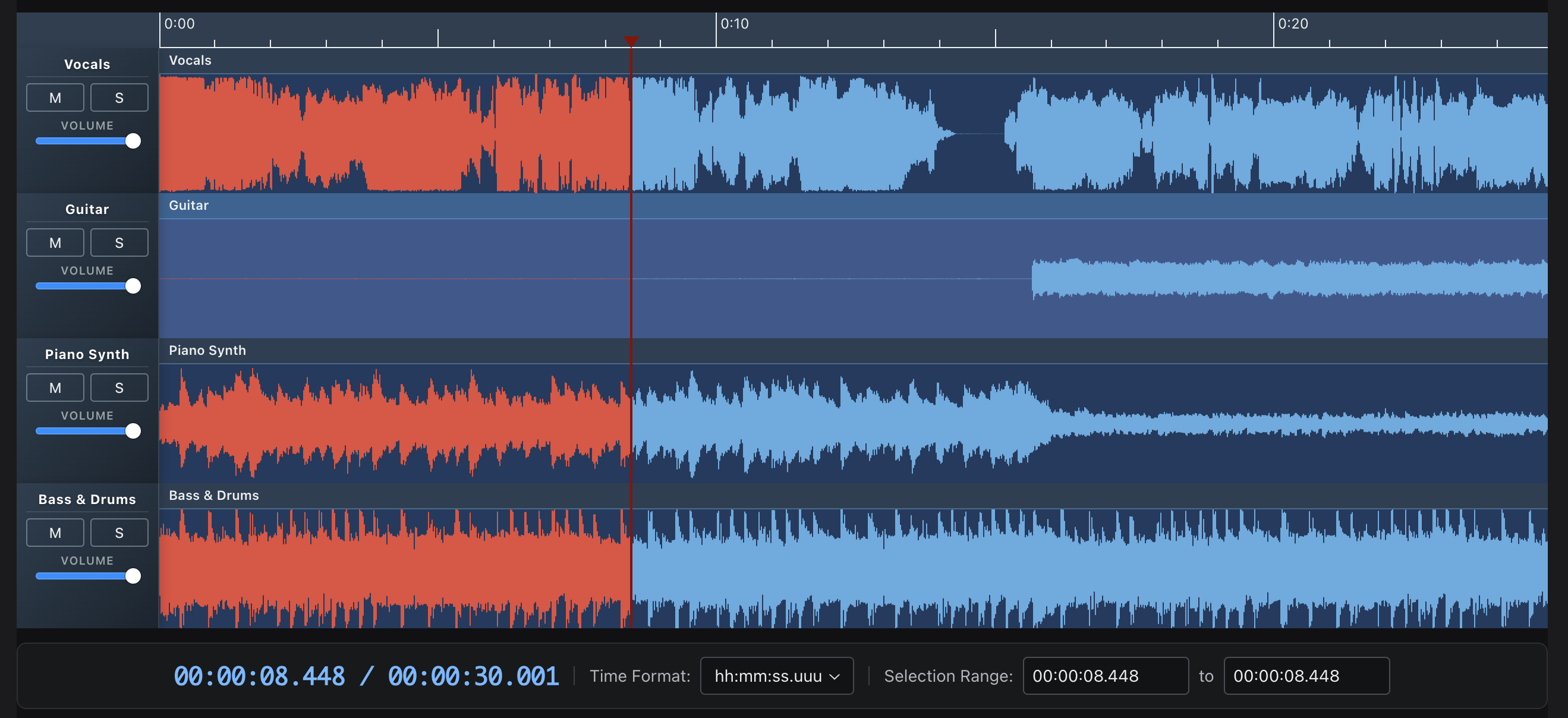
| Stem Tracks | Multi-track playback with mute/solo/volume controls |
| Effects | 20 Tone.js effects with real-time parameter control |
| WAM! Kick It Up a Notch | Host WAM 2.0 plugins with community library, native GUIs, and mixed Tone+WAM chains |
| Recording | Live recording with VU meter and waveform preview |
| Multi-Clip | Drag-and-drop clip editing with trim handles |
| Annotations | Time-synced text with keyboard navigation |
| Waveform Data | Pre-computed peaks for fast loading |
| MIDI | MIDI file playback with piano roll and SoundFont samples |
| Beats & Bars | Tempo-synced timescale with beats and bars ruler |
| Fades | Fade in/out with configurable curves |
| Stereo | Stereo waveform rendering and pan controls |
| Spectrogram | FFT-based spectrogram visualization |
| Media Element | HTMLMediaElement playout with playback rate |
| Styling | Bar width, gaps, rounded bars, gradients, and theme colors |
| Flexible API | Custom playheads, timestamps, and full UI customization |
| Package | Description |
|---|---|
@waveform-playlist/browser |
Main React components, hooks, and context |
@waveform-playlist/core |
Types, utilities, and clip/track creation |
@waveform-playlist/engine |
Framework-agnostic timeline engine with pure operations |
@waveform-playlist/ui-components |
Styled UI components (buttons, sliders, etc.) |
@waveform-playlist/playout |
Tone.js audio engine |
@waveform-playlist/webaudio-peaks |
Peak extraction from AudioBuffer or sample arrays |
Optional packages:
| Package | Description |
|---|---|
@waveform-playlist/midi |
React useMidiTracks hook + piano roll visualization with SoundFont/PolySynth playback. Re-exports the parser from @dawcore/midi. |
@waveform-playlist/annotations |
Time-synced text annotations with drag editing |
@waveform-playlist/recording |
AudioWorklet recording with live waveform preview (requires setup) |
@waveform-playlist/worklets |
Shared AudioWorklet processors for metering and recording (auto-installed with recording) |
@waveform-playlist/spectrogram |
React SpectrogramProvider + UI (menu items, settings modal). Computation/worker/orchestrator are imported from @dawcore/spectrogram. |
@waveform-playlist/media-element-playout |
HTMLMediaElement-based playout with pitch-preserving playback rate |
// Load audio files into tracks
const { tracks, loading, error } = useAudioTracks([
  { src: '/audio/vocals.mp3', name: 'Vocals' },
  { src: '/audio/drums.mp3', name: 'Drums' },
]);

// Playback controls
const { play, pause, stop, seekTo } = usePlaylistControls();

// Playback animation (60fps updates)
const { currentTime, isPlaying } = usePlaybackAnimation();

// Zoom controls
const { zoomIn, zoomOut, samplesPerPixel } = useZoomControls();

// Master effects chain
const { masterEffects, toggleBypass, updateParameter } = useDynamicEffects();

// WAV export
const { exportWav, isExporting, progress } = useExportWav();

// Recording
const { startRecording, stopRecording, isRecording } = useIntegratedRecording(
  tracks, setTracks, selectedTrackId
);
@dawcore/components provides framework-agnostic Web Components for multi-track audio editing — no React required. Built with Lit, adapter-pluggable: choose between @dawcore/transport (native Web Audio) or @waveform-playlist/playout (Tone.js).
npm install @dawcore/components @waveform-playlist/core @waveform-playlist/engine
Audio backend (choose one):
npm install @dawcore/transport          # Native Web Audio (multi-tempo, multi-meter, metronome)
# or
npm install @waveform-playlist/playout tone  # Tone.js (effects, MIDI synths)
<script type="module">
  import '@dawcore/components';
  import { NativePlayoutAdapter } from '@dawcore/transport';

  const editor = document.querySelector('daw-editor');
  const adapter = new NativePlayoutAdapter(new AudioContext());
  editor.adapter = adapter;
</script>

<daw-editor id="editor" clip-headers interactive-clips timescale>
  <daw-track name="Vocals">
    <daw-clip src="/audio/vocals.mp3" start="0" duration="10"></daw-clip>
  </daw-track>
  <daw-keyboard-shortcuts playback splitting undo></daw-keyboard-shortcuts>
</daw-editor>

<daw-transport for="editor">
  <daw-play-button></daw-play-button>
  <daw-pause-button></daw-pause-button>
  <daw-stop-button></daw-stop-button>
  <daw-record-button></daw-record-button>
</daw-transport>
Features:
<daw-track> and <daw-clip> elements with auto-loadingeditor.addTrack/removeTrack/updateTrack/addClip/removeClip/updateClip and editor.ready() for engine bootstrap before any track loadsindefinite-playback rolls DAW-style until an explicit stop, fill-viewport fills the empty viewport so the ruler renders before any track (recording sessions suppress the auto-stop automatically)Packages:
| Package | Description |
|---|---|
@dawcore/components |
Lit Web Components for multi-track editing |
@dawcore/transport |
Native Web Audio transport — scheduling, looping, tempo automation, time signatures, metronome |
@dawcore/spectrogram |
Framework-agnostic spectrogram orchestrator, FFT worker pool, and color maps — used by render-mode="spectrogram" |
@dawcore/midi |
Framework-agnostic MIDI parser (parseMidiFile, parseMidiUrl) — used by editor.loadMidi() and re-exported by @waveform-playlist/midi |
@dawcore/wam |
Web Audio Modules (WAM 2.0) plugin hosting and generic parameter GUIs — used by editor.addWamPlugin() and the effects chain (optional peer, loaded on demand) |
@dawcore/faust |
In-browser Faust DSP → WAM 2.0 compilation — used by editor.addFaustEffect() (optional peer, loaded on demand) |
Run the examples locally:
pnpm example:dawcore-native  # Native Web Audio — localhost:5173
pnpm example:dawcore-tone    # Tone.js backend — localhost:5174
pnpm example:dawcore-wam     # WAM 2.0 plugins + Faust — localhost:5175
pnpm example:media-element   # MediaElement-only React starter (no Tone) — localhost:5176
pnpm example:react-starter   # Full multitrack React starter (Tone engine) — localhost:5177
The react-starter is the smallest correct setup for the full
multitrack editor — WaveformPlaylistProvider on the default Tone.js engine with mixer
controls, plus a README section explaining the "AudioContext was prevented from starting"
browser warning and how the provider's gesture-safe startup avoids it (see its
README).
The media-element-player starter is a minimal React
single-track player using only @waveform-playlist/browser + @waveform-playlist/media-element-playout
(no @waveform-playlist/playout, no tone) — see its README.
dawcore-native example pages:
basic.html — Basic playback with timescale and file dropmulticlip.html — Multi-clip editing with move, trim, and split, plus drag-to-reorder tracks with a live slot-snap drop previewprogrammatic.html — Imperative editor.addTrack / addClip / updateClip / removeClip plus declarative DOM mutation, side-by-sidebeats-grid.html — Beats & bars grid mode with snap-to-grid, plus bar-aligned tick-based annotation regions (start-tick/end-tick)beat-map-grid.html — Variable tempo from beat maps with metronomerecord.html — Recording with overdubmetronome.html — Metronome with mixed meters, tempo presets, and looping sequencesautomation.html — Tempo automation with step, linear, and curve presetsanalyser.html — Spectrum analyser connected to master outputspectrogram.html — Per-track FFT spectrograms via render-mode="spectrogram" with color-map and frequency-scale controlseffects.html — Per-track and master insert effects (native-* registry) with live parameter sliders, bypass, and daw-effect-* event logplayer.html — Lightweight <daw-player> single-track HTMLMediaElement player: waveform with peaks-src + timescale ruler, and a scrubber-only fallback (no peaks-src), with daw-ready/daw-timeupdate/daw-play/daw-stop event logannotations.html — <daw-annotation-track> lyric/section markers with dual-view sync between the timeline lane and <daw-annotation-list>, drag-to-resize boundaries, and keyboard navigation/playbacksonnet.html — Sonnet 1 parity demo: box-label="id" bars with the full text in <daw-annotation-list>dawcore-tone example pages:
basic.html — Basic playback with Tone.js adaptermulticlip.html — Multi-clip editing with Tone.js, plus drag-to-reorder tracks with a live slot-snap drop previewprogrammatic.html — Imperative editor.addTrack / addClip / updateClip / removeClip plus declarative DOM mutation, with the Tone.js adapterbeats-grid.html — Beats & bars grid with Tone.jsrecord.html — Mic recording with overdubanalyser.html — Spectrum analyser connected to master outputspectrogram.html — Per-track FFT spectrograms with the Tone.js adaptermidi.html — Programmatic MIDI clips with piano-roll render mode and Tone.js PolySynthmidi-load.html — Load .mid files (URL or file picker) via editor.loadMidi() and play them through Tone.js PolySynthsoundfont.html — MIDI through SoundFont samples: SoundFontCache.fromUrl() + createToneAdapter({ soundFontCache }), with PolySynth fallback when the .sf2 fails to loadannotations.html — <daw-annotation-track> lyric/section markers with dual-view sync between the timeline lane and <daw-annotation-list>, drag-to-resize boundaries, and keyboard navigation/playback with the Tone.js adapterdawcore-wam example pages:
index.html — WAM 2.0 plugin hosting end to end: insert plugins on any track or the master bus (one rack per track + master), with the target chosen from a dropdown that tracks every track — including stems dragged-and-dropped onto the editor (file-drop). Load community plugins by URL or from the webaudiomodules.com library, open plugin GUIs, reorder/bypass chains, save and restore chains (including state) via localStorage, export the mix to WAV through exportAudio(), and compile Faust DSP to a live effect in the browser (@dawcore/faust) — plus pre-compiled Faust effects served from this repoSpec & roadmap: docs/specs/web-components-migration.md — full element catalogue, attribute/property/event tables, programmatic API contracts, theming tokens, and migration phases.
Requires Web Audio API support: Chrome, Firefox, Safari, Edge (modern versions).
# Install dependencies
pnpm install

# Start dev server
pnpm website

# Run tests
pnpm test

# Build all packages
pnpm build
Visit http://localhost:3000/waveform-playlist to see the examples.
Currently writing: Mastering Tone.js
Originally created for the Airtime project at Sourcefabric.

more like this
Generate stunning audio waveforms with Svelte 5 and Canvas. Transform an array of peak data into beautifully rendered,…
Oscillody is a free, real-time, oscilloscope-based audio visualizer. You can import up to 4 stems, customize the visual…
search projects, people, and tags