agentlytics
Comprehensive analytics dashboard for AI coding agents — Cursor, Windsurf, Claude Code, VS Code Copilot, Zed, Antigravi…
JavaScript★ 555
A TUI server monitoring and management dashboard for Linux. Real-time metrics, logs, and remote control from your termi…
 nickprotop
git clone https://github.com/nickprotop/ServerHub.gitnickprotop/ServerHub
An extensible server dashboard that doesn't just watch—it acts.
It helps others discover the project and motivates continued development.
ServerHub is a terminal control panel for servers and homelabs. Monitor your system, execute actions, and build custom monitoring for your specific setup—all without touching the codebase.
Monitor. Act. Extend.
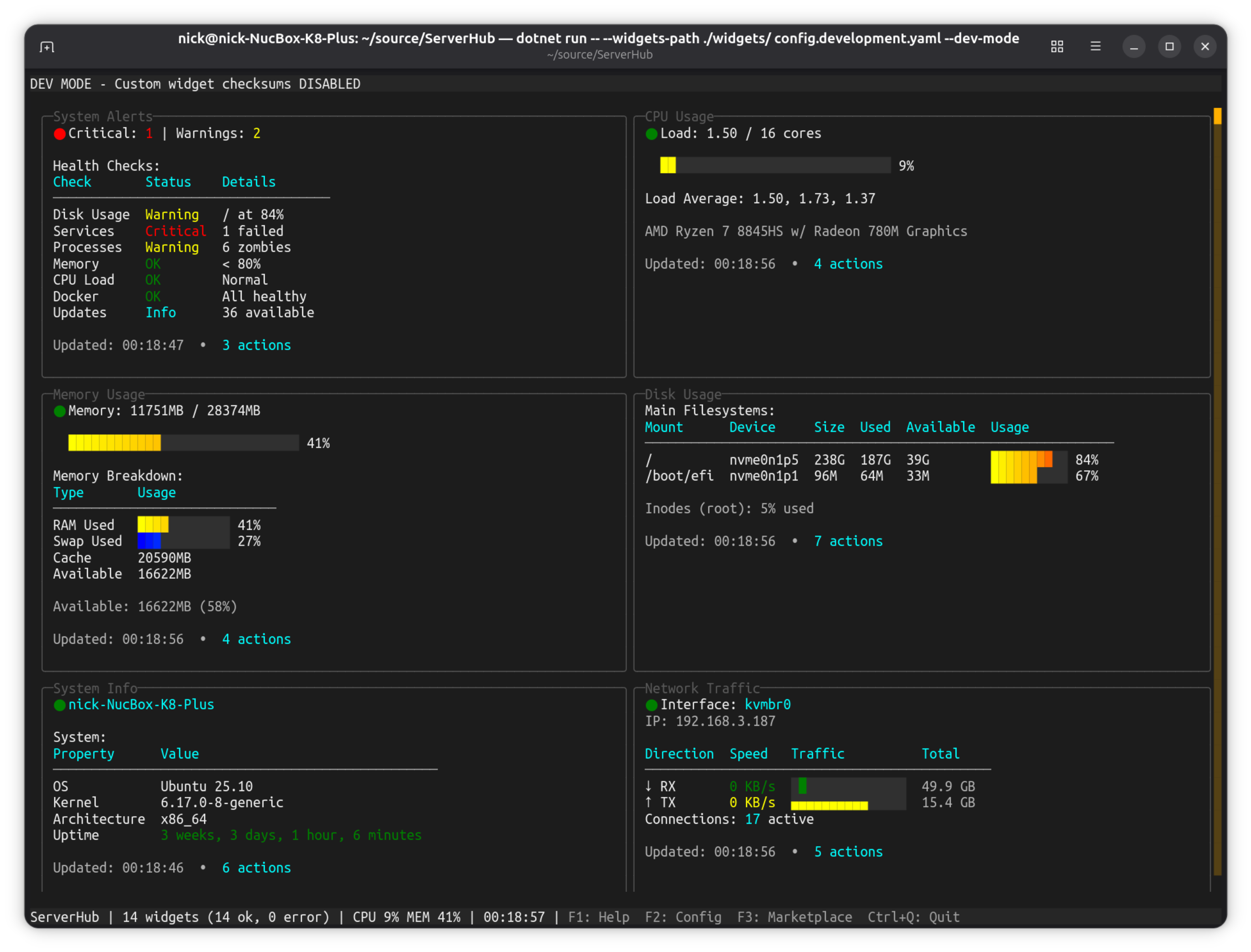
Get ServerHub running in 3 steps:
# 1. Install ServerHub
curl -fsSL https://raw.githubusercontent.com/nickprotop/ServerHub/main/install.sh | bash

# 2. Run it (creates default config automatically)
serverhub

# 3. Press F3 to browse and install community widgets
That's it! You now have a working dashboard with 14 bundled widgets. Press F3 to explore the marketplace, F2 to configure widgets, or ? for help.
Extensible by design - Write a script in any language (C#, Python, bash, Node.js, Go, Rust, or compiled binaries). If it outputs to stdout, it's a widget. Monitor anything: custom services, APIs, hardware you built yourself, scripts you already have. Widgets support expanded views - press Enter for full details beyond the dashboard summary.
Context-aware actions - Widgets don't just display data—they export actions based on what they're showing. A service widget shows different restart options depending on which services are running. An updates widget exports "Upgrade All" only when updates are available. Docker widget offers actions per container. Each widget adapts to the current state.
Control, not just monitoring - Upgrade packages, restart services, manage containers, trigger backups—execute actions with confirmation dialogs, progress tracking, and sudo support when needed. Your dashboard becomes a control panel.
Security-first extensibility - SHA256 validation for custom widgets with a documented threat model. Minimal environment variables. Path restrictions. Symlink blocking. Professional security without sacrificing flexibility.
Discover and install community-contributed widgets from the ServerHub marketplace.
Full Marketplace Documentation
Press F3 in the dashboard to open the interactive marketplace browser:
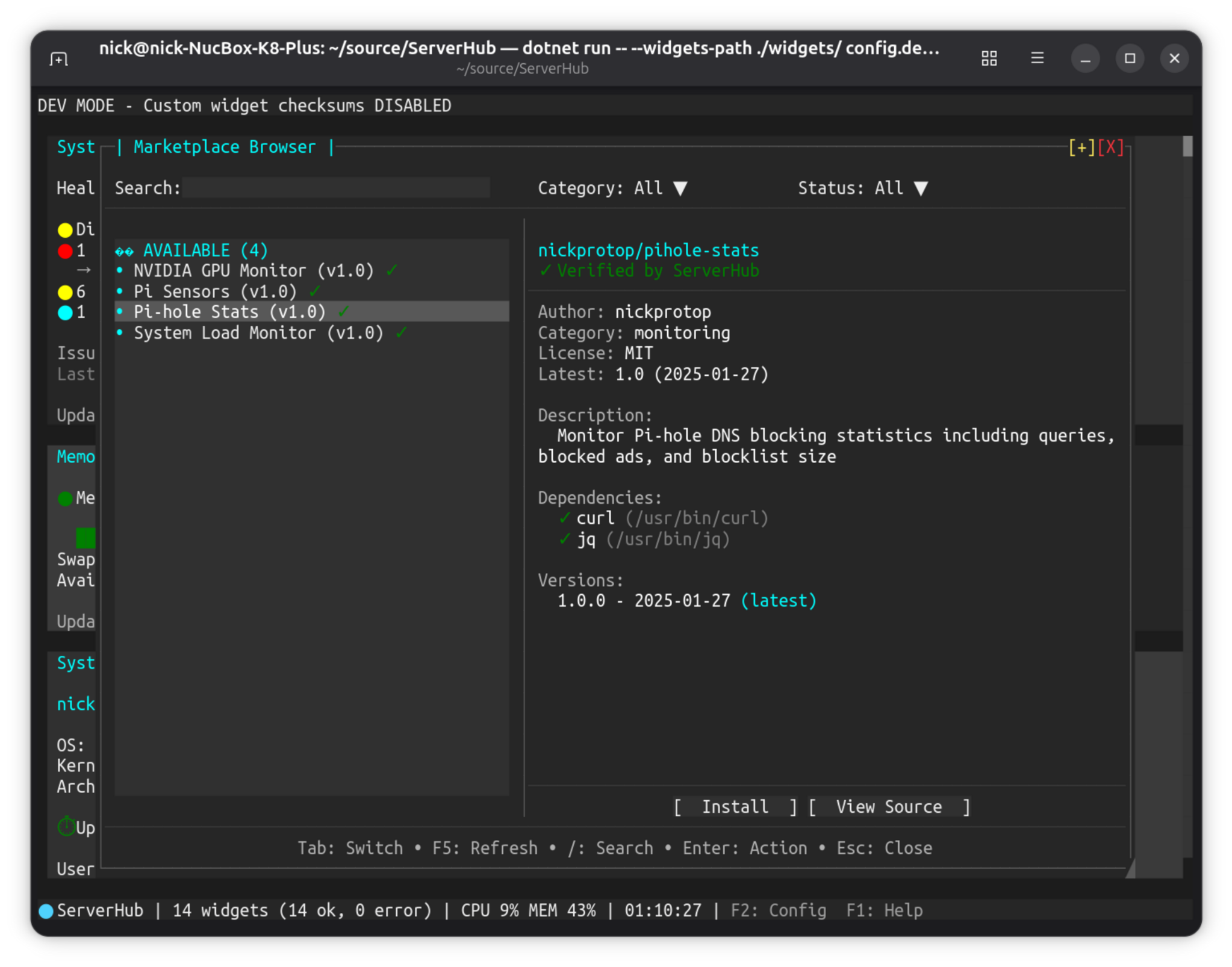
--widgets-path if you started ServerHub with a custom widgets directoryWidget management:
Search and install from the terminal:
# Search for widgets
serverhub marketplace search monitoring

# List all widgets
serverhub marketplace list

# List by category
serverhub marketplace list --category monitoring

# Get detailed information
serverhub marketplace info username/widget-name
# Install latest version
serverhub marketplace install username/widget-name

# Install specific version
serverhub marketplace install username/widget-name@1.0.0

# View installed marketplace widgets
serverhub marketplace list-installed
# Check for available updates
serverhub marketplace check-updates

# Update a specific widget
serverhub marketplace update username/widget-name

# Update to a specific version
serverhub marketplace update username/widget-name --version 2.0.0

# Update all widgets
serverhub marketplace update-all

# Auto-confirm updates (skip prompts)
serverhub marketplace update --yes username/widget-name
Note: Uninstall marketplace widgets via the interactive browser (F3 in dashboard)
Validate widget scripts before deployment with the test-widget command:
serverhub test-widget mywidget.sh              # Interactive test
serverhub test-widget mywidget.sh --yes        # Skip confirmation (CI/CD)
serverhub test-widget mywidget.sh --extended   # Test extended mode
The test command validates protocol compliance, checks action syntax, and provides warnings and suggestions. Returns exit code 0 on success, 1 on failure (CI/CD friendly).
Full Widget Testing Documentation
The marketplace uses a security-first approach:
You are responsible for reviewing code before installing unverified widgets.
Want to contribute your own widget? See MARKETPLACE.md for the submission process.
No .NET runtime required - ServerHub ships as a self-contained binary.
Download and install the latest release:
curl -fsSL https://raw.githubusercontent.com/nickprotop/ServerHub/main/install.sh | bash
This automatically:
~/.local/bin to your PATHFor development or if you want to build from source:
git clone https://github.com/nickprotop/ServerHub.git
cd ServerHub
./build-and-install.sh
Requires .NET 9.0 SDK for building.
To remove ServerHub from your system:
curl -fsSL https://raw.githubusercontent.com/nickprotop/ServerHub/main/uninstall.sh | bash
This removes:
~/.local/bin~/.local/share/serverhub~/.config/serverhub (the script will ask)serverhub # Run with default config serverhub myconfig.yaml # Use custom config file serverhub --init-config config.yaml # Create config by discovering widgets serverhub --discover # Find and add custom widgets serverhub --verify-checksums # Verify all widget checksums serverhub --dev-mode # Development mode (see Security section) serverhub test-widget <script> [--yes] # Test widget protocol compliance serverhub --help # Show all options
First-time setup - The default config (~/.config/serverhub/config.yaml) is automatically created on first run with all bundled widgets.
Custom configurations - Use --init-config to create a new configuration file by discovering available widgets:
# Create config with bundled widgets only
serverhub --init-config config.production.yaml

# Create config with bundled + custom widgets from specific directory
serverhub --init-config config.dev.yaml --widgets-path ./widgets/
How it works:
~/.config/serverhub/widgets/ for custom widgets--widgets-path if providedlocation fields--discover or --dev-mode)Note: Custom config paths (non-default) are not auto-created. You must explicitly use --init-config to create them. This prevents accidental file creation from typos.
| Key | Action |
|---|---|
Tab / Shift+Tab |
Navigate between widgets |
Arrow keys |
Scroll within focused widget |
F2 |
Configure widgets (add, edit, reorder) |
F3 |
Browse marketplace widgets |
F5 |
Refresh all widgets |
Space |
Pause/resume refresh |
? or F1 |
Show help |
Ctrl+Q |
Quit |
Configuration file location: ~/.config/serverhub/config.yaml
On first run, ServerHub automatically creates this file with all bundled widgets configured.
For custom configuration paths, use --init-config:
# Create a new configuration file
serverhub --init-config myconfig.yaml

# Create config with widgets from a specific directory
serverhub --init-config myconfig.yaml --widgets-path ./widgets/
default_refresh: 5

widgets:
  cpu:
    path: cpu.sh
    refresh: 2
    location: bundled  # Optional: bundled, custom, or auto (default)

  memory:
    path: memory.sh
    refresh: 2

  docker:
    path: docker.sh
    refresh: 30              # Dashboard refreshes every 30s
    expanded_refresh: 10     # Expanded dialog refreshes every 10s
    location: bundled

  my-custom:
    path: my-custom.sh
    location: custom
    sha256: a1b2c3d4...  # Required for custom widgets (use --discover)
    refresh: 10

layout:
  order:
    - cpu
    - memory
    - docker
    - my-custom

breakpoints:
  double: 100    # 2 columns at 100+ chars
  triple: 160    # 3 columns at 160+ chars
  quad: 220      # 4 columns at 220+ chars
Refresh Intervals:
Each widget can have two refresh intervals:
refresh - Refresh rate for the main dashboard (required)expanded_refresh - Refresh rate when viewing the expanded dialog (optional)If expanded_refresh is not set, the widget uses the refresh value for both views.
Common patterns:
Slower expanded refresh - Reduce resource usage when viewing details:
alerts:
  refresh: 30
  expanded_refresh: 60  # Slower - alerts don't change often
Faster expanded refresh - More detail when actively monitoring:
docker:
  refresh: 30
  expanded_refresh: 10  # Faster when viewing container details
Real-time monitoring - Keep the same rate for both:
cpu:
  refresh: 2  # No expanded_refresh - uses 2s for both views
The location field controls where ServerHub searches for widget scripts:
location: bundled - Search only in ~/.local/share/serverhub/widgets/location: custom - Search only in ~/.config/serverhub/widgets/ and --widgets-pathlocation: auto (or omit) - Search all directories in priority order: --widgets-path → ~/.config/serverhub/widgets/ → ~/.local/share/serverhub/widgets/ (default)Use cases:
cpu bundled, cpu_1 custom)When using --init-config with --widgets-path, widgets found in the custom path are added with location: custom and unique IDs if filenames conflict with bundled widgets.
See config.example.yaml for full configuration options.
| Widget | Description |
|---|---|
cpu |
CPU usage and load average |
memory |
Memory and swap usage |
disk |
Disk space usage |
network |
Network interface statistics |
processes |
Top processes by CPU/memory |
sysinfo |
System information (hostname, uptime, kernel) |
docker |
Docker container status |
services |
Systemd service status |
updates |
Available package updates |
alerts |
System health alerts |
sensors |
Hardware temperature sensors |
netstat |
Network connections |
logs |
Recent system log entries |
ssl-certs |
SSL certificate expiry status |
Write widgets in any language - C# scripts, bash, Python, Node.js, Go, Rust, or compiled binaries. As long as it outputs to stdout following our protocol, it works.
Place custom widget scripts in ~/.config/serverhub/widgets/.
All custom widgets require SHA256 checksum validation (see Security section below).
Widget Development Guide - Create, test, and deploy widgets
# Create widget from template
serverhub new-widget

# Discover new widgets interactively (recommended)
serverhub --discover

# Verify checksums for all configured widgets
serverhub --verify-checksums
Widgets output structured text to stdout:
echo "title: My Widget"
echo "row: [status:ok] Everything is fine"
echo "row: [progress:75:inline]"
echo "row: [line:10,20,15,30,25:cyan:CPU History:0-100:50:6]"  # Line graph
echo "row: [grey70]Last updated: $(date)[/]"
See docs/WIDGET_PROTOCOL.md for the full protocol reference.
Real-world examples showing custom widgets for specific scenarios:
See docs/EXAMPLES.md for complete working examples with scripts.
Widgets are executable scripts that run with your user privileges. A malicious widget could read your files, make network requests, or do anything else you can do. We'd rather be annoying about checksums than watch your server have a very bad day.
What we protect against:
| Threat | Protection |
|---|---|
| Malicious custom widgets | Checksum requirement forces you to review code before trusting |
| Tampering after trust | Modified files fail checksum validation and won't run |
| Copy-paste attacks | We don't auto-show checksums on failure (see Why We Don't Auto-Generate Checksums) |
| Accidental execution of untrusted code | Unknown widgets are blocked by default |
| Symlink attacks | Symlinks are detected and blocked during validation |
| Path traversal | Scripts must be within allowed widget directories |
| Environment variable leakage | Widgets run with minimal environment variables |
What we DON'T protect against:
| Threat | Notes |
|---|---|
| Compromised build environment | If attackers modify bundled checksums at build time, they can ship malicious code. Mitigation: reproducible builds, signed releases (future) |
| You approving malicious code | If you --discover a widget and approve without reading it, that's on you |
| Privilege escalation | Widgets run as your user. If you run ServerHub as root, widgets run as root. Don't do this. |
| TOCTOU race conditions | Small window between checksum validation and execution. Low risk in practice |
| Side-channel attacks | Widget output is displayed; timing or output analysis is possible |
| Source | Trust Level | Checksum Source | Failure Behavior |
|---|---|---|---|
| Bundled widgets | Highest | Hardcoded at build time (maintainer-reviewed) | Widget disabled with error message in widget area |
| Custom widgets | User-verified | You add sha256 to config after reviewing code |
Widget disabled with error message in widget area |
ServerHub performs multiple security checks before executing any widget script:
--widgets-path (if specified)~/.config/serverhub/widgets/ (custom widgets)~/.local/share/serverhub/widgets/ (bundled widgets)Additionally during execution:
| Scenario | Behavior |
|---|---|
| Bundled widget checksum mismatch | Widget refuses to run, displays "Checksum mismatch" error |
| Bundled widget file missing | Widget refuses to run, displays "Widget not found" error |
| Custom widget missing checksum | Widget refuses to run, displays "No checksum configured" with instructions |
| Custom widget checksum mismatch | Widget refuses to run, displays "Checksum mismatch" error with expected vs actual |
| Custom widget file missing | Widget refuses to run, displays "Widget not found" error |
| Symlink detected | Widget refuses to run, displays "Symlinks are not allowed" error |
| Path outside allowed directories | Widget refuses to run, displays "Script path is not within allowed directories" error |
| Script not executable | Widget refuses to run, displays "Script is not executable" with chmod instructions |
In all cases, other widgets continue to function normally. A single compromised or misconfigured widget doesn't take down your dashboard.
Bundled widgets (~/.local/share/serverhub/widgets/) are pre-validated with checksums baked into the application at build time. They just work.
Custom widgets (~/.config/serverhub/widgets/) require a sha256 checksum in your config:
widgets:
  my-widget:
    path: my-widget.sh
    sha256: a1b2c3d4e5f6...  # Required!
    refresh: 10
Without a checksum, custom widgets will not run. This is intentional.
Option 1: Initialize Config with Discovery (Recommended for new configs)
# Create config with auto-discovered widgets
serverhub --init-config config.yaml --widgets-path ./widgets/

# Then review and add checksums interactively
serverhub --discover
This discovers all widgets in bundled and custom locations, generating a config file. Custom widgets are added without checksums (security), requiring you to review them via --discover or run with --dev-mode.
Option 2: Discovery (Recommended for existing configs)
serverhub --discover
This shows you a code preview of each unconfigured widget before adding it. When you approve, the checksum is captured at that moment—the "trusted moment" when you've actually seen what the code does.
Option 3: Manual
# 1. Read the script yourself
cat ~/.config/serverhub/widgets/my-widget.sh

# 2. Calculate the checksum
sha256sum ~/.config/serverhub/widgets/my-widget.sh

# 3. Add to config with the checksum
nano ~/.config/serverhub/config.yaml
ServerHub's auto-creation behavior is intentionally restrictive to prevent security issues:
Auto-created: ~/.config/serverhub/config.yaml (default path only)
Not auto-created: Custom config paths (e.g., config.dev.yaml, myconfig.yaml)
config.developmnet.yaml)--widgets-path--init-config explicitly to createWhy this matters:
Running serverhub config.dev.yaml --widgets-path ./widgets/ should fail if the config doesn't exist, not silently create a config that expects bundled widgets while you're pointing at custom widgets. This mismatch causes path resolution issues and confusing behavior.
When a widget fails validation, ServerHub does not helpfully show you "just add this checksum." That would defeat the entire security model:
Instead, you must go through a "trusted moment"—either --discover (which shows the code) or manually running sha256sum (which requires conscious action).
We use SHA256 for checksum validation. While even older algorithms like SHA1 would provide sufficient collision resistance for integrity checking of small scripts, SHA256 is:
For widget development only, you can skip custom widget checksum validation:
serverhub --dev-mode --widgets-path ./my-dev-widgets
Dev mode indicators:
Important notes:
--dev-mode in productionVerify all configured widget checksums:
serverhub --verify-checksums
Example output:
Verifying widget checksums...

  cpu                  VALID (bundled)
  memory               VALID (bundled)
  my-custom-widget     VALID (config)
  untrusted-widget     NO CHECKSUM
      Run --discover or manually verify before adding checksum
  tampered-widget      MISMATCH (config)
      Expected: a1b2c3d4e5f6...
      Actual:   f9e8d7c6b5a4...
  missing-widget       NOT FOUND

Results: 3 valid, 1 mismatch, 2 missing/no-checksum
Exit codes:
0 - All widgets valid1 - One or more failures (mismatch, missing checksum, or not found)Use in scripts and CI/CD:
# Pre-deployment check
serverhub --verify-checksums || { echo "Widget validation failed"; exit 1; }
--discover — don't just approve blindly--verify-checksums periodically — catch tampering early (add to cron/systemd timers)These features are not currently implemented but are under consideration:
Signed Widgets
Reproducible Builds
Nikolaos Protopapas
This project is licensed under the MIT License - see the LICENSE file for details.
more like this
Comprehensive analytics dashboard for AI coding agents — Cursor, Windsurf, Claude Code, VS Code Copilot, Zed, Antigravi…
SCYTHE is a lightweight, C#-based game engine focused on modifiability and rapid iteration using Raylib.
search projects, people, and tags