bit
CLI / TUI Logo Designer + ANSI Font Library with Gradients, Shadows, and Multi-Format Export
 paulilaaso
git clone https://github.com/paulilaaso/bit.gitpaulilaaso/bit
Bit - Terminal ANSI Logo Designer & Font Library
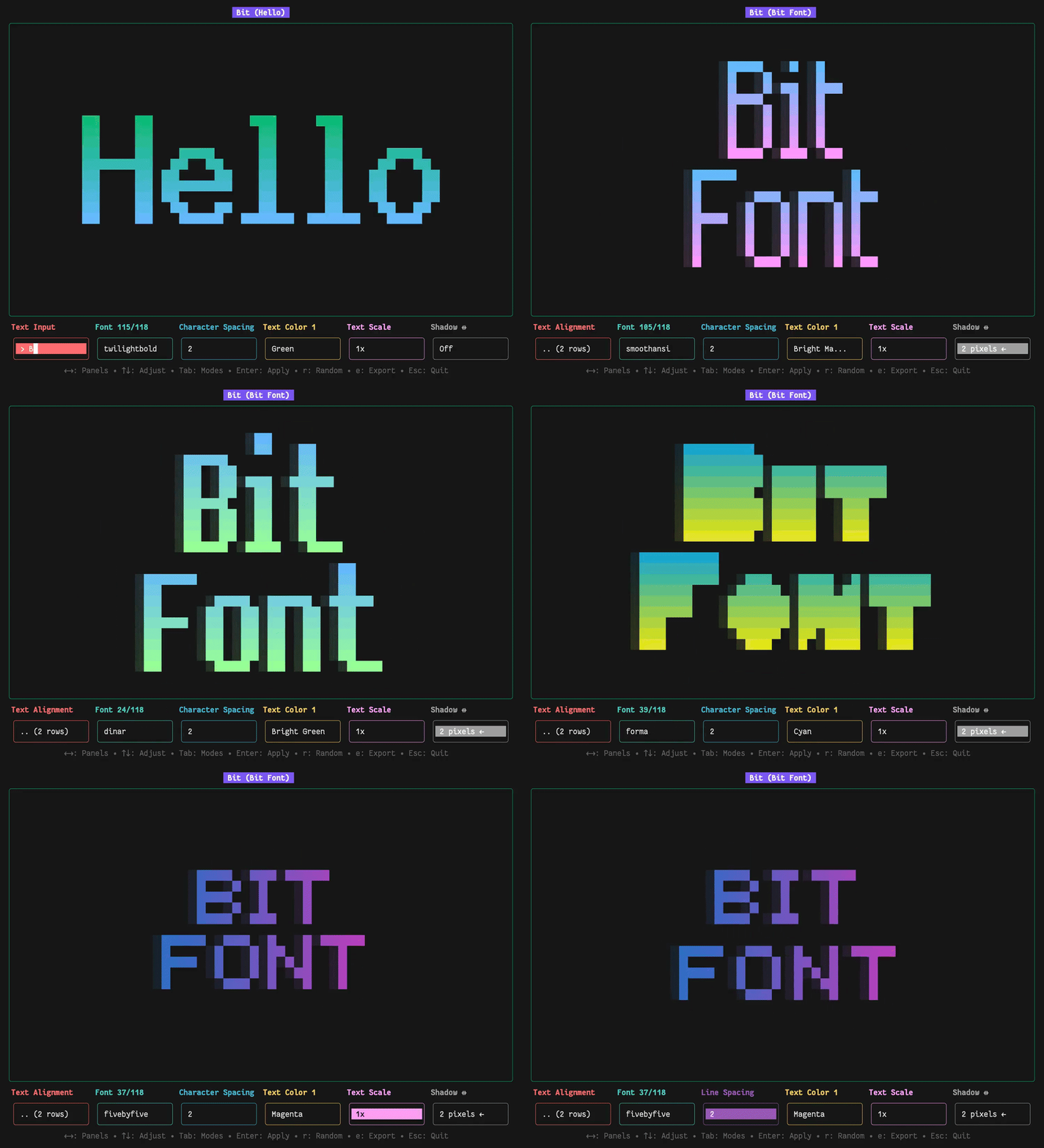
Bit is a terminal-based ANSI logo designer and bitmap-font utility for creating, previewing, and exporting stylized text directly from your console. It features an interactive multi-panel TUI, a streamlined CLI, and a standalone Go library. Bit renders ANSI text with custom typography, multi-directional gradients, and textured shadows, exporting the results as images or code for popular programming languages.
Features
| Feature | Description |
|---|---|
| 100+ Font Styles | Classic terminal, retro gaming, modern pixel, decorative, and monospace fonts. All free for commercial and personal use. |
| Multi-Format Export | Export to PNG, TXT, Go, JavaScript, Python, Rust, and Bash. PNG exports with transparent background. |
| Advanced Text Effects | Color gradient effects (horizontal & vertical), shadow effects (horizontal & vertical), and text scaling (0.5×–4×). |
| Rich Color Support | 14 vibrant predefined UI colors that can be combined with gradients. The library and CLI also accept any hex color for unlimited possibilities. |
| Alignment & Spacing | Adjust character, word, line spacing, and per-character manual kerning. Align text left, center, or right. |
| Smart Typography | Automatic and custom kerning options, descender detection and alignment. |
| Powerful CLI Tool | Render text quickly with extended options for fonts, colors, spacing, and effects. |
| Standalone Go Library | A simple, self-contained API with type-safe enums for effortless programmatic ANSI text rendering. |
Quick Start
# 1. Clone the repository
git clone https://github.com/paulilaaso/bit
cd bit

# 2. Install dependencies
go mod tidy

# 3. Build the interactive UI
go build -o bit ./cmd/bit

# 4. Start creating!
./bit
Installation
Quick Install (Linux/macOS)
curl -sfL https://raw.githubusercontent.com/paulilaaso/bit/main/install.sh | sh
This installs bit to /usr/local/bin. The binary works in two modes:
- Interactive UI: Run
bitwith no arguments - CLI mode: Run
bit [options] <text>to render directly
Manual Installation
Download the latest release for your platform from the Releases page.
Available for:
- Linux (x86_64, arm64)
- macOS (x86_64, arm64)
- Windows (x86_64, arm64)
Extract and install:
# Linux/macOS
tar -xzf bit_*_Linux_x86_64.tar.gz
sudo mv bit /usr/local/bin/

# Windows (PowerShell)
Expand-Archive bit_*_Windows_x86_64.zip
# Move bit.exe to your PATH
Build from Source
Prerequisites: Go 1.25+
# Clone repository
git clone https://github.com/paulilaaso/bit
cd bit

# Build the binary
make build

# Or manually
go build -o bit ./cmd/bit
Note
Fonts are embedded using go:embed, ensuring the binaries are fully self-contained.
Usage
Running Bit
# Start interactive UI
bit

# CLI mode - quick render
bit "Hello World"

# CLI mode - with options
bit -font ithaca -color 31 "Red Text"

# List all fonts
bit -list

# Load custom font or directory of fonts (along with built-in fonts)
bit -load ./myfont.bit
bit -load ./fonts/

# Show help
bit -help
Interactive UI - Keyboard Controls
| Key Binding | Action Description |
|---|---|
← → / h l |
Navigate between the 6 main control panels |
↑ ↓ / k j |
Adjust values in the currently selected panel or navigate text rows in multi-line mode |
Tab |
Access sub-modes within panels |
Enter |
Activate/deactivate text input mode for editing |
r |
Randomize font, colors, and gradient settings for instant inspiration |
e |
Enter export mode to save your creation in various formats |
Esc |
Quit the application and return to terminal |
Control Panels
The UI features 6 main control panels with sub-modes accessible via Tab key:
1. 🔴 Text Input Panel (3 modes)
- Text Input Mode: Enter and edit text with multi-line support
- Press
↓to create new row - Press
↑↓to navigate between rows - Cursor positions are tracked per-row
- The row count is shown in label when editing multiple rows
- Press
- Text Kerning Mode: Fine-tune letter spacing at the cursor position
- Press
←→orh/lto move the cursor through the current row - Press
↑↓ork/jto increase/decrease spacing by one pixel - The current manual kerning value is shown in the label as
+1,-2, etc.
- Press
- Text Alignment Mode: Choose Left, Center, or Right alignment
2. 🟢 Font Selection Panel
- Browse through 100+ available bitmap fonts
- Shows "Font X/XXX" in label
- Fonts are lazy loaded on first use for memory efficiency
3. 🔵 Spacing Panel (3 modes)
- Character Spacing: 0 to 10 pixels between characters
- Word Spacing: 0 to 20 pixels for multi-word lines
- Line Spacing: 0 to 10 pixels for multi-line text layout
4. 🟡 Color Panel (3 modes)
- Text Color 1: Primary text color (14 ANSI colors)
- Text Color 2: Gradient end color
- Gradient auto-enables when different from Text Color 1
- Shows "None" when same as Text Color 1
- Gradient Direction: Up-Down, Down-Up, Left-Right, Right-Left
5. 🟣 Text Scale Panel
- Four scale options: 0.5x, 1x, 2x, 4x
- Uses ANSI-aware scaling algorithm
- Handles half-pixel characters correctly
6. ⚫ Shadow Panel (3 modes)
- Horizontal Shadow: -5 to 5 pixels (← or →)
- Shows "Off" at 0 position
- Vertical Shadow: -5 to 5 pixels (↑ or ↓)
- Shows "Off" at 0 position
- Shadow Style: Light (░), Medium (▒), Dark (▓)
- Visual preview shows actual ANSI character repeated
Warning
If shadows are enabled with half-pixel characters, a warning appears in the title bar. The library automatically disables shadows in this case to prevent visual artifacts.
CLI Mode
The bit binary includes a powerful CLI mode for quick text rendering:
Basic Commands
# Render text with default settings
bit "Hello"

# List all available fonts
bit -list

# Use specific font and color (ANSI code)
bit -font ithaca -color 31 "Red"

# Use specific font and color (hex code)
bit -font ithaca -color "#FF0000" "Red"

# Gradient text with ANSI codes
bit -font dogica -color 31 -gradient 34 -direction right "Gradient"

# Gradient text with hex codes
bit -font dogica -color "#FF0000" -gradient "#0000FF" "Gradient"

# Text with shadow
bit -font larceny -color 94 -shadow -shadow-h 2 -shadow-v 1 "Shadow"

# Scaled text
bit -font pressstart -color 32 -scale 1 "2X"

# Aligned text
bit -font gohufontb -color 93 -align right "Go\nRight"

# Inline custom kerning: \+ adds space, \- removes space
bit "H\+el\+lo W\-orld"
CLI Options
| Flag | Description | Values |
|---|---|---|
-font |
Font name to use | Any available font name (default: first font) |
-color |
Text color | ANSI codes (30-37, 90-96) or hex (#FF0000) |
-gradient |
Gradient end color | ANSI codes (30-37, 90-96) or hex (#0000FF) |
-direction |
Gradient direction | down, up, right, left |
-char-spacing |
Character spacing | 0 to 10 |
-word-spacing |
Word spacing | 0 to 20 |
-line-spacing |
Line spacing | 0 to 10 |
-scale |
Text scale factor | -1 (0.5x), 0 (1x), 1 (2x), 2 (4x) |
-shadow |
Enable shadow effect | true/false |
-shadow-h |
Shadow horizontal offset | -5 to 5 |
-shadow-v |
Shadow vertical offset | -5 to 5 |
-shadow-style |
Shadow style | 0 (light), 1 (medium), 2 (dark) |
-align |
Text alignment | left, center, right |
-list |
List all available fonts | - |
Available Colors
| Code | Color | Preview | Code | Color | Preview |
|---|---|---|---|---|---|
| 30 | Black | 90 | Gray | ||
| 31 | Red | 91 | Bright Red | ||
| 32 | Green | 92 | Bright Green | ||
| 33 | Yellow | 93 | Bright Yellow | ||
| 34 | Blue | 94 | Bright Blue | ||
| 35 | Magenta | 95 | Bright Magenta | ||
| 36 | Cyan | 96 | Bright Cyan | ||
| 37 | White | 97 | Bright White |
Tip
The CLI and library support any hex color (e.g., -color "#FF5733"), providing unlimited color possibilities beyond the ANSI palette.
Library
Bit includes a powerful standalone Go library (ansifonts) that's completely independent of the TUI. The library can be imported into any Go project without any TUI dependencies.
Quick Library Example
package main

import (
	"fmt"
	"github.com/paulilaaso/bit/ansifonts"
)

func main() {
	// Load a font
	font, err := ansifonts.LoadFont("ithaca")
	if err != nil {
		panic(err)
	}

	// Advanced rendering with options
	options := ansifonts.RenderOptions{
		CharSpacing:            3,
		WordSpacing:            3,
		LineSpacing:            1,
		TextColor:              "#FF0000",
		GradientColor:          "#0000FF",
		UseGradient:            true,
		GradientDirection:      ansifonts.LeftRight,
		Alignment:              ansifonts.CenterAlign,
		ScaleFactor:            1.0,
		ShadowEnabled:          true,
		ShadowHorizontalOffset: 2,
		ShadowVerticalOffset:   1,
		ShadowStyle:            ansifonts.MediumShade,
	}

	// Validate options before rendering (optional - render functions validate automatically)
	if err := options.Validate(); err != nil {
		fmt.Printf("Invalid options: %v\n", err)
		return
	}

	rendered := ansifonts.RenderTextWithOptions("Hello", font, options)
	for _, line := range rendered {
		fmt.Println(line)
	}
}
Tip
See the ansifonts library documentation for detailed API reference and examples.
Font Collection
The project includes 100+ carefully curated bitmap fonts embedded in the binary.
Fonts are stored as .bit files (JSON format) containing:
{
  "name": "Font Name",
  "author": "Author Name",
  "license": "License Type",
  "characters": {
    "A": ["line1", "line2", ...],
    "B": ["line1", "line2", ...],
    ...
  }
}
Note
Each font file contains a license field indicating its specific license terms. All fonts are under permissive open-source licenses, which allow free usage, modification, and distribution for both personal and commercial purposes.
Export Formats
The interactive UI supports exporting your creations to:
| Format | Extension | Description |
|---|---|---|
| PNG | .png |
PNG image with transparent background |
| TXT | .txt |
Plain text with ANSI codes stripped |
| Go | .go |
Go source code with embedded ANSI strings |
| JavaScript | .js |
JavaScript array with console.log display function |
| Python | .py |
Python list with print function |
| Rust | .rs |
Rust vector with println! macro |
| Bash | .sh |
Bash script with echo -e for ANSI support |
All exports include:
- Properly escaped ANSI sequences
- Language-specific string literals
- Ready-to-run code
PNG exports preserve the exact appearance of your terminal art with transparent backgrounds.
Acknowledgments
- Font Authors: Thank you to all the original font creators whose work is included.
- Charm: For the excellent TUI framework.
- Go Community: For the robust standard library and tooling.
License
This project is licensed under the MIT License. See the LICENSE file for details.
more like this