meine
meine 🌒 - A CLI file manager and system utility built with Textual. It combines intuitive command parsing with rich t…
Python★ 50
Terminal RSS Reader for Digital Minimalists — Tool for Escaping the Doomscroll
 paulilaaso
git clone https://github.com/paulilaaso/hys.gitpaulilaaso/hys
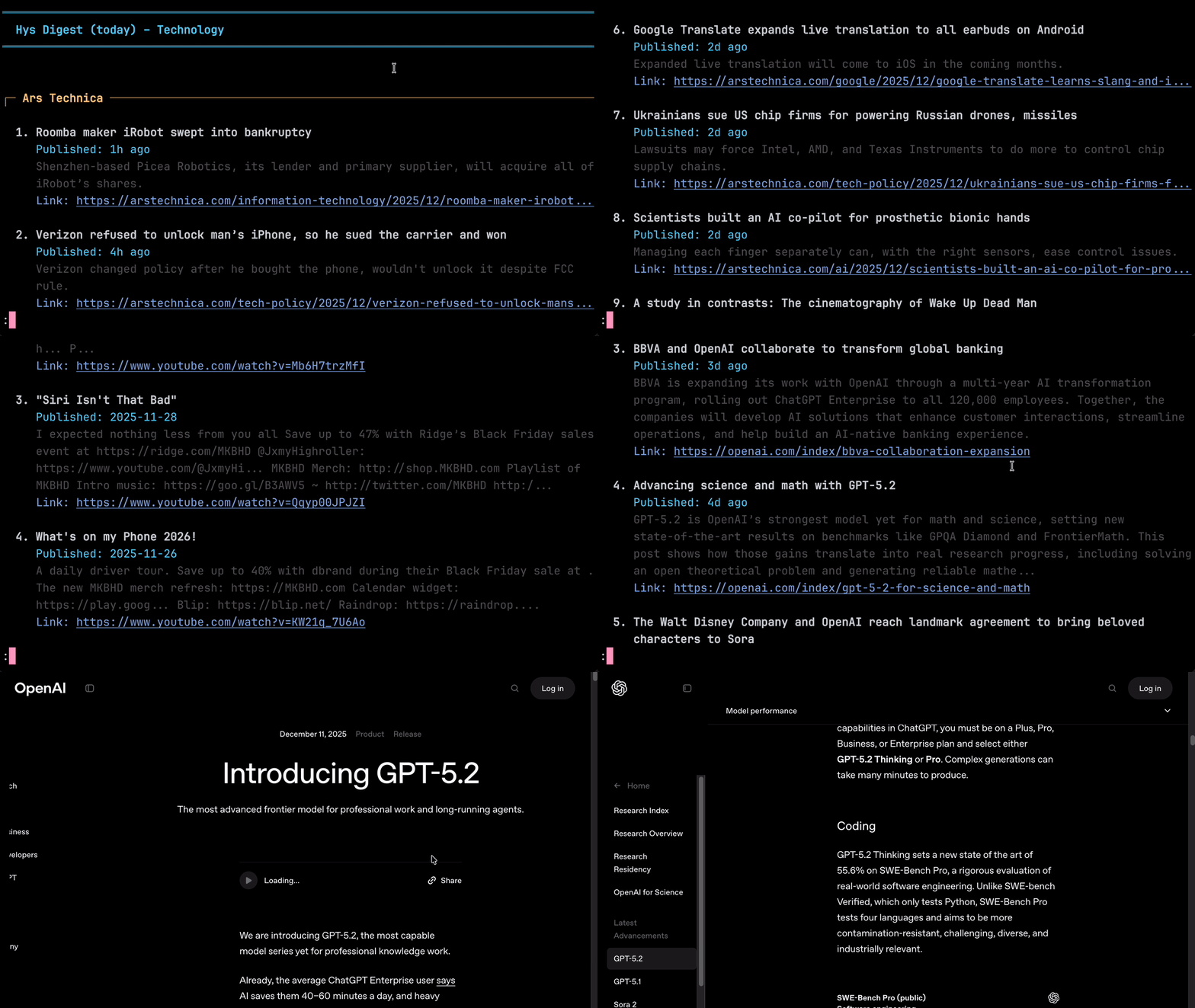
Hys is a fast, lightweight, and opinionated terminal RSS reader written in Zig that helps you avoid doom-scrolling. It enforces a once-per-day fetch limit, encouraging you to gather new information in a single daily batch like a morning newspaper, rather than receive an endless stream of pings and notifications throughout the day.
| Feature | Description |
|---|---|
| Doomscroll-Free | Designed as a "Daily Digest." Enforces a fetch limit to help you stay informed without the infinite scroll. |
| Blazing Fast | Built with Zig. Starts in milliseconds and parses hundreds of items in seconds. |
| Open Links | OSC 8 hyperlink support to open articles in your default browser from URLs and links. |
| OPML Ready | Import your existing subscriptions from any standard RSS reader or export your feeds effortlessly. |
| Multilingual Support | Native support for Chinese, Japanese, Korean, Indic, Cyrillic etc. |
| Feed Groups | Organize your feeds into groups (e.g. tech, science, art) and read them individually or all at once. |
| Pager TUI | Automatically pipes into less for a distraction-free reading experience with intuitive vim-style keybindings. |
| AI-Friendly | Optional plain JSON output for seamless integration with AI agents and LLM workflows. |
| Search | Find text in your feeds with the search functionality integrated into less. |
| Universal Feed Support | RSS 2.0 and Atom 1.0 with robust parsing, HTML entity decoding, and UTF-8 validation |
brew install paulilaaso/tap/hys
yay -S hys          # Latest release
yay -S hys-git      # Latest development version
Add your first feed and start reading:
hys --sub "https://news.ycombinator.com/rss"
hys
sudo apt-get install libcurl4-openssl-devsudo dnf install libcurl-develsudo pacman -S curlchoco install curl (using Chocolatey) or vcpkg install curl:x64-windowsClone the repository:
git clone https://github.com/paulilaaso/hys.git
cd hys
Build and Install:
# Install to ~/.local/bin (make sure it's in your PATH)
zig build -Doptimize=ReleaseSafe install -p ~/.local
# Add a feed to your main group
hys --sub "https://site.com/feed"

# Add a feed to a specific group
hys tech --sub "https://site.com/feed"

# Read the main group
hys

# Read a specific group
hys tech

# Read multiple groups combined
hys tech,science,art

# Read all groups at once
hys --all

# One-off read of a URL (doesn't save to config)
hys https://example.com/rss.xml
| Action | Command |
|---|---|
| Subscribe to a feed (title optional) | hys --sub "https://site.com/feed" "Title" |
| Import OPML into main group | hys --import ~/downloads/feeds.opml |
| Export main group's feeds (OPML) | hys --export backup.opml |
| Set display name for a group | hys <group> --name "Pretty Name" |
| List all groups | hys --groups |
| Action | Command |
|---|---|
| Read from all groups | hys --all |
| View previous days' fetches | hys --day 1 or hys --day 2 |
| View last fetch regardless of date | hys --last or hys -l |
| Reset today's daily limiter | hys --reset |
| Action | Command |
|---|---|
| Display help with all available flags | hys --help |
| Display version information | hys --version |
| Show config file path | hys --config |
| Force-enable pager | hys --pager |
| Disable pager for this run | hys --no-pager |
| Output as JSON (no pager) | hys --json |
When Hys opens in your system pager (less), these keys are available:
Line-by-line
j or Down: Scroll down one linek or Up: Scroll up one lineEnter: Scroll down one liney: Scroll up one linePaging
Space or f or PageDown: Page down one screenb or PageUp: Page up one screend: Half-page downu: Half-page upJumps
g: Jump to topG: Jump to bottomSearch
/text: Search forward?text: Search backwardn: Next matchN: Previous matchMisc
h: Show help for all less commandsq: Exit back to terminalHys creates a JSON configuration file at ~/.hys/config.json on first run.
{
  "display": {
    "maxTitleLength": 120,
    "maxDescriptionLength": 300,
    "maxItemsPerFeed": 20,
    "showPublishDate": true,
    "showDescription": true,
    "showLink": true,
    "truncateUrls": true,
    "pagerMode": true,
    "underlineUrls": true,
    "dateFormat": "%Y-%m-%d"
  },
  "history": {
    "retentionDays": 50,
    "fetchIntervalDays": 1,
    "dayStartHour": 0
  },
  "network": {
    "maxFeedSizeMB": 0.2
  }
}
Note
Apple's default Terminal does not support OSC 8 hyperlinks. If you're using Apple Terminal, you need to set truncateUrls to false in your config. For a better experience, consider using a terminal that supports OSC 8 hyperlinks, such as Ghostty, Wezterm, Kitty, or iTerm2.
Feeds are stored in JSON files within ~/.hys/feeds/. Each group has its own file corresponding to its name (e.g., main is stored in ~/.hys/feeds/main.json).
To remove or edit a feed:
~/.hys/feeds/main.json).feeds array.xmlUrl or text.This project is licensed under the MIT License. See the LICENSE file for details.
more like this
meine 🌒 - A CLI file manager and system utility built with Textual. It combines intuitive command parsing with rich t…
Skill Claude Code de veille tech francophone. Agrège les flux RSS (Journal du Hacker, Human Coders News…) et produit un…
search projects, people, and tags