agentlytics
Comprehensive analytics dashboard for AI coding agents — Cursor, Windsurf, Claude Code, VS Code Copilot, Zed, Antigravi…
JavaScript★ 555
QOwnNotes is a plain-text file notepad and todo-list manager with Markdown support and Nextcloud / ownCloud integration.
 pbek
pbekInstallation | Changelog | Issues | Shortcuts | Documentation | Privacy Policy | Screenshots | Nextcloud API App | ownCloud API App | Matrix room | Telegram Group | IRC Chat | Mastodon | QOwnNotes Web Companion Firefox extension | QOwnNotes Web Companion Chrome extension | QOwnNotes Web App | QOwnNotes Tor Hidden Service

QOwnNotes is the open source notepad with Markdown support and todo list manager for GNU/Linux, macOS and Windows, that works together with Nextcloud Notes and ownCloud Notes.
You are able to write down your thoughts with QOwnNotes and edit or search for them later from your mobile device, like with Nextcloud Notes for Android or the Nextcloud / ownCloud web-service.
The notes are stored as plain text markdown files and are synced with Nextcloud's/ownCloud's file sync functionality. Of course other software, like Syncthing or Dropbox can be used too.
If you like the concept of having notes accessible in plain text files, like it is done in the Nextcloud / ownCloud notes apps to gain a maximum of freedom then QOwnNotes is for you.
Visit the project page here: QOwnNotes project page
To manage your todo lists in the web and on your mobile devices, you need to install the Tasks backend on Nextcloud or ownCloud.
To get more on-line features for your notes, like versioning and trash access, you might also want to install the QOwnNotesAPI app on your server.
To access your ownCloud notes from your mobile device you may want to get one of these:
On Android you could also use any sync-tool like Synchronize Ultimate or FolderSync to sync your note files and use software like neutriNotes or Markor to edit your notes.
On iOS Notebooks may also work well (syncing notes via WebDAV).
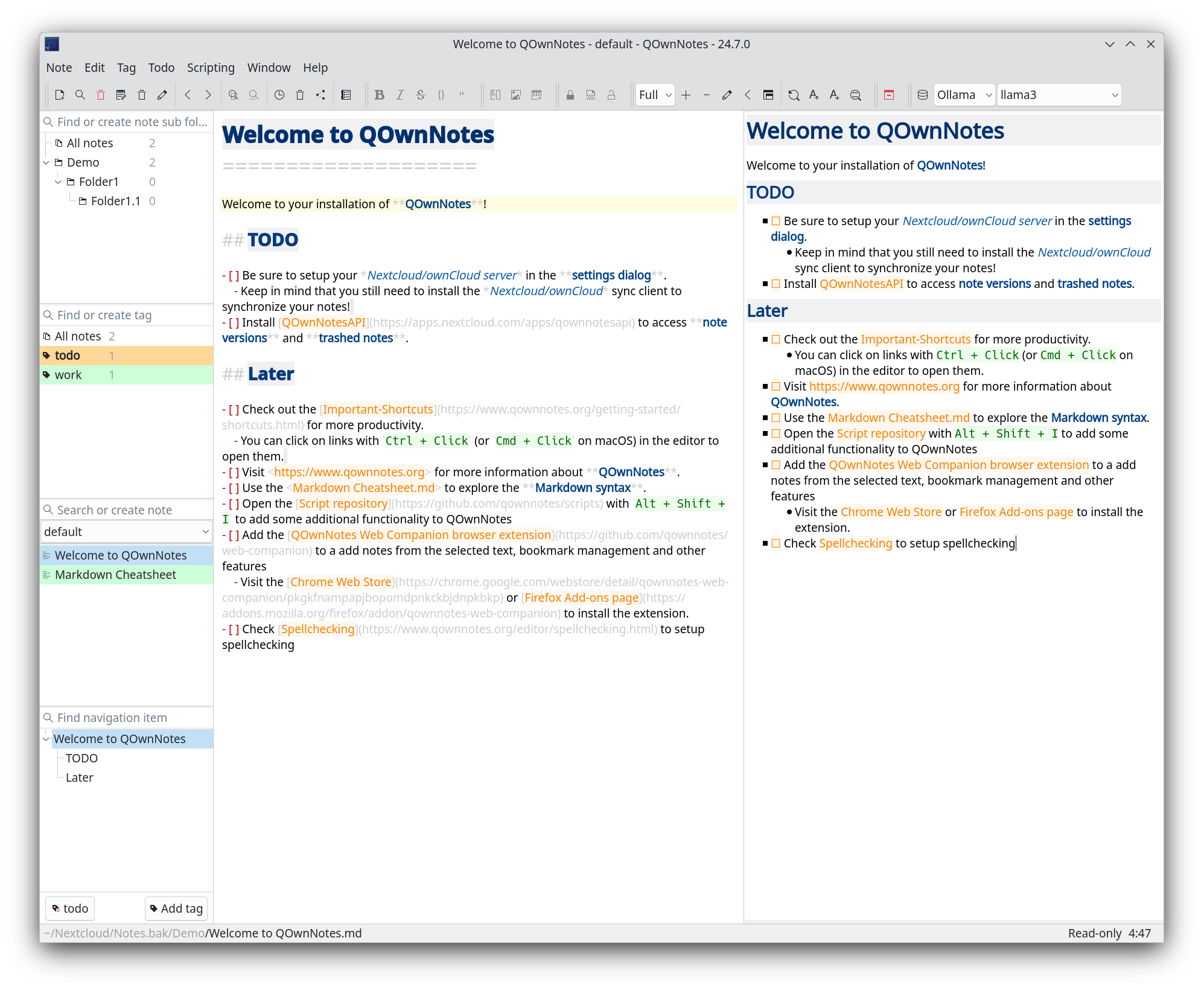
You can visit the QOwnNotes project page for more screenshots.
[[Note]] with auto-completion, heading anchors, aliases, backlinks, and refactoring supportPlease visit Installation for all the ways to install QOwnNotes.
To get the most current features you can build the application from the source code. Download the latest source here: QOwnNotes Source on GitHub as ZIP
Alternatively you can also check out the code directly from the git repository:
git clone https://github.com/pbek/QOwnNotes.git -b release --depth=1
cd QOwnNotes
git submodule update --init
Then download Qt Creator, you will also
need the packages qtwebsockets to build QOwnNotes with Qt6
(only qtwebsockets for Qt5). If you build under Windows, you want to stick to
MinGw 64-bit.
Afterward open the project file src/QOwnNotes.pro and click on
Build / Build Project QOwnNotes.
Or you can build it directly in your terminal:
cd src

# build binary translation files if you want another language than English
lrelease QOwnNotes.pro

# prepare build process and build the application
qmake
make -j4
If you are going to work with the code, then you can do the following instead of the above:
cd src
qmake CONFIG+=DEV_MODE CONFIG+=debug ..
make -j4
The DEV_MODE variable enabled higher warning levels + precompiled headers.
Please feel free to contribute source code to this project, make suggestions or report troubles on the QOwnNotes issues page!
You can also visit QOwnNotes on GitHub.
This SOFTWARE PRODUCT is provided by THE PROVIDER "as is" and "with all faults." THE PROVIDER makes no representations or warranties of any kind concerning the safety, suitability, lack of viruses, inaccuracies, typographical errors, or other harmful components of this SOFTWARE PRODUCT.
There are inherent dangers in the use of any software, and you are solely responsible for determining whether this SOFTWARE PRODUCT is compatible with your equipment and other software installed on your equipment. You are also solely responsible for the protection of your equipment and backup of your data, and THE PROVIDER will not be liable for any damages you may suffer in connection with using, modifying, or distributing this SOFTWARE PRODUCT.
more like this
Comprehensive analytics dashboard for AI coding agents — Cursor, Windsurf, Claude Code, VS Code Copilot, Zed, Antigravi…
本地优先的 macOS AI Agent 信号灯:状态栏 + 桌面悬浮信号灯,自动监控 Codex / Claude Code。Local menu bar and floating desktop status lights for A…
search projects, people, and tags