lottery
🎉🌟✨🎈年会抽奖程序,基于 Express + Three.js的 3D 球体抽奖程序,奖品🧧🎁,文字,图片,抽奖规则均可配置,😜抽奖人员信息Excel一键导入😍,抽奖结果Excel导出😎,给你的抽奖活动带来全新酷炫体验🚀🚀🚀
JavaScript★ 4.6k
Google Reader inspired self-hosted RSS reader written in VueJS with an Express NodeJS backend. RSSMonster is compatible…
 pietheinstrengholt
git clone https://github.com/pietheinstrengholt/rssmonster.gitpietheinstrengholt/rssmonster

Copyright (c) 2026 Piethein Strengholt, piethein@strengholt-online.nl
RSSMonster is not just another RSS reader — it is an intelligent reading engine designed to help you cut through information overload and focus on what actually matters.
Where traditional RSS aggregators like Feedly and Inoreader primarily deliver chronological lists of articles, RSSMonster takes a fundamentally different approach: it understands, evaluates, and prioritizes content on your behalf — transparently and under your control.

At its core, RSSMonster treats your feeds as a stream of signals rather than a pile of unread items. New articles are enriched with quality, freshness, originality, trust, attention, and semantic relationship metadata. That extra context lets the application answer better questions: is this worth reading now?, is this just syndicated copy?, which sources are covering the same event?, and which broader storyline does this belong to?
RSSMonster combines advanced search expressions, semantic clustering, quality analysis, and importance-based ranking into a system where views are declarative, not hard-coded. Instead of fixed tabs and opaque algorithms, you define what matters using composable queries that power dynamic Smart Folders such as:
Every ranking decision is explainable. Every view is customizable. Every signal — freshness, quality, originality, trust — is visible and adjustable. The result is a reader that can behave like a quick daily briefing, a research inbox, a low-noise monitoring tool, or a classic feed reader depending on the view you choose.
j/k, open an article with Enter or o, toggle its read status with m or r, save it with s, focus search with /, or refresh feeds with Shift+R.favorite:true, star:true, unread:false, read:true, clicked:true, seen:false, hot:true, tag:tech, title:javascript), article age filters (firstSeen:24h, firstSeen:7d), score thresholds (quality:>0.6, freshness:>=0.5), semantic filters (event:true, event:false, eventCount:>=3, island:true, island:false), sorting (sort:asc, sort:desc, sort:trust, sort:recommended, sort:quality, sort:attention), and flexible date filters (@2025-12-14, @today, @yesterday, @lastweek, @"3 days ago", @"last Monday"). island:true keeps articles whose event is linked through a topic to one of the user's active interest islands. Example: title:javascript ai @today island:true quality:>0.6 sort:recommended@today unread:true sort:recommended (Top Stories Today), unread:true quality:>0.7 sort:quality (Worth Your Time), event:true island:true eventCount:>=3 sort:recommended (interest-aligned events), hot:true unread:true sort:attention (Low Noise Mode).npm run feedtrust to calculate scores using originality (35%), quality (25%), engagement (20%), and consistency (20%)/rss endpoint with query parameters)RSSMonster's newer architecture adds a semantic layer between feed crawling and the article list. Rather than storing articles as isolated feed entries, the system enriches them with vectors, scores, cluster membership, topic membership, and engagement signals. Those derived signals are then used by search expressions, Smart Folders, ranking, and the UI.
The semantic pipeline works in stages:
quality:>0.7, freshness:>=0.5, event:true, island:true, hot:true, tag:security, and sort:recommended.This design keeps the intelligence of the reader inspectable. RSSMonster does not only decide what to show; it exposes the dimensions behind that decision so you can build views for different reading modes. A morning scan might prefer fresh event clusters with multiple sources, while deeper research might expand the full cluster, inspect related topic groups, and compare how different feeds covered the same story.
Batch reclustering is available through npm run recluster. It rebuilds semantic assignments over the configured content window, refreshes event and topic statistics, and helps repair cluster quality after large imports, threshold changes, or embedding updates.
git clone https://github.com/pietheinstrengholt/rssmonster.git
cd rssmonster
# Install server dependencies
cd server
npm install

# Install client dependencies
cd ../client
npm install
cd ..
Copy the .env.example files to .env in both directories:
# Server configuration
cp server/.env.example server/.env

# Client configuration
cp client/.env.example client/.env
Edit server/.env:
DB_DATABASE=your_database_name
DB_USERNAME=your_database_user
DB_PASSWORD=your_database_password
DB_HOSTNAME=localhost
NODE_ENV=development
Edit client/.env:
VITE_APP_HOSTNAME=http://localhost:3000
VITE_NODE_ENV=development
VITE_ENABLE_AGENT=false  # Set to 'true' to enable AI assistant
Run database migrations and seed initial data:
cd server
./node_modules/.bin/sequelize db:migrate
./node_modules/.bin/sequelize db:seed:all
When processing or querying large numbers of articles, it is recommended to tune MySQL sort memory to reduce sort-related bottlenecks.
Add the following to your MySQL configuration (for example in my.cnf):
[mysqld]
sort_buffer_size = 4M
After installation (and after each deployment to a new environment), generate taxonomy vectors and seed them into the database:
cd server
npm run taxonomy:vectors
npm run seed:island-taxonomy
Important: npm run taxonomy:vectors requires a valid OpenAI API key in server/.env:
OPENAI_API_KEY=your-openai-api-key-here
You can crawl feeds in two ways:
Option A: Manual crawl from command line
cd server
DISABLE_LISTENER=true npm run crawl
This runs a synchronous crawl of all active feeds and provides a summary upon completion.
Option B: Automated crawl via cron
Add a cron job to crawl feeds every 5 minutes by calling the API endpoint:
*/5 * * * * curl http://localhost:3000/api/crawl
Note: The API endpoint runs the crawl asynchronously in the background and returns immediately without output.
If you have semantic search enabled and need to rebuild article clusters from scratch:
cd server
npm run recluster
This command will:
When to use this:
Note: This is a destructive operation that rebuilds all clusters. It requires articles to have embedding vectors already generated.
Feed trust scores help identify high-quality sources based on originality, article quality, and user engagement:
cd server
npm run feedtrust
This command calculates trust scores (0.0 to 1.0) for all active feeds using:
When to use this:
The trust score uses exponential moving average (EMA) to smoothly adapt over time while being resistant to short-term fluctuations.
RSSMonster includes an AI-powered assistant that enables natural language interactions with your RSS feeds. Ask questions like:
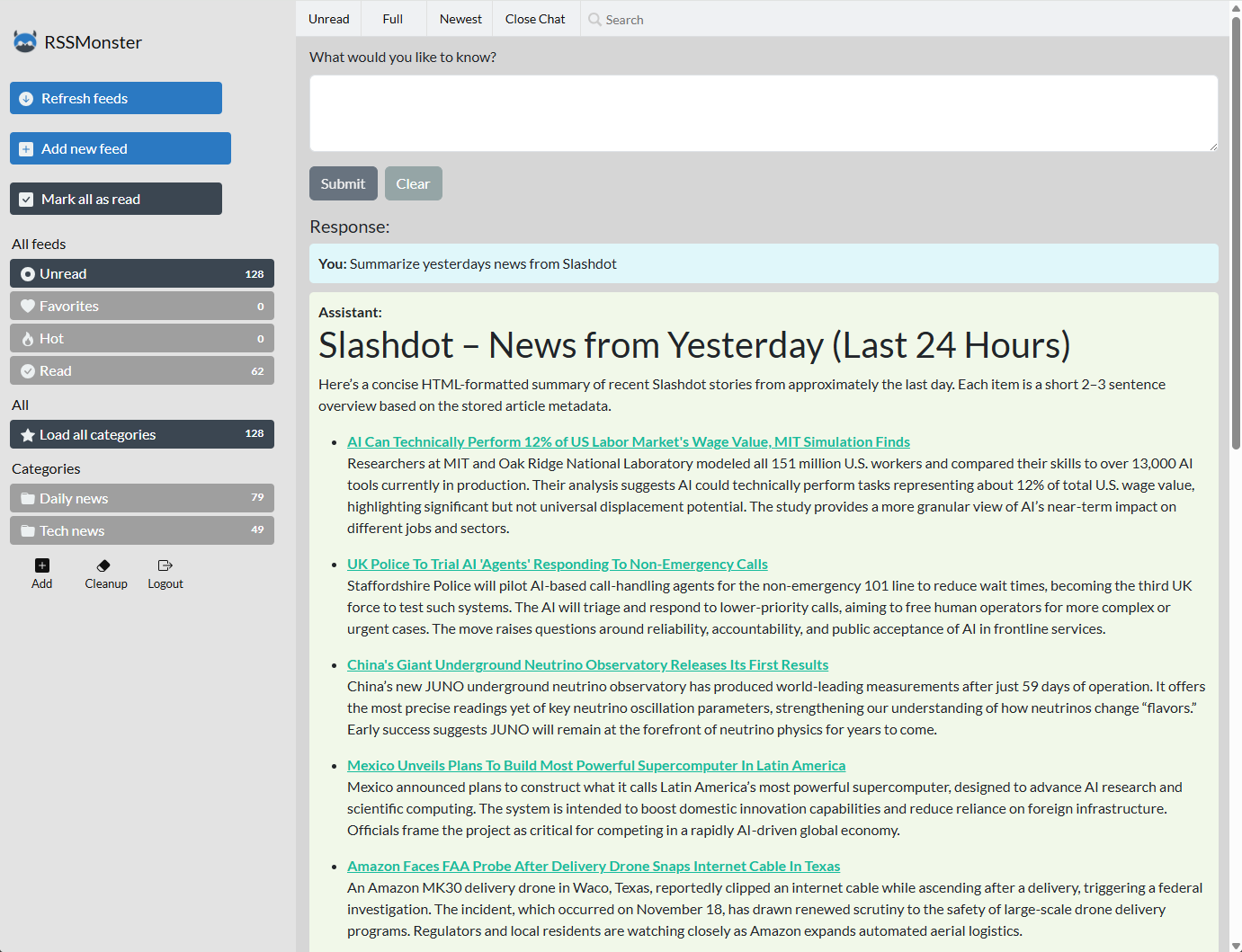
To enable the AI assistant and other agentic features, configure the following environment variables:
Server (server/.env):
OPENAI_API_KEY=your-openai-api-key-here
OPENAI_MODEL_AGENT=gpt-5.1
OPENAI_MODEL_CRAWL=gpt-4o-mini
After configuration, restart both the client and server. The assistant provides:
RSSMonster automatically tracks article clicks and uses AI to classify content with three quality metrics: advertisementScore (ad/promotional content detection), sentimentScore (emotional tone analysis), and qualityScore (content depth and accuracy assessment). These scores provide at-a-glance insights into article quality.
Note: All interactions are user-scoped, ensuring privacy and data isolation in multi-user environments.
Note for Developers: You can access the MCP server directly at /mcp for programmatic integration. Authentication requires a valid JWT token passed via the Authorization: Bearer <token> header. Obtain your token by authenticating through the /api/auth/login endpoint.
Client (with hot reload):
cd client
npm run dev
Server (with hot reload):
cd server
npm run dev
To attach a debugger, start the server with npm run debug; Node exposes its inspector on port 9229.
The client will typically run on http://localhost:5173 and the server on http://localhost:3000.
Update Environment Variables
Client (client/.env):
VITE_APP_HOSTNAME=https://your-production-domain.com
VITE_NODE_ENV=production
Server (server/.env):
NODE_ENV=production
Build the Client
cd client
npm run build
Move Static Files
# Move the dist folder to the server directory
mv client/dist server/
Generate and Seed Taxonomy Vectors (Required in New Environments)
cd server
npm run taxonomy:vectors
npm run seed:island-taxonomy
Make sure OPENAI_API_KEY is set in server/.env before running npm run taxonomy:vectors.
cd server
npm run start
RSSMonster consists of a Vue.js client and an Express.js server and requires an external MySQL database.
If you already have a MySQL database, you can run rssmonster as a single container. Below an example for Linux / WSL:
docker run -d \
  -p 3000:3000 \
  --add-host=host.docker.internal:host-gateway \
  -e NODE_ENV=production \
  -e DB_HOSTNAME=host.docker.internal \
  -e DB_PORT=3306 \
  -e DB_DATABASE=rssmonster \
  -e DB_USERNAME=rssmonster \
  -e DB_PASSWORD=rssmonster \
  rssmonster/rssmonster
For production environments, use Let's Encrypt with Certbot for SSL/TLS certificates:
certbot certonly --standalone -d yourdomain.com --agree-tos -q
Create a weekly cron job:
# Example cron entry (runs weekly)
0 0 * * 0 certbot renew --quiet && cp /etc/letsencrypt/live/yourdomain.com/* /path/to/rssmonster/cert/
Add the following to your server/.env file:
ENABLE_HTTPS=true
The server will automatically use HTTPS with certificates from the cert/ directory. Ensure your SSL certificates are properly placed:
cert/fullchain.pemcert/privkey.pemRestart the server to apply the changes:
cd server
npm run start
RSSMonster is compatible with the Fever API, enabling integration with third-party RSS clients.
http://your-rssmonster-url/api/fever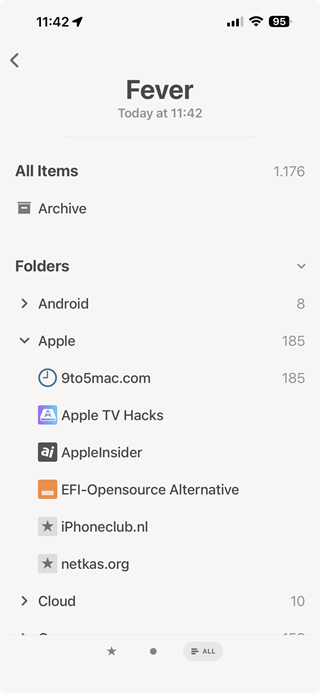
RSSMonster supports the Google Reader API, providing compatibility with a wide range of RSS clients.
See the Google Reader API compatibility matrix for the exact endpoint contract, authentication examples, client checklist, identifier formats, and unsupported behavior.
http://your-rssmonster-url/api/greader| App | Platform | Notes |
|---|---|---|
| News+ | Android | With Google Reader extension |
| FeedMe | Android | Full sync support |
| Reeder | iOS/macOS | Classic version |
| Vienna RSS | macOS | Open source |
| ReadKit | macOS | Multi-service reader |
# Login (returns SID and Auth tokens)
curl 'http://localhost:3000/api/greader/accounts/ClientLogin?Email=username&Passwd=password'

# Get subscriptions
curl -H "Authorization:GoogleLogin auth=username/token" \
  'http://localhost:3000/api/greader/reader/api/0/subscription/list?output=json'

# Get unread counts
curl -H "Authorization:GoogleLogin auth=username/token" \
  'http://localhost:3000/api/greader/reader/api/0/unread-count?output=json'

# Get articles
curl -H "Authorization:GoogleLogin auth=username/token" \
  'http://localhost:3000/api/greader/reader/api/0/stream/contents/reading-list'
Contributions are welcome! To contribute:
git checkout -b feature/amazing-feature)git commit -m 'Add amazing feature')git push origin feature/amazing-feature)Please ensure your code follows the existing style and includes appropriate tests.
RSSMonster is built with the following frameworks and libraries:
This project is licensed under the MIT License - see the LICENSE.md file for details.
more like this
search projects, people, and tags