bangen
✨ Colorful animated ASCII banners in your terminal — powered by pyfiglet & rich 🖤
 programmersd21
git clone https://github.com/programmersd21/bangen.gitprogrammersd21/bangenBangen ✨

Bangen is an ASCII banner renderer built on pyfiglet, rich, and Pillow.
It gives you a fast live TUI, a composable effect pipeline, JSON presets, and export support for TXT, PNG, and GIF.
Built for terminal art, title cards, intros, and animated text that still feels sharp when exported.
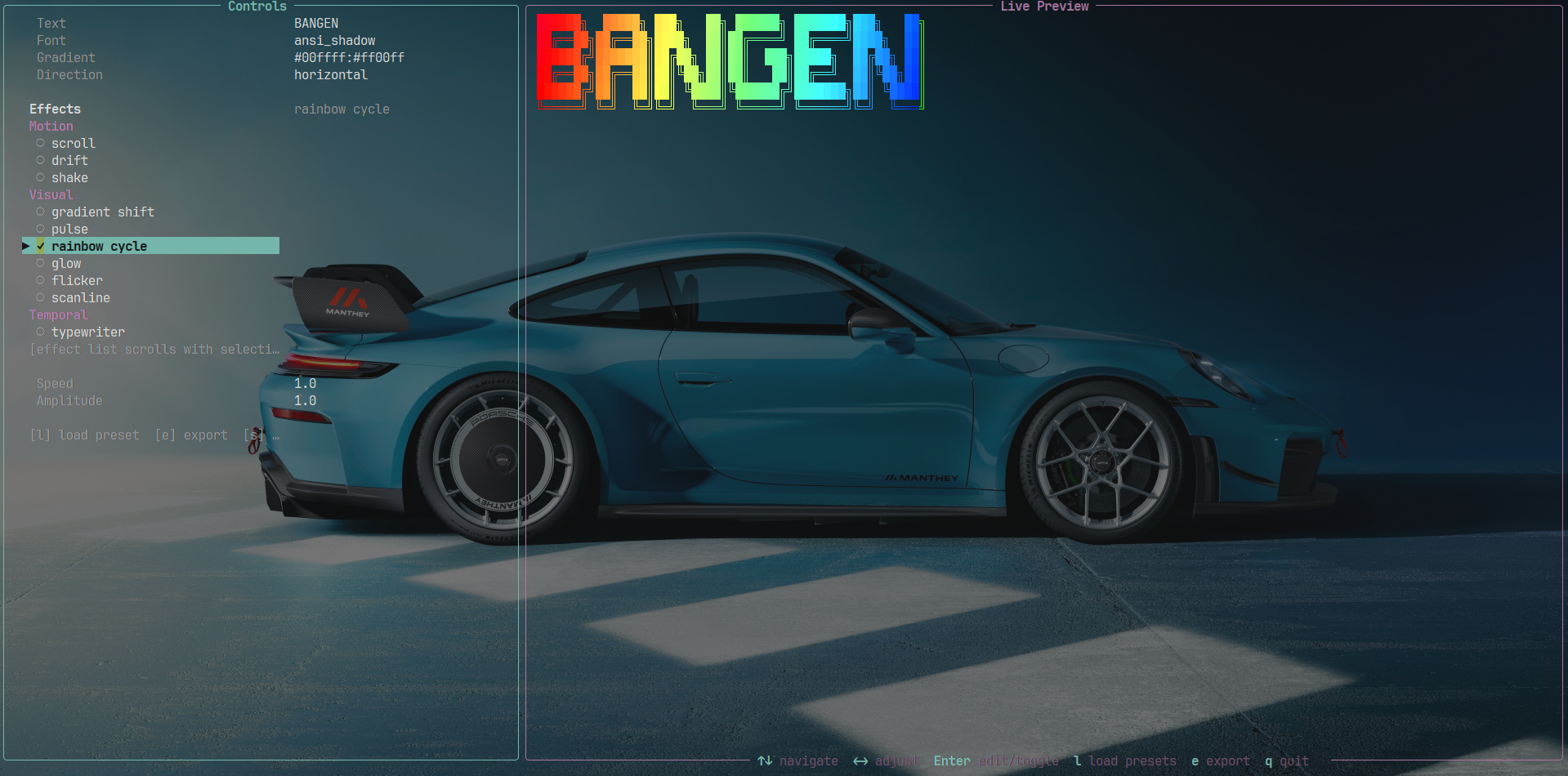
🌿 Screenshot
Star History ⭐
Why It Stands Out ⚡
- Live split-screen TUI with export modal
- Static and animated banner rendering
- Auto-sizing based on terminal and text dimensions
- Transparent
PNGand animated transparentGIFexport - Plain
TXTexport with exact ASCII output - CLI export progress with percentage, elapsed time, ETA, and status text
- Typer-powered CLI help with cleaner option formatting and examples
- Multi-stop gradients with horizontal or vertical interpolation
- Built-in presets plus user presets stored in
~/.bangen/presets/ - Effect library grouped into motion, visual, temporal, distortion, and signature tiers
- CLI workflows for rendering, exporting, listing assets, and loading presets
Quick Look 👀
bangen "SYSTEM READY" --font slant --gradient "#7c3aed:#06b6d4" --effect glow --effect wave
Setup 🛠️
- Manual pip install:
git clone https://github.com/programmersd21/bangen.git
cd bangen
python -m venv .venv
source .venv/bin/activate
pip install -e .
- AUR install:
yay -S bangen-bin
Thanks to @Dominiquini for assistance in AUR deployment.
- Prebuilt install:
https://github.com/programmersd21/bangen/releases/latest
Requirements:
- Python
3.11+ - Pillow is included in the base install
Quick Start 🚀
Render a basic banner:
bangen "HELLO"
Render with custom styling:
bangen "HELLO" --font slant --gradient "#ff00ff:#00ffff"
Render with effects:
bangen "HELLO" --effect wave --effect glow --effect pulse --speed 1.5 --amplitude 2.0
Run screensaver mode:
bangen "HELLO" --screensaver
Export a GIF:
bangen "HELLO" --effect wave --effect glow --export-gif banner.gif --gif-duration 3 --gif-fps 20
Interface 🎛️
TUI 🖥️
Launch the editor:
bangen
Controls:
↑↓navigate fields and effects←→adjust font or numeric settingsEnteredit or toggle the selected fieldCtrl+Vpaste from clipboard (in text input fields)ctoggle changelog viewireport an issueatoggle auto-size info display (shows terminal-relative sizing)lload a saved preset or load from a custom preset fileeopen the export dialogssave the current presetqquit
The effect selector is windowed, so you can move through the full library without overflowing the controls panel.
Text Input: All text input boxes (text, path, gradient) now support pasting from your clipboard using Ctrl+V, making it easier to work with long or complex values.
Auto-Size Info: Press a to toggle a display of the calculated banner sizing in relation to your terminal dimensions. Shows: text dimensions, calculated canvas size, scale factor, and padding.
Export Dialog 📦
Press e inside the TUI to open the exporter.
- Toggle
GIF,PNG, andTXT - Edit the output path directly
- Adjust GIF-only
durationandfps - Auto-update the file extension when the format changes
- Show live export progress in the modal with percentage, elapsed time, ETA, and stage text
- Confirm overwrite when the target file already exists
CLI ⌨️
The CLI is powered by Typer, so bangen --help now presents a cleaner option list and examples while keeping the same flag-based workflow.
Find out your version of bangen
bangen --version
Basic Rendering
bangen "HELLO"
bangen "HELLO" --font slant --gradient "#ff00ff:#00ffff"
bangen "HELLO" --gradient "#ff0000:#ffff00:#00ff00" --gradient-dir vertical
Discoverability
bangen main --list-effects
bangen main --list-fonts
bangen main --list-presets
Presets and AI
bangen "HELLO" --preset cyberpunk
bangen "SYSTEM" --preset matrix
bangen "HELLO" --preset-file ./my_preset.json
bangen "HELLO" --ai "retro CRT hacker title"
Export
bangen "HELLO" --export-txt banner.txt
bangen "HELLO" --export-png banner.png
bangen "HELLO" --effect wave --effect glow --export-gif banner.gif --gif-duration 3 --gif-fps 20
CLI exports show a live progress bar with percentage, elapsed time, ETA, and the current export stage.
Auto-Size
Auto-sizing is enabled by default. It automatically adjusts banner width/height based on terminal and text dimensions for optimal rendering and exports.
Disable auto-sizing if needed:
bangen "HELLO" --no-auto-size
bangen "HELLO" --no-auto-size --export-txt banner.txt
Enable it explicitly (already default):
bangen "HELLO" --auto-size
bangen "HELLO" --auto-size --export-gif banner.gif --gif-duration 3 --gif-fps 20
Auto-Size Features:
- Enabled by default (use
--no-auto-sizeto disable) - Analyzes your current terminal dimensions
- Calculates optimal canvas width and height
- Applies intelligent scaling (maintains aspect ratio)
- Shows sizing info:
Text: WxH | Canvas: WxH | Scale: Sx | Padding: (X,Y) - Works with all export formats (
GIF,PNG,TXT) - Ensures exports are properly sized relative to the rendering environment
Releases 📦
GitHub Actions builds standalone binaries for Windows, macOS, and Linux and uploads them to the matching GitHub release.
- asset names follow the project version from
pyproject.toml - release files include the platform in the filename
- the release workflow expects a tag matching the project version, for example
v2.2.3 - release builds explicitly bundle the TUI package, effect modules,
pyfigletfont assets, Rich, and Pillow runtime pieces so the standalone app works outside a Python environment
Screensaver
Turns any banner text into a full-terminal animated screensaver. It auto-fits the text to the current terminal size, switches between effect scenes, and randomizes speed, amplitude, frequency, and scene duration.
bangen "SYSTEM READY" --screensaver
bangen "NIGHT MODE" --screensaver --screensaver-duration 60
bangen "SIGNAL" --screensaver --screensaver-seed 42
Notes:
Ctrl+Cexits screensaver mode--font,--gradient, presets, and AI prompts still influence the starting style- effect selection is managed by the screensaver engine, so
--effectis not the main control surface in this mode - export flags are ignored while screensaver mode is running
Terminal Animation
Useful for temporal effects such as wipe and typewriter:
bangen "HELLO" --effect wipe --animate --animate-duration 5
Effects Library 🎨
Motion
wavevertical_wavebouncescrolldriftshake
Visual
gradient_shiftpulserainbow_cycleglowflickerscanline
Temporal
typewriterfade_inwipestaggerloop_pulse
Distortion
glitchchromatic_aberrationnoise_injectionmeltwarpfragment
Signature
matrix_rainfireelectricvhs_glitchneon_signwave_interferenceparticle_disintegration
Effect Stacks 🧪
Effects are order-sensitive and composable:
banner.apply(build_effect("wave", config=cfg))
banner.apply(build_effect("chromatic_aberration", config=cfg))
banner.apply(build_effect("pulse", config=cfg))
Multiple Effects Stability: When combining many effects (3+), the rendering engine now intelligently normalizes opacity and brightness values to prevent pixelation, noise, and visual artifacts. This ensures your stacked effects remain sharp and clear in both TUI preview and exports (GIF, PNG, TXT).
Common style stacks:
cyberpunk:glitch+chromatic_aberration+pulseneon:glow+pulseorneon_signmatrix:matrix_rain+typewriterretro:scanline+flickerfire:fire+meltelectric:electric+glow
Styling & Presets 🌈
Gradients
Use colon-separated hex stops:
#ff00ff:#00ffff
#ff0000:#ffff00:#00ff00
Use --gradient-dir vertical for top-to-bottom interpolation.
Presets 💾
Storage
Saved presets live under:
~/.bangen/presets/*.json
You can create these files manually, save them from the TUI with s, or save from the CLI with --save-preset NAME.
Loading
- TUI: press
l, then chooseSAVEDorFILE - CLI:
--preset NAMEloads from built-ins or~/.bangen/presets/ - CLI:
--preset-file PATHloads a preset JSON from any path without saving it
Preset Format
{
  "name": "my_preset",
  "font": "ansi_shadow",
  "gradient": "#ff00ff:#00ffff",
  "gradient_direction": "horizontal",
  "effects": ["wave", "glow", "pulse"],
  "effect_config": {
    "wave": { "speed": 1.8, "amplitude": 2.0, "frequency": 0.7 },
    "pulse": { "speed": 1.2, "min_brightness": 0.55 },
    "glow": {}
  }
}
Notes:
name,font, andgradientshould always be providedeffectsorder mattersspeed,amplitude, andfrequencymap to sharedEffectConfig- any additional keys inside
effect_configare passed to the effect constructor
Project Layout 🧱
bangen/
├── effects/
│   ├── base.py
│   ├── distortion.py
│   ├── motion.py
│   ├── signature.py
│   ├── temporal.py
│   ├── utils.py
│   └── visual.py
├── export/
│   ├── exporter.py
│   ├── gif.py
│   ├── png.py
│   └── txt.py
├── gradients/
├── presets/
├── rendering/
└── tui/
    ├── app.py
    ├── export_dialog.py
    └── preset_dialog.py
Notes 📝
- Auto-sizing (
--auto-sizeflag orakey in TUI) intelligently adjusts banner dimensions based on terminal size for optimal rendering and exports. - Animated exports are now rendered with optimized font sizing (11px) for sharp, crisp ASCII art without pixelation artifacts.
- Animated exports look best when you keep effect stacks readable instead of maxing out distortion-heavy combinations. The rendering engine now handles complex effect stacks gracefully without artifacts.
- Temporal effects such as
wipeandtypewriterare best previewed with--animatein the terminal before exporting. --screensaveris designed for live terminal playback, not export generation.- Text input fields in dialogs support copy-paste via
Ctrl+Vfor easier workflow.
License 📄
MIT. See LICENSE.
more like this