agentlytics
Comprehensive analytics dashboard for AI coding agents — Cursor, Windsurf, Claude Code, VS Code Copilot, Zed, Antigravi…
JavaScript★ 555
Menu Bar RSS reader for macOS
 relikd
git clone https://github.com/relikd/baRSS.gitrelikd/baRSS

RSS & Atom feed reader that lives in the system status bar.
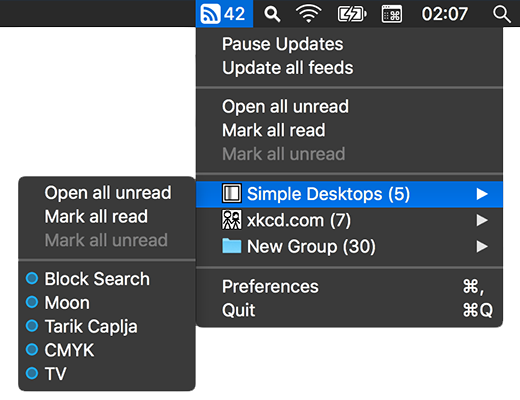
baRSS will automatically update feeds for you, and inform you of new content. The new articles are just a menu away.
But contrary to the definition of RSS, there is no content viewer. Instead, articles open in your browser of choice.
baRSS is unobtrusive, fast, and built from scratch with minimal footprint in mind. The application uses less than 30 Mb memory and has a ridiculous file size of 1 Mb.
Speaking of reducing web traffic.
In contrast to other applications, baRSS does not save any cached web sessions or cookies as a matter of fact.
But it will reuse ETag and Last-Modified headers to avoid unnecessary transmissions.
Further, tuning the update frequently will decrease the traffic even more.
Requires macOS High Sierra (10.13) or higher.
brew install --cask relikd/tap/barss
xattr -d com.apple.quarantine /Applications/baRSS.app
or download from releases.
Searching for the App Store release? Read this notice.
You'll need Xcode and RSXML2.
git clone https://github.com/relikd/baRSS
git clone https://github.com/relikd/RSXML2
Open baRSS/baRSS.xcodeproj and build the project.
For the release version, run Product > Archive.
baRSS has no option to launch on start. However, you can still add the application to auto boot by adding it to the system login items:
System Preferences > User > Login Items (macOS 10.x-12)
System Preferences > General > Login Items & Extensions (macOS 13+)
If you hold down the option key and click on an article item, you can mark a single item (un-)read without opening it. I am still searching for a way to keep the menu open after click (if you know of a way, let me know!).
To add websites without RSS feed you can use the regex converter. Hold down the option key in the feed edit modal and click the red regex button. Though, admittedly, this is for experts only. I still have to find a nice user-friendly way to achieve this.
The option “Show only unread” will hide all items which have been read. You can hold down option key before opening the menu bar icon to show hidden articles regardless. This is a nice way to quickly lookup a hidden article without going into settings and twiddling with the checkbox.
The following options have no UI equivalent and must be configured in Terminal.
Most likely, you will never stumble upon these if not reading this chapter.
Note: To reset an option run defaults delete de.relikd.baRSS {KEY}, where {KEY} is an option from below.
defaults write de.relikd.baRSS colorStatusIconTint -string "#37F"
defaults write de.relikd.baRSS colorUnreadIndicator -string "#FBA33A"
open barss:backup && cp "$HOME/Library/Containers/de.relikd.baRSS/Data/Library/Application Support/baRSS/backup/feeds_latest.opml" "$HOME/Desktop/baRSS_backup_$(date "+%Y-%m-%d").opml"
The following list is a collection of ideas that may be added if people request it.
If you find this app somewhere on the App Store, you can be sure that it is a counterfeit. As long as you can read this very notice, I am not responsible for the publication. Further, I can't guarantee the App Store version wasn't modified by a malicious actor to spy on you.
First, open source is awesome! Second, my old reader, RSS Menu, made some design decisions I didn't like. For example, the new integrated browser window.
One thing I liked most, was the fact that feeds were opened in the default browser. Not like 99% of the other feed readers on the market that show a separate HTML viewer window. No rendering issues, no broken links, no content that is different from the actual news article.
I know, the whole purpose of RSS is to deliver content without the need of opening a webpage. But for me RSS is more about being informed whenever a blog or news feed has updated content. E.g, subscribing to video channels without having to have an account.
Actually, I started this project with Swift. Even without adding much functionality, the app was exceeding the 10 Mb file size. The working alpha version, written in Objective-C, had only 500 Kb. The reason being that Swift frameworks are always packed into the final application.
Sadly, this was before Swift 5 and ABI stability. Had I only started the project a year later… But on the other hand, now it is macOS 10.12 compatible.
This project uses a modified version of Brent Simmons' RSXML for feed parsing. RSXML2 is licensed under a MIT license (same as this project).
more like this
Comprehensive analytics dashboard for AI coding agents — Cursor, Windsurf, Claude Code, VS Code Copilot, Zed, Antigravi…
Free open-source Cloudflare R2 desktop client and S3 GUI for macOS, Windows, and Linux. Manage Cloudflare R2, AWS S3, M…
Skill Claude Code de veille tech francophone. Agrège les flux RSS (Journal du Hacker, Human Coders News…) et produit un…
search projects, people, and tags