irrigation_unlimited
♒Irrigation controller for Home Assistant
 rgc99
rgc99git clone https://github.com/rgc99/irrigation_unlimited.gitrgc99/irrigation_unlimitedIrrigation Unlimited
- 1. Introduction
- 2. Features
- 3. Structure
- 4. Installation
- 5. Configuration
- 6. Configuration examples
- 7. Actions
- 8. Frontend
- 9. Automation
- 10. Notifications
- 11. Troubleshooting
- 12. Notes
- 13. Snake case
- 14. Parameter Types
- 15. Contributions are welcome
- 16. Credits
- 17. UI Configuration
1. Introduction
This integration is for irrigation systems large and small. It can offer some complex arrangements without large and messy scripts. This integration will complement many other irrigation projects.
Home Assistant makes automating switches easy with the built in tools available. So why this project? You have a system in place but now you have extended it to have a number of zones. You don't want all the zones on at once because of water pressure issues. Maybe you would like each zone to have a number of schedules say a morning and evening watering. What about water restrictions that limit irrigation systems to certain days of the week or days in the month, odd or even for example. Perhaps you would like different schedules for winter and summer. Now you would like to adjust the times based on weather conditions, past, present or future. Let's turn a zone or even a controller off for system maintenance. Starting to sound more like your system? Finally what's going on now and what's up next.
Each controller has an associated (master) sensor which shows on/off status and other attributes. The master will be on when any of its zones are on. The master sensor can have a pre and post amble period to activate or warm up the system like charge up a pump, enable WiFi or turn on a master valve. The master sensor has a number of service calls available to enable/disable all the zones it controls.
Zones also have an associated sensor which, like the master, shows on/off status and various attributes. Zones sensors have service calls that can enable/disable and provide manual runs. Also adjust run times in automation scripts using information from integrations that collect weather data like OpenWeatherMap, BOM, weatherunderground and many others. Go crazy with projects like HAsmartirrigation. Easily integrate probes and sensors from ESPHome for real-time adjustments. Examples provided below.
View and control your system with the Irrigation Unlimited companion card. A compact card where you can monitor upcoming schedules along with irrigation history.
2. Features
- Unlimited controllers.
- Unlimited zones.
- Unlimited schedules. Schedule by absolute time or sun events (sunrise/sunset). Select by days of the week (mon/tue/wed...). Select by days in the month (1/2/3.../odd/even). Select by months in the year (jan/feb/mar...). Use cron expressions. Overlapped schedules.
- Unlimited sequences. Operate zones one at a time in a particular order with a delay in between. A 'playlist' for your zones.
- Suitable for indoor (greenhouse, hothouse, undercover areas) and outdoor (gardens, lawns, crops).
- Hardware independent. Use your own switches/valve controllers.
- Software independent. Pure play python.
*Practical limitations will depend on your hardware.
3. Structure
Irrigation Unlimited is comprised of controllers, zones and schedules in a tree like formation. Each controller has one or more zones and each zone has one or more schedules. Controllers and zones will have a binary sensor associated with each one so they can be integrated with Home Assistant.
└── Irrigation Unlimited
  └── Controller 1 -> binary_sensor.irrigation_unlimited_c1_m
    └── Zone 1 -> binary_sensor.irrigation_unlimited_c1_z1
      └── Schedule 1
      └── Schedule 2
          ...
      └── Schedule N
    └── Zone 2 -> binary_sensor.irrigation_unlimited_c1_z2
        ...
    └── Zone N -> binary_sensor.irrigation_unlimited_c1_zN
        ...
    └── Sequence 1
      └── Schedule 1
      └── Schedule 2
        ...
      └── Schedule N
      └── Zone 1
      └── Zone 2
        ...
      └── Zone N
    └── Sequence 2
      ...
    └── Sequence N
  └── Controller 2 -> binary_sensor.irrigation_unlimited_c2_m
      ...
  └── Controller N -> binary_sensor.irrigation_unlimited_cN_m
      ...
Controllers and zones can specify an entity such as a switch or light, basically anything that turns on or off the system can control it. This is the irrigation valve. If this does not go far enough for your purposes then track the state of the binary sensors in an automation and do your own thing like run a script or scene.
This component will set up the following platforms.
| Platform | Description |
|---|---|
binary_sensor |
Show a valve on or off |
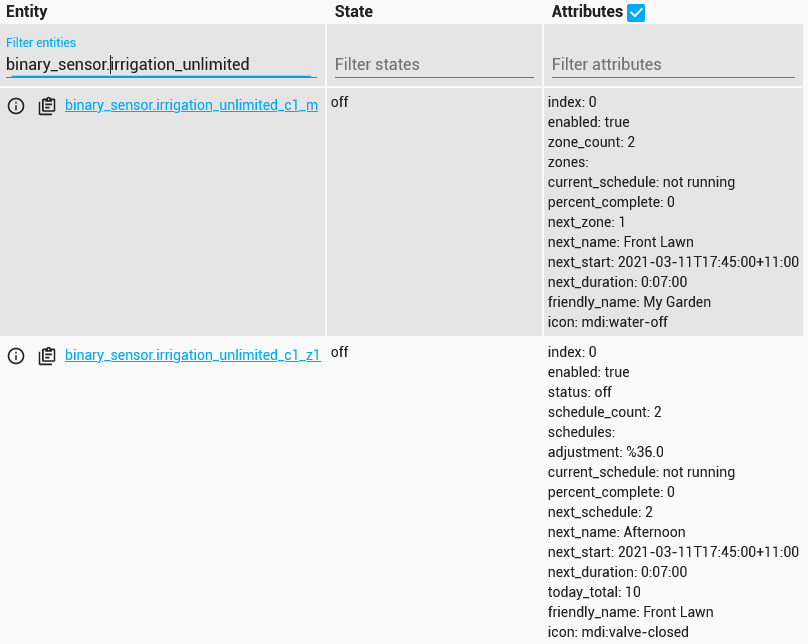
A binary sensor is associated with each controller and zone. Controller or master sensors are named binary_sensor.irrigation_unlimited_cN_m and zone sensors binary_sensor.irrigation_unlimited_cN_zN. These sensors show the state of the master or child zones. Attributes show additional information like current schedule and next run time and duration.
4. Installation
HACS is the recommended method for installation. If you are having difficulties then please see the troubleshooting guide
4.1. Install from HACS
- Just search for Irrigation Unlimited integration in HACS and install it.
- Add Irrigation Unlimited to your configuration.yaml file. See configuration examples below.
- Restart Home Assistant.
4.2. Manual installation
- Using the tool of choice open the directory (folder) for your HA configuration (where you find
configuration.yaml). - If you do not have a
custom_componentsdirectory (folder) there, you need to create it. - In the
custom_componentsdirectory (folder) create a new folder calledirrigation_unlimited. - Download all the files from the
custom_components/irrigation_unlimited/directory (folder) in this repository. - Place the files you downloaded in the new directory (folder) you created.
- Restart Home Assistant
- In the HA UI go to "Configuration" -> "Integrations" click "+" and search for "Irrigation"
Using your HA configuration directory (folder) as a starting point you should now also have this:
custom_components/irrigation_unlimited/__init__.py
custom_components/irrigation_unlimited/binary_sensor.py
custom_components/irrigation_unlimited/const.py
custom_components/irrigation_unlimited/entity.py
custom_components/irrigation_unlimited/history.py
custom_components/irrigation_unlimited/irrigation_unlimited.py
custom_components/irrigation_unlimited/manifest.json
custom_components/irrigation_unlimited/schema.py
custom_components/irrigation_unlimited/service.py
custom_components/irrigation_unlimited/services.yaml
5. Configuration
Configuration is done by yaml. Note: The configuration can be reloaded without restarting HA. See below for details and limitations.
UI configuration is optional. Irrigation Unlimited also supports configuration via the Home Assistant UI — see UI Configuration for details. If a
yamlconfiguration is present it will take precedence over any settings made through the UI.
| Name | Type | Default | Description |
|---|---|---|---|
controllers |
list | Controller Objects | Controller details (Must have at least one) |
granularity |
number | 60 | System time boundaries in seconds |
refresh_interval |
number | 30 | Refresh interval in seconds. When a controller or zone is on this value will govern how often the count down timers will update. Decrease this number for a more responsive display. Increase this number to conserve resources |
rename_entities |
bool | false | DANGER ZONE. Allow the sensor entity_id's to be altered. The controller_id and zone_id will be combined to form the new entity_id. Note: Automations, sensors, scripts, front end cards etc. may need to be updated to reflect the new entity_id's of the controllers and zones |
history_span |
number | 7 | Deprecated. See history span |
history_refresh |
number | 120 | Deprecated. See history refresh_interval |
history |
object | History Object | History data gathering options |
clock |
object | Clock Object | Clock options |
5.1. Controller Objects
This is the controller or master object and manages a collection of zones. There must be at least one controller in the system. The controller state reflects the state of its zones. The controller will be on if any of its zones are on and off when all zones are off.
| Name | Type | Default | Description |
|---|---|---|---|
zones |
list | Zone Objects | Zone details (Must have at least one) |
sequences |
list | Sequence Objects | Sequence details |
name |
string | Controller N | Friendly name for the controller |
controller_id |
string | N | Controller reference. Used to change the default entity name (enable with rename_entities). This must be in snake_case style with the exception the first character can be a number |
enabled |
bool | true | Enable/disable the controller |
preamble |
duration | '00:00' | The time master turns on before any zone turns on. This is in effect a delay-start timer, controller will turn on before the zones. Can be negative to make the controller turn on after the zone |
postamble |
duration | '00:00' | The time master remains on after all zones are off. This is in effect a run-on timer, controller will turn off after the specified delay. Can be negative to make the controller turn off before the zone - this can reduce water hammering |
entity_id |
switch_entity | Switch entity_id(s) for example switch.my_master_valve_1 |
|
entity_states |
string | all | Actions to perform on entity_id. Possible values: all, on, off, none |
all_zones_config |
object | All Zones Object | Shorthand default for all zones |
check_back |
object | See Check Back Object | |
queue_manual |
bool | false | Manual runs should be queued or run immediately |
user |
object | See User Object | |
volume |
object | See Volume Object |
5.2. All Zone Objects
This object is useful when the same settings are required for each zone. It is simply a shorthand or a more concise way to specify the same settings for each zone. The parameter becomes a default which can be overridden in the actual zone.
| Name | Type | Default | Description |
|---|---|---|---|
minimum |
duration | The minimum run time | |
maximum |
duration | The maximum run time | |
duration |
duration | The default run time | |
future_span |
number | 3 | Run queue look ahead in days |
allow_manual |
bool | false | Allow manual run even when disabled |
show |
object | See Zone Show Object | |
check_back |
object | See Check Back Object | |
user |
object | See User Object | |
entity_states |
string | all | Actions to perform on entity_id. Possible values: all, on, off, none |
volume |
object | See Volume Object |
5.3. Zone Objects
The zone object manages a collection of schedules. There must be at least one zone for each controller.
| Name | Type | Default | Description |
|---|---|---|---|
schedules |
list | Schedule Objects | Schedule details (Optional) |
zone_id |
string | N | Zone reference. Used for sequencing and to rename the entity. This must be in snake_case style with the exception the first character can be a number. Set rename_entities to alter the entity _id of the sensor |
name |
string | Zone N | Friendly name for the zone |
enabled |
bool | true | Enable/disable the zone |
minimum |
duration | '00:01' | The minimum run time |
maximum |
duration | The maximum run time | |
threshold |
duration | The zone will not run until the duration meets the threshold | |
duration |
duration | The default run time. Used when no time is provided for a manual run |
|
future_span |
number | 3 | Number of days to look ahead |
allow_manual |
bool | false | Allow manual run even when disabled |
entity_id |
switch_entity | Switch entity_id(s) for example switch.my_zone_valve_1 |
|
entity_states |
string | all | Actions to perform on entity_id. Possible values: all, on, off, none |
show |
object | See Zone Show Object | |
check_back |
object | See Check Back Object | |
user |
object | See User Object | |
volume |
object | See Volume Object |
5.4. Zone Show Object
These are various options to reveal attributes on the zone entity (only one for now).
| Name | Type | Default | Description |
|---|---|---|---|
timeline |
bool | false | Show the zone timeline. This will expose an attribute called timeline on the zone entity |
config |
bool | false | Show the zone configuration. This will expose an attribute called configuration on the zone entity with JSON encoded configuration objects |
5.5. Schedule Objects
Schedules are future events, not dates for example Mondays at sunrise.
The schedule can have the commencement or completion fixed to a time or event with the anchor parameter. Any adjustments to the duration will alter the start time if finish is specified or the completion time if start is specified. Note: If anchoring to finish and the schedule can not complete before the specified time then the run will defer to the following day. This is an important consideration if adjusting run times dynamically as it may lead to a 'skipping' situation. Ensure there is sufficient time to complete the run when making adjustments. See here for more information on adjusting runs times.
The parameters weekday, day, month and from/until are date filters. If not specified then all dates qualify.
| Name | Type | Default | Description |
|---|---|---|---|
time |
time/Sun Event/Crontab | Required | The start time. Either a time (07:30), sun event or cron expression |
anchor |
string | start | start or finish. Sets the schedule to commence or complete at the specified time |
duration |
duration | The length of time to run. Required for zones and optional for sequences | |
name |
string | Schedule N | Friendly name for the schedule |
weekday |
list | The days of week to run [mon, tue...sun] | |
day |
list/string/Every n days |
Days of month to run [1, 2...31]/odd/even/Every n days |
|
month |
list | Months of year to run [jan, feb...dec] | |
enabled |
bool | true | Enable/disable the schedule |
schedule_id |
string | A unique identifier across all schedules. This must be in snake_case style | |
from |
string | see below* | Start date in the year. Format is dd mmm for example 15 Mar |
until |
string | see below* | Last date in the year. Format is dd mmm for example 15 Sep |
* from and until are mutually inclusive.
5.5.1 Sun Event
Leave the time value in the Schedule Objects blank and add the following object. An optional before or after time can be specified.
| Name | Type | Default | Description |
|---|---|---|---|
sun |
string | Required | sunrise or sunset |
before |
duration | '00:00' | Time before the event |
after |
duration | '00:00' | Time after the event |
5.5.2 Crontab
Leave the time value in the Schedule Objects blank and add the following object.
| Name | Type | Default | Description |
|---|---|---|---|
cron |
string | Required | A valid cron expression. Details can be found here |
5.5.3 Every n Days
Set the day value in the Schedule Objects to a dictionary with the following keys.
| Name | Type | Default | Description |
|---|---|---|---|
every_n_days |
number | Required | The interval between runs. |
start_n_days |
date | Required | The start date for the interval, you can alternate multiple schdules by offseting this by every_n_days. |
5.6. Sequence Objects
Sequences allow zones to run one at a time in a particular order with a delay in between. This is a type of watering 'playlist'. If a delay is specified and a pump or master valve is operated by the controller then consider the postamble setting in the Controller Object. Set this to the largest delay to prevent pump on/off operations.
Sequences directly descend from a controller and are loosely connected to a zone entity via the zone_id parameter. The zone_id may point to one or many (a list) zone entities. A zone may be referenced more than once in a sequence.
└── Irrigation Unlimited
      └──> Controller
            ├──> Zones
            │     ├──> Zone 1 <────┐
            │     ├──> Zone 2 <────┤
            │     │     ...        │
            │     └──> Zone N <────┤
            └──> Sequence          │
                  ├──> zone_id >───┤
                  ├──> zone_id >───┤
                  │      ...       │
                  └──> zone_id >───┘
| Name | Type | Default | Description |
|---|---|---|---|
schedules |
list | Schedule Objects | Schedule details (Optional). Note: duration if specified is the total run time for the sequence, see below for more details |
zones |
list | Sequence Zone Objects | Zone details (Must have at least one) |
delay |
duration | Delay between zones. This value is a default for all Sequence Zone Objects. Can be negative to make the next zone on before the current zone has finished | |
duration |
duration | The length of time to run each zone. This value is a default for all Sequence Zone Objects | |
repeat |
number | 1 | Number of times to repeat the sequence |
name |
string | Run N | Friendly name for the sequence |
sequence_id |
string | N | Sequence reference. This must be in snake_case style with the exception the first character can be a number |
enabled |
bool | true | Enable/disable the sequence |
5.7. Sequence Zone Objects
The sequence zone is a reference to the actual zone defined in the Zone Objects. Ensure the zone_id's match between this object and the zone object. The zone may appear more than once in the case of a split run.
| Name | Type | Default | Description |
|---|---|---|---|
zone_id |
string/list | Required | Zone reference. This must match the zone_id in the Zone Objects |
delay |
duration | Delay between zones. This value will override the delay setting in the Sequence Objects |
|
duration |
duration | The length of time to run. This value will override the duration setting in the Sequence Objects. Can be negative to make the next zone on before the current zone has finished |
|
volume |
number | None | Volume limit. End this sequence zone when the volume has been reached. Requires the volume object to be configured |
repeat |
number | 1 | Number of times to repeat this zone |
enabled |
bool | true | Enable/disable the sequence zone |
Special note for schedules and the duration parameter contained within when used with sequences. Each zone in the sequence will be proportionally adjusted to fit the specified duration. For example, if 3 zones were to each run for 10, 20 and 30 minutes respectively (total 1 hour) and the schedule.duration parameter specified 30 minutes then each zone would be adjusted to 5, 10 and 15 minutes. Likewise if schedule.duration specified 1.5 hours then the zones would be 15, 30 and 45 minutes. Some variation may occur due to rounding of the times to the system boundaries (granularity). This parameter influences the durations specified in the sequence and sequence zone objects.
5.8. History Object
The timeline and total_today attributes use history information. This information is read and cached by the history module.
| Name | Type | Default | Description |
|---|---|---|---|
enabled |
bool | true | Enable/disable history |
span |
number | 7 | Number of days of history data to fetch |
refresh_interval |
number | 120 | History refresh interval in seconds |
read_delay |
number | 0 | Delay before reading history data in seconds |
5.8.1. Long term statistics (LTS)
History is typically purged after 10 days. If you wish to retain the total_today data beyond this period then setup a Long-Term Statistic sensor. See here for an example.
For more information see Long-Term Statistics
5.9. Clock Object
This object controls the internal clock mode.
| Name | Type | Default | Description |
|---|---|---|---|
mode |
string | seer | fixed or seer. Set the clock to fixed (game loop) or seer (event loop) |
show_log |
bool | false | Expose the clock ticks via next_tick and tick_log attributes in the coordinator entity |
max_log_entries |
number | 50 | Set the number of entries in the tick log history |
5.10. Check Back Object
This is used to check the state of the physical switch concurs with the state of the controller or zone. An out of sync can occur due to transmission or communications problems especially with protcols like WiFi, Zigbee or ZWave. The check back will report discrepancies and attempt to resync the switch. Should the resync fail a message will be logged and an event fired. The event can be use for notifications such as an email or phone alert. For more information see Notifications
| Name | Type | Default | Description |
|---|---|---|---|
state |
string | all | One of none, all, on or off |
delay |
number | 30 | Seconds to wait after switch is turned on or off |
retries |
number | 3 | Number of times to recheck the switch |
resync |
bool | true | Attempt to resync the switch |
toggle |
bool | false | Toggle the switch on/off or off/on instead of attempting to just set the state |
state_on |
string | on |
The value that represents the on state of the switch |
state_off |
string | off |
The value that repesents the off state of the switch |
entity_id |
string | Optional, use this when switch entity is write only and state is read from another entity. If switch entity is R/W then ignore this parameter |
5.11. User Object
The user object is available on the controller, all_zone and zone objects. It is basically a pass through of arbitrary static user defined data. Elements are prefixed and presented as attributes in the entities.
| Name | Type | Default | Description |
|---|---|---|---|
name |
string/number/bool | ||
name_2 |
string/number/bool |
* name should be in snake_case style.
Here is an example:
controllers:
   - name: "Test controller 1"
     user:
       area: My Farm
       picture: /my_pic.jpg
     all_zones_config:
       user:
         actuator: KNX 6.1
     zones:
       - name: "Zone 1"
         user:
           area: Eastern Pastures
           flow_rate_gallon_per_minute: 25
           picture: /my_pic.jpg
           gps: 42.746635,-75.770045
       - name: "Zone 2"
Thus, the controller and zone present the following attributes:
#Controller 'Test controller 1':
binary_sensor.irrigation_unlimited_c1_m.user_area = 'My Farm'
binary_sensor.irrigation_unlimited_c1_m.user_picture = '/my_pic.jpg'

#Zone 1:
binary_sensor.irrigation_unlimited_c1_z1.user_actuator = 'KNX 6.1' #this is inherited from all_zones_config
binary_sensor.irrigation_unlimited_c1_z1.user_area = 'Eastern Pastures'
binary_sensor.irrigation_unlimited_c1_z1.user_flow_rate_gallon_per_minute = '25'
binary_sensor.irrigation_unlimited_c1_z1.user_picture = '/my_pic.jpg'
binary_sensor.irrigation_unlimited_c1_z1.user_gps = '42.746635,-75.770045'

#Zone 2:
binary_sensor.irrigation_unlimited_c1_z2.user_actuator = 'KNX 6.1' #this is inherited from all_zones_config
The user defined static data available as attribute may help to customize cards or to present additional data on cards, in particular via the functionality within [entity-multiple-row](type: custom:multiple-entity-row). This feature maybe further developed and extended to the sequence: object over time.
5.12. Volume Object
The volume object accepts a volume meter and calculates the total volume and flow rate. One volume sensor, perhaps in the main line or feed, can be shared among the zones. In this case use the same entity_id for each zone or setup the volume object in the all_zones_config
| Name | Type | Default | Description |
|---|---|---|---|
entity_id |
str | The volume sensor. The sensor should be a utility type meter where the reading increments forever | |
volume_scale |
number | 1 | Use this to convert to other unit i.e. to or from gallons and litres |
volume_precision |
number | 3 | The number of decimal places to display |
flow_rate_scale |
number | 3600 | Use this to convert to another time unit i.e. hours, minutes, seconds |
flow_rate_precision |
number | 3 | The number of decimal places to display |
If you only have a flow meter and not a volume counter then use the Integral platform to create one. Here is an example using a Sonoff Smart Water Valve.
integration:
  - source: sensor.sonoff_swv_volume_flow_rate
    name: total_volume
    round: 3
    method: left
6. Configuration examples
6.1. Minimal configuration
# Example configuration.yaml entry
irrigation_unlimited:
  controllers:
    zones:
      entity_id: "switch.my_switch"
      schedules:
        - time: "06:00"
          duration: "00:20"
6.2. Sun event example
# Example configuration.yaml entry
# Run 20 minutes before sunrise for 30 minutes
irrigation_unlimited:
  controllers:
    zones:
      entity_id: "switch.my_switch_1"
      schedules:
        - name: "Before sunrise"
          time:
            sun: "sunrise"
            before: "00:20"
          duration: "00:30"
6.3. Sequence example
# Example configuration.yaml entry
irrigation_unlimited:
  controllers:
    zones:
      - name: "Front lawn"
        entity_id: "switch.my_switch_1"
      - name: "Vege patch"
        entity_id: "switch.my_switch_2"
      - name: "Flower bed"
        entity_id: "switch.my_switch_3"
    sequences:
      - delay: "00:01"
        schedules:
          - name: "Sunrise"
            time:
              sun: "sunrise"
          - name: "After sunset"
            time:
              sun: "sunset"
              after: "00:30"
        zones:
          - zone_id: 1
            duration: "00:10"
          - zone_id: 2
            duration: "00:02"
          - zone_id: 3
            duration: "00:01"
6.4. Simple water saving / eco mode example
# Example water saver. Run for 5 min on 2 off repeat 3 times
irrigation_unlimited:
  controllers:
    zones:
      - entity_id: "switch.my_switch_1"
    sequences:
      - duration: "00:05"
        delay: "00:02"
        repeat: 3
        schedules:
          - time: "05:00"
        zones:
          - zone_id: 1
6.5. Every hour on the hour
# Example to run for 5 min every hour on the hour from 5am to 5pm
irrigation_unlimited:
  controllers:
    zones:
      - entity_id: "switch.my_switch_1"
    sequences:
      - name: "On the hour from 5am to 5pm"
        duration: "00:05"
        delay: "00:55"
        repeat: 12
        schedules:
          - time: "05:00"
        zones:
          - zone_id: 1
Similar to above but using the cron scheduler.
# Example to run for 5 min every hour on the hour from 5am to 5pm
irrigation_unlimited:
  controllers:
    zones:
      - entity_id: "switch.my_switch_1"
    sequences:
      - name: "On the hour from 5am to 5pm"
        duration: "00:05"
        schedules:
          - time:
              cron: "0 5-17 * * *"
        zones:
          - zone_id: 1
6.6. Seasonal watering
# Run 15 min 3 times a week in summer, 10 min once a week in winter and twice a week in spring/autumn
irrigation_unlimited:
  controllers:
    zones:
      - entity_id: "switch.my_switch_1"
        schedules:
          - time: "05:30"
            duration: "00:15"
            weekday: [mon, wed, fri]
            month: [dec, jan, feb]
          - time: "05:30"
            duration: "00:10"
            weekday: [sun]
            month: [jun, jul, aug]
          - time: "05:30"
            duration: "00:12"
            weekday: [mon, thu]
            month: [mar, apr, may, sep, oct, nov]
This is similar to the above but using sequences in a 3 zone system. Each zone runs for 12 minutes for a total of 36 min (plus delays). In Summer the total duration is extended to 45 minutes and winter reduced to 30 minutes. When using the duration parameter in the Schedule it relates to the total duration of the sequence, each zone is adjusted accordingly.
irrigation_unlimited:
  controllers:
    zones:
      - entity_id: "switch.my_switch_1"
      - entity_id: "switch.my_switch_2"
      - entity_id: "switch.my_switch_3"
    sequences:
      - name: "Run 1"
        duration: "00:12"
        delay: "00:01"
        schedules:
          - name: "Summer"
            time: "05:30"
            weekday: [mon, wed, fri]
            month: [dec, jan, feb]
            duration: "00:45"
          - name: "Winter"
            time: "05:30"
            weekday: [sun]
            month: [jun, jul, aug]
            duration: "00:30"
          - name: "Spring and Autumn"
            time: "05:30"
            weekday: [mon, thu]
            month: [mar, apr, may, sep, oct, nov]
        zones:
          - zone_id: 1
          - zone_id: 2
          - zone_id: 3
Just in case this does not go far enough then create three sequences with one schedule each. This will allow complete control over all aspects of the sequence including which zones to run, order, durations, delays, repeats etc. Still want more then create a sequence for each month of the year. This example reverses the order in Spring/Autumn for no good reason and excludes a zone in Winter.
irrigation_unlimited:
  controllers:
    zones:
      - entity_id: "switch.my_switch_1"
      - entity_id: "switch.my_switch_2"
      - entity_id: "switch.my_switch_3"
    sequences:
      - name: "Summer"
        duration: "00:15"
        delay: "00:01"
        schedules:
          - time: "05:30"
            weekday: [mon, wed, fri]
            month: [dec, jan, feb]
        zones:
          - zone_id: 1
          - zone_id: 2
          - zone_id: 3
      - name: "Winter"
        duration: "00:10"
        delay: "00:01"
        schedules:
          - time: "07:30"
            weekday: [sun]
            month: [jun, jul, aug]
        zones:
          - zone_id: 1
          - zone_id: 3
      - name: "Spring and Autumn"
        duration: "00:12"
        delay: "00:01"
        schedules:
          - time: "06:30"
            weekday: [mon, thu]
            month: [mar, apr, may, sep, oct, nov]
        zones:
          - zone_id: 3
          - zone_id: 2
          - zone_id: 1
6.7. Finish at sunrise
# Finish a watering run 10 minutes before sunrise
irrigation_unlimited:
  controllers:
    zones:
      - entity_id: "switch.my_switch_1"
      - entity_id: "switch.my_switch_2"
      - entity_id: "switch.my_switch_3"
      - entity_id: "switch.my_switch_4"
    sequences:
      - name: "My watering run"
        duration: "00:30"
        delay: "00:01"
        schedules:
          - name: "Before dawn"
            time:
              sun: "sunrise"
              before: "00:10"
            anchor: finish
        zones:
          - zone_id: 1
          - zone_id: 2
          - zone_id: 3
          - zone_id: 4
For a more comprehensive example refer to here.
6.8. Tips
-
Schedules can not only have a day of week (mon, wed, fri) but also a month of year (jan, feb, mar). This allows the setup of seasonal watering schedules. For example run every day in summer and twice a week in winter. Setup a different schedule for each month of the year using this filter.
-
Use sequences to setup a water saving or eco mode. Eco mode uses small cycles with a delay to allow the water to soak in and minimise run off. Run all the zones for half the time and then repeat.
-
No need to restart HA after changing the configuration.yaml file. Go to Configuration -> Server Controls -> YAML configuration and reloading and press 'RELOAD IRRIGATION UNLIMITED'.
-
After setting up configuration.yaml, the operation can be controlled via service calls as shown below. Perform manual runs, adjust watering times, cancel running schedules and enable/disable zones from a frontend
7. Actions
The binary sensor associated with each controller and zone provide several services. These sensors offer the following services:
enabledisabletogglesuspendcancelmanual_runadjust_timeload_schedule
If a controller sensor is targetted then it will effect all its children zones and/or sequences. The sequence_id may contain a list of sequences. If an element in the list is a number then it refers to the position of the sequence under the controller i.e. 1st, 2nd etc. If the element contains a string this then refers to the sequence_id. Similarly the zones may contain a list of zones. If the element in the list contains a number then it refers to the position of the zone under the controller. If the element is a string then it refers to the zone_id. For example sequence_id: [1, 'lawn'] the 1 is a number because it is not enclosed in quotation marks.
7.1. Actions enable, disable and toggle
Enables/disables/toggles the controller, zone, sequence or sequence zone respectively.
| Service data attribute | Type | Required | Description |
|---|---|---|---|
entity_id |
string/list | yes | Controller or zone to enable/disable/toggle. |
sequence_id |
number/list | no | Sequences to enable/disable/toggle. Entity must be a controller. |
zones |
number/list | no | Sequence zones to enable/disable/toggle. |
7.2. Actions pause and resume
Pauses/resumes a sequence. This service call "stops the clock" when paused so to speak and "continues to run it" upon resume.
This is particularly helpful in a use case scenario where a main water supply is used for both irrigation and ie filling a domestic cold water tank at the same time. If the water pressure is only sufficient for either irrigaton or tank filling, this service call allows to pause the irrigation whilst a tank is filled, and then resumes irrigation without interrupting the time allocated to the sequences or zones thereof.
| Service data attribute | Type | Required | Description |
|---|---|---|---|
entity_id |
string/list | yes | Entity_id of a controller or sequence to pause/resume. If a controller entity is selected it will target the sequence or all sequences (see next parameter). If more than one entity_id are to be targeted a group integration helper may be used. |
sequence_id |
number/list | only if entity_id represents a controller | Sequence to pause/resume. The sequence_id is only used when the entity_id is the controller. If sequence_id is set to 0 then all sequences of the controller will be effected. |
There is an example for a pause-resume button that targets all sequences within all controllers creating a globla pause and resume button.
7.3. Action suspend
Suspend operation of a controller, zone, sequence or sequence zone for a period of time. This is like a temporary disable that will automatically reset.
| Service data attribute | Type | Required | Description |
|---|---|---|---|
entity_id |
string/list | yes | Controller or zone to run. |
sequence_id |
number/list | no | Sequences to suspend. Entity must be a controller. |
zones |
number/list | no | Sequence zones to suspend. |
for |
duration | see below* | Suspend for a period of time. Supports templating. |
until |
string | see below* | Suspend until a point in time. Format is %Y-%m-%d %H:%M:%S for example 2023-08-01 07:30:00. |
reset |
none | see below* | Reset or cancel the current suspension. |
* Must have one and only one of for, until or reset.
7.4. Action cancel
Cancels the current running schedule.
| Service data attribute | Type | Required | Description |
|---|---|---|---|
entity_id |
string/list | yes | Controller or zone to cancel. |
7.5. Action manual_run
Turn on the controller or zone for a period of time. When a sequence is specified each zone's duration will be auto adjusted as a proportion of the original sequence. Zone times are calculated and rounded to the nearest time boundary. This means the total run time may vary from the specified time.
| Service data attribute | Type | Required | Description |
|---|---|---|---|
entity_id |
string/list | yes | Controller or zone to run. |
time |
duration | no | Total time to run. Supports templating. If not provided or is "0:00:00" then adjusted defaults will be applied |
delay |
duration | no | Delay between runs when queued |
queue |
boolean | no | Queue or run immediately. |
sequence_id |
number/list | no | Sequences to run. Each zone duration will be adjusted to fit the allocated time, delays are not effected. Note: The time parameter includes inter zone delays. If the total delays are greater than the specified time then the sequence will not run. Entity must be a controller. |
7.6. Action adjust_time
Adjust the run times. Calling this service will override any previous adjustment i.e. it will not make adjustments on adjustments. For example, if the scheduled duration is 30 minutes calling percent: 150 will make it 45 minutes then calling percent 200 will make it 60 minutes. When a sequence is specified each zone's duration will be auto adjusted as a proportion of the original sequence.
A schedule anchored to a start time will alter the completion time. Likewise a schedule anchored to a finish time will change the commencement time. In this situation ensure there is enough time in the current day for the schedule to complete or it will be deferred to the following day. Adjustments must be made before the scheduled start time. Running schedules will be not affected.
Tip: Use forecast and observation data collected by weather integrations in automations to adjust the run times. See below for more information.
| Service data attribute | Type | Required | Description |
|---|---|---|---|
entity_id |
string/list | yes | Controller or zone to run. |
actual |
duration | see below* | Specify a new run time. This will replace the existing duration. Supports templating. |
percentage |
float | see below* | Adjust time by a percentage. Values less than 100 will decrease the run time while values greater than 100 will increase the run time. Supports templating. |
increase |
duration | see below* | Increase the run time by the specified time. A value of '00:10' will increase the duration by 10 minutes. Value will be capped by the maximum setting. Supports templating. |
decrease |
duration | see below* | Decrease the run time by the specified time. A value of '00:05' will decrease the run time by 5 minutes. Value will be limited by the minimum setting. Supports templating. |
reset |
none | see below* | Reset adjustment back to the original schedule time (Does not effect minimum or maximum settings). |
minimum |
duration | no | Set the minimum run time. Supports templating. |
maximum |
duration | no | Set the maximum run time. Note: The default is no limit. Supports templating. |
sequence_id |
number/list | no | Sequences to adjust. Entity must be a controller. |
zones |
number/list | no | Zones to adjust. |
* Must have one and only one of actual, percentage, increase, decrease or reset.
7.7. Action load_schedule
Reload a schedule. This will allow an edit to an existing schedule. All fields are optional except the schedule_id. If a field is specified then it is overwritten otherwise it is left untouched. This service does NOT save the new schedule in the event of a reload or HA restart, it will revert to the original configuration.
| Name | Type | Default | Description |
|---|---|---|---|
schedule_id |
string | Required | The unique schedule identifier. The target schedule must have the unique schedule_id set |
time |
time/Sun Event/Crontab | The start time. Either a time (07:30), sun event or cron expression | |
anchor |
string | start or finish. Sets the schedule to commence or complete at the specified time |
|
duration |
duration | The length of time to run. Required for zones and optional for sequences | |
name |
string | Friendly name for the schedule | |
weekday |
list | The days of week to run [mon, tue...sun] | |
day |
list/string/Every n days |
Days of month to run [1, 2...31]/odd/even/Every n days |
|
month |
list | Months of year to run [jan, feb...dec] | |
enabled |
bool | Enable/disable the schedule |
7.8. Action reload
Reload the YAML configuration file. Do not add or delete controllers or zones, they will not work because of the associated entities which are created on startup. This may be addressed in a future release, however, suggested work around is to set enabled to false to effectively disable/delete. All other settings can be changed including schedules. You will find the control in Configuration -> Server Controls -> YAML configuration reloading. Note: since version 2021.10.0 all settings can be changed including new controllers and zones.
7.9. Action call access roadmap
A reminder that sequences directly descend from a controller. Therefore service calls that manipulate a sequence should address the parent controller. An entity_id of a zone when trying to adjust a sequence will most likely not have the desired effect.
The combination of three key parameters entity_id, sequence_id and zones will target the various sections of the configuration.
entity_id:This will be either the controller or zone entity.sequence_id:This is the position number of the sequence under the controller.sequence_id: 1is the first, 2 is the second and so on. As a shortcut,sequence_idwill alter all sequences.zones:This is the position number of the zone reference under the sequence.zones: 1is the first, 2 is the second and so on. As a shortcut,zones: 0will alter all zone references in the sequence. May also take a listzones: [1,3,5]
The following is a valid irrigation unlimited configuration. It shows how various points can be changed using the service calls above. Example numbers have the nomenclature C.Z.S.R = Controller.Zone.Sequence.zoneReference. If Z is zero then the entity_id must be the controller/master i.e. binary_sensor.irrigation_unlimited_cN_m. If Z is not zero then then entity_id is the zone i.e. binary_sensor.irrigation_unlimited_cN_zN.
irrigation_unlimited:
  controllers:
    - name: "Controller 1"
      enabled: true # <= See example 1.0
      zones:
        - name: "Controller 1, Zone 1"
          enabled: true # <= See example 1.1
          - schedules:
              - time: "04:00"
                duration: "00:10" # <= See example 1.1.1
        - name: "Controller 1, Zone 2"
          enabled: true # <= See example 1.2
          - schedules:
              - time: "05:00"
                duration: "00:10" # <= See example 1.2.1
      sequences:
        - name: "Controller 1, Sequence 1"
          enabled: true # <= See example 1.0.1e
          schedules:
            - time: "06:00"
              duration: "01:00" # <= See example 1.0.1
          zones:
            - zone_id: [1, 2] # This is controller 1, sequence 1, zone reference 1
              enabled: true # <= See example 1.0.1.1e
              duration: "00:10" # <= See example 1.0.1.1
            - zone_id: 2  # This is controller 1, sequence 1, zone reference 2
              enabled: true # <= See example 1.0.1.2e
              duration: "00:10" # <= See example 1.0.1.2
        - name: "Controller 1, Sequence 2"
          enabled: true # <= See example 1.0.2e
          schedules:
            - time: "07:00"
              duration: "01:00" # <= See example 1.0.2
          zones:
            - zone_id: 1 # This is controller 1, sequence 2, zone reference 1
              enabled: true # <= See example 1.0.2.1e
              duration: "00:10" # <= See example 1.0.2.1
    - name: "Controller 2"
      enabled: true # <= See example 2.0
      zones:
        - name: "Controller 2, Zone 1"
          enabled: true # <= See example 2.1
        - name: "Controller 2, Zone 2"
          enabled: true # <= See example 2.2
      sequences:
        - name: "Controller 2, Sequence 1"
          enabled: true # <= See example 2.0.1e
          schedules:
            - time: "09:00"
              duration: "01:00" # <= See example 2.0.1
          zones:
            - zone_id: 1 # This is controller 2, sequence 1, zone reference 1
              enabled: true # <= See example 2.0.1.1e
              duration: "00:10" # <= See example 2.0.1.1
            - zone_id: 2 # This is controller 2, sequence 1, zone reference 2
              enabled: true # <= See example 2.0.1.2e
              duration: "00:10" # <= See example 2.0.1.2
        - name: "Controller 2, Sequence 2"
          enabled: true # <= See example 2.0.2e
          schedules:
            - time: "09:00"
              duration: "01:00" # <= See example 2.0.2
          zones:
            - zone_id: 1 # This is controller 2, sequence 2, zone reference 1
              enabled: true # <= See example 2.0.2.1e
              duration: "00:10" # <= See example 2.0.2.1
            - zone_id: 2 # This is controller 2, sequence 2, zone reference 2
              enabled: true # <= See example 2.0.2.2e
              duration: "00:10" # <= See example 2.0.2.2
Notes:
- The
adjust_timeservice call examples show the adjustment method ofactual. This is shown for simplicity however all methods are available as described above. - The
enableservice call can also bedisableortoggle.
# Example 1.0 -> controller 1 -> enabled. This will alter the enabled status for the controller.
- service: irrigation_unlimited.enable
  data:
    entity_id: binary_sensor.irrigation_unlimited_c1_m

# Example 1.1 -> controller 1 -> zone 1 -> enabled. This will alter the enabled status for zone 1.
- service: irrigation_unlimited.enable
  data:
    entity_id: binary_sensor.irrigation_unlimited_c1_z1

# Example 1.1.1 -> controller 1 -> zone 1 -> duration. This will alter the duration for zone 1.
- service: irrigation_unlimited.adjust_time
  data:
    entity_id: binary_sensor.irrigation_unlimited_c1_z1
    actual: "00:20"

# Example 1.2 -> controller 1 -> zone 2 -> enabled. This will alter the enabled status of zone 2.
- service: irrigation_unlimited.enable
  data:
    entity_id: binary_sensor.irrigation_unlimited_c1_z2

# Example 1.2.1 -> controller 1 -> zone 1 -> duration. This will alter the duration for zone 2.
- service: irrigation_unlimited.adjust_time
  data:
    entity_id: binary_sensor.irrigation_unlimited_c1_z2
    actual: "00:20"

# Example 1.0.1e -> controller 1 -> sequence 1 -> enabled. This will alter the enabled status of sequence 1.
- service: irrigation_unlimited.enable
  data:
    entity_id: binary_sensor.irrigation_unlimited_c1_m
    sequence_id: 1

# Example 1.0.1 -> controller 1 -> sequence 1 -> duration. This will proportionally alter the duration
# for all zone references in the first sequence.
- service: irrigation_unlimited.adjust_time
  data:
    entity_id: binary_sensor.irrigation_unlimited_c1_m
    sequence_id: 1
    actual: "00:20"

# Example 1.0.1.1e -> controller 1 -> sequence 1 -> zone reference 1 -> enabled. This will alter the enabled
# status of the first zone reference in the first sequence.
- service: irrigation_unlimited.enable
  data:
    entity_id: binary_sensor.irrigation_unlimited_c1_m
    sequence_id: 1
    zones: 1

# Example 1.0.1.1 -> controller 1 -> sequence 1 -> zone reference 1 -> duration. This will alter the duration
# for the first zone reference in the first sequence.
- service: irrigation_unlimited.adjust_time
  data:
    entity_id: binary_sensor.irrigation_unlimited_c1_m
    sequence_id: 1
    zones: 1
    actual: "00:20"

# Example 1.0.1.2 - controller 1 -> sequence 1 -> zone reference 2 -> enabled. This will alter the enabled
# status of the second zone reference in the first sequence.
- service: irrigation_unlimited.enable
  data:
    entity_id: binary_sensor.irrigation_unlimited_c1_m
    sequence_id: 1
    zones: 2

# Example 1.0.1.2 - controller 1 -> sequence 1 -> zone reference 2 -> duration. This will alter the duration
# for the second zone reference in the first sequence.
- service: irrigation_unlimited.adjust_time
  data:
    entity_id: binary_sensor.irrigation_unlimited_c1_m
    sequence_id: 1
    zones: 2
    actual: "00:20"

# Example 1.0.2e - controller 1 -> sequence 2 -> enabled. This will alter the enabled
# status of the second sequence.
- service: irrigation_unlimited.enabled
  data:
    entity_id: binary_sensor.irrigation_unlimited_c1_m
    sequence_id: 2

# Example 1.0.2 - controller 1 -> sequence 2 -> duration. This will proportionally alter the duration
# for all zone references in the second sequence.
- service: irrigation_unlimited.adjust_time
  data:
    entity_id: binary_sensor.irrigation_unlimited_c1_m
    sequence_id: 2
    actual: "00:20"

# Example 1.0.2.1e - controller 1 -> sequence 2 -> zone reference 1 -> enabled
- service: irrigation_unlimited.enable
  data:
    entity_id: binary_sensor.irrigation_unlimited_c1_m
    sequence_id: 2
    zones: 1

# Example 1.0.2.1 - controller 1 -> sequence 2 -> zone reference 1 -> duration
- service: irrigation_unlimited.adjust_time
  data:
    entity_id: binary_sensor.irrigation_unlimited_c1_m
    sequence_id: 2
    zones: 1
    actual: "00:20"

# Example 2.0 -> controller 2 -> enabled. This will alter the enabled status for the controller.
- service: irrigation_unlimited.enable
  data:
    entity_id: binary_sensor.irrigation_unlimited_c2_m

# Example 2.1 -> controller 2 -> zone 1 -> enabled. This will alter the enabled status for zone 1.
- service: irrigation_unlimited.enable
  data:
    entity_id: binary_sensor.irrigation_unlimited_c2_z1

# Example 2.2 -> controller 2 -> zone 2 -> enabled. This will alter the enabled status of zone 2.
- service: irrigation_unlimited.enable
  data:
    entity_id: binary_sensor.irrigation_unlimited_c2_z2

# Example 2.0.1e - controller 2 -> sequence 1 -> enabled. This will alter the enabled status
# for the first sequence.
- service: irrigation_unlimited.enable
  data:
    entity_id: binary_sensor.irrigation_unlimited_c2_m
    sequence_id: 1

# Example 2.0.1 - controller 2 -> sequence 1 -> duration. This will proportionally alter the duration
# for all zone references in the first sequence.
- service: irrigation_unlimited.adjust_time
  data:
    entity_id: binary_sensor.irrigation_unlimited_c2_m
    sequence_id: 1
    actual: "00:20"

# Example 2.0.1.1e - controller 2 -> sequence 1 -> zone reference 1 -> enabled. This will alter the enabled
# status for the first zone reference in the first sequence.
- service: irrigation_unlimited.enable
  data:
    entity_id: binary_sensor.irrigation_unlimited_c2_m
    sequence_id: 1
    zones: 1

# Example 2.0.1.1 - controller 2 -> sequence 1 -> zone reference 1 -> duration. This will alter the duration
# for the first zone reference in the first sequence.
- service: irrigation_unlimited.adjust_time
  data:
    entity_id: binary_sensor.irrigation_unlimited_c2_m
    sequence_id: 1
    zones: 1
    actual: "00:20"

# Example 2.0.1.2e - controller 2 -> sequence 1 -> zone reference 2 -> enabled. This will alter the enabled
# status for the second zone reference in the first sequence.
- service: irrigation_unlimited.enable
  data:
    entity_id: binary_sensor.irrigation_unlimited_c2_m
    sequence_id: 1
    zones: 2

# Example 2.0.1.2 - controller 2 -> sequence 1 -> zone reference 2 -> duration. This will alter the duration
# for the second zone reference in the first sequence.
- service: irrigation_unlimited.adjust_time
  data:
    entity_id: binary_sensor.irrigation_unlimited_c2_m
    sequence_id: 1
    zones: 2
    actual: "00:20"

# Example 2.0.2e - controller 2 -> sequence 2 -> enabled
- service: irrigation_unlimited.enable
  data:
    entity_id: binary_sensor.irrigation_unlimited_c2_m
    sequence_id: 2

# Example 2.0.2 - controller 2 -> sequence 2 -> duration
- service: irrigation_unlimited.adjust_time
  data:
    entity_id: binary_sensor.irrigation_unlimited_c2_m
    sequence_id: 2
    actual: "00:20"

# Example 2.0.2.1e - controller 2 -> sequence 2 -> zone reference 1 -> enabled
- service: irrigation_unlimited.enable
  data:
    entity_id: binary_sensor.irrigation_unlimited_c2_m
    sequence_id: 2
    zones: 1

# Example 2.0.2.2 - controller 2 -> sequence 2 -> zone reference 1 -> duration
- service: irrigation_unlimited.adjust_time
  data:
    entity_id: binary_sensor.irrigation_unlimited_c2_m
    sequence_id: 2
    zones: 1
    actual: "00:20"

# Example 2.0.2.2e - controller 2 -> sequence 2 -> zone reference 2 -> enabled
- service: irrigation_unlimited.enable
  data:
    entity_id: binary_sensor.irrigation_unlimited_c2_m
    sequence_id: 2
    zones: 2

# Example 2.0.2.2 - controller 2 -> sequence 2 -> zone reference 2 -> duration
- service: irrigation_unlimited.adjust_time
  data:
    entity_id: binary_sensor.irrigation_unlimited_c2_m
    sequence_id: 2
    zones: 2
    actual: "00:20"
8. Frontend
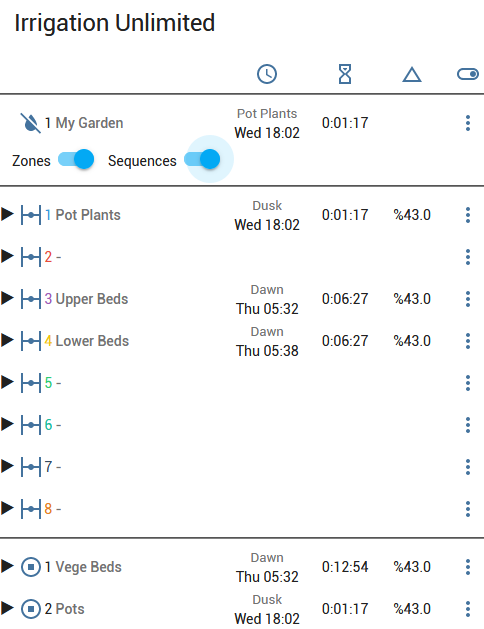
From release 2022.4.0 a companion card is available.
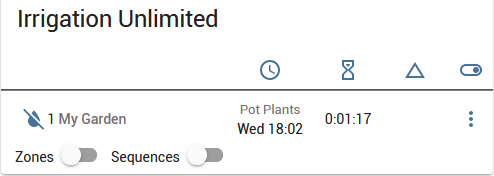
and expands to
8.1. Generic Cards
Most of the following will require installation of further lovelace cards. For some inspiration and a compact card try this.
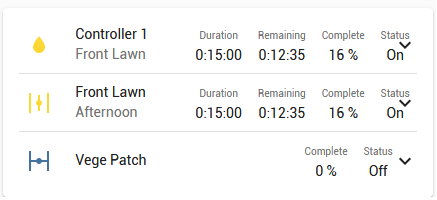
and it expands to:
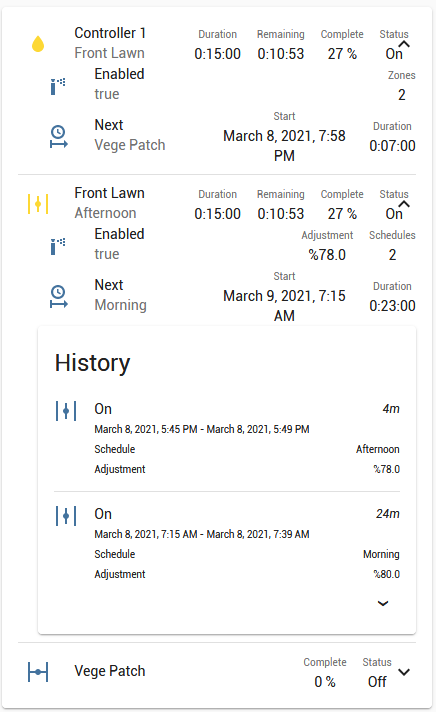
Note: This card uses some custom cards multiple-entity-row, fold-entity-row, logbook-card and at the moment card-mod for styles.
For watering history information here is a sample card.
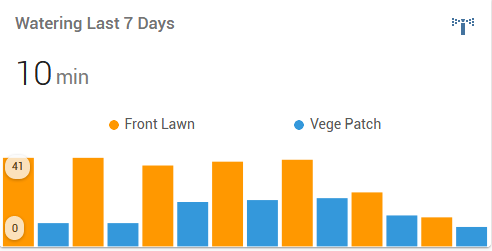 .
.
Note: At time of writing this requires a pre-released version of mini-graph-card. Note: If you get "NaN" displayed instead of the actual value then clear out your browsers cache and make sure the development release is installed.
Although not really part of the integration but to get you started quickly here is a temperature card.
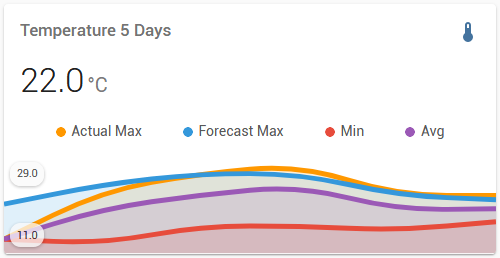 .
.
And a rainfall card. Note how the watering times reduced as rainfall started. More on this below in Automation.
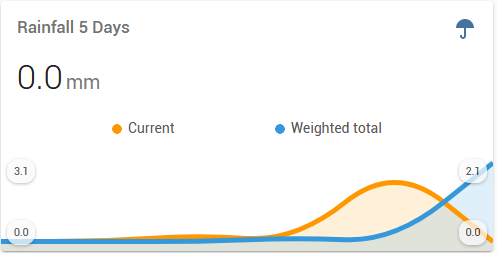
Finally, a system event log
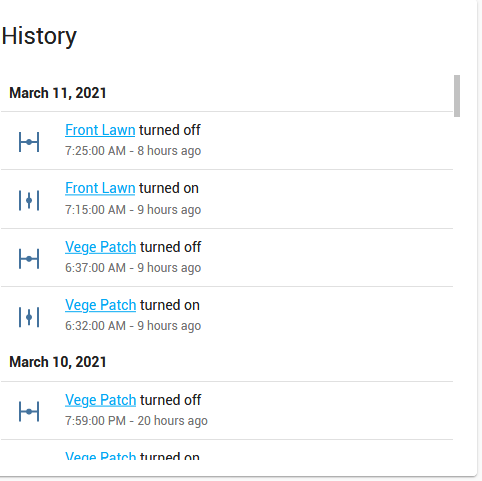
Putting it all together, here is the complete picture
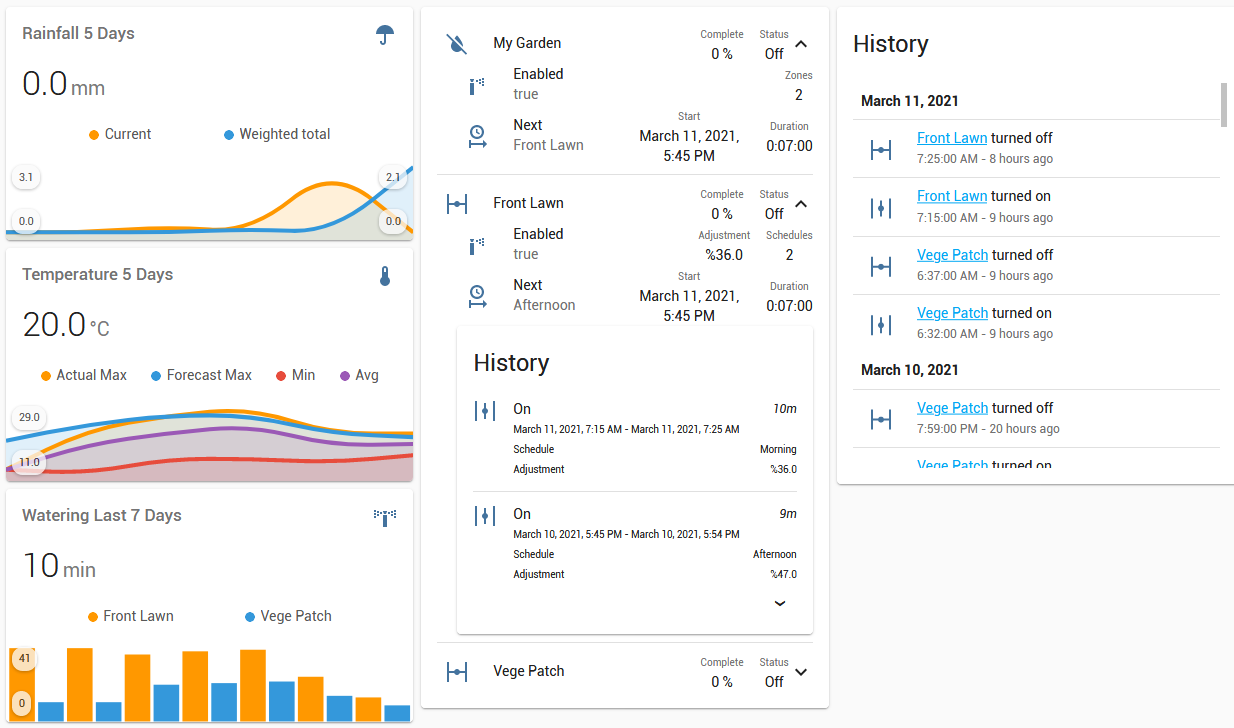
This configuration is three vertical stacks and works well on mobile devices.
8.2. Timeline
Minimum version 2021.12.0 of Irrigation Unlimited is required for this feature. First up, enable the timeline in the zone show object.
irrigation_unlimited:
  controllers:
    all_zones_config: # <= Add these three lines <─┐
      show: # <= to the configuration            <─┤
        timeline: true # <= for all zones        <─┘
    zones:
      entity_id: "switch.my_switch"
      show: # <= Add these two lines to the                    <─┐
        timeline: true # <= configuration for individual zones <─┘
      schedules:
        - time: "06:00"
          duration: "00:20"
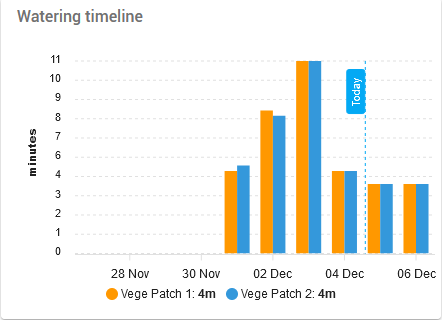
Like the watering history card above it also shows the upcoming schedule for a complete overview of your irrigation. Find the code here. Requires apexcharts-card.
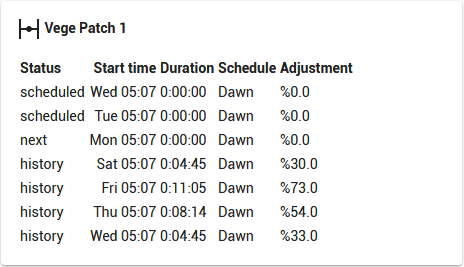
If you prefer something akin to a airport departure board then try this. Uses Markdown card which is built into Home Assistant so will work straight out of the box.
8.3. Frontend Requirements
The manual_run and enable/disable cards require additional support files. Minimum version 2021.6.3 of Irrigation Unlimited is required. There is a support file packages/irrigation_unlimited_controls.yaml which should go in the config/packages directory. Also required is a pyscript which is called from the above automation to populate the input_select with all the irrigation unlimited controllers and zones. The script should go in the config/pyscript directory. If you don't have a packages and a pyscript folder then create them and add the following to your configuration.yaml.
homeassistant:
  packages: !include_dir_named packages
Using your HA configuration directory (folder) as a starting point you should now also have this:
pyscript/irrigation_unlimited_service_shim.py
packages/irrigation_unlimited_controls.yaml
More information on packages can be found here and pyscript can be found here, don't worry about the Jupyter kernel unless you are really keen. Hint: A pyscript is used instead of Jinja2 as it produces a list which Jinja2 is not capable of, many have tried... The pyscript is a small piece of code that convert for example ‘1.1 Zone1’ inside an input_select control into ‘binary_sensor.irrigation_unlimited_c1_z1’ and then call the actual service. They are just helpers sitting between the lovelace card and the integration. It's a great way to add some additional capabilities to lovelace cards.
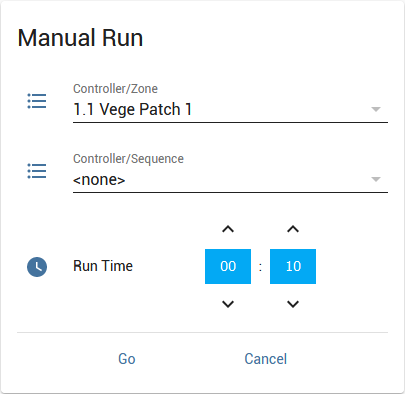
8.4. Manual run card
Here is a card for manual runs, see requirements above. You can find the code here. Note: This card uses paper-buttons-row and time-picker-card.
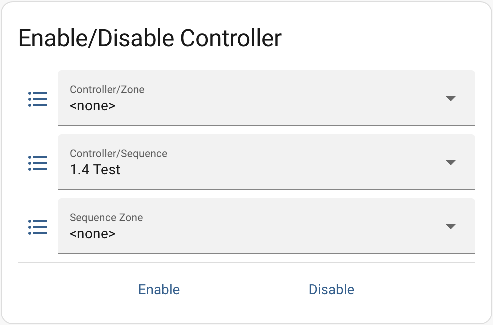
8.5. Enable-disable card
This card will enable or disable a zone from a dropdown list, see requirements above. The code is here. Like the manual run card it requires paper-buttons-row.
8.6. Pause-resume button
The following yaml script can be attached to a front end button to pause and resume all zones of all sequences of all UI controllers.
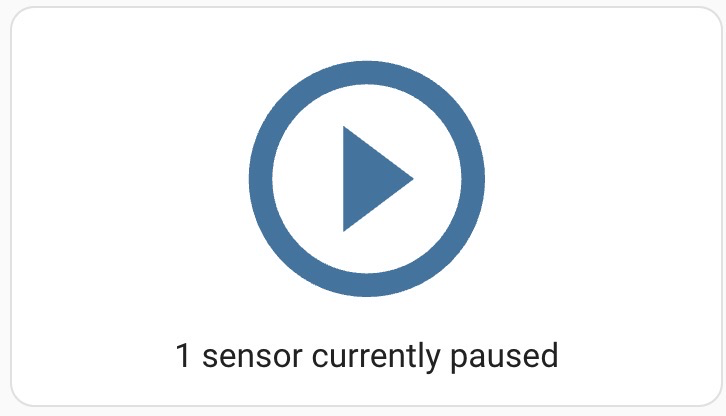
Please note that a group helper for all UI controllers is required for this code sample to work.
group:
  irrigation_controllers:
  name: Irrigation Controllers
  entities:
    #Add at least one UI controller entity here
    - binary_sensor.irrigation_unlimited_c1_m
    - binary_sensor.irrigation_unlimited_c2_m
    - binary_sensor.irrigation_unlimited_c3_m
    - binary_sensor.irrigation_unlimited_c4_m
    - binary_sensor.irrigation_unlimited_c5_m
    - binary_sensor.irrigation_unlimited_c6_m
    #Add as many controller entities as you have configured

script:
  toggle_irrigation:
      alias: "Irrigation: Pause/Resume all irrigation unlimited controllers"
      sequence:
        - choose:
            - conditions:
                - condition: template
                  value_template: >-
                    {% set paused_sensors = states.binary_sensor
                        | selectattr('entity_id', 'match', '^binary_sensor\.irrigation_unlimited_c\d+_s\d+$')
                        | selectattr('attributes.status', 'equalto', 'paused')
                        | map(attribute='entity_id')
                        | list %}
                    {{ paused_sensors | length > 0 }}
              sequence:
                - service: irrigation_unlimited.resume
                  data:
                    entity_id: group.irrigation_controllers
                    sequence_id: 0
            - conditions:
                - condition: template
                  value_template: >-
                    {% set paused_sensors = states.binary_sensor
                        | selectattr('entity_id', 'match', '^binary_sensor\.irrigation_unlimited_c\d+_s\d+$')
                        | selectattr('attributes.status', 'equalto', 'paused')
                        | map(attribute='entity_id')
                        | list %}
                    {{ paused_sensors | length == 0 and states('group.irrigation_controllers') == 'on' }}
              sequence:
                - service: irrigation_unlimited.pause
                  data:
                    entity_id: group.irrigation_controllers
                    sequence_id: 0
      icon: mdi:play-pause
Issue 142 has a detailed discussion relating the pause and resume service call and its various use cases.
9. Automation
more like this
PowerDisplayESPHome
A small display for ESPHome and Home Assistant to retrieve the current house consumption and energy price via a sensor…