meine
meine 🌒 - A CLI file manager and system utility built with Textual. It combines intuitive command parsing with rich t…
Python★ 50
Your Windows, Linux, macOS computer as MQTT and HomeAssistant integration
 richibrics

If you really like this project and you would like to support it:
Simple and powerful cross-platform script to control your pc and share statistics using communication protocols like MQTT and home control hubs like HomeAssistant.
Like his predecessor - PyMonitorMQTT - IoTuring allows you to choose which data are sent and which command are expected to be given.
Why should you use this ? You don't have to write your configurations manually, entities are updated asynchronously and multiple warehouses can be used with one single run (and this is not deprecated obviously!).
But the most important thing: works on all OSs and all architectures ! Windows, Linux, macOS, openBSD; x86, amd64, ARM and so on...
CHANGELOG: available in Releases page
When the HomeAssistant warehouse is active, your computer will automatically show up in HomeAssistant as a single device, so all your entities will be grouped together. The device will also have some properties like connectivity and battery status.
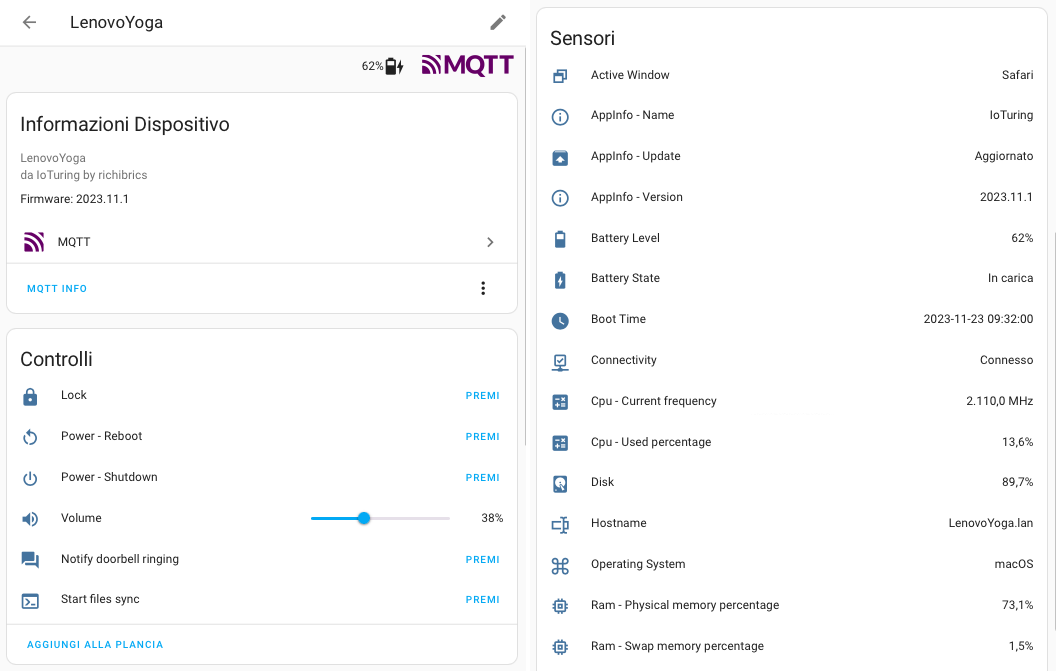
All sensors and switches will be ready to be added to your dashboard in your favourite cards !
For detailed instructions about how to add your computer to HomeAssistant, look at the HomeAssistant setup section below.
pipx install IoTuring
sudo apt update
sudo apt install pipx
pipx ensurepath
pipx install IoTuring
pacman -Syu python-pipx
pipx ensurepath
pipx install IoTuring
py -m pip install --user pipx
py -m pipx ensurepath
py -m pipx install IoTuring
IoTuring without any prefixes.Requirements:
git clone https://github.com/richibrics/IoTuring
cd IoTuring
mkdir .venv
python -m venv .venv
. ./.venv/bin/activate
pip install --upgrade pip
pip install .
Requirements:
pip install IoTuring
The first time you run IoTuring you need to specify which entities and warehouses you want to enable.
To run in configuration mode, you only need to specify the -c argument along the script execution command:
IoTuring -c
A simple menu will show and you will be able to configure your entities and warehouses ! Once you have selected your preferred settings, you're ready to run IoTuring.
You will be able to enter the configuration menu whenever you want (with the same command as above) to edit your choises.
You can simply run IoTuring using this command:
IoTuring
To see all command options run IoTuring --help:
> IoTuring --help
usage: IoTuring [-h] [-v] [-c] [-o]

Simple and powerful cross-platform script to control your pc and share statistics using communication protocols like MQTT and home control hubs like HomeAssistant.

options:
  -h, --help          show this help message and exit
  -v, --version       show program's version number and exit
  -c, --configurator  enter configuration mode
  -o, --open-config   open config file

Start without argument for normal use
Run the configurator:
docker run -it -v ./.config/IoTuring/:/config richibrics/ioturing:latest IoTuring -c
Enable the Console Warehouse to see logs!
Run detached after configuration:
docker run -d -v ./.config/IoTuring/:/config richibrics/ioturing:latest
For a docker compose example see docker-compose.yaml. Create configuration manually or with the command above!
Steps to connect IoTuring to your HomeAssistant install:
| Name | Description | Supported platforms |
|---|---|---|
| ActiveWindow | shares the name of the window you're working on |    |
| AppInfo | shares app informations like the running version | |
| Battery | shares the battery level and charging status | |
| BootTime | shares the machine boot time | |
| Cpu | shares useful information about cpu usage (times, frequencies, percentages) | |
| DesktopEnvironment | shares the running desktop environment (useful only for Linux) | |
| Disk | shares disk usage data | |
| DisplayMode | command for changing multimonitor display mode | |
| Fanspeed | shares maximum fanspeed of each controller | |
| Hostname | shares the machine hostname | |
| Lock | command for locking the machine | |
| Monitor | command for switching monitors on/off | |
| Notify | displays a notification | |
| OperatingSystem | shares the operating system of your machine | |
| Power* | commands for poweroff, reboot and sleep | |
| Ram | shares useful information about ram usage | |
| Temperature | shares temperature sensor data | |
| Terminal | runs custom commands in the shell | |
| Time | shares the machine local time | |
| Uptime | shares the time since the machine is on | |
| Username | shares the name of the user who is working on the machine | |
| Volume | control audio volume | |
* To use the features from Power entity on macOS and on some Linux distros you need to give permissions to your user to shutdown and reboot without sudo password. You can easily do that by using the following terminal command:
sudo sh -c "echo '$USER ALL=(ALL) NOPASSWD: /sbin/poweroff, /sbin/reboot, /sbin/shutdown' >> /etc/sudoers"
IOTURING_CONFIG_DIR: Change the path to the directory of the config fileIOTURING_LOG_LEVEL: Set the log levelTo run IoTuring with debug log on Linux or on Mac run:
env IOTURING_LOG_LEVEL=LOG_DEBUG IoTuring
On Windows:
set "IOTURING_LOG_LEVEL=LOG_DEBUG" && IoTuring
See DEVELOPMENT.md
Icons in this readme are from Material Design Icons, License: Pictogrammers Free License
Notification icon is from Home Assistant: License: CC BY-SA 4.0
more like this
meine 🌒 - A CLI file manager and system utility built with Textual. It combines intuitive command parsing with rich t…
Create and add progress bars, Office365 Files and Dropbox Paper papers by labels and link them to your Todoist tasks.
search projects, people, and tags