handpose-facemesh-demos
🎥🤟 8 minimalistic templates for tfjs mediapipe handpose and facemesh
JavaScript★ 192
Open-source 7DoF 3D-printable robotic arm with LeRobot integration.
 robertorobotics
git clone https://github.com/robertorobotics/Nextis-AIRA-3D.gitrobertorobotics/Nextis-AIRA-3D
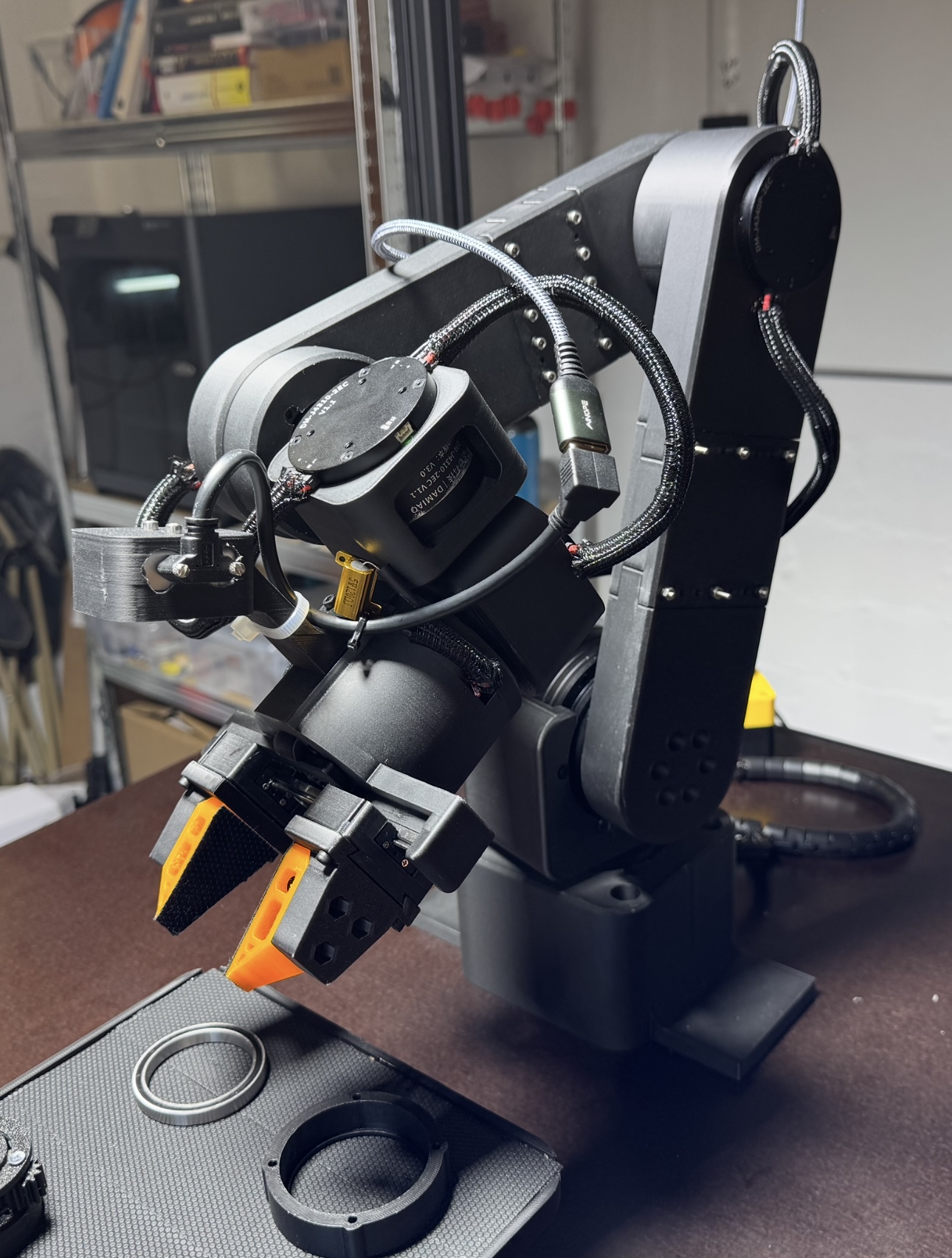
An Intelligent Robotic Arm
Build it. Plug it in. Train AI.
Designed and built by Nextis · Powered by LeRobot
AIRA is a 3D-printable, 7-DoF (6-DoF + 1-DoF Gripper) robotic arm with native integration into LeRobot — Hugging Face's open-source robotics framework. Clone the repo, pip install, and you get teleoperation, demonstration recording, and training with ACT, Diffusion Policy, PI0, GR00T N1.5, and every other policy in the LeRobot ecosystem.
This is a LeRobot plugin, not a fork. Your arm stays up to date with the latest LeRobot features automatically.
Early Access: The AIRA plugin is under active development and has not been fully tested by the community yet. Expect rough edges. Contributions, bug reports, and feedback are very welcome.
Safety Notice: AIRA uses high-torque motors (up to 35 Nm peak) that can cause injury or damage if misconfigured. You must configure and test every motor individually before assembling the arm. Always keep one hand on the power switch during first tests. You build and operate AIRA entirely at your own risk. See the Assembly Guide for the full safety protocol.
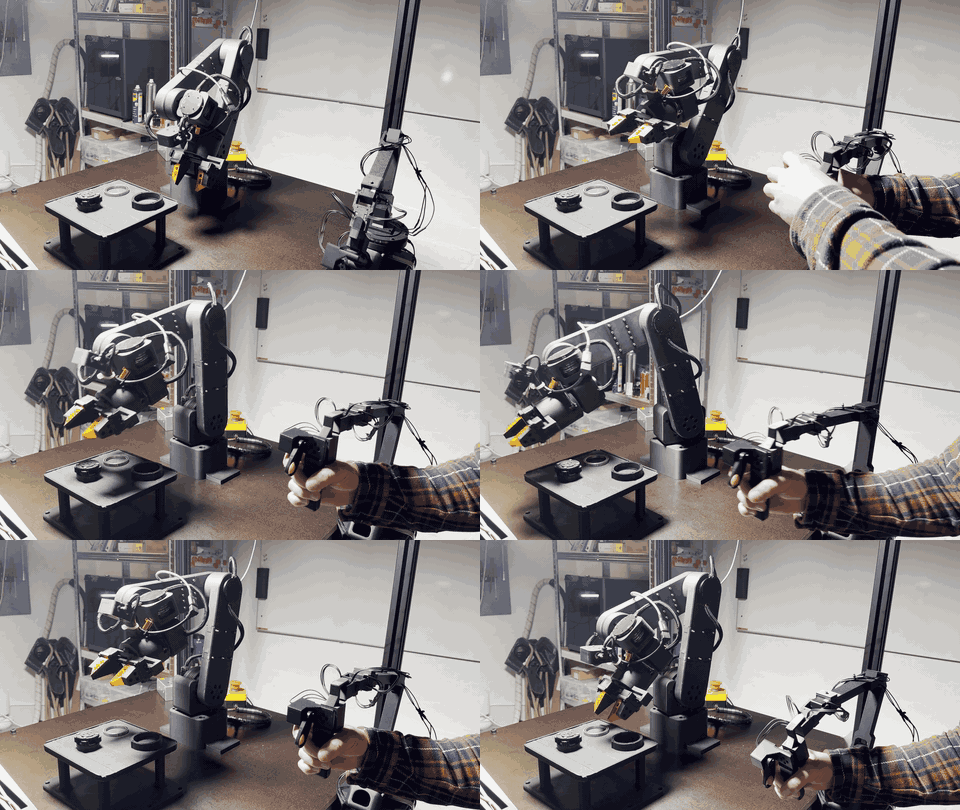
Teleoperation with the leader arm → autonomous policy execution
AIRA — Follower Arm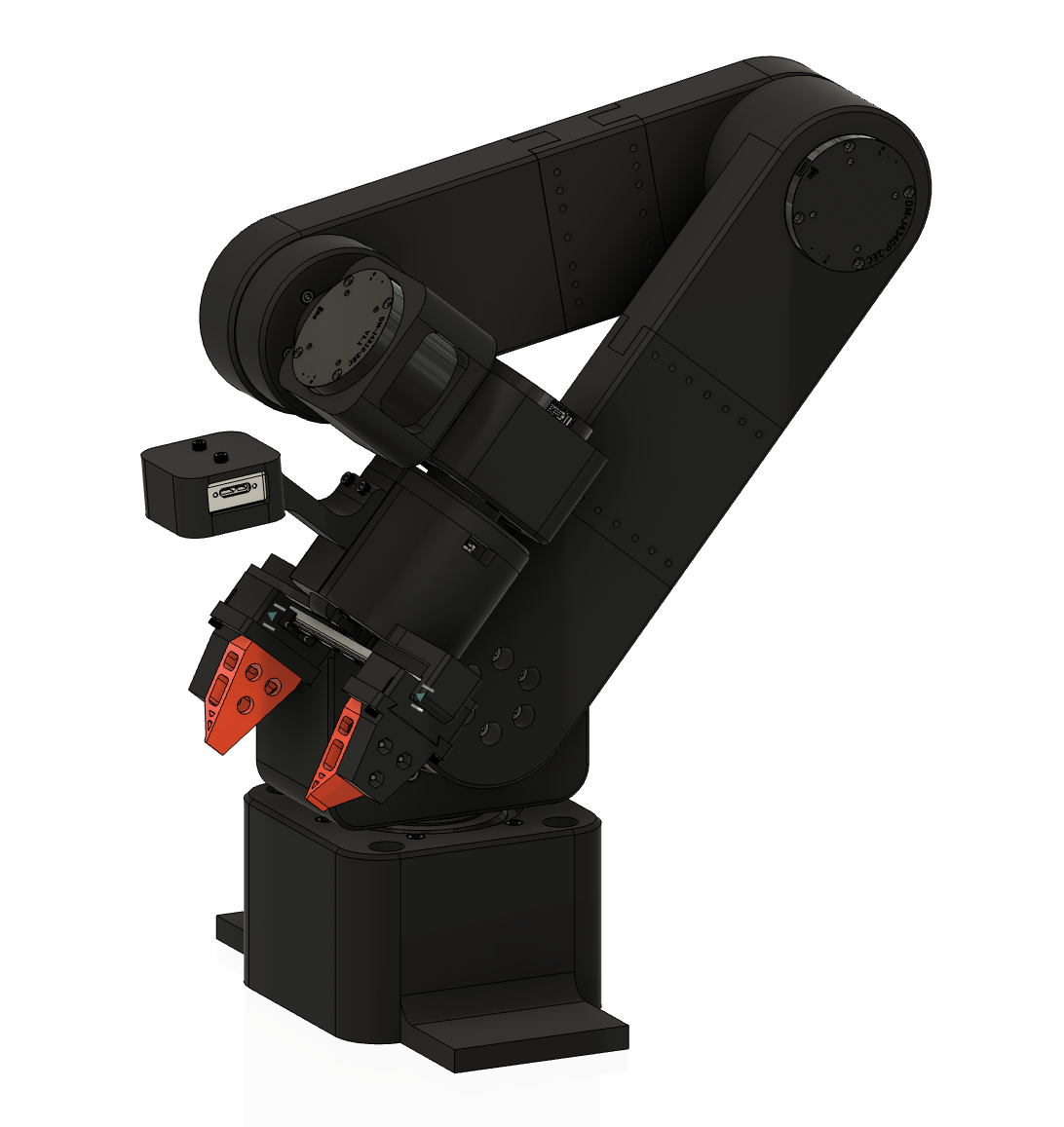
Damiao CAN bus motors |
AIRA — Leader Arm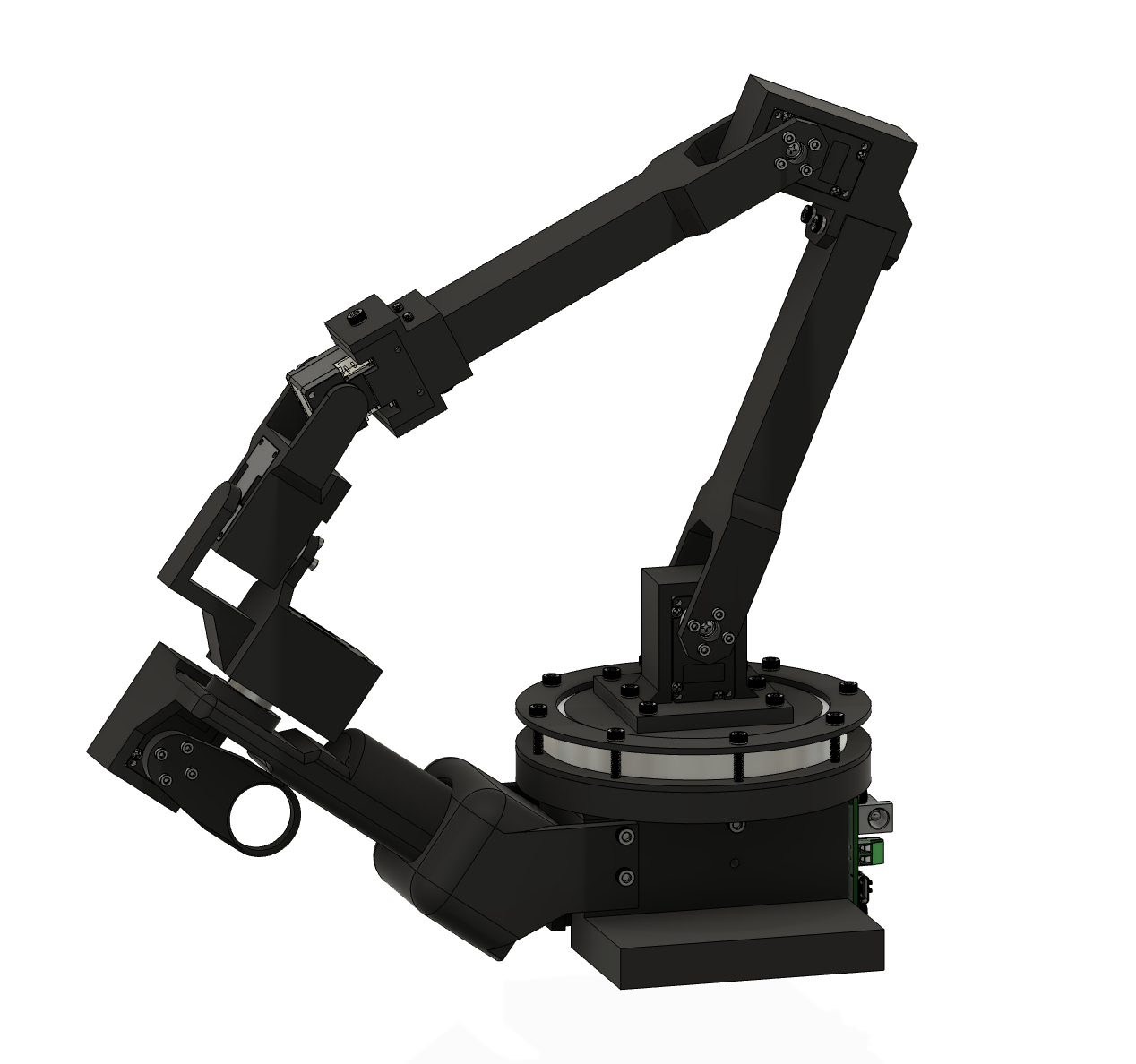
Dynamixel XL330 servos |
Click images above for fully interactive 3D viewer · Also available as downloadable STEP files in
/hardware
aira-setup walks you through motor-by-motor configuration. No terminal expertise needed| Component | Gear Ratio | Rated / Peak Torque | Rated / Peak Current | Qty | Purpose |
|---|---|---|---|---|---|
| Damiao J8009P | 9:1 | 20 Nm / 35 Nm | 20A / 50A | 2 | Base + Link1 (follower) |
| Damiao J4340P | 40:1 | 9 Nm / 27 Nm | 2.5A / 8A | 2 | Link2 + Link3 (follower) |
| Damiao J4310P | 10:1 | 3 Nm / 12.5 Nm | 2.5A / 7.5A | 3 | Link4 + Link5 + Gripper (follower) |
| Dynamixel XL330-M077 | — | Serial, 0.13 Nm | — | 7 | All joints (leader) |
| USB-CAN adapter | — | e.g. Canable, MKS CANable | — | 1 | CAN bus interface |
| RealSense D405 | — | Depth camera | — | 1 | Wrist camera (optional) |
Estimated cost: €2,000–€2,500 / $2,200–$2,750 (full teleop kit including shipping & import duties) · Per-part breakdown in hardware/BOM.md
See
hardware/ASSEMBLY.mdfor print settings and the full parts list.
git clone https://github.com/robertorobotics/Nextis-AIRA-3D
cd Nextis-AIRA-3D
pip install -e .
sudo aira-setup-can
Critical: Configure each motor individually on the bench before installing it in the arm. See the Assembly Guide for the full safety protocol.
aira-setup
The wizard walks you through connecting each motor one by one, setting Slave/Master IDs, and calibrating.
Only after all motors are configured and verified. See
hardware/ASSEMBLY.md.
lerobot-teleoperate \
  --robot.type=aira_follower \
  --teleop.type=aira_leader
lerobot-record \
  --robot.type=aira_follower \
  --teleop.type=aira_leader \
  --dataset.repo_id=your-username/pick-and-place \
  --dataset.single_task="pick up the red block"
lerobot-train \
  --policy=act \
  --dataset.repo_id=your-username/pick-and-place
lerobot-eval \
  --policy.path=outputs/train/act_pick_and_place/checkpoints/last \
  --robot.type=aira_follower
lerobot-robot-aira/
├── src/
│   ├── lerobot_robot_aira/           # Main package (robot + motors + CLI)
│   │   ├── motors/
│   │   │   ├── damiao.py             # Damiao CAN bus driver (MIT impedance control)
│   │   │   └── tables.py             # Motor model parameters (J8009P, J4340P, J4310P)
│   │   ├── robots/
│   │   │   └── aira_follower.py      # LeRobot Robot interface → Damiao hardware
│   │   ├── teleoperators/
│   │   │   └── aira_leader.py        # LeRobot Teleoperator → Dynamixel leader arm
│   │   └── cli/
│   │       ├── setup_wizard.py       # aira-setup — interactive motor configuration
│   │       ├── setup_can.py          # aira-setup-can — CAN bus setup
│   │       └── test_motors.py        # aira-test-motors — hardware diagnostics
│   └── lerobot_teleoperator_aira/    # Shim for LeRobot teleoperator discovery
│       └── __init__.py               # Re-exports AiraLeader from main package
├── hardware/                         # STL, STEP, BOM, assembly instructions
├── examples/                         # Step-by-step tutorials
└── tests/
AIRA registers with LeRobot's plugin system via pkgutil module scanning. LeRobot discovers any installed package named lerobot_robot_* (for robots) or lerobot_teleoperator_* (for teleoperators). When you run lerobot-teleoperate --robot.type=aira_follower, LeRobot finds lerobot_robot_aira and lerobot_teleoperator_aira automatically — no source code changes needed.
The critical new component is the Damiao CAN bus driver (damiao.py). LeRobot has built-in Feetech and Dynamixel support, but no CAN bus motors. AIRA adds this. The leader arm reuses LeRobot's built-in Dynamixel driver.
"No CAN interfaces found"
Plug in your USB-CAN adapter and run
sudo aira-setup-can
"Motor did not respond"
Check power supply voltage, CAN bus wiring, termination resistor
"Permission denied on CAN bus"
Run the setup with
sudo, or add your user to thecangroup
Calibration issues
Delete
~/.cache/lerobot_robot_aira/calibration/and re-runaira-setup
"DynamixelMotorsBus connection failed"
Check USB port:
ls /dev/ttyUSB* /dev/ttyACM*
AIRA builds on the work of an incredible open-source community:
This project is open source (Apache 2.0). Contributions welcome:
Don't want to source and print everything yourself? We offer two options:
Both available at nextis.tech/hardware.
Apache 2.0 — see LICENSE.
Disclaimer: AIRA is provided as-is, without warranty of any kind. High-torque robotic arms are inherently dangerous. You are solely responsible for safe assembly, configuration, and operation. Nextis and the contributors to this project accept no liability for any damage, injury, or loss resulting from the use of this hardware or software.
Built with care by Nextis
more like this
🎥🤟 8 minimalistic templates for tfjs mediapipe handpose and facemesh
simple generator for 3D-printed frames for a moxon rectangle antenna
search projects, people, and tags