

Install ·
Features ·
Build ·
Contribute
Features
Switching & Navigation
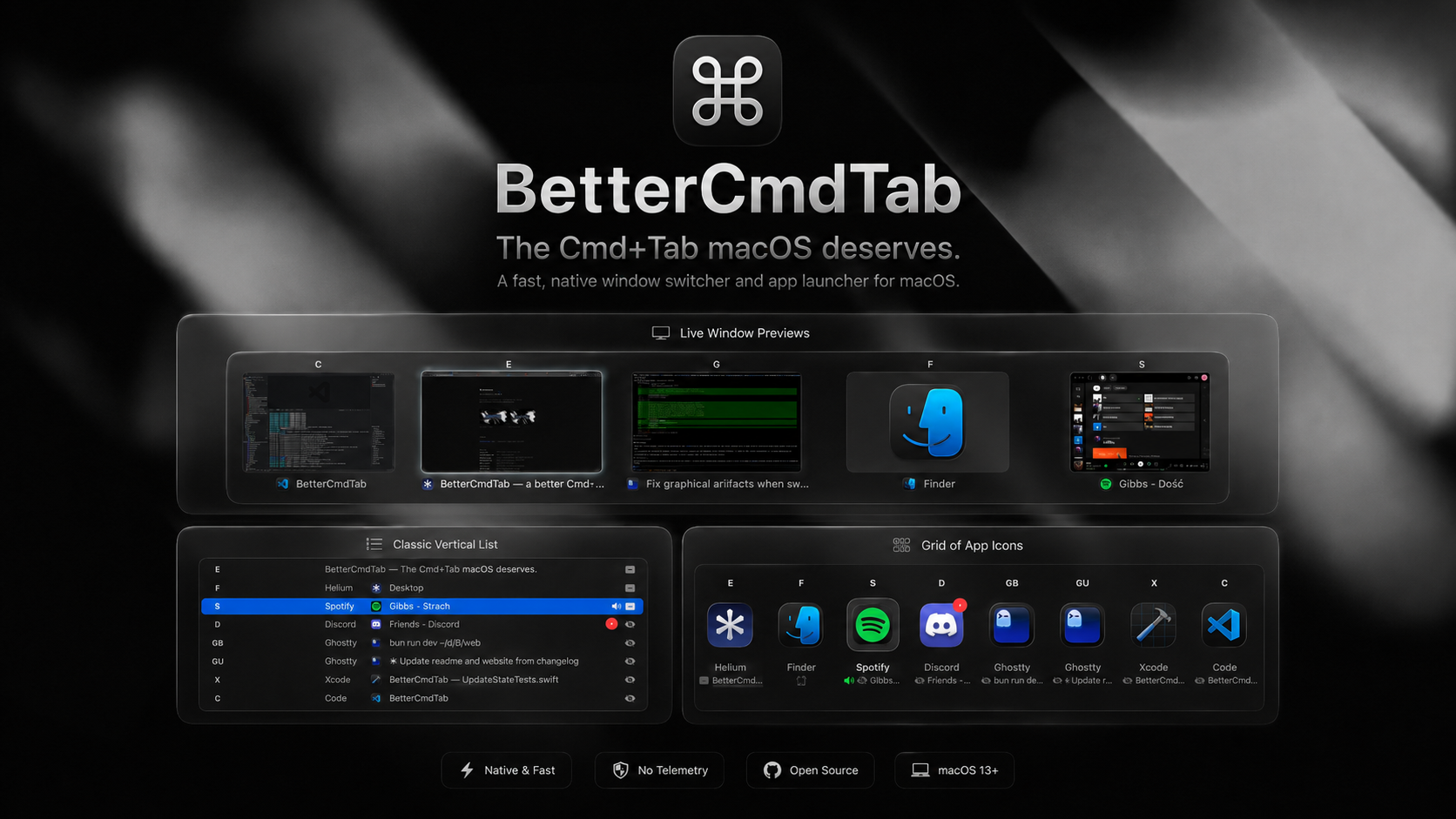
- Three layouts — classic list, grid of icons, or live window previews.
- Letter-prefix jump — type a name to jump to it.
- Search & launch — press
/ to fuzzy-find, or launch any installed app.
- Window switching —
⌘+ ` cycles windows of the front app.
- Tap or hold — tap to switch instantly, hold to open the switcher.
- Scroll to switch — spin the mouse wheel to move through apps.
- Multi-monitor — opens on the display you're actively working on.
- Stay open — optionally keep the switcher open after you release ⌘: browse at your pace, confirm with Return or a click, dismiss with Esc.
- Reverse step — hold Shift to keep stepping backwards through the list (or turn the tap-Shift reverse off).
- Keyboard-only — optionally turn off selecting with mouse hover and mouse click.
Window & Tab Management
- Window titles — show each window's title under its icon in Grid and Previews.
- Tab drill-in — press
\ on a row whose window has tabs to pick a specific tab (Safari, Chrome, Arc, Brave, Edge, Vivaldi, Opera, Dia, Finder, Terminal, iTerm).
- Tabs as rows — optionally surface each native or browser tab as its own row, not just behind the
\ peek — with an experimental most-recently-used tab order and a clear hint when Safari/Chrome need automation permission.
- Quick actions — quit, close, minimize, maximize, hide inline.
- Hover actions — quick-action buttons appear on hover: close, minimize, zoom, hide, quit, force-quit.
- Window management — tile windows to halves or corners, maximize, or center with
⌃⌘ arrows; press the tile key again to cycle ½ → ⅔ → ⅓ widths.
- Move windows — send the highlighted window to the next display.
Filtering & Organization
- Sort order — order apps by recents (MRU), alphabetically, or launch order — or by most-recent windows, mixing every app's windows by when you last used them.
- Scoped shortcuts — add as many global hotkeys as you like, each opening the switcher pre-filtered (all windows, the current Space, Visible Spaces, the current app's windows, or minimized only), and each with its own layout, sorting, filters, and colors independent of the global settings.
- Show windows from — All Spaces, the current Space only, or Visible Spaces — made for multiple monitors: lists what's on screen across all your displays and hides windows parked on background desktops.
- Minimized & hidden — include minimized windows, hidden and windowless apps.
- Pin & filter — keep favorites up top, hide the rest.
- Per-app rules — hide an app, or have it ignore ⌘Tab always or only when fullscreen.
Productivity & Workflow
- App hotkeys — assign a global shortcut to focus or launch a chosen app (9 slots).
- Recently closed — reopen an app you just quit.
- Unread badges — Dock badge counts, in the switcher.
- Audio indicator — flags apps playing sound.
- Instant Spaces — switch Spaces with no animation.
Reliability & Power Features
- Force quit —
⌘+⌥+Q SIGKILLs the highlighted app for when graceful Quit hangs.
- Secure-input survivor — ⌘Tab and window management keep working even while a password field holds Secure Event Input.
Appearance & Customization
- Liquid Glass — system material on macOS 26.
- Theming — panel opacity, corner radius, and background material; the selection highlight follows your macOS accent color.
- Preview titles — choose how window titles align in previews and whether the selected name is bold.
- Configurable — custom hotkey, size, scale, layout, grid columns, and reveal delay.
Gestures & Feedback
- Trackpad & haptics — three-finger swipe to open the switcher or switch Spaces, with optional haptic and click feedback.
Privacy & Backup
- Hide from screen sharing — keep the switcher out of screen recordings and shared screens. Needs macOS 14.6+.
- Export & import — back up and move your whole setup as a plain JSON file (legacy
.cmdtab files still import).
- Config file — optionally keep settings in
~/.config/bettercmdtab/config.json: edits apply live, and changes made in the app are written back. A schema.json is generated next to it (and referenced from the file), so editors autocomplete and type-check your edits.
Install
Requirements
- macOS 13.0 (Ventura) or newer
- Accessibility permission
Homebrew
brew install --cask bettercmdtab
Download
Grab the latest signed .dmg from the Releases page, open it, drag BetterCmdTab.app to /Applications, and launch.
On first launch macOS will ask for Accessibility permission — this is required for the global ⌘+Tab event tap and for reading window lists via the Accessibility API. Grant it under System Settings → Privacy & Security → Accessibility.
Build from source
If you prefer building it yourself from source, see this section in CONTRIBUTING.md for instructions.
Privacy
BetterCmdTab does not collect, transmit, or store any data. There is no telemetry, no crash reporting service, no analytics SDK, and no account. The only network requests it makes are to api.github.com and github.com when checking for updates, and only when you ask it to.
Contributing
Issues and pull requests welcome. See CONTRIBUTING.md for project layout, build / test instructions, and PR guidelines.
License
GPL v3. See LICENSE.
BetterCmdTab is licensed under the GNU General Public License v3.0. You are free to use, study, modify, and redistribute it — including for commercial purposes — but any distributed derivative work must also be released under GPL v3 with full source code. This keeps the project and any fork of it open, forever.
Credits
Built by @rokartur. Inspired by AltTab, Witch, and Contexts.
 rokartur