agentlytics
Comprehensive analytics dashboard for AI coding agents — Cursor, Windsurf, Claude Code, VS Code Copilot, Zed, Antigravi…
JavaScript★ 555
Keyboard-first desktop Kanban workspace for AI coding agents with embedded terminals, git worktrees, and hook-driven ta…
 rookedsysc
git clone https://github.com/rookedsysc/kanvibe.gitrookedsysc/kanvibeKeyboard-first Kanban workspace for AI coding agents
KanVibe keeps AI coding work out of scattered terminal tabs. Track branch-based tasks on a real-time Kanban board, open each task's tmux/zellij session in the browser or desktop app, and let Claude Code, Gemini CLI, Codex CLI, and OpenCode hooks move tasks through the workflow automatically.
Use shortcuts for project filters, task search, notifications, task detail panels, and common task actions without losing terminal focus.
Buying me a coffee is nice, but honestly? A contribution would make my day even more. :)
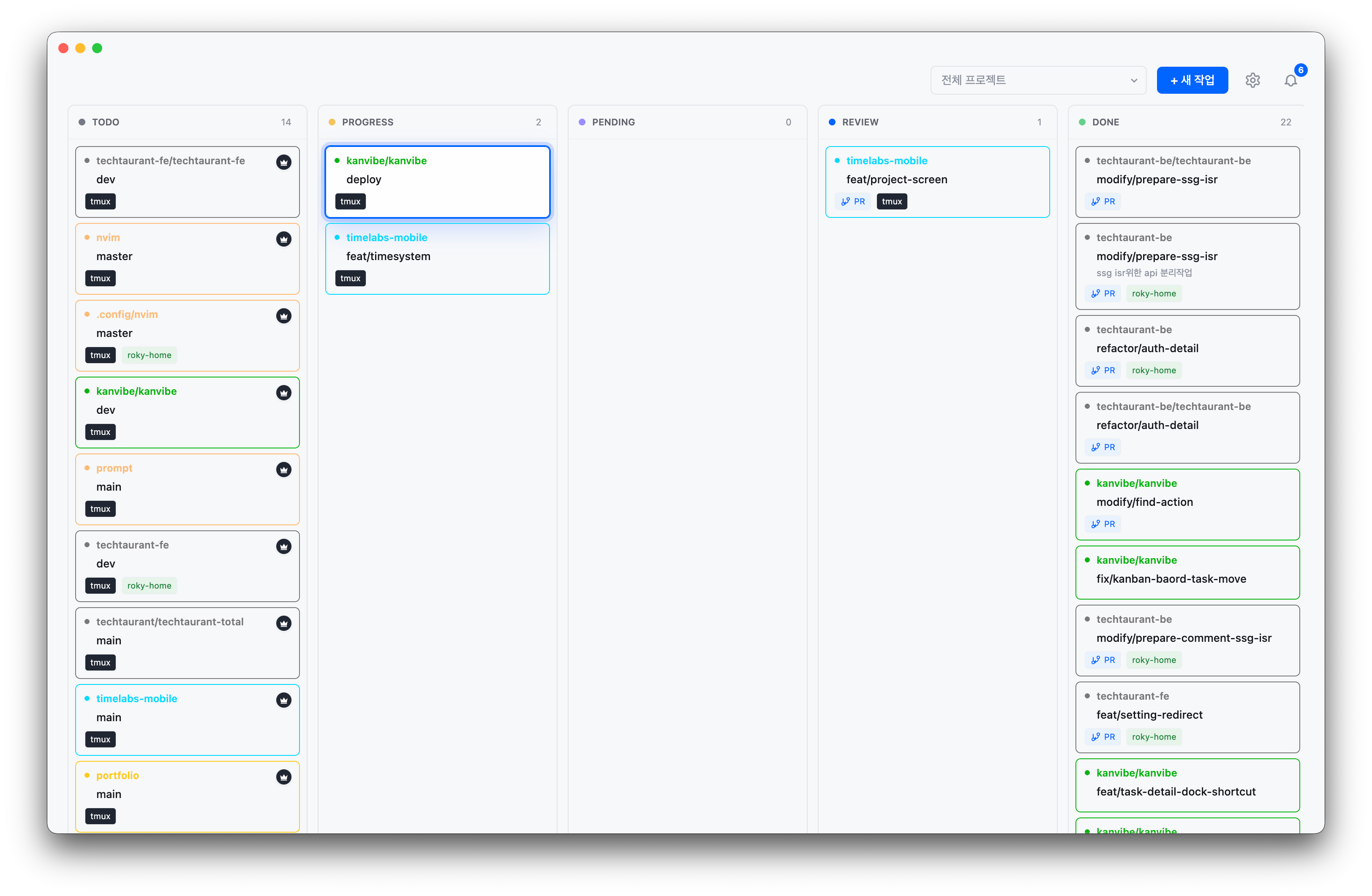
Main Kanban board |
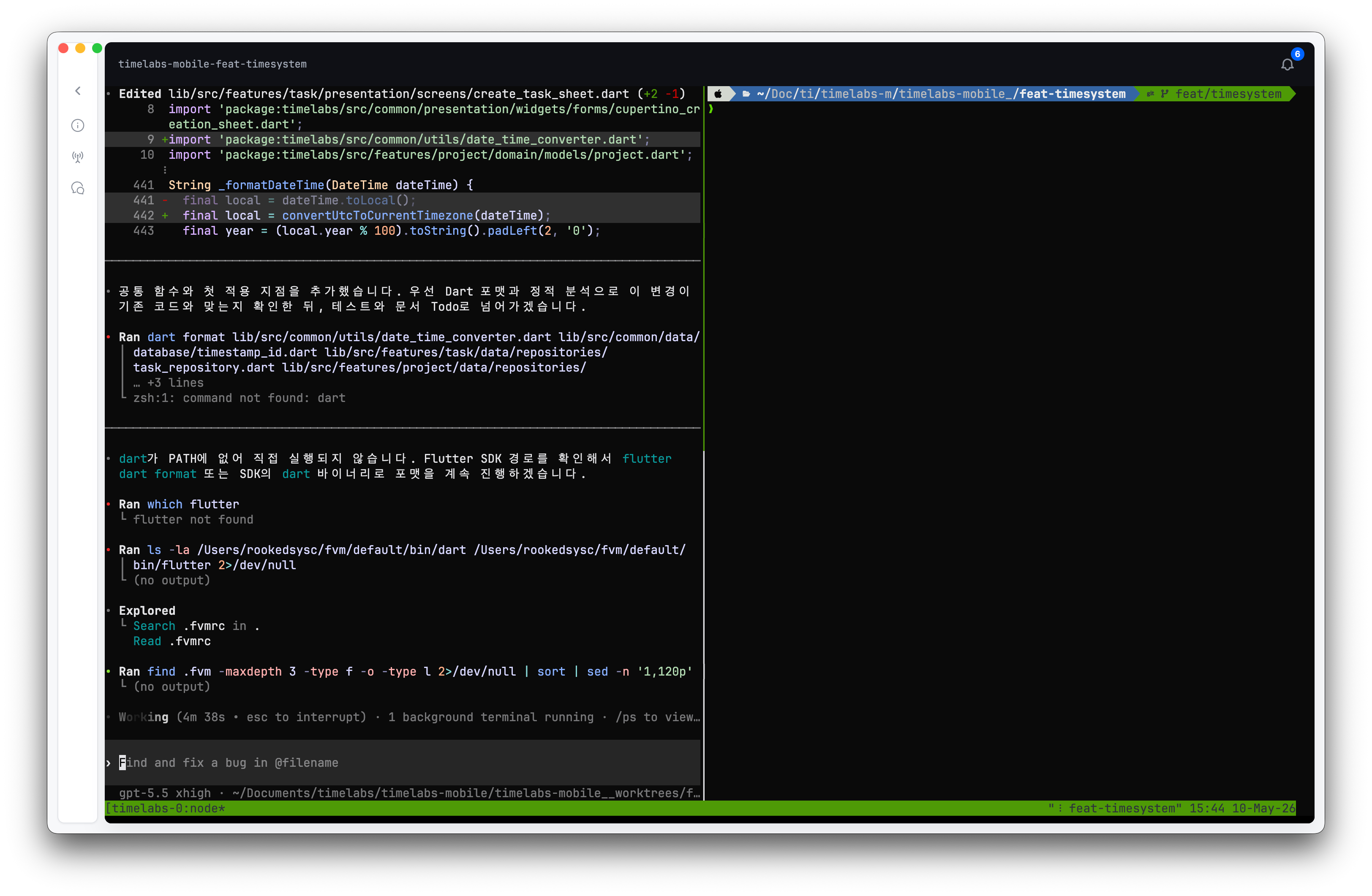
Task detail workspace |
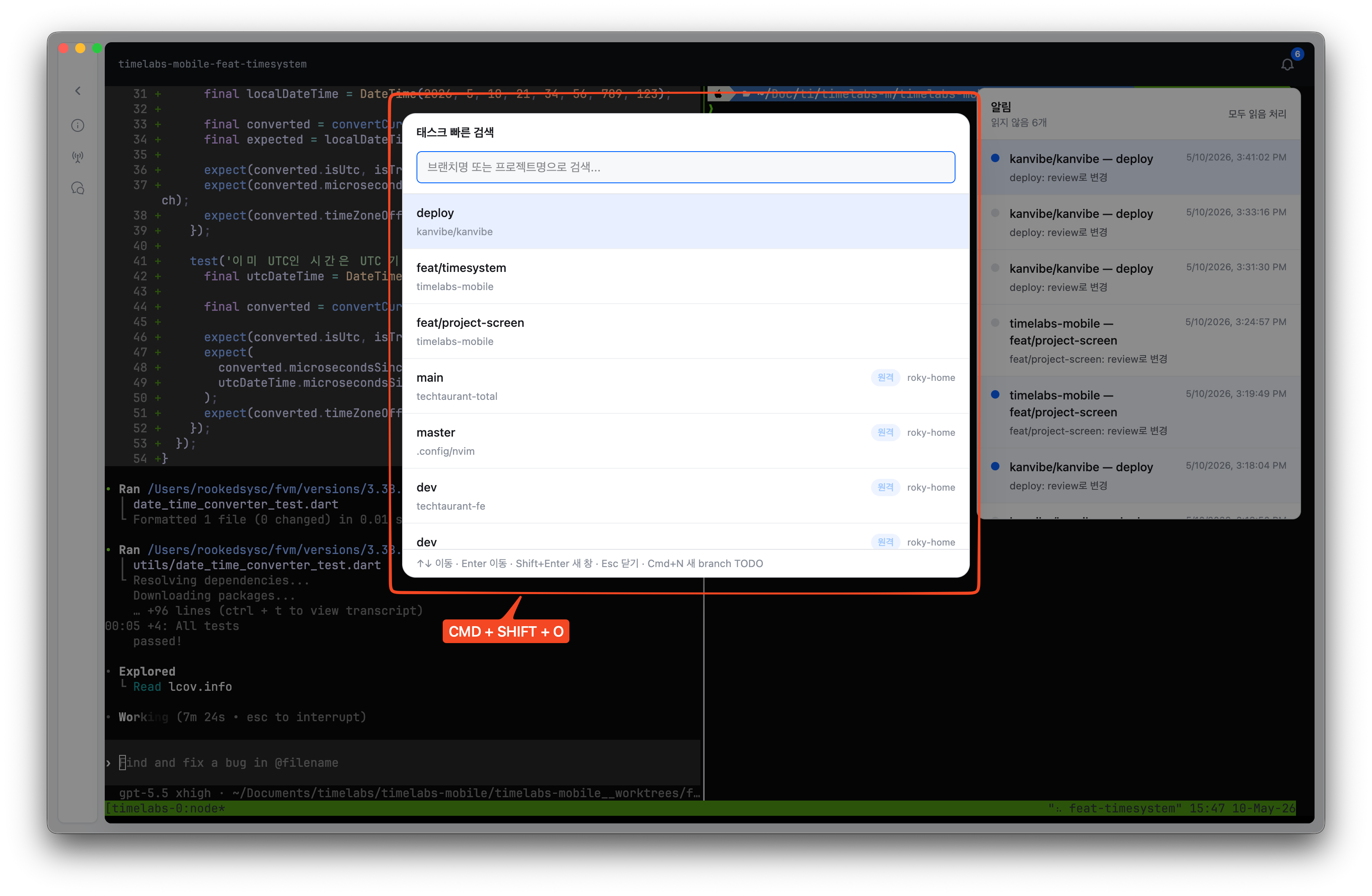
Open task search from anywhere, filter by project or branch name, and jump directly into the task workspace without returning to the board first.
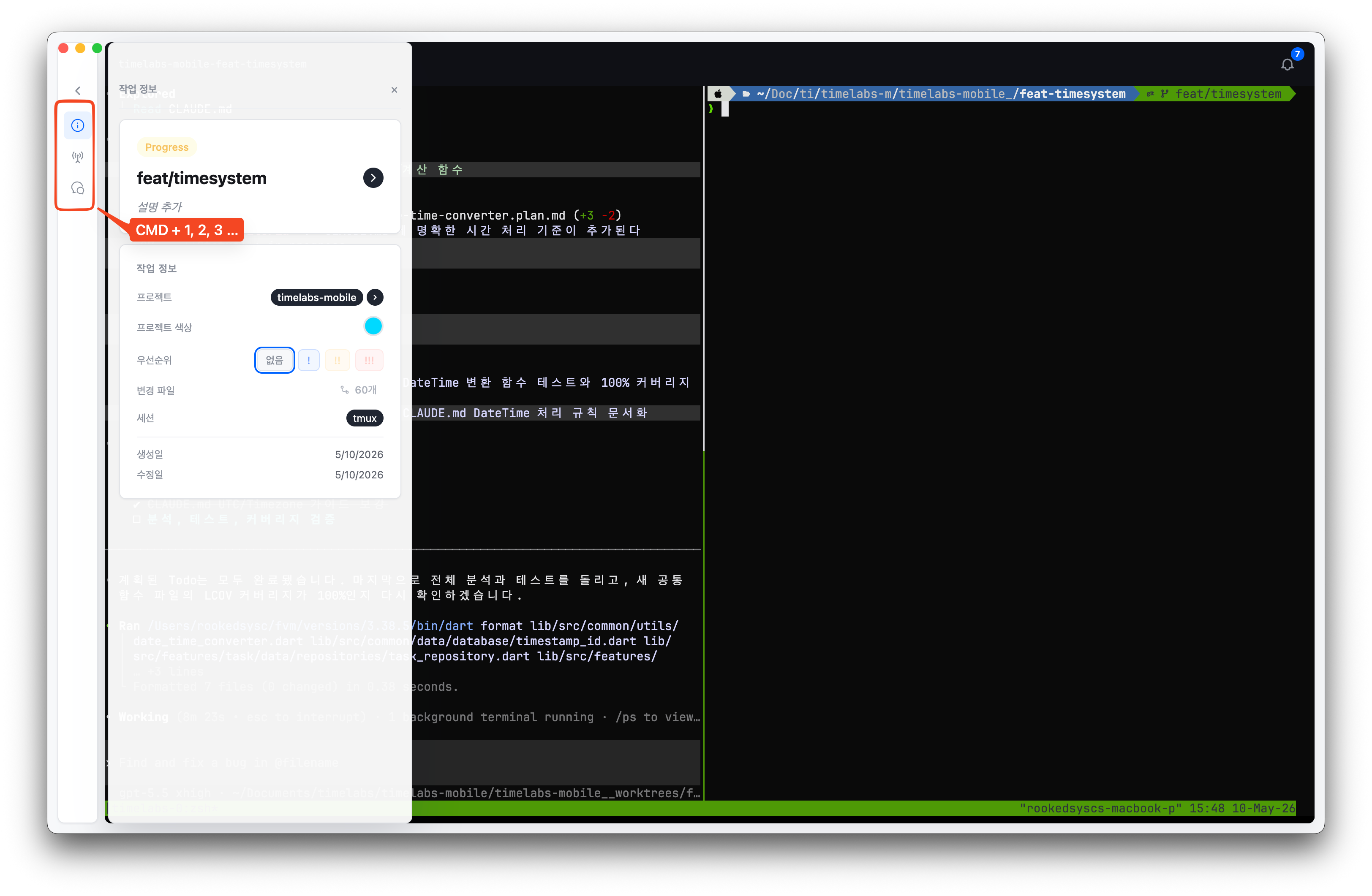
Use numbered dock shortcuts on a task detail page to open task metadata, hook status, AI chat, and PR actions before the keystroke reaches the embedded terminal.
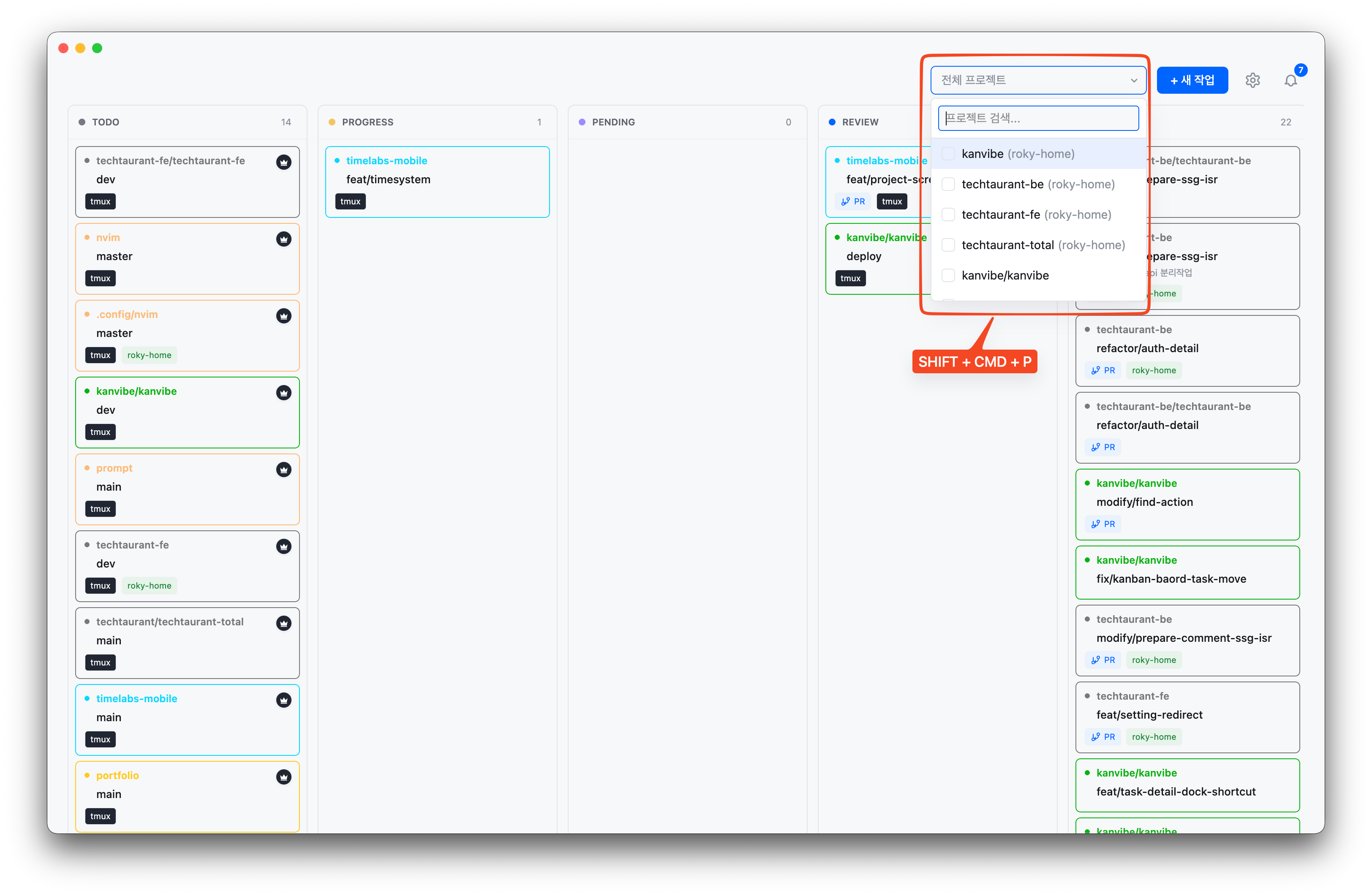
Narrow the board to the active projects you care about, with keyboard navigation for switching between repositories quickly.
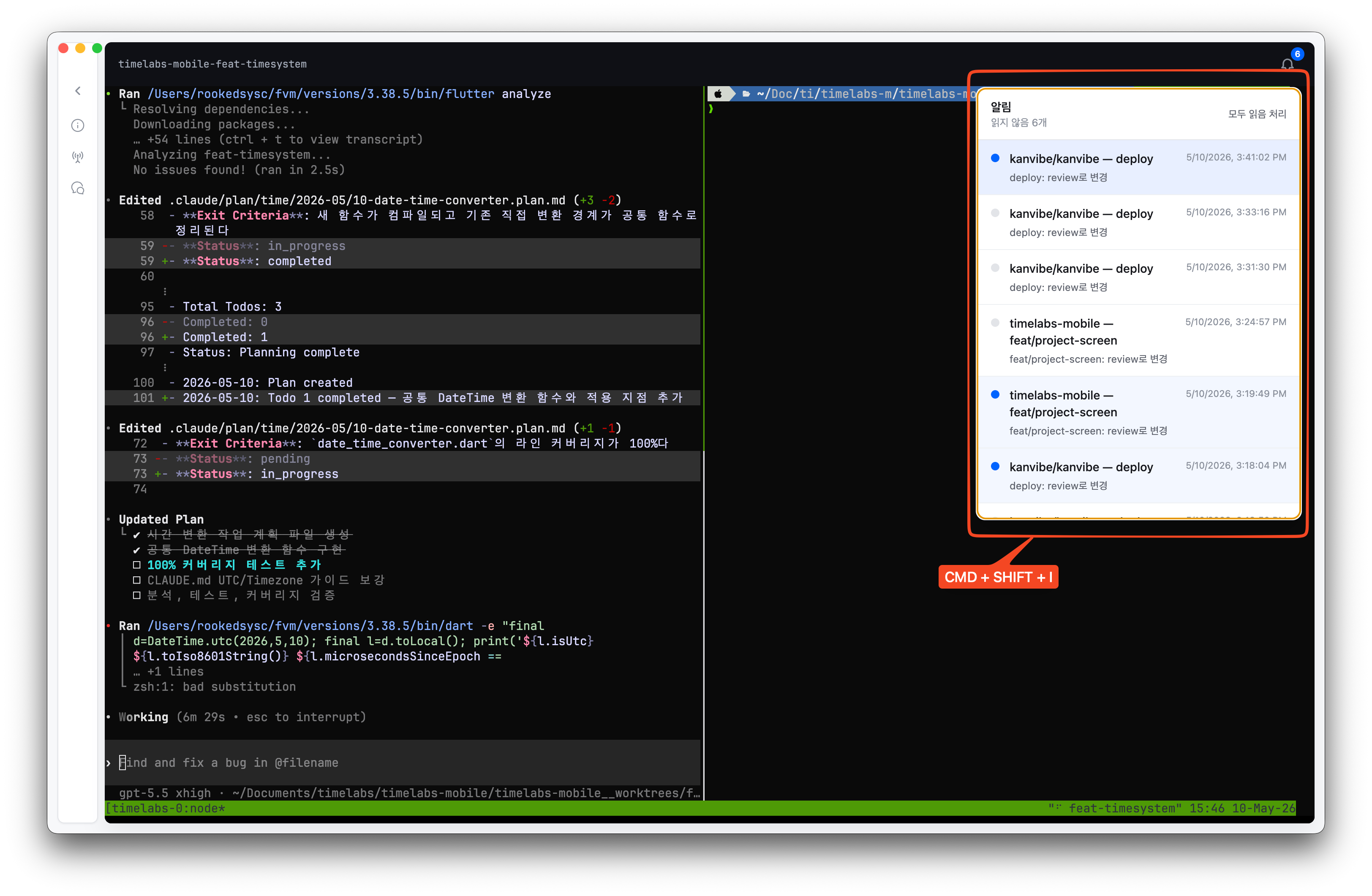
Open the notification panel to review AI agent status changes, background sync results, and task events, then jump to the related task.
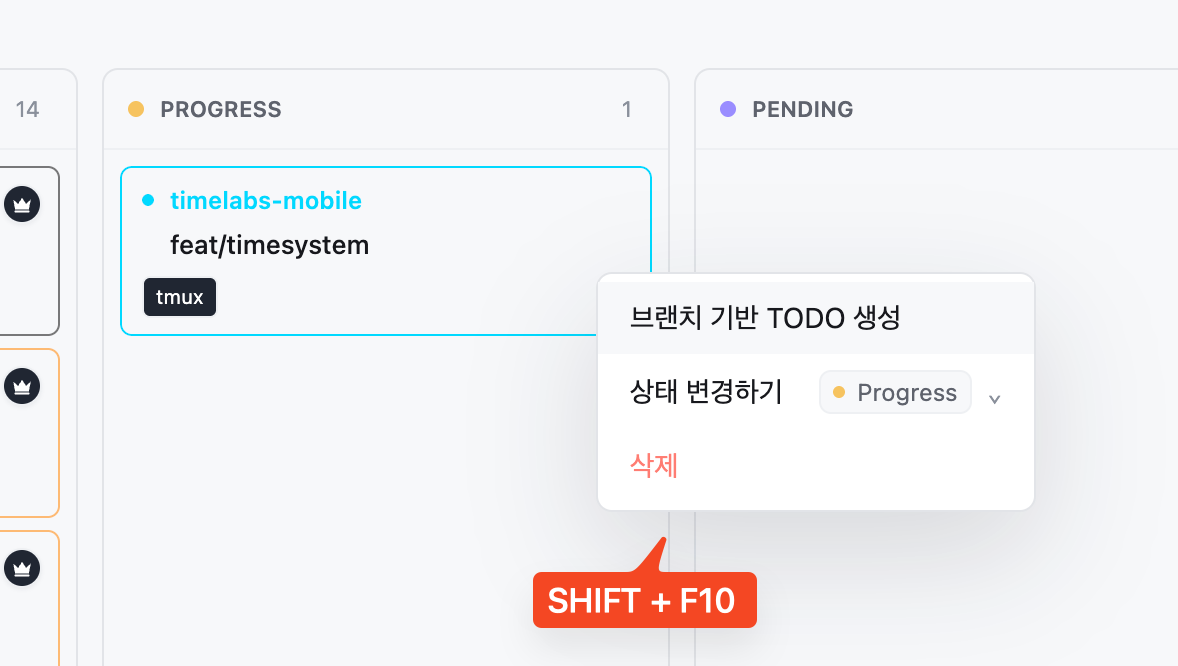
Create follow-up branch TODOs directly from the highlighted search result, preserving project and branch context for the next piece of work.
Turn on Vim-style board controls in Settings → Keyboard, then move across task cards with h/j/k/l, find visible task text with /, open the new-task modal with n, move statuses with :move progress, and delete a focused task with dd.
Open the Vim controls demo video
| Dependency | Version | Required | Install |
|---|---|---|---|
| git | latest | Yes | brew install git |
| tmux | latest | Yes | brew install tmux |
| gh | latest | Yes | brew install gh (requires gh auth login) |
| zellij | latest | No | brew install zellij |
Until KanVibe is accepted into the official Homebrew Cask repository, install it from the KanVibe Homebrew tap:
brew install --cask rookedsysc/kanvibe/kanvibe
open -a KanVibe
After the official Homebrew Cask is accepted, the install command becomes:
brew install --cask kanvibe
brew update
brew upgrade --cask kanvibe
brew uninstall --cask kanvibe
brew untap rookedsysc/kanvibe
Click the magnifying-glass directory scan button on the main board toolbar — it sits between the project filter and + New Task — to open the project registry dialog. In the dialog, choose a local or remote git repository path and click Scan & Register; KanVibe then registers the repository, detects existing worktree branches, and installs supported agent hooks.
To stop managing a project, delete it from the registered-project list in the registry dialog. This removes only the SQLite project record and associated KanVibe task records; git branches, worktrees, and files on disk are kept.
Add a TODO task from the Kanban board. When creating a task with a branch name, KanVibe automatically:
Tasks are managed through 5 statuses: TODO → PROGRESS → PENDING → REVIEW → DONE
Change statuses via drag & drop, or let AI Agent Hooks transition them automatically. When a task moves to DONE, its branch, worktree, and terminal session are automatically deleted.
Each task's terminal page supports multiple pane layouts:
| Layout | Description |
|---|---|
| Single | One full-screen pane |
| Horizontal 2 | Two panes side by side |
| Vertical 2 | Two panes stacked |
| Left + Right TB | Left pane + right top/bottom split |
| Left TB + Right | Left top/bottom split + right pane |
| Quad | Four equal panes |
Each pane can run a custom command (e.g., vim, htop, lazygit, test runner, etc.). Configure layouts globally or per-project from the settings dialog.
~/.ssh/config~/.kanvibe, with per-host concurrency capped at 4x available CPU coresssh -Y) is requested only when local DISPLAY, remote X11Forwarding, and xauth are available| Shortcut | Scope | Action |
|---|---|---|
Cmd/Ctrl+F or / with Vim-style controls enabled |
Board | Open page find for visible project/task text; press Enter for next and Shift+Enter for previous |
h / j / k / l or ← / ↓ / ↑ / → |
Board task cards | Move focus left/down/up/right across visible task cards; if no task is focused, enter the first visible task |
n |
Board | Open the new task modal immediately |
:move todo|progress|pending|review|done |
Focused board task card | Move the focused task to the target status without drag-and-drop; press Tab in the command input to autocomplete a unique status prefix |
dd |
Focused board task card | Delete the focused task after confirmation |
Cmd/Ctrl+Shift+O |
Global | Open quick task search by branch or project name (default, configurable) |
Cmd/Ctrl+Shift+P |
Board | Open the project filter dropdown |
Cmd/Ctrl+Shift+I |
Board | Open the notifications dropdown |
Cmd+[ / Cmd+] (macOS), Alt+[ / Alt+] (Linux) |
Global | Navigate back/forward through app history; back falls back to board home when there is no previous page |
Cmd+1/2/3 (macOS), Alt+1/2/3 (Linux) |
Task detail | Activate the numbered detail dock items: info, status/hooks, and AI chat. These shortcuts are intercepted before terminal input |
Cmd+4 (macOS), Alt+4 (Linux) |
Task detail | Open the task PR in the browser when a PR exists; otherwise the shortcut belongs to the fourth numbered dock item when present |
Cmd/Ctrl+N |
Quick task search | Create a new branch TODO from the currently highlighted task |
↑ / ↓ / Enter / Shift+Enter / Esc |
Quick task search | Move selection, open task, open task in a new window, close dialog |
↑ / ↓ / Enter / Esc |
Project filter dropdown | Move selection, toggle project filter, close dropdown |
↑ / ↓ / Enter / Esc |
Notifications dropdown | Move selection, open notification target, close dropdown |
Task detail dock numbering excludes the back-to-board button and follows the visible dock item order. If a task has a PR URL, PR takes slot 4 and later dock items shift to 5+; without a PR, the next dock item uses slot 4.
Vim-style board controls (h/j/k/l, /, n, dd, and :move ...) can be turned on or off in Settings → Keyboard. Arrow-key task navigation and Cmd/Ctrl+F page find remain available even when Vim-style controls are disabled.
KanVibe integrates with Claude Code Hooks, Gemini CLI Hooks, Codex CLI, and OpenCode to automatically track task status. Tasks are managed through 5 statuses:
| Status | Description |
|---|---|
| TODO | Initial state when a task is created |
| PROGRESS | AI is actively working on the task |
| PENDING | AI asked a follow-up question; waiting for user response (Claude Code only) |
| REVIEW | AI has finished; awaiting review |
| DONE | Task complete — branch, worktree, and terminal session are automatically deleted |
User sends prompt          → PROGRESS
AI asks question (AskUser) → PENDING
User answers               → PROGRESS
AI finishes response       → REVIEW
BeforeAgent (user prompt)  → PROGRESS
AfterAgent (agent done)    → REVIEW
Gemini CLI does not have an equivalent to Claude Code's
AskUserQuestion, so the PENDING state is not available.
UserPromptSubmit                → PROGRESS
PermissionRequest (Bash only)  → PENDING
PreToolUse (Bash only)         → PROGRESS
Stop                           → REVIEW
KanVibe now uses Codex's current lifecycle hooks model with .codex/hooks.json plus [features].hooks = true in .codex/config.toml:
Codex loads project-local .codex/ hooks only for trusted project/worktree paths. If a task runs in a generated worktree, trust that worktree in Codex before expecting the local hook file to fire.
Codex's current
PermissionRequestandPreToolUsematchers are Bash-scoped, soPENDINGrepresents approval waits rather than every kind of conversational follow-up question.
User sends message (message.updated, role=user) → PROGRESS
AI asks a question (question.asked)             → PENDING
User answers question (question.replied)        → PROGRESS
Session idle (session.idle)                     → REVIEW
OpenCode uses its own plugin system instead of shell-script hooks. KanVibe generates a TypeScript plugin at .opencode/plugins/kanvibe-plugin.ts that subscribes to OpenCode's native event hooks (message.updated, question.asked, question.replied, and session.idle) via the @opencode-ai/plugin SDK. This means status updates are handled in-process without spawning external shell commands.
All agent hooks are auto-installed when you register a project through KanVibe's directory scan or create a task with a worktree. You can also install them individually from the task detail page.
| Agent | Hook Directory | Config File |
|---|---|---|
| Claude Code | .claude/hooks/ |
.claude/settings.json |
| Gemini CLI | .gemini/hooks/ |
.gemini/settings.json |
| Codex CLI | .codex/hooks/ |
.codex/config.toml, .codex/hooks.json |
| OpenCode | .opencode/plugins/ |
Plugin auto-discovery |
Task status changes via AI Agent Hooks trigger browser notifications with project, branch, and status. Click to jump directly to the task detail page.
Setup: Browser will prompt for permission on first visit. Configure filters in Project Settings → Notifications.
| Endpoint | Method | Description |
|---|---|---|
/api/hooks/start |
POST | Create a new task |
/api/hooks/status |
POST | Update task status by branchName + projectName; if the target is missing, KanVibe still sends a browser notification and returns 404 without changing status |
Review code changes directly in the browser with a GitHub-style diff viewer. Click the Diff badge on the task detail page to see all modified files compared to the base branch.
| Category | Technology |
|---|---|
| Frontend/Backend | Next.js 16 (App Router) + React 19 + TypeScript |
| Database | SQLite + TypeORM + better-sqlite3 |
| Styling | Tailwind CSS v4 |
| Terminal | xterm.js + WebSocket + node-pty |
| SSH | system ssh binary |
| Drag & Drop | @hello-pangea/dnd |
| i18n | next-intl |
| Desktop Packaging | Electron + Electron Builder |
This project is licensed under the AGPL-3.0. You are free to use, modify, and extend it for open-source purposes. Commercial SaaS distribution is not permitted under this license. See LICENSE for details.
See docs/CONTRIBUTING.md for guidelines.
more like this
Comprehensive analytics dashboard for AI coding agents — Cursor, Windsurf, Claude Code, VS Code Copilot, Zed, Antigravi…
Skill Claude Code de veille tech francophone. Agrège les flux RSS (Journal du Hacker, Human Coders News…) et produit un…
A to-do list that runs your Claude Code agents — capture anywhere, dispatch in parallel, review from your phone.
search projects, people, and tags