agentlytics
Comprehensive analytics dashboard for AI coding agents — Cursor, Windsurf, Claude Code, VS Code Copilot, Zed, Antigravi…
JavaScript★ 555
A remote, phone-first console for your tmux — agent-agnostic, no database. Spawn and watch coding agents in parallel wo…
 sahil87
 run-kit
Part of the shll toolkit — see all projects there.
Your tmux, in the browser and on your phone. run-kit is a remote console for the machine you actually work on — every tmux session and pane as a live terminal, in a sidebar, from your desk or your couch. It's the modern, terminal-native answer to the old server web-console: nothing to configure, no database, state read straight from tmux.
What makes it sing in 2026 is what you tend to run in those panes: AI coding agents, many at once. rk riff spawns each one in its own git worktree, and the dashboard lets you watch the whole fleet. But run-kit never wraps the agent — a pane is just a pane. It's equally a build, a REPL, an ssh session, htop. The agent is one of the things you run, not the thing run-kit is. That's the point: when the agent tooling churns underneath you (and it does, monthly), the terminal layer stays put.
curl -fsSL https://shll.ai/install | sh
Installs the entire shll toolkit via Homebrew, handling tap trust automatically. run-kit relies on its sibling tools (wt for the riff worktree flow), so the full-toolkit install is the supported path.
From install to a working dashboard with one agent running:
run-kit agent-setup             # optional, once per machine: agent busy/waiting/idle in the dashboard
run-kit daemon start            # start the dashboard daemon on :3000
open http://localhost:3000      # open the dashboard in your browser

# in a tmux session (tmux new -s work if you aren't in one):
run-kit riff                    # spawn an agent workspace (--skill /name picks the slash-command)
run-kit riff also needs wt on your PATH — included with the full-toolkit install, or shll install wt — and your agent CLI available. When something fails, run-kit doctor prints per-dependency status.
The new workspace appears in the sidebar; click into it to drive the agent — or any command — from the browser.
The formula also installs rk as a fully interchangeable short alias of run-kit, so every command here works the same whether you type run-kit or rk.
To upgrade later, run run-kit update — pulls the latest version via Homebrew and restarts the daemon so the new binary takes effect immediately.
Coming from the old
rkformula? run-kit was originally published assahil87/tap/rk. If brew warns thatsahil87/tap/rk was renamed to sahil87/tap/run-kit, you have a keg installed under the old name — remove it with a benignbrew uninstall sahil87/tap/rk(your config and therkcommand alias are unaffected), thenbrew install sahil87/tap/run-kitifrun-kitis no longer on yourPATH.
See the install & access guide for prerequisites, run-kit doctor, development setup, and driving run-kit from your phone over Tailscale HTTPS.
| run-kit | |
|---|---|
| It is | A remote, phone-first console for your tmux — agent-agnostic, no database, state derived from tmux + filesystem. A spawner (run-kit riff) and a dashboard (run-kit serve) that compose. |
| It isn't | An agent wrapper. It doesn't speak any agent's protocol, parse any agent's output, or care what's in the pane. That's deliberate — it's what makes it outlive whichever agent you run. |
run-kit riff creates a worktree, opens a tmux window in it, and launches your agent. run-kit riff -N 3 spawns three workspaces in parallel; failures roll back cleanly.Cmd+K command palette is the primary discovery surface. Touch targets are tuned for mobile so you can steer a session from your phone while away from your desk.run-kit restarts because the daemon never touches them.fab-kit and wt — run-kit riff --skill /fab-fff launches a full fab-kit pipeline in an isolated worktree. Reach for run-kit when you have more parallel changes than one terminal can hold.
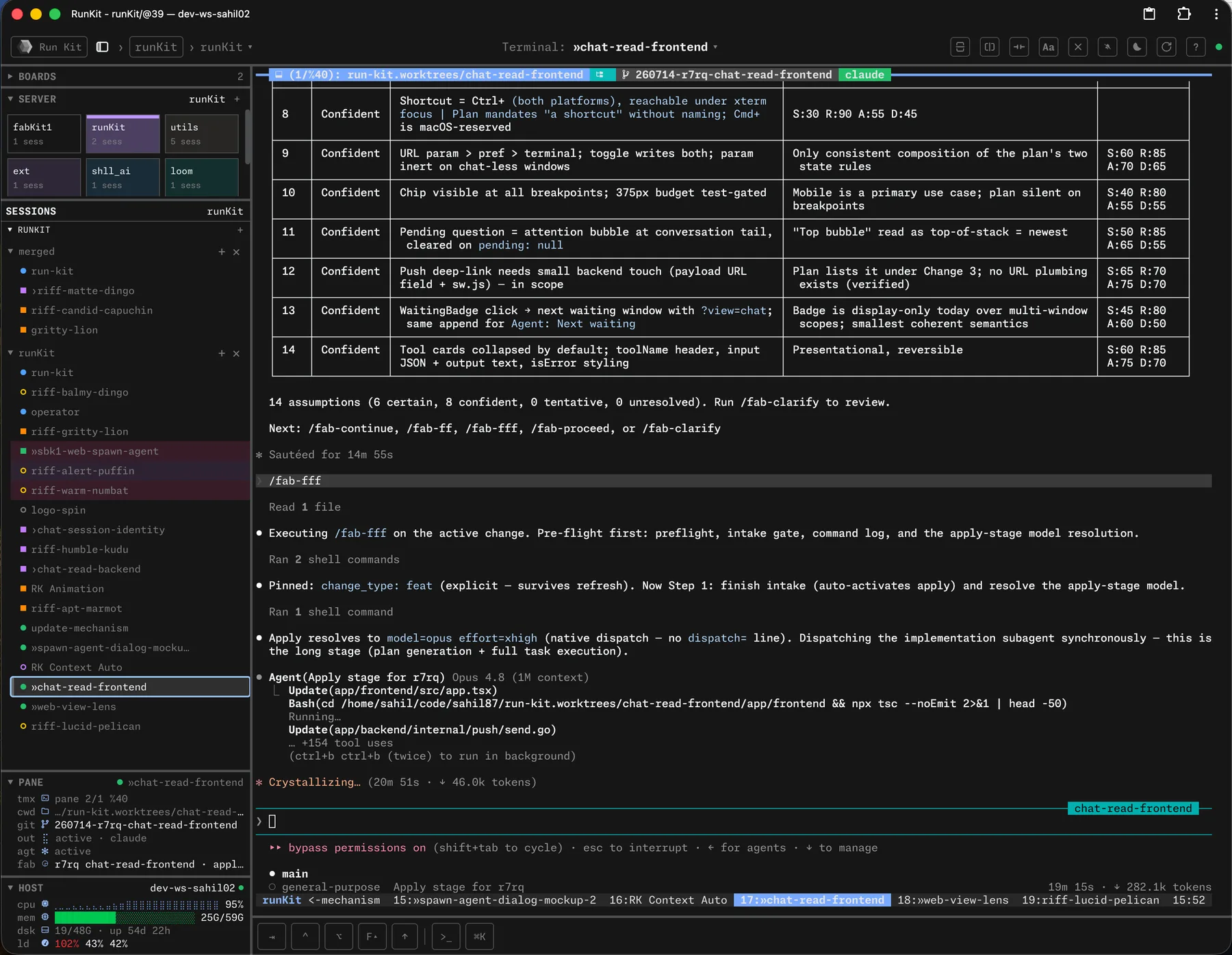


run-kit is two independent halves that compose (the command is run-kit; rk is the fully interchangeable short alias people tend to type):
run-kit riff         run-kit serve
  ▼                    ▼
spawns agent        runs the
workspaces ─────►   browser dashboard
(tmux + worktree)   (watches tmux)
You can run either alone. Run run-kit riff in any tmux session without ever starting run-kit serve — you get the spawning behavior, no dashboard. Run run-kit serve and never call run-kit riff — you get a tmux browser dashboard for sessions you spawn manually. The two are designed to compose, not depend on each other.
run-kit riff — the spawnerOne invocation gives you a git worktree, a tmux window inside it, and one or more panes ready to go. The default pane runs your coding agent, but a pane can run anything — run-kit riff is a workspace launcher, not an agent launcher.
Pane array model. --skill and --cmd are repeatable. Each occurrence adds one pane; argv order (left to right) becomes pane order. Bare --skill opens a blank agent session; bare --cmd drops into $SHELL.
Layouts. auto (default), tiled, even-horizontal, even-vertical, main-horizontal, main-vertical. Set with --layout.
Presets. Common pane/layout combos go in fab/project/config.yaml under riff.presets.<name>. Invoke as run-kit riff <name> or run-kit riff --preset <name>.
Parallel. -N <N> spawns N workspaces in parallel; failures roll back successful ones before exiting.
wt passthrough. Flags after -- go to wt create verbatim (e.g. --base, --reuse, --worktree-name).
Examples:
run-kit riff                                         # 1 pane, default skill (/fab-discuss)
run-kit riff --skill /fab-fff                        # 1 pane, specific slash-command
run-kit riff --skill /fab-fff --cmd "just dev"       # 2 panes (agent + dev server)
run-kit riff --skill /a --cmd x --cmd y --layout main-vertical
run-kit riff ship                                    # invoke the 'ship' preset
run-kit riff ship -N 3                               # 3 parallel ship workspaces
run-kit riff -- --worktree-name pacing-canyon        # name the worktree
Prerequisites: must be inside a tmux session, wt on PATH, and the launcher (default claude --dangerously-skip-permissions) available. Override the launcher per-project via agent.spawn_command in fab/project/config.yaml — point it at any agent CLI, or any command at all.
See the riff guide for the full reference.
run-kit serve — the HTTP serverStart the HTTP server in the foreground. Configurable via RK_HOST (default 127.0.0.1) and RK_PORT (default 3000).
run-kit serve                                # foreground on 127.0.0.1:3000
RK_HOST=0.0.0.0 RK_PORT=8080 run-kit serve   # bind all interfaces, port 8080
To run it in the background, use the run-kit daemon subcommands:
run-kit daemon start                         # background daemon in a tmux session
run-kit daemon restart                       # stop and start
run-kit daemon stop                          # graceful shutdown
run-kit daemon status                        # show daemon state and port owner
The daemon runs in its own dedicated tmux server (rk-daemon), completely separate from your sessions. Restart the daemon and everything you're running keeps running — the console reconnects automatically.
Each window in the sidebar, dashboard, and pane panel carries a single status dot that tells you where it sits in the fab → PR lifecycle and how healthy it is — using two orthogonal channels:
Exactly one signal drives the dot, in precedence order PR > fab > tmux.
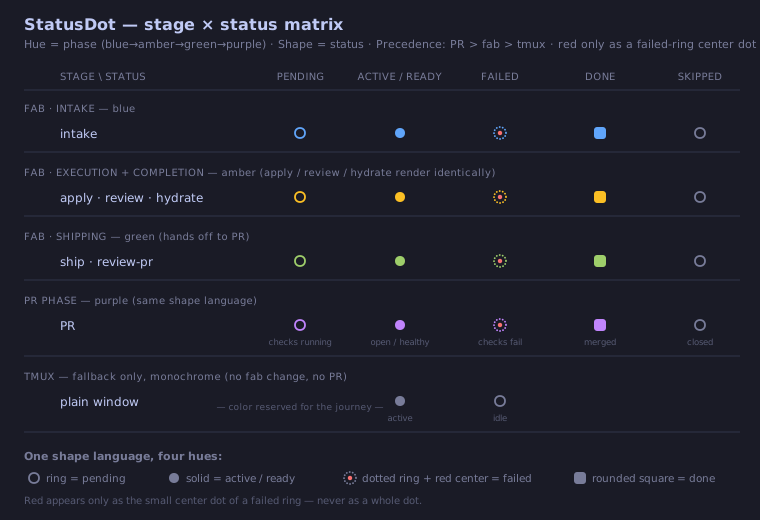
See the status dot reference for the full matrix, the per-state rendering, and the design rationale.
run-kit agent-setupWindows running an AI agent can report a live lifecycle state in the sidebar and pane panel: active (turn in progress), waiting (blocked on you — a permission prompt or question), or idle (turn done, with elapsed duration). waiting is the state worth a glance at your phone: the agent isn't working, it's waiting for you.
This is opt-in and needs a one-time setup per machine:
run-kit agent-setup              # shows the settings diff, asks before writing
run-kit agent-setup --uninstall  # removes exactly the run-kit-owned entries
It installs agent-harness hooks into your user-global agent config (v1: Claude Code, ~/.claude/settings.json) that stamp a @rk_agent_state tmux pane option on lifecycle events. Each hook is a thin, stable wrapper that delegates to run-kit agent-hook — a stable interface whose logic (the pid resolution, the value write) lives in the binary. No run-kit server is needed at fire time, and because the logic is in the binary, hook fixes track brew upgrade run-kit with no settings changes and no session restarts. They work for any session, in any repo, under any workflow. Idempotent: re-running updates run-kit's entries in place (recognizing and replacing older-generation entries too) and never touches your other hooks. Until it's run (and agents are restarted so new sessions pick up the hooks), agent state shows —.
Upgrading from an earlier run-kit? Older installs had the hook logic inlined in
settings.json. Runrun-kit agent-setuponce more to swap in the new delegating wrapper, then restart your agent sessions (harnesses snapshot hook config at session start). This is the last time a hook logic change needs a re-setup — future fixes ship in the binary. (Changes to which events map to which state still need a re-setup, since that mapping lives in the settings entries.)
The cross-repo convention is documented in docs/specs/agent-state.md.
A board is a named, cross-server pane dashboard. Pin any tmux window from any server into a board, and the board renders all pinned panes side-by-side in a horizontally-scrollable layout — perfect for watching three parallel agent sessions, or comparing a just dev server's output against the agent that's editing it.
Three ways to pin a window to a board:
Cmd+K) — Board: Pin Current Window, Board: Unpin Current Window, Board: Switch to <name>, Board: Leave Board View.Inside a board:
Cmd+] / Cmd+[ cycles pane focus to the next / previous pane (wraps).localStorage).Pin state lives in tmux (via the @rk_board window option) so it follows the window, not the browser — open the same board URL on your phone and you see the same panes. Pane widths are intentionally local to each device.
Some browser features (clipboard, secure context) require HTTPS. Accessing run-kit from another machine on your tailnet also requires HTTPS:
tailscale serve --bg http://localhost:3000.https://<machine>.<tailnet>.ts.net on your phone or another laptop.For a stable custom hostname or public access via Funnel, see the Tailscale guide.
A native desktop shell — an Electron window that wraps your dashboard and frees the browser-reserved ⌘ keyboard tier for run-kit itself. Install and update it with the CLI:
run-kit desktop install    # fetch the latest release DMG, install to /Applications
run-kit desktop update     # same, but a no-op when already current
run-kit desktop status     # installed vs latest version (read-only)
Installing through the CLI matters: the desktop DMGs are ad-hoc signed (no notarization), so a browser download gets stamped with com.apple.quarantine and Gatekeeper blocks the app on every install and every update ("Apple could not verify…"). Quarantine is applied by the downloading application — command-line tools don't apply it — so run-kit desktop install produces a quarantine-free install that opens cleanly, first time and every time. The installer does its own verification instead: it checks the DMG's SHA256 against the GitHub release digest (when available) and runs codesign --verify --deep --strict on the app before installing.
Manual fallback (no run-kit CLI on the machine): download the DMG for your architecture from GitHub Releases, drag Run Kit.app into Applications, then clear the quarantine flag — via System Settings → Privacy & Security → Open Anyway, or:
xattr -dr com.apple.quarantine "/Applications/Run Kit.app"
The manual route repeats that dance on every update; the CLI path never needs it.
Any process on the box can push a real OS-level notification to your phone or desktop — even when the RunKit PWA tab is closed — via Web Push:
run-kit notify "deploy finished" --title "CI"
run-kit notify POSTs to the local server, which fans the message out to every
subscribed browser using the Web Push protocol (signed with a server-side VAPID
key persisted under ~/.rk/). It is fail-silent: if the server is
unreachable or returns an error it exits 0 and prints nothing, so it never
stalls a calling script or agent loop.
Opt in from the browser: click the bell icon in the top bar (or open the
command palette with Cmd+K and run Notifications: Enable push). This
requests notification permission and subscribes the current device. There is no
settings page — the bell dropdown and the palette are the opt-in gestures. The
bell dropdown also offers Send test notification (a local test that bypasses
the server) and a Notifications help link.
See the notifications guide for setup and the common "it says sent but nothing appears" troubleshooting (almost always an OS-level notification block — e.g. macOS Focus mode).
Secure-context requirement: Web Push (service worker +
PushManager) only works in a secure context — that means HTTPS orlocalhost. Hitting run-kit onlocalhost:3000or behind a TLS reverse proxy (e.g.tailscale serve, see Drive it from your phone) both qualify. Over plain HTTP to a remote host, the browser silently refuses to register the service worker and the Enable push command will report that a secure context is required.
run-kit shell-init <shell> emits eval-safe tab-completion for your shell (it registers completion for both run-kit and the rk alias). Add this line to your rc file:
eval "$(run-kit shell-init zsh)"   # in ~/.zshrc
eval "$(run-kit shell-init bash)"  # in ~/.bashrc
Supports zsh, bash, fish, and powershell. Completion-only — run-kit has no shell function wrapper; every subcommand is reached via run-kit <subcommand> (or the rk alias).
💡 Have other shll tools?
shll shell-installhandles all of their shell integrations and autocompletions at once.
| Command | What it does |
|---|---|
run-kit riff |
Create a worktree + tmux window + agent/command pane(s). |
run-kit serve |
Start the HTTP server (foreground or daemon). |
run-kit status |
Show a tmux session summary. |
run-kit url |
Print the run-kit server URL (config-derived from RK_HOST/RK_PORT, default http://127.0.0.1:3000) — a heuristic for AI agents, not a liveness probe. |
run-kit skill |
Print the agent skill bundle — a static usage briefing for agents operating run-kit (canonical source docs/site/skill.md); run-kit skill display prints the visual-display topic page. |
run-kit notify |
Send a Web Push notification to your subscribed devices (see Push notifications). Fail-silent. |
run-kit doctor |
Check runtime dependencies. Run this first when something breaks. |
run-kit agent-setup |
Install agent-harness hooks (v1: Claude Code) so panes report busy/waiting/idle state (see Agent state). Once per machine; --uninstall reverses it. |
run-kit init-conf |
Scaffold default tmux.conf and tmux.d/ drop-in directory to ~/.rk/. Optional. |
run-kit update |
Upgrade via Homebrew and restart the daemon. |
run-kit desktop |
Install/update the macOS desktop app from GitHub Releases, quarantine-free (install, update, status — see Desktop app). |
run-kit completion |
Generate shell completion scripts (or use run-kit shell-init for eval-safe output). |
run-kit help |
Help about any command. |
Every command is also reachable via the short rk alias (e.g. rk riff). Run run-kit <command> --help for full flag details, or see the full command reference for every command and flag.
run-kit riff fails with "not in a tmux session" — riff requires $TMUX to be set. Start tmux first (tmux new -s work), then run run-kit riff inside it.run-kit riff fails with "wt not found" — install wt via shll install wt, or install the full toolkit from https://shll.ai.— for every window — run run-kit agent-setup once on the machine, then start a fresh agent session (hooks apply to new sessions, not already-running ones). A pane sitting at a plain shell also reads — by design — state clears when the agent exits.run-kit doctor. It checks tmux, wt, the launcher binary, port availability, and prints per-dependency status.run-kit's daemon runs in a dedicated tmux server (rk-daemon), separate from your sessions (runkit). Restarts use kill-and-restart (no polling loop or signal files), are idempotent (--restart works whether or not a daemon is running), and never touch your tmux sessions — everything you're running survives daemon restarts unaffected.
more like this
Comprehensive analytics dashboard for AI coding agents — Cursor, Windsurf, Claude Code, VS Code Copilot, Zed, Antigravi…
meine 🌒 - A CLI file manager and system utility built with Textual. It combines intuitive command parsing with rich t…
Skill Claude Code de veille tech francophone. Agrège les flux RSS (Journal du Hacker, Human Coders News…) et produit un…
A to-do list that runs your Claude Code agents — capture anywhere, dispatch in parallel, review from your phone.
search projects, people, and tags