purplemux
A web-native terminal multiplexer for Claude Code & Codex — monitor and manage multiple sessions from any browser
 subicura
git clone https://github.com/subicura/purplemux.gitsubicura/purplemuxpurplemux
Claude Code and Codex, many tasks at once. Faster.
Every session on a single screen. Uninterrupted, even on your phone.
English | 한국어 | 日本語 | 简体中文 | 繁體中文 | Deutsch | Español | Français | Русский | Português (Brasil) | Türkçe
Install
npx purplemux@latest
Open http://localhost:8022 in your browser. Done.
Requires Node.js 20+ and tmux. macOS or Linux.
Prefer a native app? Grab the macOS Electron build from the latest release (.dmg for Apple Silicon & Intel).
Why purplemux
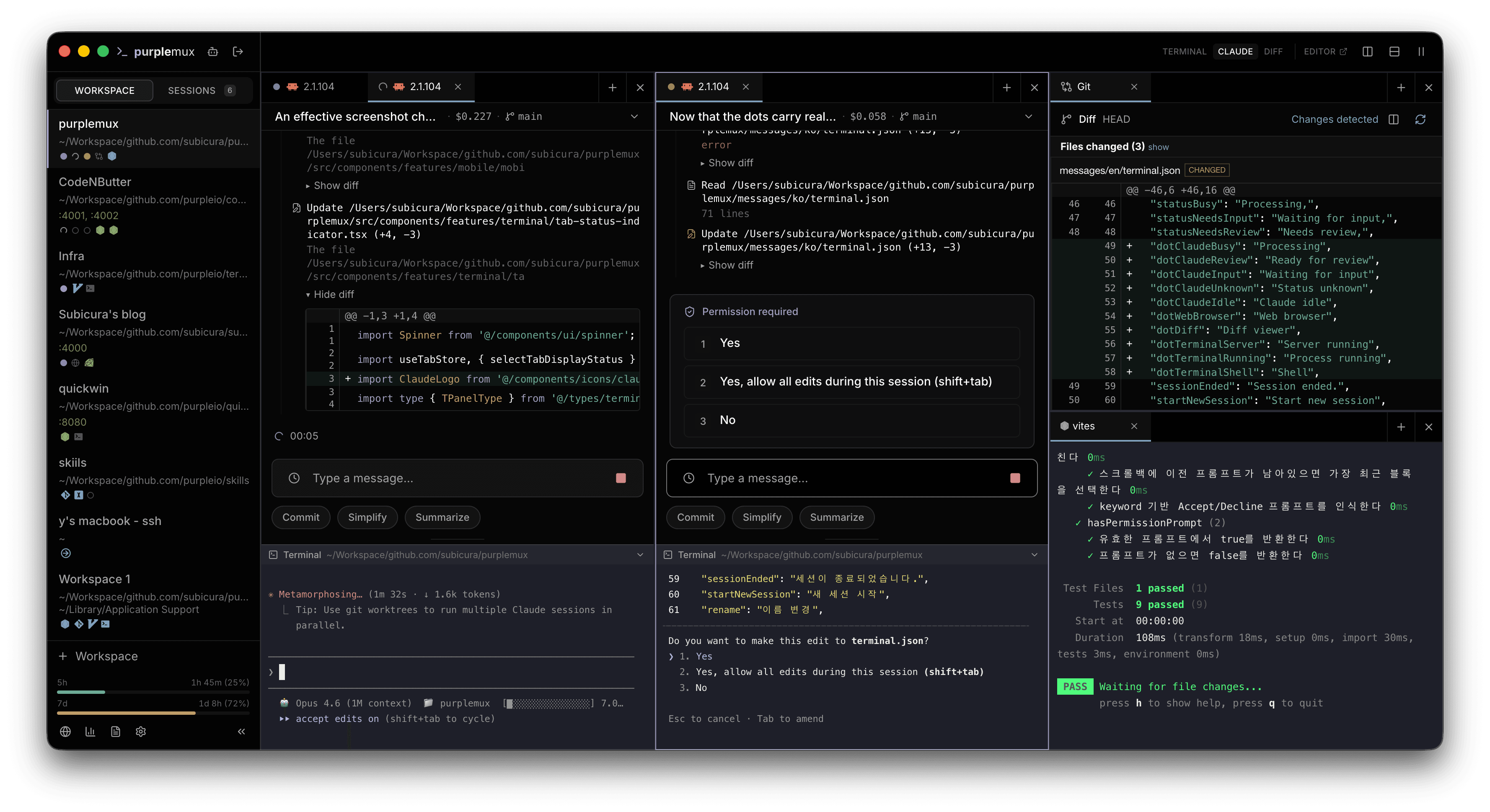
- Multi-session dashboard — See working/needs-input status for every Claude Code and Codex session at a glance
- Rate limit monitoring — 5-hour / 7-day remaining usage with reset countdown
- Push notifications — Desktop and mobile alerts when a task finishes or needs input
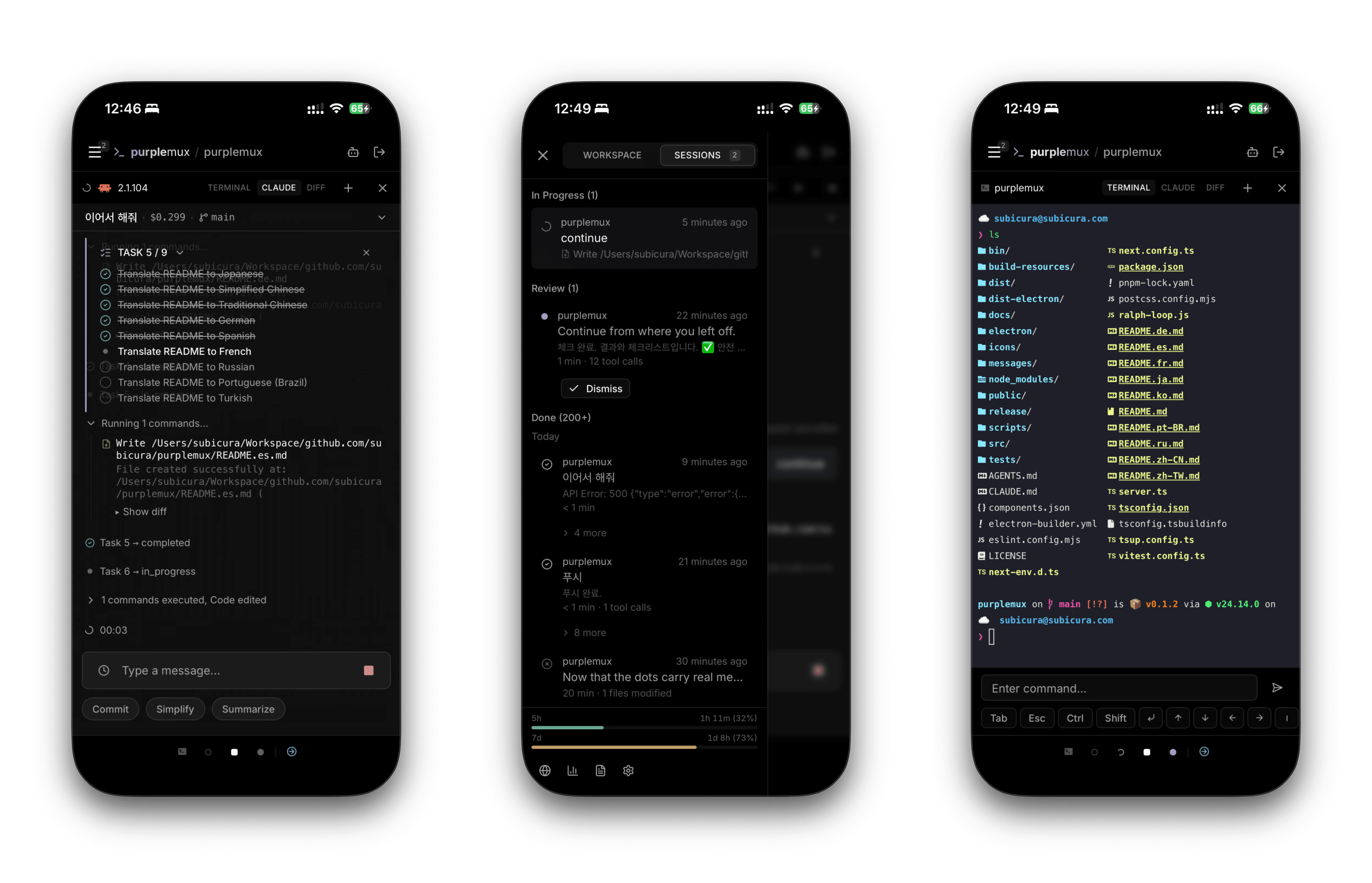
- Mobile & multi-device — Reach the same session from a phone, tablet, or another desktop
- Live session view — No more scrolling CLI output. Progress is organized as a timeline
Plus
- Uninterrupted sessions — Built on tmux. Close the browser and everything stays put. Reconnect and your tabs, panels, and directories are exactly where you left them
- Self-hosted & open source — Code and session data never leave your machine. No external servers
- Encrypted remote access — HTTPS from anywhere via Tailscale
How it differs from the official Remote Control
The official Remote Control focuses on single-session remote control. Use purplemux when you need multi-session management, push notifications, and persistent sessions.
Features
Terminal
- Split panels — Horizontal / vertical splits, drag to resize
- Tab management — Multiple tabs, drag to reorder, auto titles from process names
- Keyboard shortcuts — Splits, tab switching, focus movement
- Terminal themes — Dark / light mode, multiple color themes
- Workspaces & groups — Save and restore panel layouts, tabs, and working directories. Organize workspaces into groups with drag-and-drop
- Git workflow — Side-by-side / line-by-line diff with syntax highlighting, inline hunk expansion, and a paginated history tab. Fetch / pull / push from the panel with ahead/behind indicators — if sync fails (dirty worktree, conflicts), Ask Claude or Codex in one click
- Web browser panel — Embedded browser for checking dev output (Electron). Drive it from the
purplemuxCLI and switch viewports with a built-in device emulator - Agent tabs — Start Claude, Codex, or a combined session list from the new-tab menu
Claude Code and Codex integration
- Real-time status — Working / needs-input indicators with session switching
- Live session view — Messages, tool calls, tasks, permission prompts, thinking blocks
- Codex tabs — Launch Codex CLI sessions with the same tmux-backed persistence as Claude
- Session list — Browse and resume recent Claude and Codex sessions from one combined view
- One-click resume — Restart a paused Claude or Codex session directly from the browser
- Auto resume — Recover previous Claude sessions on server start
- Quick prompts — Register frequently used prompts and send with one click
- Attachments — Drop images into the chat input, or attach files to insert their paths. Works on mobile
- Message history — Reuse previous messages
- Usage analytics — Claude + Codex tokens, cost, per-project breakdowns, and daily AI reports
- Rate limits — 5-hour / 7-day remaining usage with reset countdown for supported providers
Mobile & accessibility
- Responsive UI — Terminal and timeline on phones and tablets
- PWA — Add to home screen for a native-app feel
- Web Push — Receive notifications even after closing the tab
- Multi-device sync — Workspace changes reflected in real time
- Tailscale — HTTPS access from outside via a WireGuard-encrypted tunnel
- Password authentication — scrypt hashing, safe even when exposed externally
- Multilingual — 11 languages including 한국어, English, 日本語, 中文
Supported platforms
| Platform | Status | Notes |
|---|---|---|
| macOS (Apple Silicon / Intel) | ✅ | Electron app included |
| Linux | ✅ | No Electron |
| Windows | ❌ | Not supported |
Install details
Requirements
Required for Claude tabs. Install Claude Code and sign in before starting a Claude tab:
curl -fsSL https://claude.ai/install.sh | bash
# or, with Homebrew latest channel
brew install --cask claude-code@latest
Optional for Codex tabs. Install Codex CLI and sign in before starting a Codex tab:
npm i -g @openai/codex
# or
brew install --cask codex
npx (fastest)
npx purplemux@latest
Global install
npm install -g purplemux
purplemux
CLI examples
purplemux tab create -w WS -t codex-cli -n "fix auth"
purplemux tab create -w WS -t agent-sessions
Run from source
git clone https://github.com/subicura/purplemux.git
cd purplemux
pnpm install
pnpm start
Development mode:
pnpm dev
Log level
Set the overall level with LOG_LEVEL (default info).
LOG_LEVEL=debug pnpm dev
To enable specific modules only, list module=level pairs in LOG_LEVELS, separated by commas. Available levels: trace / debug / info / warn / error / fatal.
# Trace only Claude Code hook behavior at debug
LOG_LEVELS=hooks=debug pnpm dev

# Multiple modules at once
LOG_LEVELS=hooks=debug,status=warn pnpm dev
Modules not listed in LOG_LEVELS fall back to LOG_LEVEL.
Remote access (Tailscale Serve)
tailscale serve --bg 8022
Access at https://<machine>.<tailnet>.ts.net. To disable:
tailscale serve --bg off 8022
Security
Password
Set a password on first access. It is hashed with scrypt and stored in ~/.purplemux/config.json.
To reset, delete ~/.purplemux/config.json and restart — the onboarding screen will appear again.
HTTPS
The default is HTTP. Always use HTTPS when exposing the app externally:
- Tailscale Serve — WireGuard encryption with automatic certificates
- Nginx / Caddy — Must forward WebSocket upgrade headers (
Upgrade,Connection)
Data directory (~/.purplemux/)
| File | Description |
|---|---|
config.json |
Authentication (hashed) and app settings |
workspaces.json |
Workspace layouts, tabs, directories |
vapid-keys.json |
Web Push VAPID keys (auto-generated) |
push-subscriptions.json |
Push subscription data |
hooks/ |
User-defined hooks |
Architecture
┌─────────────────────────────────────────────────────────────┐
│  Browser                                                    │
│  ┌───────────┐ ┌───────────┐ ┌──────────┐ ┌─────────────┐   │
│  │  xterm.js │ │ Timeline  │ │ Status   │ │ Multi-device│   │
│  │  Terminal │ │           │ │          │ │ Sync        │   │
│  └─────┬─────┘ └─────┬─────┘ └────┬─────┘ └──────┬──────┘   │
└────────┼─────────────┼────────────┼──────────────┼──────────┘
         │ws           │ws          │ws            │ws
         │/terminal    │/timeline   │/status       │/sync
         ▼             ▼            ▼              ▼
┌─────────────────────────────────────────────────────────────┐
│  Node.js Server (:8022)                                     │
│  ┌──────────┐  ┌───────────────┐  ┌─────────────────────┐   │
│  │ node-pty │  │ JSONL Watcher │  │ Status Manager      │   │
│  │ PTY↔WS   │  │ File watch →  │  │ Process tree +      │   │
│  │ Binary   │  │ Parse → Send  │  │ JSONL tail analysis │   │
│  └────┬─────┘  └───────┬───────┘  └──────────┬──────────┘   │
└───────┼────────────────┼─────────────────────┼──────────────┘
        ▼                ▼                     ▼
┌─────────────────────────────────────────────────────────────┐
│  System                                                     │
│  tmux (purple socket)         Agent CLIs                    │
│  ┌────────┐ ┌────────┐       ┌────────────────────────────┐ │
│  │Session1│ │Session2│  ...  │ Claude Code                │ │
│  │ (shell)│ │ (shell)│       │   ~/.claude/projects/*.jsonl │ │
│  └────────┘ └────────┘       │ Codex                      │ │
│                              │   ~/.codex/sessions/*.jsonl │ │
│                              └────────────────────────────┘ │
└─────────────────────────────────────────────────────────────┘
Terminal I/O — xterm.js connects to node-pty via WebSocket; node-pty attaches to tmux sessions. A binary protocol handles stdin/stdout/resize with backpressure control.
Status detection — Agent event hooks deliver instant updates via HTTP POST. Claude Code uses SessionStart, Stop, and Notification; Codex uses SessionStart, UserPromptSubmit, PreToolUse, PostToolUse, Stop, and PermissionRequest. Polling every 5–15s inspects process trees and analyzes the last 8KB of JSONL files.
Timeline — Watches JSONL session logs under ~/.claude/projects/ and ~/.codex/sessions/, parses new lines on change, and streams structured entries to the browser.
tmux isolation — Uses a dedicated purple socket, completely separate from your existing tmux. No prefix key, no status bar.
Auto recovery — On server start, restores previous Claude sessions via claude --resume {sessionId}. Codex sessions can be resumed from the session list or with codex resume {sessionId}.
License
more like this
agentlytics
Comprehensive analytics dashboard for AI coding agents — Cursor, Windsurf, Claude Code, VS Code Copilot, Zed, Antigravi…
veille-techno
Skill Claude Code de veille tech francophone. Agrège les flux RSS (Journal du Hacker, Human Coders News…) et produit un…