xmb-bigscreen
XMB for Plasma BigScreen, console-like fullscreen launcher for living room gamepad users
QML★ 50
Quake Champions Quick Launcher - QC without the Bethesda Launcher
 syncore
git clone https://github.com/syncore/qclauncher.gitsyncore/qclauncher QCLauncher
QCLauncher is a small tool for Quake Champions. With it, you can launch Quake Champions without running the Bethesda Launcher or having the Bethesda Launcher open. QCLauncher has just 2 files, uses very few resources, and can be configured to immediately exit after launching the game. You can download it here.
⚡ It is very important to recognize that QCLauncher does not entirely replace the Bethesda Launcher. Most importantly, if you are not using the Early Access Steam version of QC you will still need the Bethesda Launcher to download any QC game updates or to verify your game files if necessary. QCLauncher will tell you when Quake Champions game updates are available and you will be unable to play if you do not have the latest version of Quake Champions from Bethesda.
The Bethesda Launcher:
Quickly and easily enable undocumented game options.
Easily add Quake Champions to Steam and use the Steam overlay if you have not purchased the Quake Champions Early Access version through Steam.
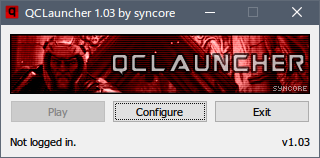
💾 You can download both the latest version of the binary and source code from the releases page.
qclauncher.exe file from the zip file.qclauncher.exe to run QCLauncher.C:\Program Files (x86)\bethesda.net Launcher\games\quakechampions\client\bin\pcqclauncher.exe in Steam to add it as a non-Steam game. You can rename it to Quake Champions if you want, so that it will be displayed that way in your friends list.Since version 1.01, it has been possible to pass custom Quake Champions start-up options to QCLauncher with the --customargs flag. For example, create a shortcut to QCLauncher or start QCLauncher in this manner:
qclauncher.exe --customargs="--set /Config/CONFIG/WeaponZScale -10 --set /Config/CONFIG/isLowResParticles 1"
QCLauncher will then pass these options to Quake Champions on launch.
go get -ldflags="-H windowsgui -s -w" github.com/syncore/qclaunchermsBuildDir variable in this file. If you have VS2017, but not the Enterprise edition (i.e. Professional), adjust the msBuildDir variable to point to its MSBuild.exe executable location.GOOS=windows GOARCH=amd64 go get -d -ldflags="-H windowsgui -s -w" github.com/syncore/qclaunchergo env GOPATH on the command line.GOPATH\src\github.com\syncore\qclauncherbuild.batbuild.sh (the application only runs on Windows, but can be built on Linux/OSX).qclauncher.exe file in the bin directory.No. QCLauncher does NOT touch or modify any game files or game code at all. Any additional functionality that QCLauncher provides is derived from the game itself and the game's built-in commands. The tool is simply a very lightweight utility that launches the game. Use it if you'd like to, or not. I wrote it as a learning exercise in the tradition of contributing to the Quake community. It's open-source. Inspect the code and you will see that there is no funny business going on.
I can be contacted under the name syncore on Discord. Any other issues can be opened on the issue tracker here on Github, and I will try to address them, time permitting. Additionally, there is an ESR thread available here and a PlusForward.net thread available here.
👍 🎮 Happy fragging, and please support this latest Quake title! Download it for free at https://www.quake.com
more like this
XMB for Plasma BigScreen, console-like fullscreen launcher for living room gamepad users
Launcher and management utility for running an Astroneer Dedicated Server on Linux using WINE
search projects, people, and tags