AutomationShield
Arduino library and MATLAB/Simulink API for the AutomationShield Arduino expansion boards for control engineering educa…
C★ 51
GPIOViewer Arduino Library to see live GPIO Pins on ESP32 boards
 thelastoutpostworkshop
git clone https://github.com/thelastoutpostworkshop/gpio_viewer.gitthelastoutpostworkshop/gpio_viewerTransforms the way you troubleshoot your microcontroller projects.


ℹ️ Make sure you have the latest ESP32 boards by Espressif Systems in your Board Manager
Sketch > Include Library > Add ZIP Library...ℹ️ Make sure you have the latest ESP32 boards by Espressif Systems in your Platforms
Add (or change) the following to your platformio.ini file:
platform = espressif32
framework = arduino
lib_deps =
    https://github.com/ESP32Async/ESPAsyncWebServer.git
    https://github.com/ESP32Async/AsyncTCP.git
    https://github.com/thelastoutpostworkshop/gpio_viewer.git
ℹ️ You can also get examples provided with the library in the Arduino IDE through the menu
File > Examples > GPIOViewer
ℹ️ You only need to include the library, declare the GPIOViewer and call begin() at the end of your setup, and that's it!
#include <gpio_viewer.h> // Must me the first include in your project
GPIOViewer gpio_viewer;

void setup()
{
  Serial.begin(115200);

  // Comment the next line, If your code aleady include connection to Wifi in mode WIFI_STA (WIFI_AP and WIFI_AP_STA are not supported)
  gpio_viewer.connectToWifi("Your SSID network", "Your WiFi Password");
  // gpio_viewer.setPort(5555);   // You can set the http port, if not set default port is 8080

  // Your own setup code start here

  // Must be at the end of your setup
  // gpio_viewer.setSamplingInterval(25); // You can set the sampling interval in ms, if not set default is 100ms
  // gpio_viewer.setSkipPeripheralPins(false); // Default true: skip I2C/SPI/UART pins owned by peripherals
  gpio_viewer.begin();
}
ℹ️ The default HTTP port is 8080 and default sampling interval is 100ms
ℹ️ By default, GPIOViewer skips pins owned by active I2C/SPI/UART peripherals (ESP32 core v3+). Use setSkipPeripheralPins(false) to monitor them anyway.
ℹ️ Wifi must be in mode WIFI_STA (WIFI_AP and WIFI_AP_STA are not supported)
ℹ️ The GPIOViewer application supports mDNS. If available on your network, you can access it at http://gpioviewer.local:8080 (with the port number used in a setPort()). If mDNS is unavailable/blocked, use the IP address URL printed on the serial monitor (with the port number used in a setPort()).
Contributors are welcomed! If you want to submit pull requests, here is how you can do it.
Since version 1.5.6, the library detects pin functions like ADC and Touch, this has been causing problems on some boards, like the XiaoESP32-S3-Sense. You can disable pin detection by adding this define before including the library :
#define NO_PIN_FUNCTIONS
#include <gpio_viewer.h>
If your code don't compile, before submitting an issue:
Try placing this header file after all other includes:
#include <gpio_viewer.h>
If GPIOViewer is running and your are experiencing problems in the web application, before submitting an issue:
ℹ️ You can use the "Generic View" in the GPIO Web Application to see GPIO pin activites live even if your board image is not listed
ℹ️ You can also request an ESP32 board image addition by creating a new issue.
| Description | Image | Pinout |
|---|---|---|
| AZ Delivery NodeMCU ESP32 | !  |
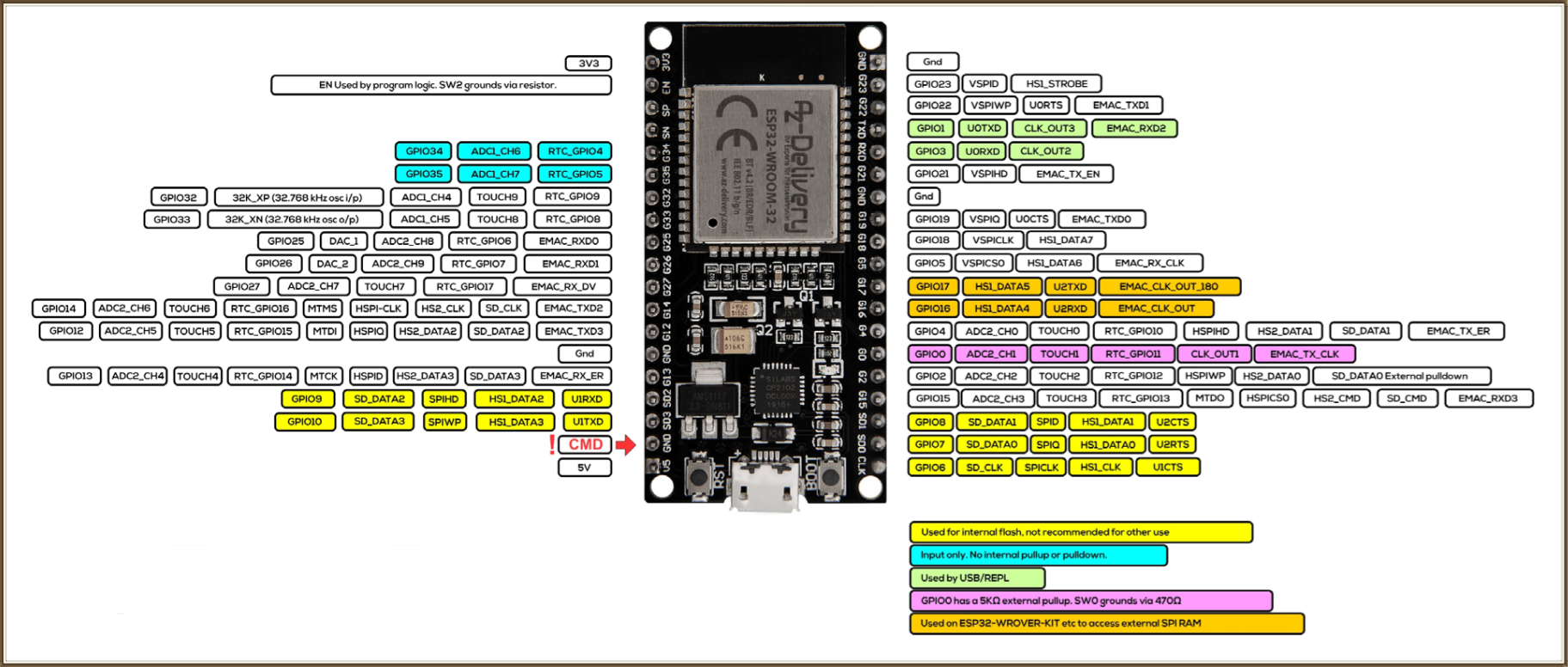 |
| DFROBOT Beetle ESP32-C6 | !  |
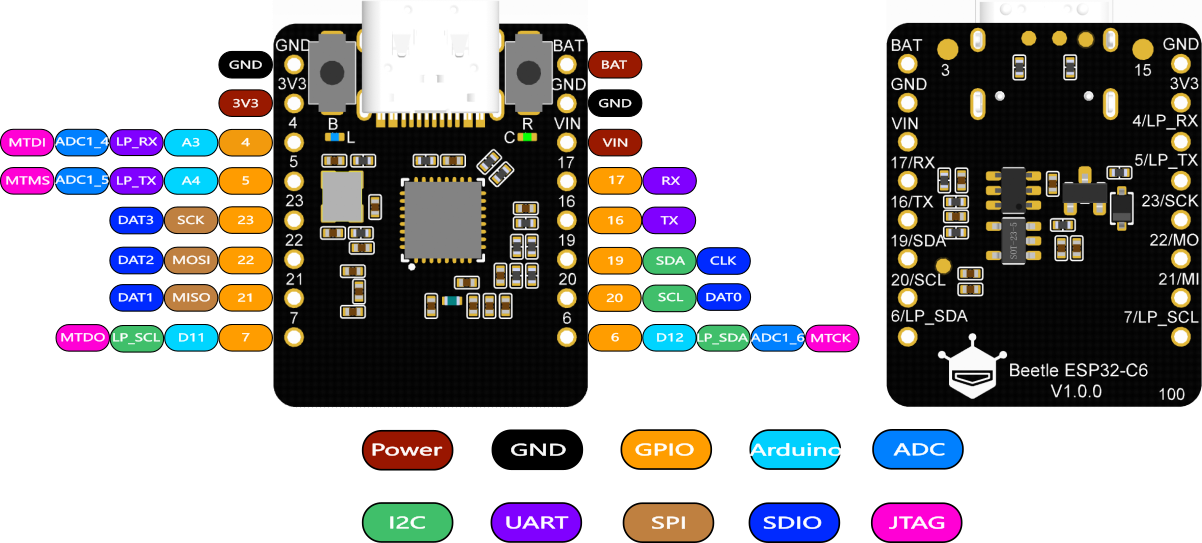 |
| ESP32 NodeMCU 32S | !  |
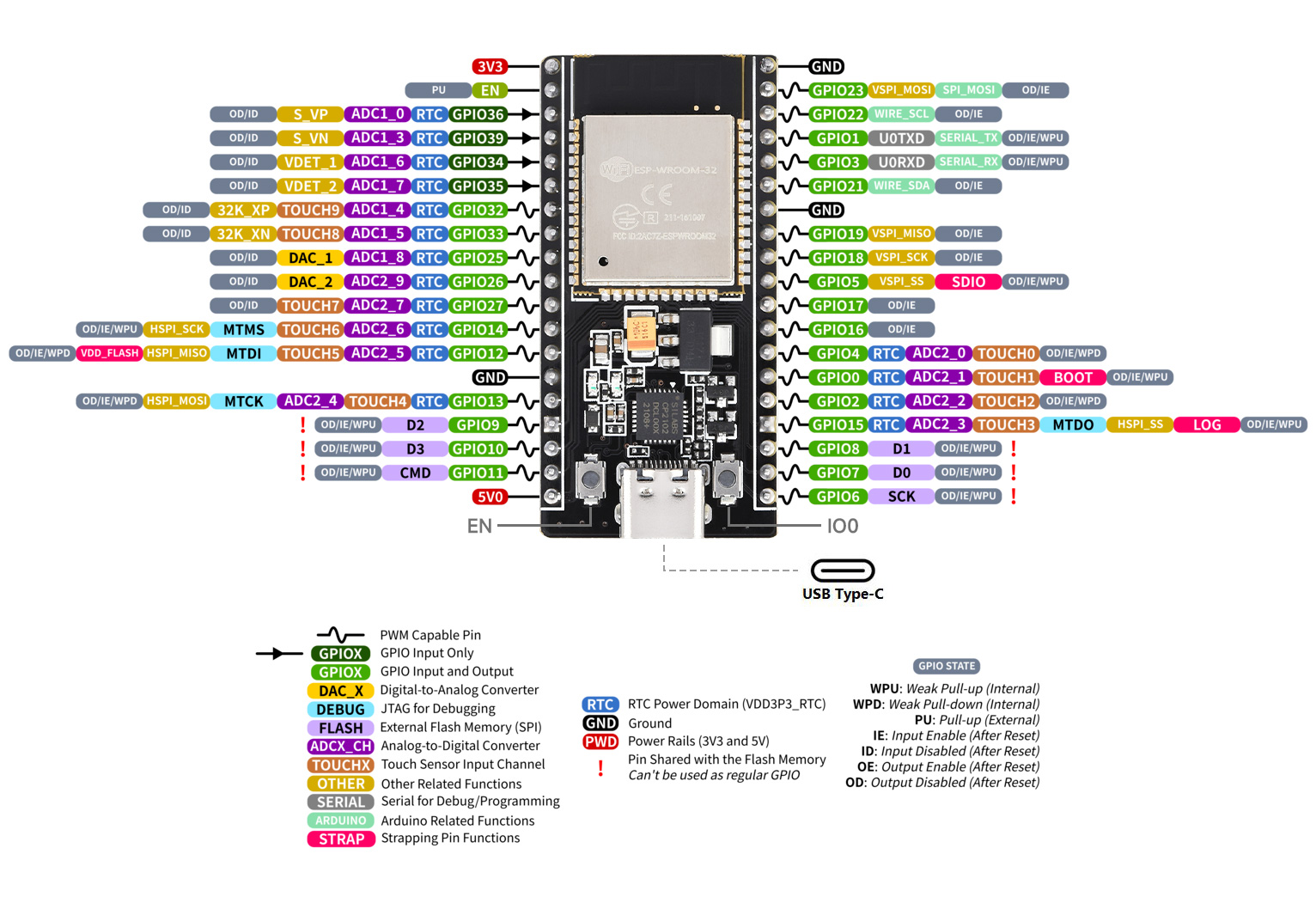 |
| ESP32 VROOM 32D (38 pins) | !  |
|
| ESP32 VROOM 32D (38 pins) | ! |
|
| ESP32 VROOM 32D (30 pins) | !  |
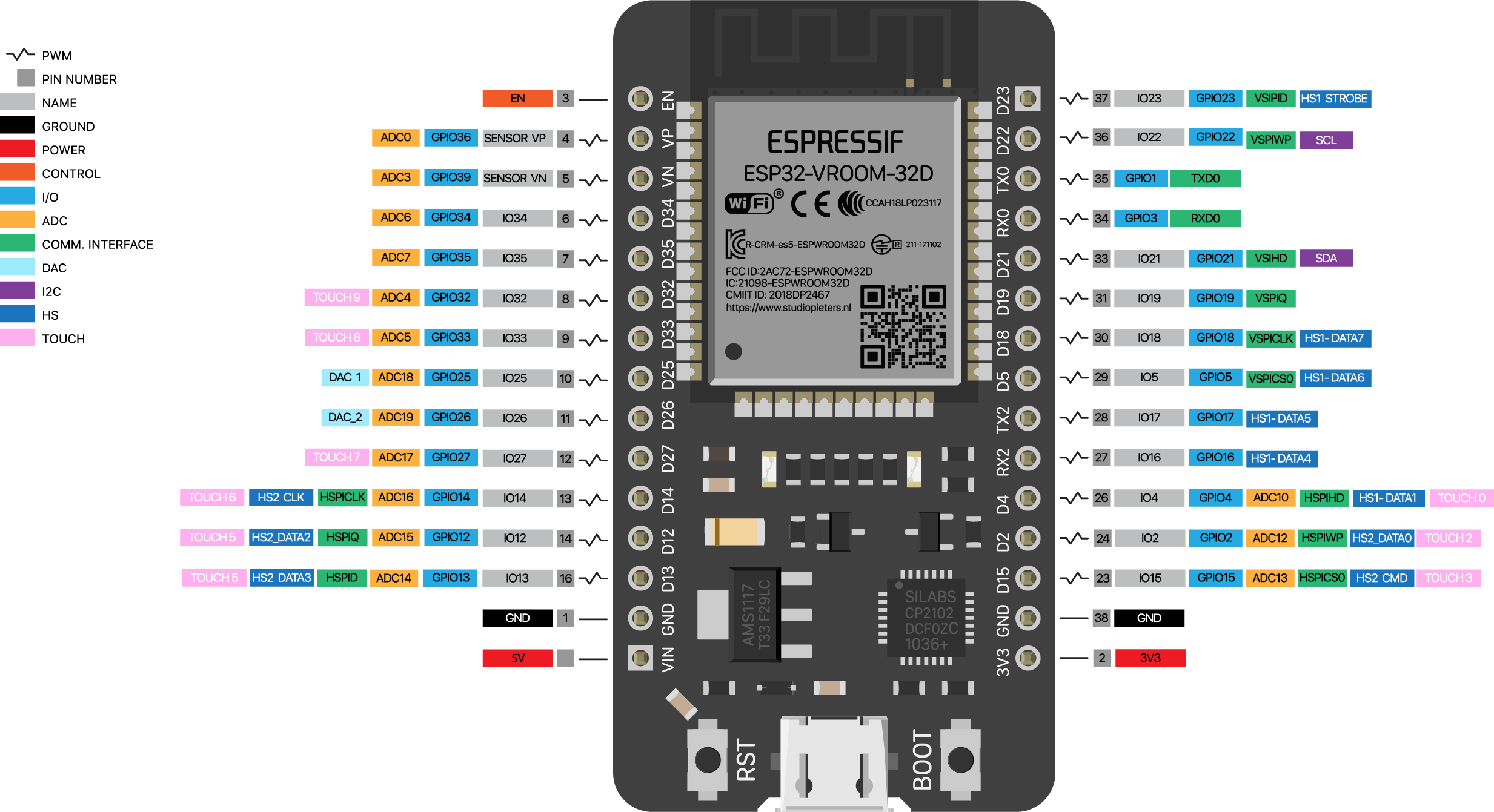 |
| ESP32 D1 R32 | !  |
|
| ESP32-CAM | !  |
|
| ESP32-C3 Super Mini | !  |
|
| ESP32 C3 Wroom-02 | !  |
|
| ESP32-C5 DevKit1 | !  |
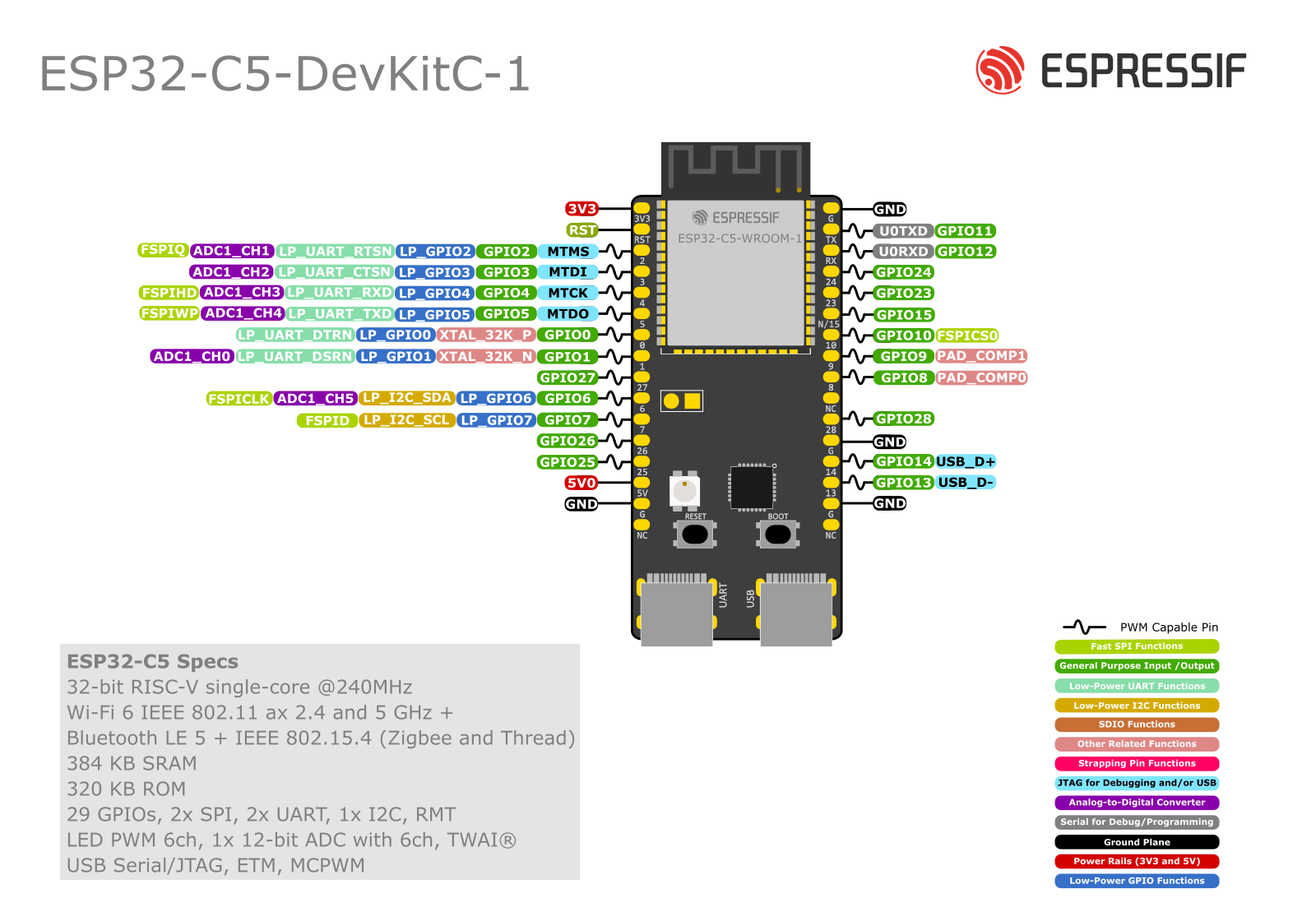 |
| ESP32-C6 DevKitM | !  |
|
| ESP32 Wroom-32UE | !  |
|
| ESP32 EVB | !  |
|
| ESP32-S3-DevKitM-1-N8 | !  |
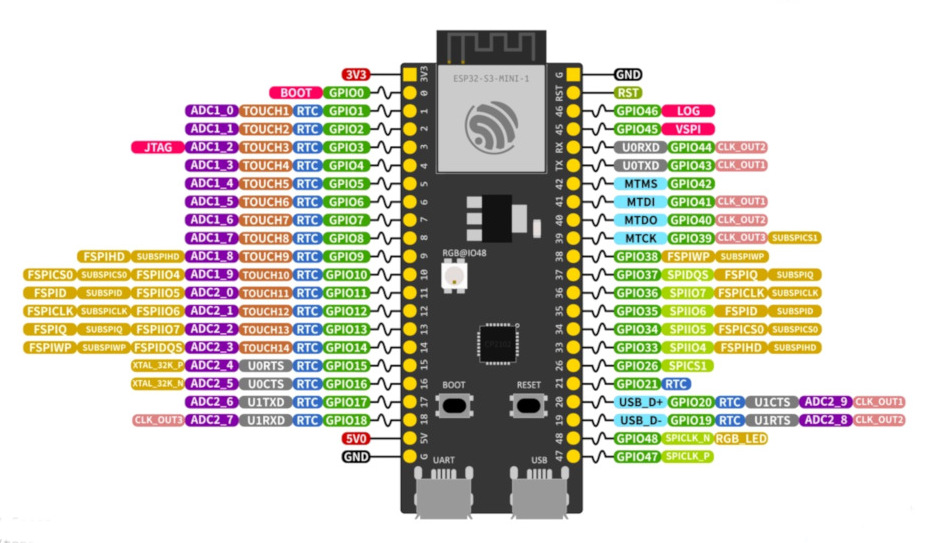 |
| ESP32 S3 Wroom-1 | !  |
|
| Esp32 S2 Mini V1.0.0 | !  |
|
| ESP32 POE | !  |
|
| ESP32 C3 Mini | !  |
|
| ESP32 C3 Mini-1 | !  |
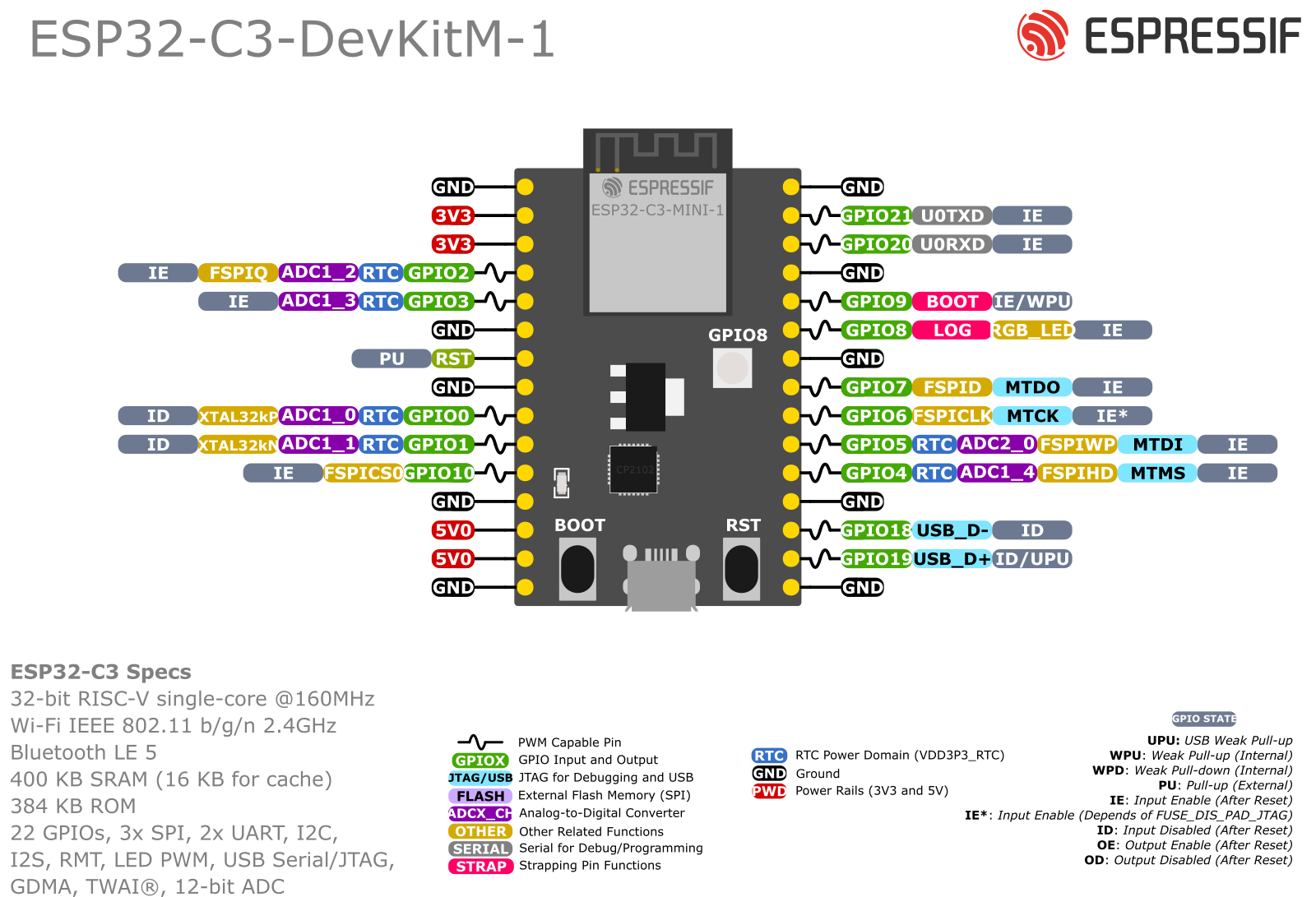 |
| ESP32 C3 Zero | !  |
|
| ESP32 C6 Zero | !  |
|
| ESP32-S3 Zero | !  |
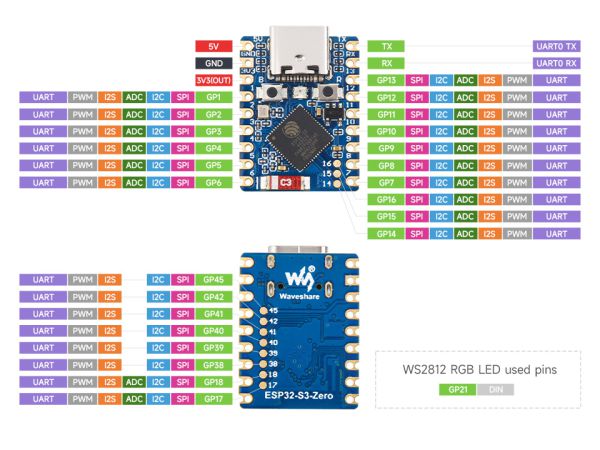 |
| ESP32 Pico Kit v4.1 | !  |
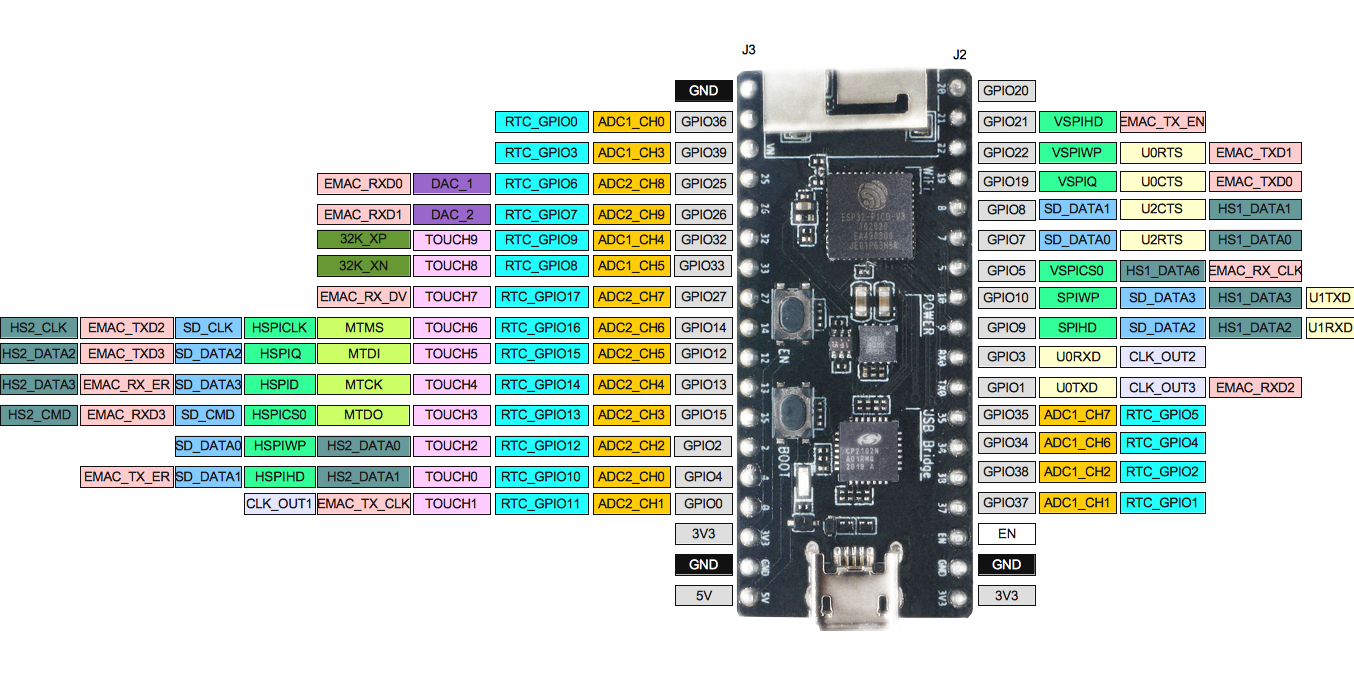 |
| Leaf S3 | !  |
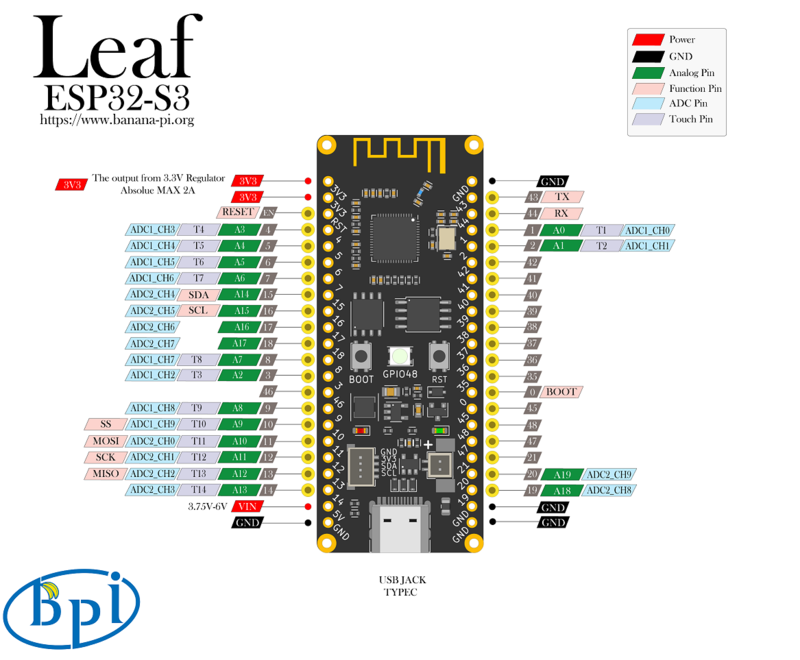 |
| Lilygo T-Display ESP32-S3 | !  |
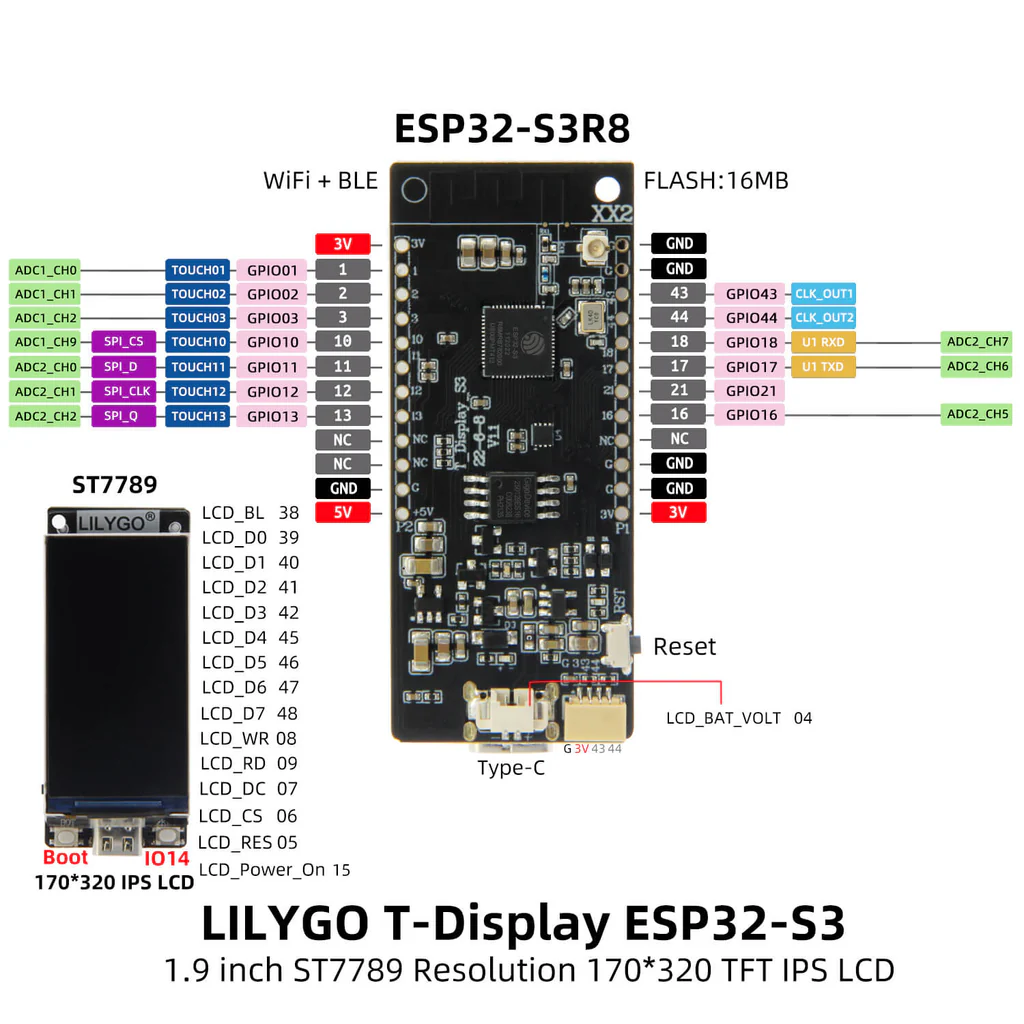 |
| Lilygo T-SIM A7670x | !  |
|
| Lilygo T7 Mini32 v1.5 | !  |
|
| Lolin D32 | !  |
|
| Freenove ESP32-S3 | !  |
|
| Freenove ESP32-Wroom | !  |
|
| Heltec HT-WB32_V3 | !  |
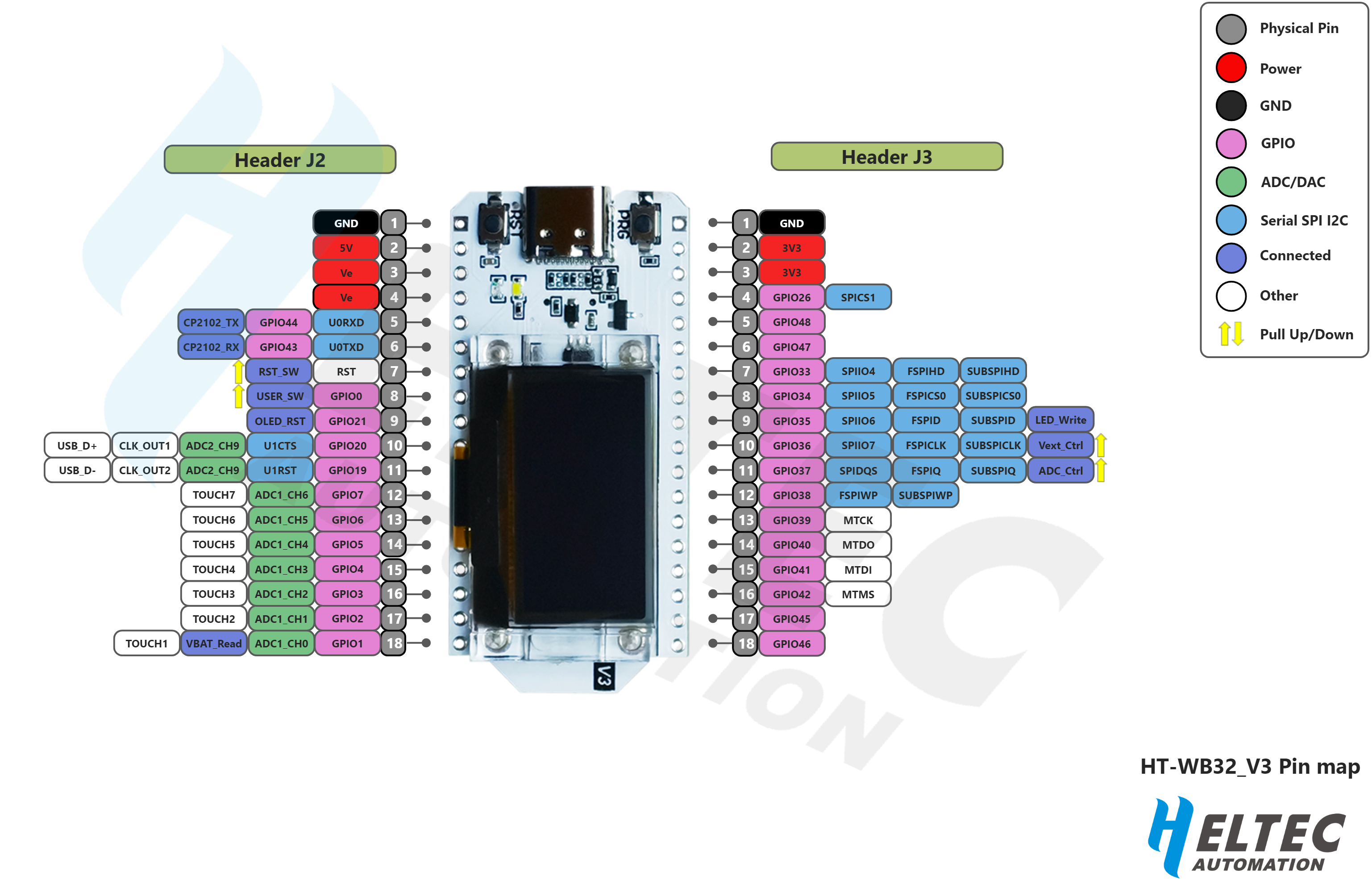 |
| Nano ESP32 | !  |
|
| Nano ESP32-C6 | !  |
|
| Olimex ESP32-P4 | !  |
 |
| Sailor Hat ESP32 | !  |
|
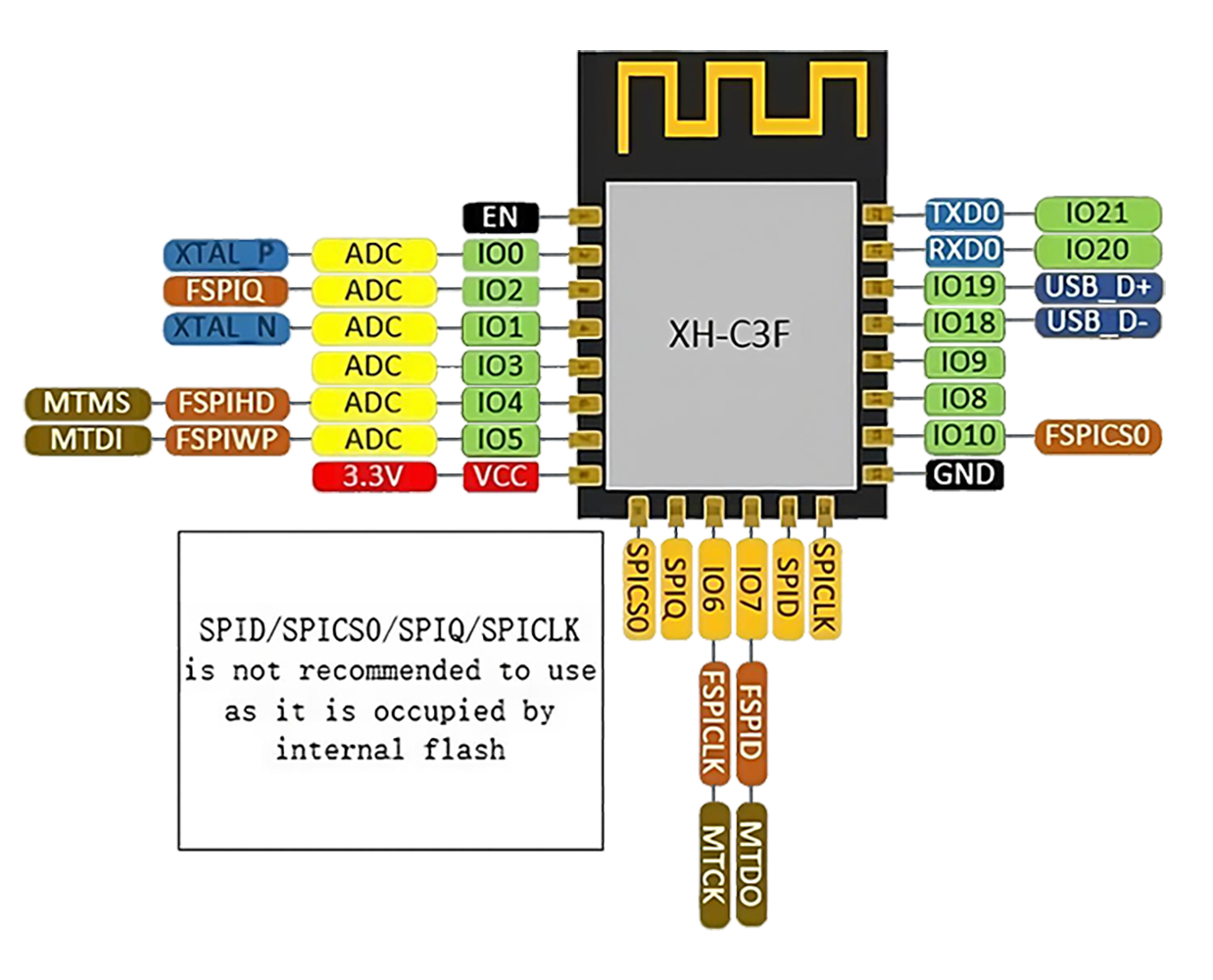
| SparkleIoT ESP32-C3F | !  |
 |
| StickLite-V3-ESP32S3 | !  |
|
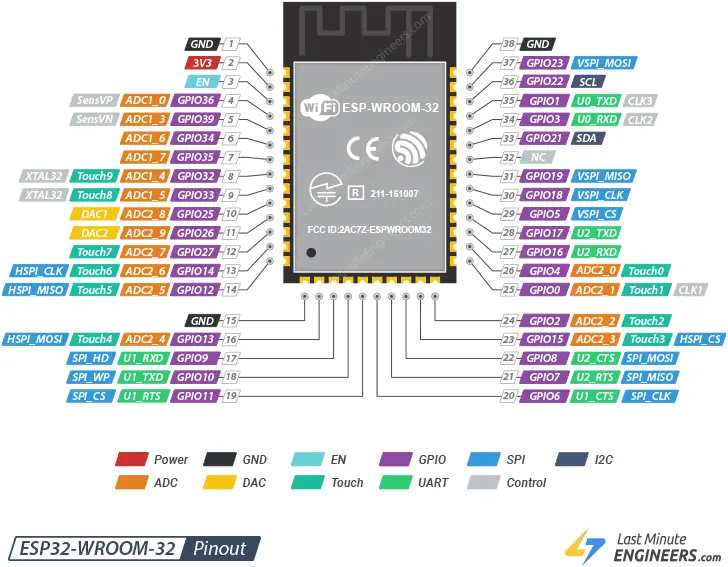
| SOC ESP32 WROOM 32 | !  |
 |
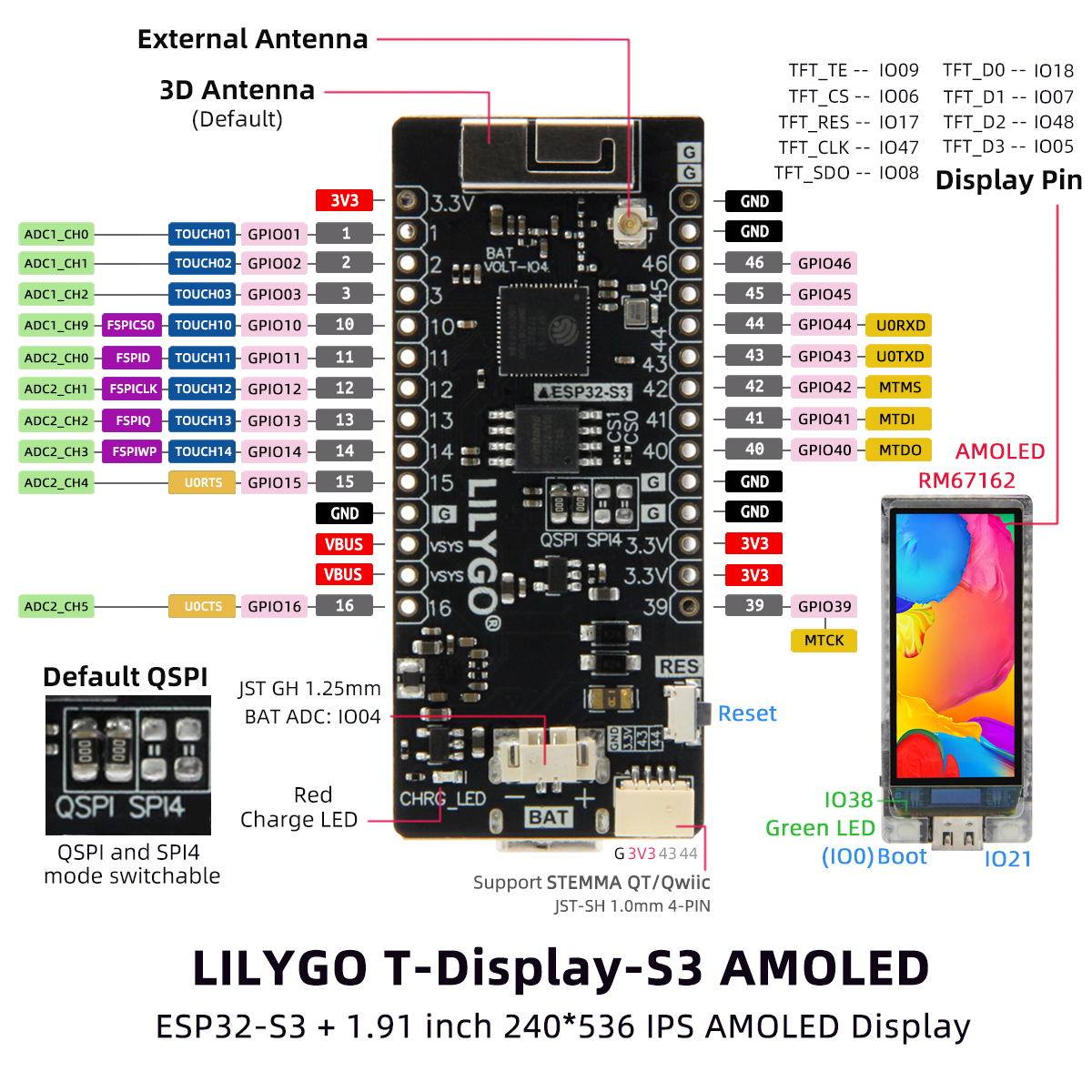
| T-Display S3 AMOLED | !  |
 |
| TinyPICO Nano | !  |
|
| TinyPico V3 | !  |
|
| TTGO Display V1.1 | !  |
|
| Wemos Lolin32 Lite V1 | !  |
|
| Wemos Lolin S3 Mini | !  |
|
| Wemos D1 Mini ESP32 | !  |
|
| Wemos D1 Mini ESP8266 | !  |
|
| WT32-S1-ETH01 | !  |
|
| NodeMcu ESP8266 | !  |
|
| XIAO ESP32 C3 | !  |
|
| XIAO ESP32 S3 | !  |
more like this
Arduino library and MATLAB/Simulink API for the AutomationShield Arduino expansion boards for control engineering educa…
ESPHome Modbus TCP↔RTU Bridge – Transparent bridge for ESP8266/ESP32 that lets multiple Modbus TCP clients communicate…
search projects, people, and tags