agentlytics
Comprehensive analytics dashboard for AI coding agents — Cursor, Windsurf, Claude Code, VS Code Copilot, Zed, Antigravi…
JavaScript★ 555
Multi-workspace terminal aggregator with Claude Code AI integration
 tony1223
git clone https://github.com/tony1223/better-agent-terminal.gittony1223/better-agent-terminal
A Tauri-powered terminal aggregator with multi-workspace support and built-in AI agent integration
Manage multiple project terminals in one window, with built-in Claude Code and Codex agent panels, file browser, git viewer, snippet manager, and remote access — all in a single Tauri app.
Version 3.0 is the Tauri-only release. The Electron runtime has been removed; the app now uses a Rust/Tauri host, a React renderer, and a small bundled Node sidecar only where JavaScript SDK/runtime support is still required.
Mobile apps require Better Agent Terminal v3.1.3 or later.
| iOS TestFlight | Android |
|---|---|
https://l.tonyq.org/bat-ios
|
https://l.tonyq.org/bat-android
|
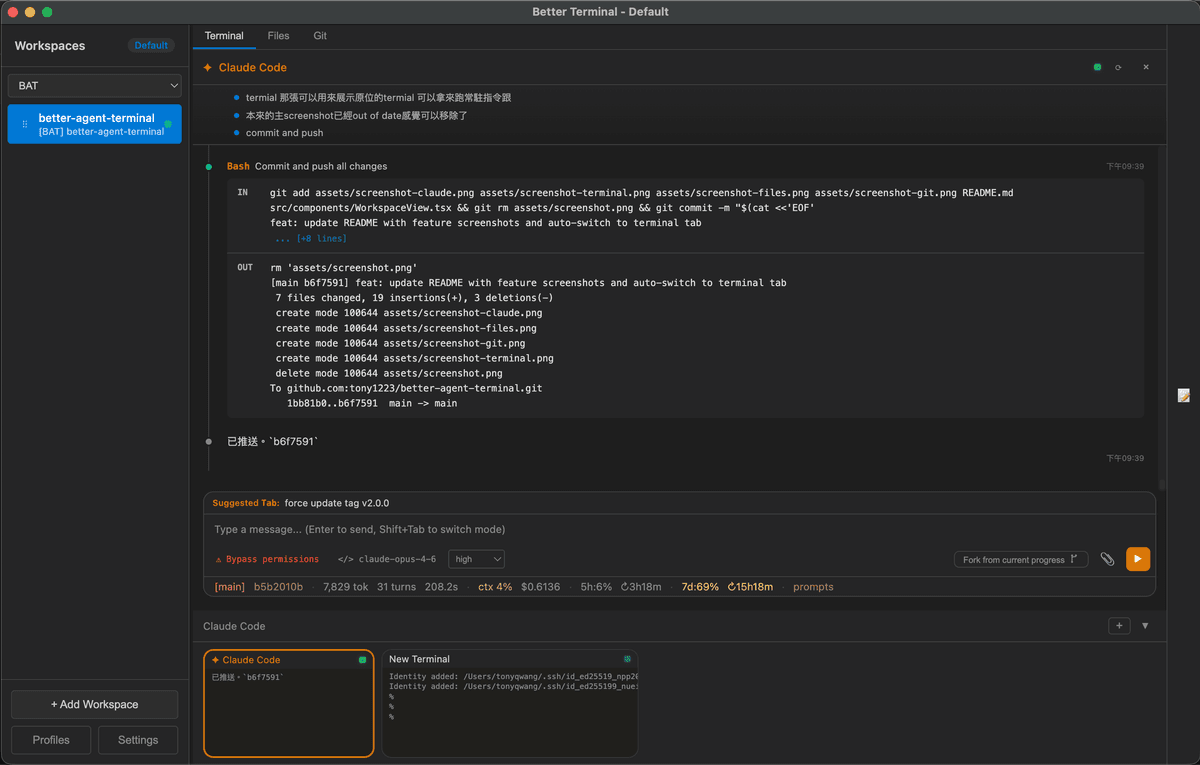
Claude Code Agent Panel — Built-in AI agent with permission controls, status line, and streaming output
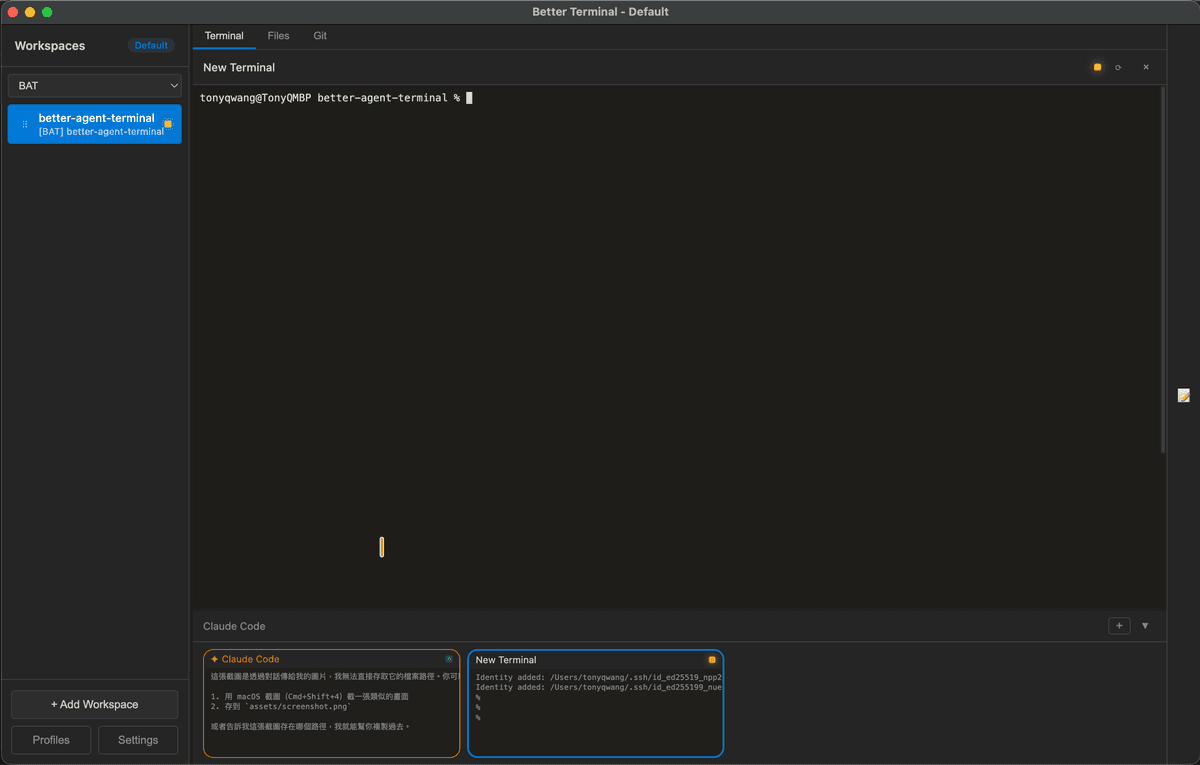
Terminal — Run persistent terminals alongside your agent for long-running commands and monitoring
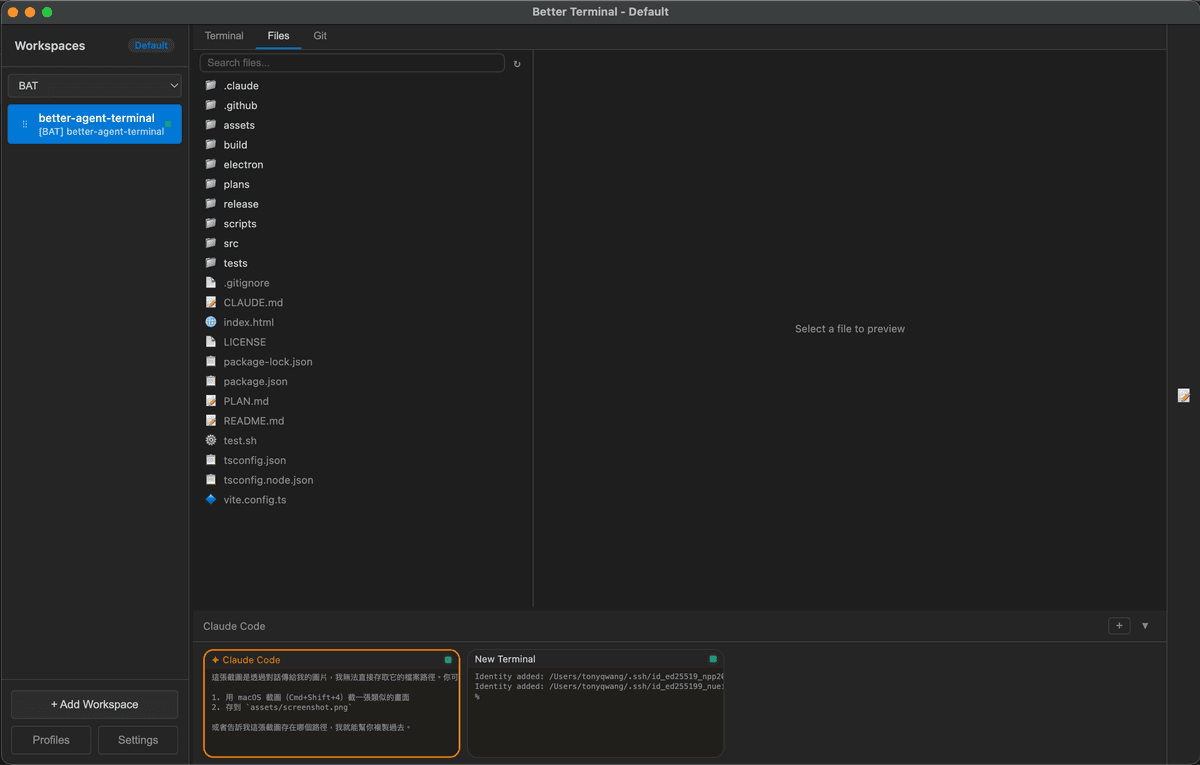
File Browser — Browse and preview project files without leaving the app
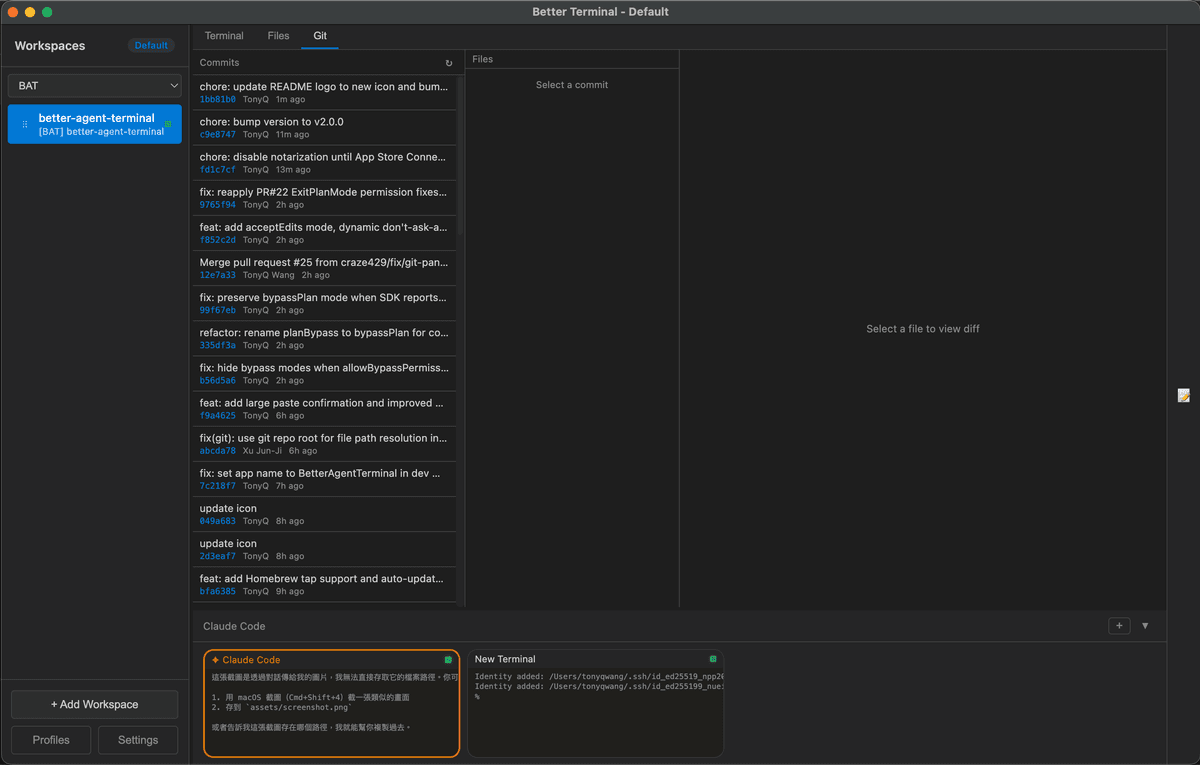
Git Viewer — View commit history and diffs at a glance
.md files in a dedicated right sidebar panel with live file watching and right-click context menuA configurable status bar at the bottom of the agent panel, with 15 items across three zones (left / center / right):
| Item | Description |
|---|---|
| Session ID | First 8 chars of SDK session ID (click to resume a past session) |
| Git Branch | Current git branch name |
| Tokens | Total input + output token count (click for context breakdown) |
| Turns | Number of conversation turns |
| Duration | Session duration |
| Context % | Percentage of context window used (color-coded) |
| Cost | Total session cost in USD |
| Workspace | Current workspace name |
| 5h Usage / Reset | 5-hour API rate limit usage and reset countdown |
| 7d Usage / Reset | 7-day API rate limit usage and reset countdown |
| Max Output | Maximum output tokens for current model |
| Cache Eff. | Cache read efficiency percentage (click for cache history with per-turn cost breakdown) |
| Prompts | Link to view prompt history |
Items can be reordered, colored, and toggled on/off via a drag-and-drop template editor in Settings.
/switch to manage and switch between multiple Claude accountsOptional alternate agent backend powered by @openai/codex-sdk. Pick Codex Agent (or Codex Agent (worktree)) from the agent preset list when creating a terminal.
read-only, workspace-write, or danger-full-accessuntrusted, on-request, or never (auto)~/.codex/sessions/ are auto-indexed; resume hits a local cache so re-opening a thread is fast even with months of historyplan items render as approvable blocks in the panelOptional integration with cx — a tree-sitter-based CLI that gives agents file overviews, symbol search, definitions, and references without spinning up a language server. Useful for cutting context tokens on large codebases: agents can run cx overview (~20 tokens) before deciding which files to actually read.
When enabled in Settings → Agents → cx semantic navigation, BAT:
cx on PATH (or uses a custom binary path)cx overview / symbols / definition / references over full file readsCX_CACHE_DIR to a per-app cache directory so repeated queries are fastInstall:
| Platform | Command |
|---|---|
| macOS (Homebrew) | brew tap ind-igo/cx && brew install cx |
| Cargo | cargo install cx-cli |
| macOS / Linux (script) | curl -sL https://raw.githubusercontent.com/ind-igo/cx/master/install.sh | sh |
| Windows (PowerShell) | irm https://raw.githubusercontent.com/ind-igo/cx/master/install.ps1 | iex |
After installing, run cx lang add <language> for each language you want grammars for (e.g. rust, typescript, python), then toggle the option in BAT settings. The toggle is off by default — agents continue to work normally without cx installed.
| Shortcut | Action |
|---|---|
Ctrl+` (Windows) |
Switch to the next BAT window |
Cmd+` (macOS) / Ctrl+` (Linux) |
Toggle between Agent terminal and first regular terminal |
Ctrl+←/→ / Cmd+←/→ |
Cycle workspace tabs (Terminal / Files / Git) |
Ctrl+↑/↓ / Cmd+↑/↓ |
Switch to previous / next workspace |
Ctrl+P / Cmd+P |
File picker (search & attach files to agent context) |
Ctrl+N / Cmd+N |
Open new window |
Ctrl+Shift+T / Cmd+T |
Open the new-terminal quick-pick (choose Shell, Worktree, Claude / Codex agent…) |
Ctrl+Shift+W / Cmd+Shift+W |
Close the focused terminal |
Shift+Tab |
Switch between Terminal and Agent mode |
Enter |
Send message |
Shift+Enter |
Insert newline (multiline input) |
Escape |
Stop streaming / close modal |
Ctrl+Shift+C |
Copy selected text |
Ctrl+Shift+V |
Paste from clipboard |
Right-click |
Copy (if text selected) or Paste |
| Command | Description |
|---|---|
/resume |
Resume a previous Claude session from history |
/model |
Switch between available Claude models |
/new / /clear |
Reset session (clear conversation, fresh start) |
/abort |
Stop the current agent session immediately |
/snippet |
Show snippets to Claude for management |
/switch |
Switch between Claude accounts |
/login |
Sign in to Claude (switch account) |
/logout |
Sign out of Claude |
/whoami |
Show current account info and usage |
/auto-continue / /ac |
Auto-resend a prompt when the agent stops — see Auto-Continue |
Some tasks are too long to finish in a single turn — the agent stops mid-plan, or pauses waiting for the user to say "keep going". /auto-continue (alias /ac) tells the host to re-send a prompt automatically when the turn ends, up to N times.
Syntax (typed into the agent input box):
/auto-continue                  # enable, max 3, prompt="繼續"
/auto-continue 5                # enable, max 5, prompt="繼續"
/auto-continue 繼續做完         # enable, max 3, custom prompt
/auto-continue 10 keep going    # enable, max 10, custom prompt
/ac 5                           # short alias
/auto-continue off              # disable (also: /ac stop)
Behavior
0 every time you manually send a new message — your own input always restarts the budget.subtype=success; errors, abort, max-turns, or rate-limit halts stop auto-continue.<prompt> [auto N/max] in the message list so you can tell the agent didn't type that./abort and manual session stop clear the auto-continue state.Tips
/auto-continue 5 請依照 plan 的 step 繼續,做完一步就停下 instead of just 繼續 — the agent behaves more predictably.max (3–5) the first time you try it on a new task, then raise it once you trust the loop./ac off before a long lunch break — auto-continue will happily burn credits while you're away.brew install --cask tonyq-org/tap/better-agent-terminal
choco install better-agent-terminal
Package is currently pending review on Chocolatey.org.
Download from Releases for your platform:
| Platform | Format | Architectures |
|---|---|---|
| Windows | NSIS installer, .zip |
x86_64 |
| macOS | .dmg |
Apple Silicon (arm64) & Intel (x86_64) |
| Linux | .AppImage |
x86_64 & arm64/aarch64 |
The x86_64 AppImage keeps its historical name (BetterAgentTerminal-<version>.AppImage); the arm64 build is published as BetterAgentTerminal-<version>-arm64.AppImage. The install script picks the right one automatically.
Headless / remote server (e.g. ARM cloud hosts):
The same AppImage doubles as a headless remote server — handy for an arm64 cloud box you drive from a mobile/remote client:
# arm64 host
./BetterAgentTerminal-<version>-arm64.AppImage --bat-server --help
Since it is a WebKitGTK app, on a box with no display server, run it under a virtual display:
xvfb-run -a ./BetterAgentTerminal-<version>-arm64.AppImage --bat-server
On enterprise ARM Linux (Oracle Linux 9 / RHEL 9, glibc 2.34) the desktop AppImage's WebKitGTK layer will not load. Use the self-contained
bat-serverbundle instead — it is statically linked and needs no display; see Self-contained Linux bundle below (bat-server-linux-aarch64).
macOS DMG installation:
.dmg file from Releases.dmg to mount itnpm install -g @anthropic-ai/claude-code if you prefer to use a system-wide CLI; BAT will pick the global one when present.)Prerequisites:
/login inside the app, or pre-authenticate the Claude Code CLI — the binary is bundled, no separate global install required)git clone https://github.com/tony1223/better-agent-terminal.git cd better-agent-terminal corepack enable pnpm install
Development mode:
pnpm run dev
Build for production:
pnpm run build
For an unsigned local installer/package check, use:
pnpm run tauri:build:debug
Run the following command in your terminal (macOS, Linux, or Windows with Git Bash/MSYS2):
curl -fsSL https://raw.githubusercontent.com/tony1223/better-agent-terminal/main/install.sh | bash
This script will detect your OS and install the application to the standard location.
Native dependencies (node-pty, better-sqlite3) require Xcode Command Line Tools:
xcode-select --install
Then:
corepack enable
pnpm install
pnpm run dev      # Development
pnpm run build    # Build signed/release package when signing env is configured
pnpm run tauri:build:debug  # Local unsigned package
better-agent-terminal/
├── renderer/                          # React renderer running inside the Tauri webview
│   └── src/
│       ├── App.tsx                    # Root component, layout, profile orchestration
│       ├── components/                # Workspace, terminal, agent, file, git, settings UI
│       ├── stores/                    # Renderer state stores
│       ├── locales/                   # EN / zh-TW / zh-CN translations
│       ├── types/                     # Shared renderer/domain TypeScript types
│       ├── host-api.ts                # Tauri host adapter used by renderer code
│       └── styles/                    # Component-specific styles
├── src-tauri/                         # Tauri host runtime (Rust)
│   ├── src/                           # Commands, PTY, profiles, remote server, sidecar bridge
│   ├── capabilities/                  # Tauri IPC capability declarations
│   ├── windows/                       # Windows installer hooks
│   └── tauri.conf.json                # Tauri app and bundle configuration
├── node-sidecar/                      # Bundled Node sidecar for SDK/runtime pieces not yet native Rust
├── assets/                            # App icons and screenshots
├── scripts/
│   └── build-version.js               # Version string generator
└── package.json
@anthropic-ai/claude-agent-sdk + bundled @anthropic-ai/claude-code binary (Claude); @openai/codex-sdk (Codex Agent)BAT includes a built-in WebSocket server that allows other BAT instances or mobile devices to connect and control it remotely. This feature is currently experimental.
On the client BAT instance:
On the host BAT instance:
When a connected host advertises remote sign-in support, use the account chip
or /login from an agent panel. Claude opens its authorization URL on the
client and asks you to paste the returned code; Codex shows an official device
code and completes automatically after browser approval. The resulting
credential is finalized and stored on the host, not copied into the client.
BAT allows only one remote sign-in ceremony per provider at a time and temporarily blocks remote account switching while it completes. Authorization URLs, codes, and raw provider output are not written to BAT logs. Older hosts remain compatible: the client hides this flow and asks you to sign in from a terminal on the host until BAT is updated there.
If the host and client are not on the same local network (e.g., connecting from home to an office machine), we recommend using Tailscale to establish a secure peer-to-peer VPN:
100.x.x.x IP addressInstallation:
| Platform | Install |
|---|---|
| macOS | Download or brew install tailscale |
| Windows | Download |
| iOS | App Store |
| Android | Google Play |
| Linux | Install Guide |
After installation, sign in with the same account on all devices and they will be able to communicate. BAT's QR code will automatically use the Tailscale IP.
Warning: Enabling the Remote Server opens a WebSocket connection. Any device with the token can fully control BAT on the host machine, including executing terminal commands, accessing the file system, and controlling Claude Agent sessions.
- Do not start the server on untrusted networks
- Do not share the token with untrusted parties
- Shut down the server when not in use
- Strongly recommended to use Tailscale to avoid direct exposure to the public internet
bat-server)bat-server starts the same Tauri/Rust Remote Server without opening the GUI. It is useful for always-on hosts, SSH sessions, and container-style deployments where another BAT instance connects remotely.
pnpm run start:server -- --port=9876 --bind=localhost
Options:
| Option | Description |
|---|---|
--port=N |
TCP port to listen on (default: 9876) |
--bind=localhost|tailscale|all |
Bind only localhost, the first Tailscale 100.x.x.x address, or all interfaces |
--data-dir=PATH |
Override the persistent state directory |
--token-file=PATH |
Read a fixed connection token from an owner-restricted file (recommended) |
--token=HEX |
Backward-compatible fixed token override; emits a warning recommending --token-file |
--debug |
Enable debug logging |
Environment variables mirror the flags: BAT_DATA_DIR, BAT_TAURI_DATA_DIR, BAT_PORT, BAT_BIND, BAT_TOKEN_FILE, BAT_TOKEN, and BAT_DEBUG. BAT_TOKEN remains supported for existing automation and emits the same compatibility warning.
For direct launches, keep a fixed token in an owner-restricted file:
mkdir -p ~/.config/better-agent-terminal
(umask 077; head -c32 /dev/urandom | od -An -tx1 | tr -d ' \n' > ~/.config/better-agent-terminal/bat-server-token)
bat-server --bind=localhost --port=9876 \
  --token-file=~/.config/better-agent-terminal/bat-server-token
If neither a token flag nor token environment variable is supplied, BAT continues to use its persisted/random token behavior for backward compatibility.
On startup, the server prints the wss:// URL, token, certificate fingerprint, data directory, and a one-shot connect URL that can be pasted into a Remote Profile.
Each release also publishes a self-contained bat-server bundle for Linux — the binary plus a bundled Node runtime, the node-sidecar, and the native Claude SDK, laid out so everything resolves with zero system dependencies (no system Node/Claude/pnpm) and no xvfb (unlike the WebKitGTK AppImage above). The binary is statically linked (musl), so it has no glibc requirement of its own — the bundle's floor is set by the bundled Node runtime (glibc ≥ 2.28), which runs on enterprise Linux like Oracle Linux 9 / RHEL 9 (glibc 2.34). Published for both x86_64 and aarch64 (the ARM build closes #117); swap the arch in the filenames below. It mirrors the AppImage install-and-go flow:
# tarball + systemd installer  (arch = x86_64 or aarch64)
tar -xzf bat-server-linux-aarch64.tar.gz
sudo ./bat-server-linux-aarch64/install.sh    # writes a systemd unit + generates a token

# …or the single-file AppImage (same flags as the binary)
chmod +x bat-server-aarch64.AppImage
./bat-server-aarch64.AppImage --port=9876 --bind=localhost
The systemd installer stores the token at /etc/bat-server/credentials/token with mode 0600. On systemd 247 or newer it supplies that file through LoadCredential=; older systemd versions use the same owner-restricted file through BAT_TOKEN_FILE. Existing inline-token units and BAT_TOKEN install overrides remain compatible, are migrated to the credential file, and print a warning recommending the safer source.
To rotate the installed service token, replace the credential atomically and restart the service, then update saved Remote Profiles:
sudo sh -c 'umask 077; token=$(mktemp /etc/bat-server/credentials/.token.XXXXXX) && head -c32 /dev/urandom | od -An -tx1 | tr -d " \n" > "$token" && chmod 600 "$token" && mv -f "$token" /etc/bat-server/credentials/token'
sudo systemctl restart bat-server.service
sudo cat /etc/bat-server/credentials/token
Both set IS_SANDBOX=1 so Claude Code's bypassPermissions is allowed when the service runs as root on a single-purpose box. Agent credentials (a logged-in claude/codex or an API key) are still provided once, the same as any host.
Workspaces, settings, and session data are saved to:
| Platform | Path |
|---|---|
| Windows | %APPDATA%/better-agent-terminal/ |
| macOS | ~/Library/Application Support/better-agent-terminal/ |
| Linux | ~/.config/better-agent-terminal/ |
Set the BAT_DEBUG=1 environment variable to enable disk-based debug logging. Logs are written to debug.log in the configuration directory.
Follows semantic versioning: vMAJOR.MINOR.PATCH (e.g., v2.2.27)
Pre-release versions use the -pre.N suffix (e.g., v2.2.28-pre.1). Tags containing -pre are automatically marked as pre-release on GitHub and do not update the Homebrew tap.
Push a tag to trigger builds for all platforms:
git tag v2.2.28
git push origin v2.2.28
MIT License - see LICENSE for details.
TonyQ - @tony1223
Built with Claude Code
more like this
Comprehensive analytics dashboard for AI coding agents — Cursor, Windsurf, Claude Code, VS Code Copilot, Zed, Antigravi…
Skill Claude Code de veille tech francophone. Agrège les flux RSS (Journal du Hacker, Human Coders News…) et produit un…
A to-do list that runs your Claude Code agents — capture anywhere, dispatch in parallel, review from your phone.
Open-source, offline-first face recognition attendance platform that runs on any webcam.
search projects, people, and tags