meine
meine 🌒 - A CLI file manager and system utility built with Textual. It combines intuitive command parsing with rich t…
Python★ 50
⚡ TubeCLI — The Ultimate Open Source AI Agents Ecosystem | Agents Browser · Agents Workflow · Agents Studio World
 tubecreate
Coding agents write code. This one runs the operations — on your machine, with your keys, for your clients.
English | 简体中文 | 繁體中文 | 日本語 | 한국어 | Español | Türkçe | Русский | Tiếng Việt
TubeCLI is a self-hosted, open-source AI agent team that executes real operational work end to end. It is not a chat wrapper, and it is not a framework you have to code your agents into. You describe the job in plain language — from the CLI, a web dashboard, or Telegram — and an agent team carries it out with real tools against your own infrastructure.
Say it in chat or Telegram — "create a website called coffee-shop using the coffee-machine template" — and the website agent runs the entire chain against your own Cloudflare account, streaming every step to a live log:
[1/9] git clone --depth=1 -- <template>            → clone
[2/9] npm install
[3/9] wrangler d1 create + wrangler r2 bucket create
[4/9] wrangler d1 execute schema.sql --remote       → real remote database
[5/9] write wrangler.toml  (D1 + R2 bindings)
[6/9] npx @opennextjs/cloudflare build
[7/9] npx wrangler deploy                          → https://<site>.workers.dev
[8/9] seed the admin password you chose
[9/9] DEPLOY_RESULT {url, adminSeeded}
Every step is in deploy_runner.js — read it before you trust it. It is not one-click: it needs valid Cloudflare credentials and D1 quota, and when a step fails it stops and names the step in the log rather than reporting a half-built site as finished.
tubecli skill run "Analyze Channel" --input "https://www.youtube.com/@channel"
tubecli skill run "Extract Subtitle" --input "<video-url-or-path>"
tubecli skill run "Translate Subtitle" --input "<job-id>"
Three interchangeable extraction engines — local Whisper, Gemini, or YouTube captions — exporting SRT / JSON / VTT / ASS. Dubbing has six TTS engines. Burn-in and hardsub removal (ffmpeg delogo/blur/pixel/fill with OpenCV region detection) are implemented and reviewable, but treat them as experimental.
An agent proposing something destructive does not just do it:
codex                  # list what is waiting
codex 3                # inspect task 3 — goal, assignee, step timeline
approve 3              # or:  reject 3
Tasks the AI creates land in pending_approval and wait. Deploying, publishing and deleting all pass through that gate, and every task keeps an append-only JSONL audit trail with step timings and retry counters.
The same pipeline backs all three surfaces — CLI, web dashboard, and a Telegram bot. Send a link to the bot and it replies with the finished file; approve a task from your phone; watch a deploy log stream in the browser.
Models: every LLM call runs on local Ollama — no API key, no per-token cost — or on Gemini, OpenAI, Claude, DeepSeek, Grok and OpenRouter with your own keys. Critical paths use zero-token fast paths that never call a model at all.
Also included: WordPress publishing over the WP REST API, web crawling and change watching, video download, Google Sheets and Calendar, POD/graphic/content studios, and livestream restreaming.
What you get on git clone: the agent runtime plus 17 built-in extensions (website_manager, browser, browser_scripts, codex, video_studio, multi_agents, cloud_api, market, ollama_manager, webui, auth_manager, calendar_manager, chat, douyin_downloader, file_manager, studio3d, universal_tracker). A further 19 studios — web crawler, video downloader, subtitle extractor, TTS, content/POD/graphic studio, livestream, sheets and more — install in one click from the in-dashboard marketplace.
v2026.07.30.1 · Python 3.10+ / FastAPI / Vue / Three.js · MIT
All of it is also driveable from a browser at localhost:5295/dashboard — agents, browser profiles, skills, workflows, extensions and API keys in one place, with local Ollama and browser status live in the header and every installed studio in the sidebar.
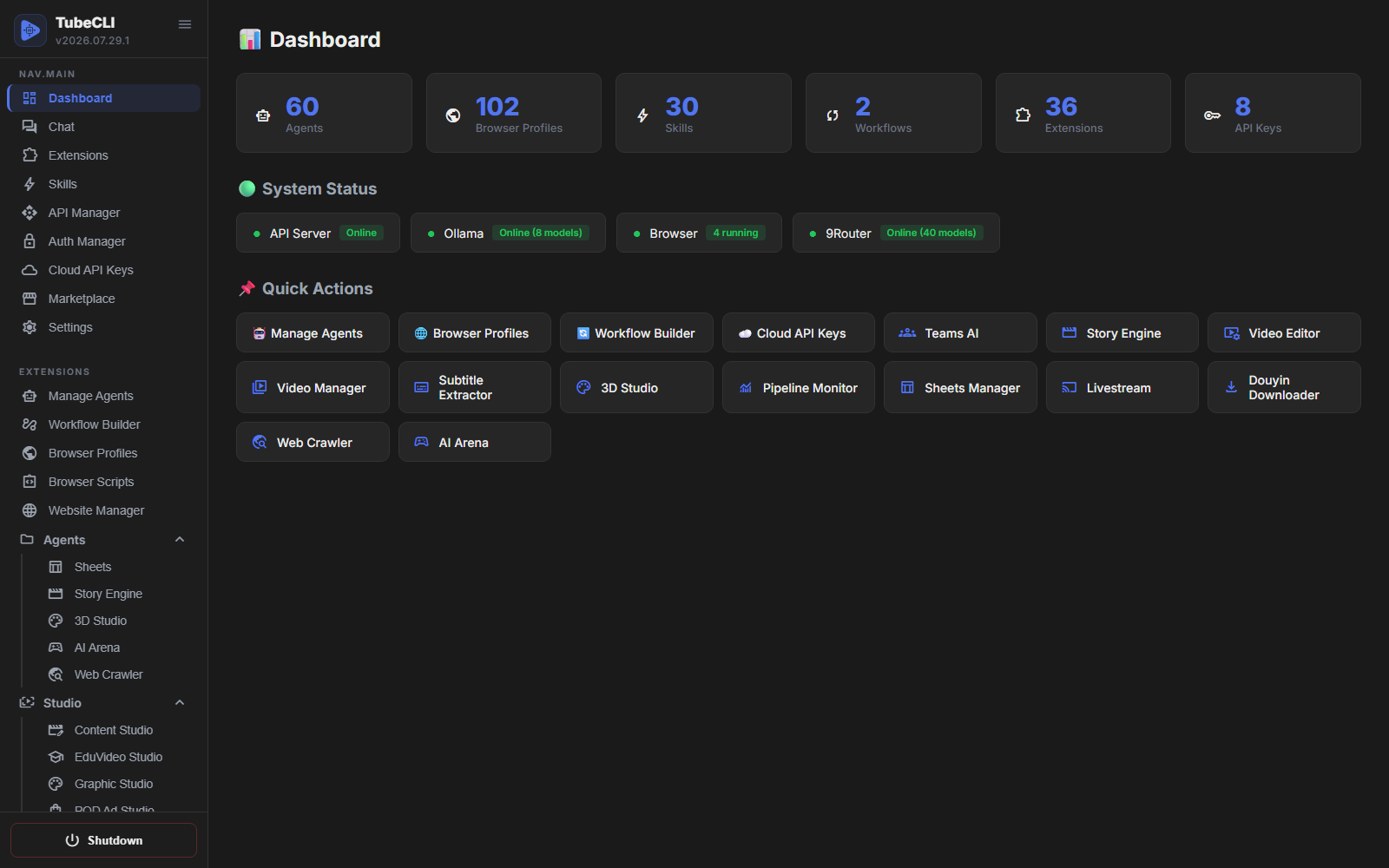
data/ directory, and with local Ollama the system needs no external API at all.pending_approval and wait for a human before anything irreversible runs — deploy, publish, delete. Every task carries an append-only JSONL audit trail with step timings and retry counters, and a running deploy can be cancelled mid-flight.The system has evolved into a full-fledged 12-subsystem architecture:
localhost:5295/dashboard to visually manage agents, workflows, skills, marketplace, settings, and monitor browsers natively.chat, codex, browser, browser_scripts, webui, market, multi_agents, studio3d, cloud_api, and more. Each extension contributes CLI commands, API routes, workflow nodes, Telegram actions, and its own UI page.For Windows: Open PowerShell (Run as Administrator) and paste the following command:
powershell -c "irm https://raw.githubusercontent.com/tubecreate/tubecli/main/install.ps1 | iex"
Note: To install with a specific language (e.g. vi, zh-TW, ja), use:
powershell -c "&([ScriptBlock]::Create((irm https://raw.githubusercontent.com/tubecreate/tubecli/main/install.ps1))) -Lang vi"
For Linux / MacOS: Open your terminal and run:
curl -fsSL https://raw.githubusercontent.com/tubecreate/tubecli/main/install.sh | bash
Note: To install with a specific language (e.g. vi, zh-TW, ja), use:
curl -fsSL https://raw.githubusercontent.com/tubecreate/tubecli/main/install.sh | bash -s -- --lang vi
It will automatically install Python, Git (if missing), clone the repo, and set up everything for you from A-Z.
git clone https://github.com/tubecreate/tubecli.git
cd tubecli
pip install -e .
Run the initialization command to setup the data/ directory, extract default skills, activate core extensions, and configure the default port.
tubecli init --lang en --port 5295
After initialization, start the API server to access the GUI.
tubecli api start
Open your browser and navigate to: http://localhost:5295/dashboard
Manage the entire system directly from the terminal if you prefer a headless approach:
tubecli agent create "My Assistant" --description "General purpose AI agent"
tubecli agent list
tubecli agent show <id>
tubecli agent delete <id>
tubecli skill list
tubecli skill run "AI Summarizer" --input "Long text content..."
tubecli api start --port 5295
tubecli api stop
tubecli workflow run <path_to_workflow.json>
tubecli codex create "Research the top 5 competitor channels" --agent "Researcher"
tubecli codex list --status pending_approval
tubecli codex approve 3
tubecli codex show 3
Tasks the AI creates always wait for your approval before they run.
tubecli extension list
tubecli extension enable webui
tubecli market search "seo"
tubecli market install "seo-analyzer"
Extensions bind their API routes when the server imports them, so restart the server after enabling or adding one.
Measured 2026-07-30. Rows where TubeCLI loses are marked plainly — if you need those, use one of the others.
| TubeCLI | n8n | Dify | CrewAI | LangGraph | OpenHands | |
|---|---|---|---|---|---|---|
| What it sells | Work already finished | Workflow platform | Agentic workflow builder | Agent framework | Low-level orchestration | Coding-agent control center |
| License | MIT | Sustainable Use | Modified Apache | MIT | MIT | MIT |
| Resell as a hosted service | Yes | No | No | Yes | Yes | Yes |
| Multi-tenant / white-label | Yes | No | No (logo must stay) | Yes | Yes | Yes |
| Self-host | Yes | Yes | Yes | Yes | Yes | Yes |
| Local LLM first-class (Ollama) | Yes | Partial | Partial | Via config | Via config | Partial |
| Zero-token fast paths | Yes | n/a | No | No | No | No |
| Deploys a site to Cloudflare Workers end-to-end | Yes (see caveat) | No | No | No | No | No |
| Crawl → draft with an LLM → publish to WordPress | Yes | Build it yourself | Build it yourself | Build it yourself | Build it yourself | No |
| Subtitle extract + translate (3 engines, SRT/VTT/ASS) | Yes | No | No | No | No | No |
| Browser automation with TOTP 2FA | Yes (2FA flaky) | Via nodes | No | No | No | No |
| Human approval gate on irreversible steps | Yes, enforced | Manual | No | No | Build it yourself | Partial |
| Telegram as a control plane | Yes | Via nodes | No | No | No | No |
| No-code visual builder | No | Yes | Yes | No | No | Partial |
| MCP support | No | Yes | Yes | Yes | Yes | Yes |
| Prebuilt integrations | ~36 extensions | 400+ | Large | Large | Large | Large |
| Managed cloud option | No | Yes | Yes | Yes | Yes | Yes |
| Enterprise support / SSO / audit | No | Yes | Yes | Yes | Yes | Partial |
| Battle-tested at scale | No — early | Yes | Yes | Yes | Yes | Yes |
Caveat on Cloudflare deploys: real but not one-click — it needs valid Cloudflare credentials and D1 quota, and admin-password seeding can fall back to the template default. Failures stop and name the failing step instead of reporting success.
Where TubeCLI honestly loses: no MCP server, no no-code builder, no managed cloud, no enterprise SSO/audit trail, and ~36 extensions against n8n's 400+ integrations. It is early software.
Where the license comparison does not apply: CrewAI, LangGraph and OpenHands are MIT too — the resale argument only beats n8n, Dify and AutoGPT's platform. Against CrewAI and LangGraph the difference is that they hand you building blocks, while TubeCLI hands you a wrangler deploy that already ran.
TubeCLI is a self-hosted, open-source AI agent team that executes operational work end to end — deploying websites to Cloudflare Workers, crawling the web and publishing to WordPress, extracting and translating video subtitles, and automating browsers. It ships 17 built-in extensions plus 19 marketplace studios, and runs from the CLI, a web dashboard, or Telegram.
Yes. MIT licensed, no paid tier, no seat limits, no credit meter. You may run it for paying clients, multi-tenant and white-labelled, without asking permission. Your only costs are your own infrastructure and whatever LLM you point it at — which can be $0 if you use local Ollama.
No. Point it at local Ollama and it runs with no API key and no per-token cost. If you prefer cloud models it supports Gemini, OpenAI, Claude, DeepSeek, Grok and OpenRouter with your own keys. Note that the shipped default is a cloud model, so switch the default to Ollama if you want fully local operation.
Yes, genuinely — not a scaffold. Its deploy runner performs git clone → npm install → wrangler d1 create + r2 bucket create → remote schema apply → OpenNext build → wrangler deploy against your own Cloudflare account, and you can read the whole runner in this repo before trusting it. It is not one-click: it needs valid Cloudflare credentials and D1 quota, and admin seeding can leave the template default password. When something fails it stops and names the failing step in the log instead of reporting a half-built site as finished.
Those give you building blocks to construct an agent; you still write the supervisor, the deploy step, and the publishing step yourself. TubeCLI ships the finished tools — a 435-line Cloudflare deploy runner, a WordPress publisher that speaks WP REST with app-password auth, a three-engine subtitle pipeline. You operate it rather than program it.
For operational tasks, yes — both aim at an agent that uses real tools rather than returning code. The differences that matter: TubeCLI runs on your hardware, has no credit meter, is MIT so you can resell it, and can run entirely on a local model. It is far less polished and far less battle-tested than a funded hosted product.
Yes, and this is a deliberate differentiator. MIT permits multi-tenant deployment, white-labelling, and reselling. For contrast: n8n's Sustainable Use License forbids reselling it as a hosted service, and Dify's modified Apache license forbids operating a multi-tenant environment and forbids removing their logo.
Local Ollama, plus six cloud providers: Gemini, OpenAI, Claude, DeepSeek, Grok and OpenRouter. Keys are managed per provider in the dashboard, models are switchable per agent, and critical flows use zero-token fast paths that never call a model at all.
No. There is no MCP server or MCP client in the repo today, and any list claiming otherwise is wrong. If MCP is a requirement, use n8n, Dify, CrewAI or LangGraph instead. Wrapping the existing extensions in an MCP server is on the roadmap.
Extraction and translation are the mature part: three interchangeable engines (local Whisper, Gemini, YouTube CC) exporting SRT/JSON/VTT/ASS, with translation as a separate step so you can review the text before it is burned anywhere. Dubbing has six TTS engines. Burn-in and hardsub removal (ffmpeg delogo/blur/pixel/fill with OpenCV region detection) are implemented and reviewable but should be treated as experimental.
The Codex queue gates it. AI-created tasks land in pending_approval and wait for a human to accept or reject before anything irreversible runs — deploying, publishing, deleting. Review it with codex 3, then approve 3 or reject 3. Every task carries an append-only JSONL audit trail with step timings and retry counters, and a running deploy can be cancelled mid-flight.
Parts of it are. Browser automation, subtitle extraction and translation, and WordPress publishing over the WP REST API are the mature pieces. Cloudflare deploys work but need supervision. The full video reup chain, subtitle burn-in, and multi-agent org-chart delegation are implemented but should be treated as experimental. Treat it as capable early software with an honest changelog, not as enterprise infrastructure.
tubecli/
├── tubecli/           # Main package
│   ├── api/           # REST API server (FastAPI)
│   ├── cli/           # CLI command modules
│   ├── core/          # Core business logic
│   ├── extensions/    # 17 built-in extensions (each with its own SKILL.md)
│   ├── nodes/         # Workflow node implementations
│   └── skills/        # Built-in system skills
├── READMEs/           # Translated documentation (9 languages)
├── docs/              # Project website
├── data/              # Runtime DB & state (gitignored)
└── tests/             # Test suite
TubeCLI is designed so that an AI agent can understand and operate it without a human walkthrough:
llms.txt at the repository root — a compact, machine-readable map of what the system is, what it can do, and what it explicitly cannot do.SKILL.md inside every extension (tubecli/extensions/*/SKILL.md) — endpoints, parameters, trigger commands and worked examples, written for LLMs rather than humans.External agents (Claude, GPT, Gemini) can read these files to learn how to drive the system, write extensions, and debug workflows autonomously.
MIT — you may use, modify, self-host, white-label and resell this software, including for paying clients. Made with 🤖 by the TubeCreate Team.
more like this
meine 🌒 - A CLI file manager and system utility built with Textual. It combines intuitive command parsing with rich t…
Create and add progress bars, Office365 Files and Dropbox Paper papers by labels and link them to your Todoist tasks.
search projects, people, and tags