steamfetch
neofetch for Steam - Display your Steam stats in terminal
 unhappychoice
git clone https://github.com/unhappychoice/steamfetch.gitunhappychoice/steamfetch
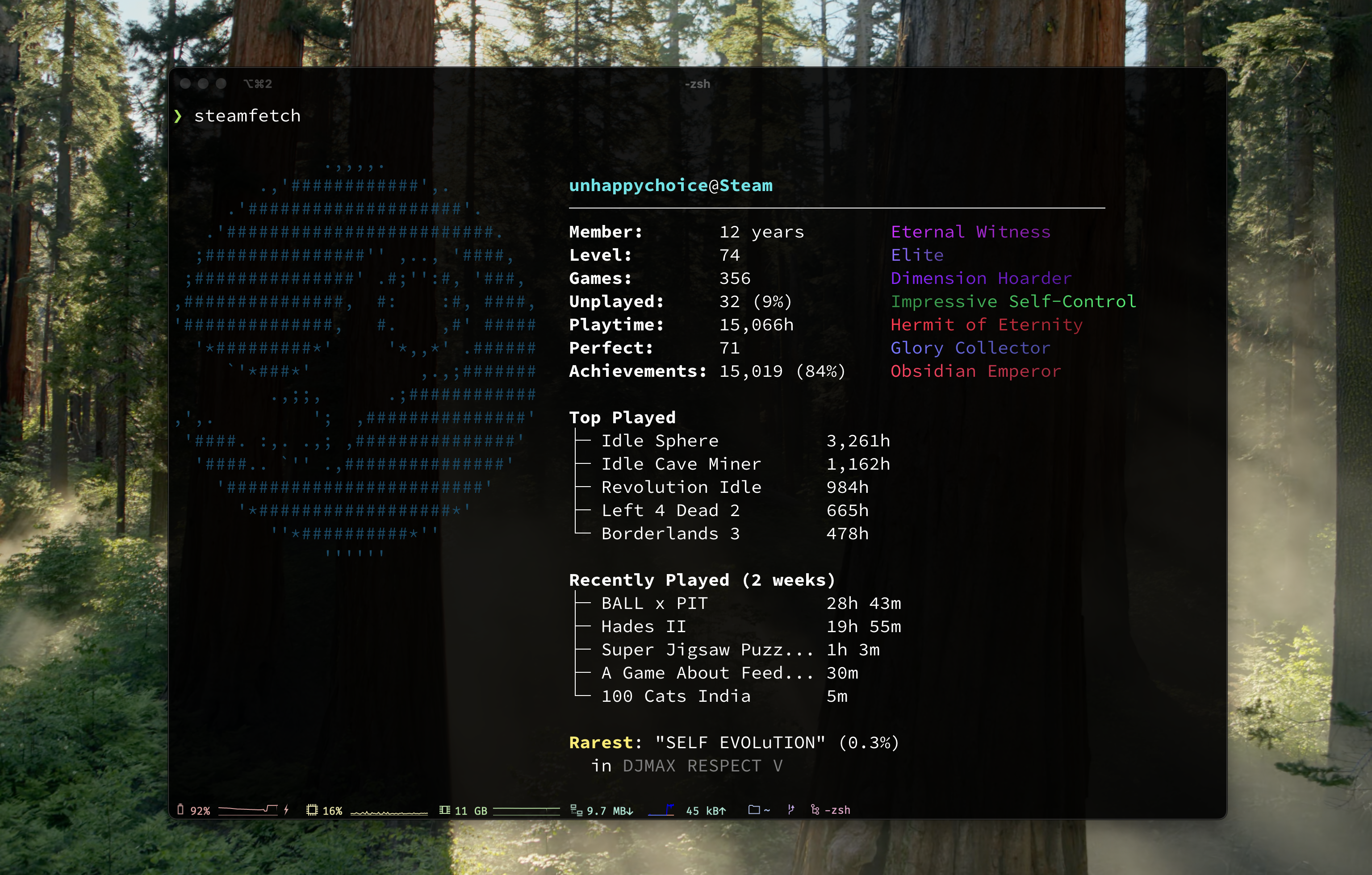
neofetch for Steam — Display your Steam stats in terminal with style.
Account level, playtime, achievements, top games, and rarest unlocks — all rendered with SteamOS-flavored ASCII art.
Installation
Install Script (Recommended)
curl -fsSL https://raw.githubusercontent.com/unhappychoice/steamfetch/main/install.sh | bash
Homebrew (macOS / Linux)
brew install unhappychoice/tap/steamfetch
Nix
Try it without installing via Nix
nix run github:unhappychoice/steamfetch
To pass arguments, add -- to the end of the nix run invocation
nix run github:unhappychoice/steamfetch -- --demo # Everything after `--` is passed as an argument to steamfetch
Download Binary
Download the latest release from GitHub Releases.
Build from Source
git clone https://github.com/unhappychoice/steamfetch.git
cd steamfetch
cargo build --release
# libsteam_api.so is automatically copied to target/release/
./target/release/steamfetch
Setup
1. Get Your Steam API Key
- Visit https://steamcommunity.com/dev/apikey
- Log in with your Steam account
- Create a new API key
2. Find Your Steam ID
Visit https://steamid.io/ and enter your Steam profile URL.
3. Configure
On first run, steamfetch creates a config file at ~/.config/steamfetch/config.toml.
Edit the config file:
[api]
steam_api_key = "your_api_key_here"
steam_id = "your_steam_id_here"

[display]
show_top_games = 5
show_recently_played = true
show_achievements = true
show_rarest = true
Or use environment variables (takes precedence over config file):
export STEAM_API_KEY="your_api_key_here"
export STEAM_ID="your_steam_id_here"
Note: If Steam is running, STEAM_ID is auto-detected via Native SDK.
Usage
# Display your Steam stats
steamfetch

# Show profile avatar image instead of ASCII logo
steamfetch --image

# Specify image protocol (auto, kitty, iterm, sixel)
steamfetch --image --image-protocol sixel

# Demo mode (no API key required)
steamfetch --demo

# Demo mode with image
steamfetch --demo --image

# Show config file path
steamfetch --config-path

# Use custom config file
steamfetch --config /path/to/config.toml

# Verbose output for debugging
steamfetch --verbose

# Show version
steamfetch --version

# Show help
steamfetch --help
Features
- Steam account stats (level, member since, games owned)
- Playtime statistics with fun titles
- Achievement progress and perfect games count
- Top played games list
- Recently played games (last 2 weeks)
- Rarest achievement display
- Beautiful SteamOS ASCII art with gradient colors
- Image display: Show your Steam avatar with
--imageflag - Demo mode for testing without API setup
Image Display
Use --image to show your Steam profile avatar instead of the ASCII logo.
Supported protocols:
- Sixel - Windows Terminal, WezTerm, foot, mlterm, xterm
- Kitty - Kitty terminal
- iTerm2 - iTerm2
- Block characters - Fallback for unsupported terminals
Protocol is auto-detected by default. Use --image-protocol to override.
Images are cached locally at ~/.cache/steamfetch/images/.
How It Works
With Steam Client Running
Uses Steamworks SDK for accurate game detection:
- Automatically detects logged-in Steam user
- Checks ownership for all known Steam games (~73,000 titles)
- Most accurate game count and achievement statistics
Without Steam Client
Falls back to Steam Web API:
- Requires
STEAM_API_KEYandSTEAM_IDenvironment variables - Returns games visible in your library
- Some owned games may not appear in API response
FAQ
Game count is lower than expected
The Steam Web API only returns games visible in your library. For a complete and accurate game count, run Steam client natively so steamfetch can use the Steamworks SDK to check ownership of all known Steam titles (~73,000+). A Steam API key is still required even when using the Native SDK.
"This Steam profile is private" error
steamfetch requires your profile and game details to be public. Go to Steam > Profile > Edit Profile > Privacy Settings and set both "My profile" and "Game details" to Public.
Achievement fetching is slow
steamfetch makes two API calls per game (player achievements + global percentages). For large libraries this can take a while on the first run. Results are cached at ~/.cache/steamfetch/achievements.json and subsequent runs will be much faster. The cache invalidates per-game when you play a game again.
Image display shows garbled output or falls back to ASCII
- Auto-detected protocol may not match your terminal. Try specifying it explicitly:
steamfetch --image --image-protocol sixel - Supported protocols: Sixel (Windows Terminal, WezTerm, foot, mlterm, xterm), Kitty, iTerm2, Block characters (fallback)
- Inside tmux/screen, terminal pixel size detection may fail. Try
--image-protocol blockas a workaround.
How to use Native SDK on WSL?
Install and run Steam inside WSL with a GUI-enabled setup (WSLg). Once Steam is running inside WSL, steamfetch will automatically detect it via the Native SDK. Note that Steam running on the Windows host side is not accessible from WSL.
"libsteam_api.so: cannot open shared object file" error
The steamfetch binary requires libsteam_api.so (Linux) / libsteam_api.dylib (macOS) to be in the same directory as the binary. This is automatically handled by the install script, Homebrew, and GitHub Releases.
If you built from source, cargo build copies the library to target/release/ automatically. If the library is missing, copy it manually next to the binary from the build output.
How to debug issues?
Run with steamfetch --verbose to see detailed output including: Steam client detection status, API request URLs, HTTP status codes, retry attempts, and failure reasons. You can also try steamfetch --demo to verify your terminal setup without needing an API key.
Contributing
Contributions are welcome! Please feel free to submit a Pull Request.
- Fork the repository
- Create your feature branch (
git checkout -b feature/amazing-feature) - Commit your changes (
git commit -m 'feat: add amazing feature') - Push to the branch (
git push origin feature/amazing-feature) - Open a Pull Request
License
ISC License - see LICENSE for details.
Author
Support
If you find this project useful, please consider:
- ⭐️ Star on GitHub
- 🐦 Share on X
- 🦋 Share on Bluesky
- 🧵 Share on Threads
- 💼 Share on LinkedIn
- 📘 Share on Facebook
- 🟧 Submit to Hacker News
- 💬 Drop it into your Discord server or gaming chat
- ✍️ Write about it on your blog or in a newsletter
Every bit of support helps. Thanks!
more like this
hydra-launcher
hydralauncher: Hydra Launcher download free PC library fontes links baixar , hydralauncher github, trusted sources ur…
thorn
a pure lazy functional programming language to make ASCII art animations (and other things too)