fontbm
BMFont compatible, cross-platform (Linux/macOS/Windows) command line bitmap font generator (FreeType2 based).
 vladimirgamalyan
git clone https://github.com/vladimirgamalyan/fontbm.gitvladimirgamalyan/fontbmfontbm
BMFont compatible, cross-platform (Linux/macOS/Windows) command line bitmap font generator (FreeType2 based render).
Status
| Linux | macOS | Windows |
|---|---|---|
 |
 |
 |
Usage
Download compiled version (fontbm.zip for Windows, fontbm for Linux) from Releases. Run:
fontbm --font-file FreeSans.ttf --output myfont
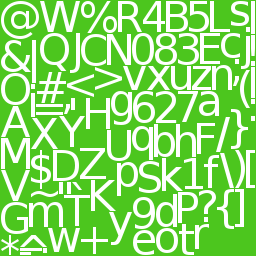
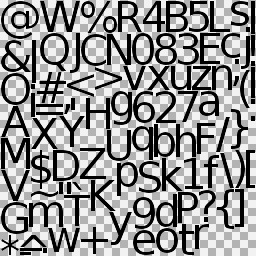
It will produce myfont.fnt (file format) and myfont_0.png (how to render text).
The metrics file always has the .fnt extension, whatever --data-format is used. Run fontbm --help for the same reference right in the terminal.
Available options (bold options are required):
| option | default | comment |
|---|---|---|
| --font-file | font to render, .ttf or .otf | |
| --output | output name without extension | |
| --font-size | 32 | character height in pixels (it matches to BMFont size, when "Match char height" option in Font Settings dialog is ticked) |
| --chars | 32-126 | characters to render, as decimal Unicode code points: single values and/or first-last ranges, comma separated (without spaces), for example 32-64,92,120-126; the default is used only if 'chars-file' option is not defined |
| --chars-file | optional path to UTF-8 text file with additional required characters (will be combined with 'chars' option), can be set multiple times | |
| --texture-size | 32x32,64x32,64x64,128x64, 128x128,256x128,256x256, 512x256,512x512,1024x512, 1024x1024,2048x1024,2048x2048 | comma separated list of allowed texture sizes as widthxheight (without spaces), tried from left to right, the first one all glyphs fit into is used |
| --texture-crop-width | shrink every texture page to the rightmost used pixel | |
| --texture-crop-height | shrink every texture page to the lowest used pixel | |
| --max-texture-count | fail if more texture pages than this are needed (unlimited if not set) | |
| --texture-name-suffix | index_aligned | how the page number is added to the .png name: index_aligned (myfont_00.png, zero padded to the highest page number), index (myfont_0.png), none (myfont.png, single page only) |
| --color | 255,255,255 | foreground RGB color, decimal 0-255 each, for example: 32,255,255 (without spaces) |
| --background-color | background RGB color, decimal 0-255 each, for example: 0,0,128 (without spaces), transparent by default | |
| --monochrome | disable anti-aliasing | |
| --data-format | txt | output data file format: txt, xml, bin, json (the extension stays .fnt in every case) |
| --kerning-pairs | disabled | generate kerning pairs: disabled, basic, regular (tuned by hinter), extended (bigger output size, but more precise) |
| --padding-up | 0 | pixels added above each glyph, inside its rectangle |
| --padding-right | 0 | pixels added right of each glyph, inside its rectangle |
| --padding-down | 0 | pixels added below each glyph, inside its rectangle |
| --padding-left | 0 | pixels added left of each glyph, inside its rectangle |
| --spacing-vert | 0 | pixels left between glyph rectangles, vertically |
| --spacing-horiz | 0 | pixels left between glyph rectangles, horizontally |
| --align-horiz | 1 | round glyph rectangle width up to a multiple of this value, must be greater than 0 |
| --align-vert | 1 | round glyph rectangle height up to a multiple of this value, must be greater than 0 |
| --verbose | print the FreeType version being used | |
| --help | print help and exit |
fontbm exits with 0 on success and 1 on error. Errors and warnings are printed to stderr, --help and --verbose output to stdout.
Building Linux
Dependencies:
- GCC-4.9
- CMake 3.10
- FreeType
Build:
cmake .
make
Building Windows (using vcpkg)
Download and install vcpkg and CMake 3.10.2 (or above). Run:
vcpkg install freetype
cmake -G "Visual Studio 14 2015" -DCMAKE_TOOLCHAIN_FILE=<path to vcpkg dir>/scripts/buildsystems/vcpkg.cmake
Open .sln in Visual Studio 2015 and rebuild all.
Building Windows
Download and install CMake 3.10 (or above) and FreeType. Run:
cmake -G "Visual Studio 14 2015"
Open .sln file in Visual Studio 2015, configure paths to FreeType and rebuild all.
Building macOS
(thanx to andycarle Moddable-OpenSource/moddable#325 (comment))
brew install freetype
brew install cmake
git clone https://github.com/vladimirgamalyan/fontbm.git
cd fontbm
cmake .
make
Using AI agents
fontbm is self-documenting: fontbm --help prints a full reference — every option with its default, the produced files and ready to run examples — so an AI agent can drive it from that output alone. Just point the agent at the binary.
To let an agent reach for fontbm on its own, copy the skills/fontbm directory to your agent's skill directory. It is a thin pointer that tells the agent when fontbm is relevant and sends it to --help for the details. Then ask something like make bitmap font, 24pt, Arial.
Special thanks
License
The project also bundles third party software under its own licenses:
- lvandeve/lodepng - PNG encoder and decoder in C and C++ - zlib
- juj/RectangleBinPack - 2d rectangular bin packing - Public Domain
- leethomason/tinyxml2 - a simple, small, efficient, C++ XML parse - zlib
- UTF8-CPP - UTF-8 with C++ in a Portable Way - BSL-1.0
- catchorg/Catch2 - A modern, C++-native, header-only, test framework for unit-tests - BSL-1.0
- jarro2783/cxxopts - Lightweight C++ command line option parser - MIT
- nlohmann/json - JSON for Modern C++ - MIT
more like this
chinese-hershey-font
Convert Chinese Characters to Single-Line Fonts using Computer Vision