agentlytics
Comprehensive analytics dashboard for AI coding agents — Cursor, Windsurf, Claude Code, VS Code Copilot, Zed, Antigravi…
JavaScript★ 555
UltraGameStudio - AI coding agent for game development: engine workflows, gameplay code, and asset generation.
 wellingfeng
git clone https://github.com/wellingfeng/UltraGameStudio.gitwellingfeng/UltraGameStudio
In a game engine, code is only a small part of the work. The rest is assets and pipeline — materials, blueprints, terrain, sky, UI, skeletal animation, packaging, performance. UltraGameStudio is a Claude Code / Codex / Gemini style agent rebuilt around that reality: it understands game-engine concepts, generates the full range of game assets (images, 3D models, 2D sprite animation, atlases, audio, rigging, video), and routes routine work through free or low-cost channels so premium quota goes where it matters.
English · 中文 · Français · Deutsch · Español · Português · Русский · 日本語 · 한국어 · हिन्दी · العربية · Discord · QQ Group: 149523963
 |
Thanks to API NODE for sponsoring this project! API NODE is an AI API gateway that provides stable, cost-effective relay access to Claude Code, Codex, Gemini, and other leading models through a single endpoint — a great fit for routing UltraGameStudio requests through one reliable provider. Register via this link. |
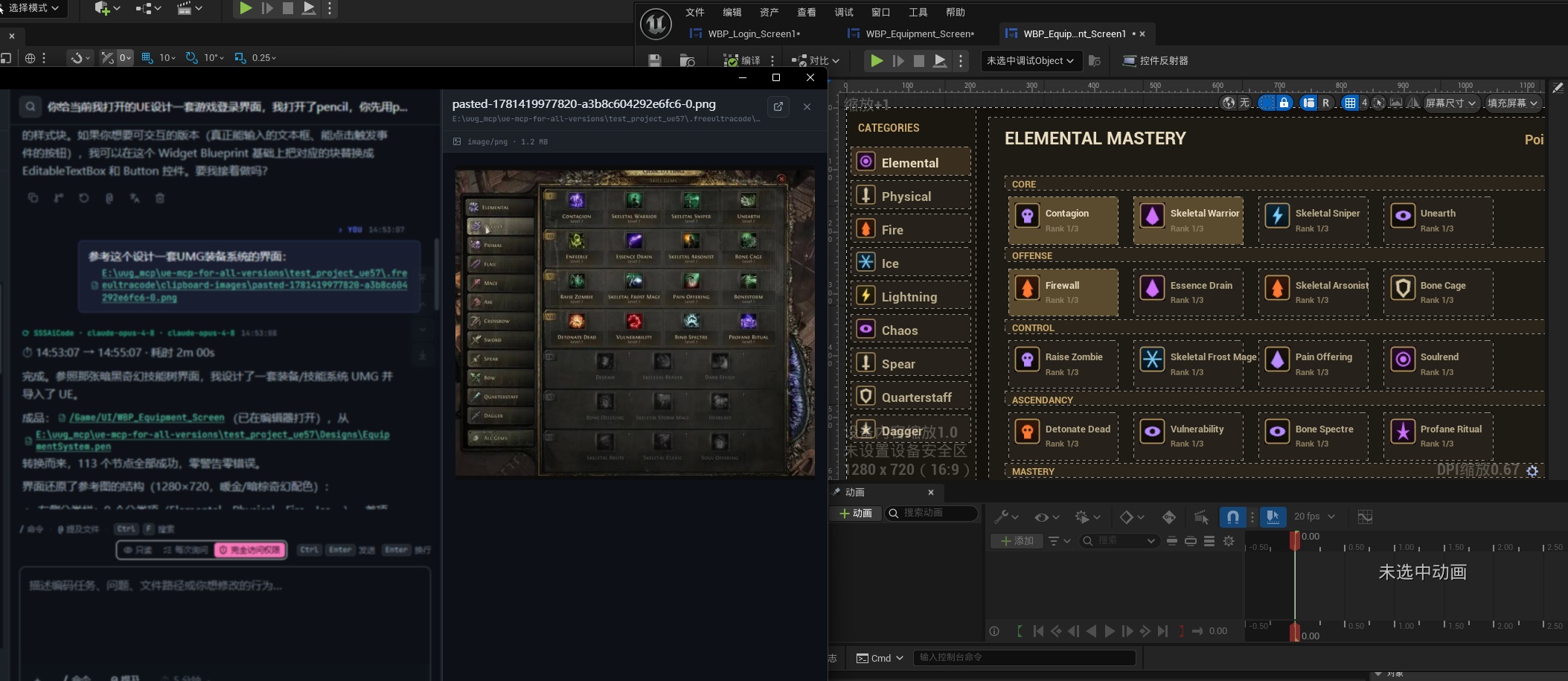
One-click Unreal Engine UMG interface
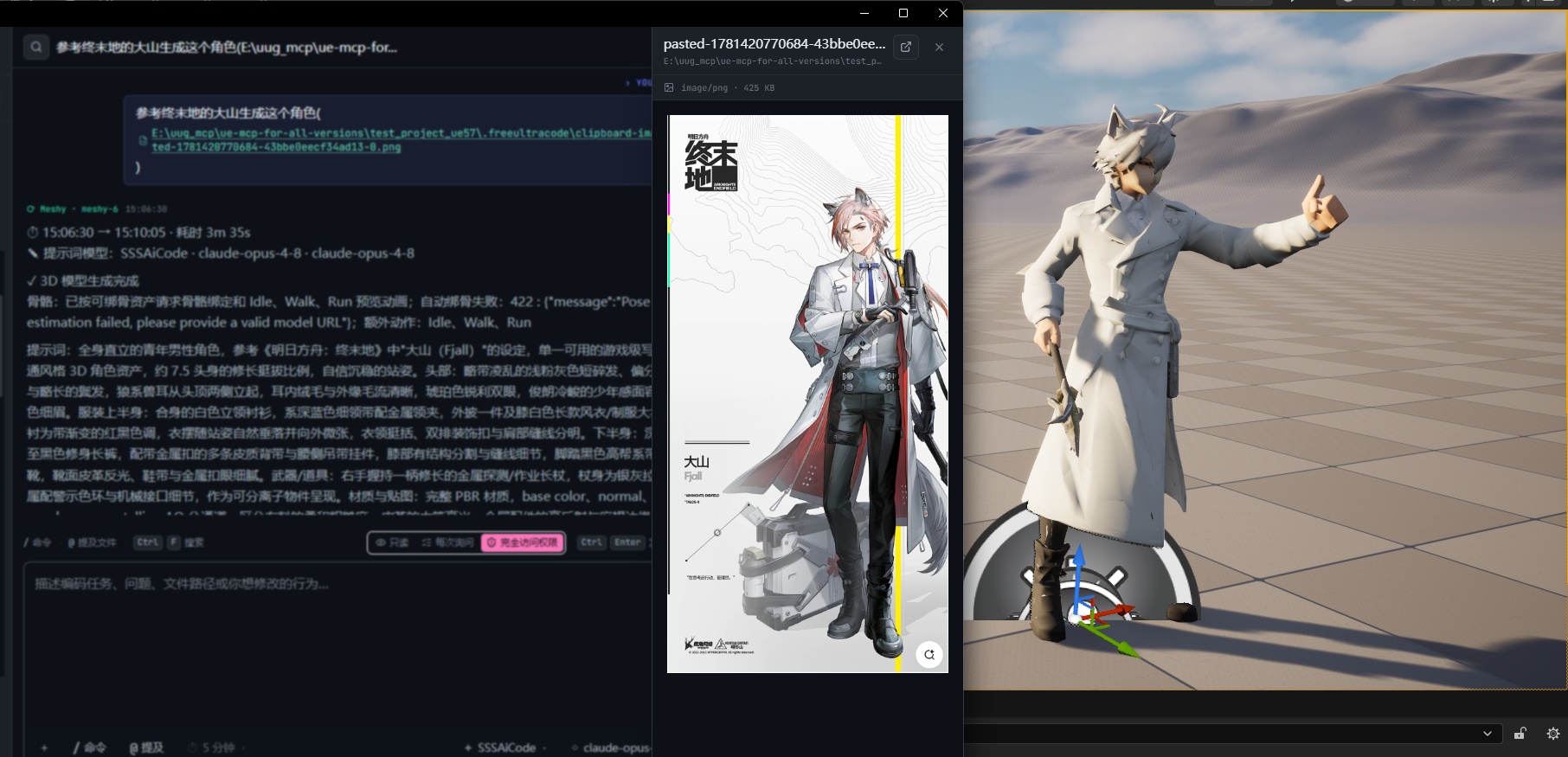
One-click 3D model generation
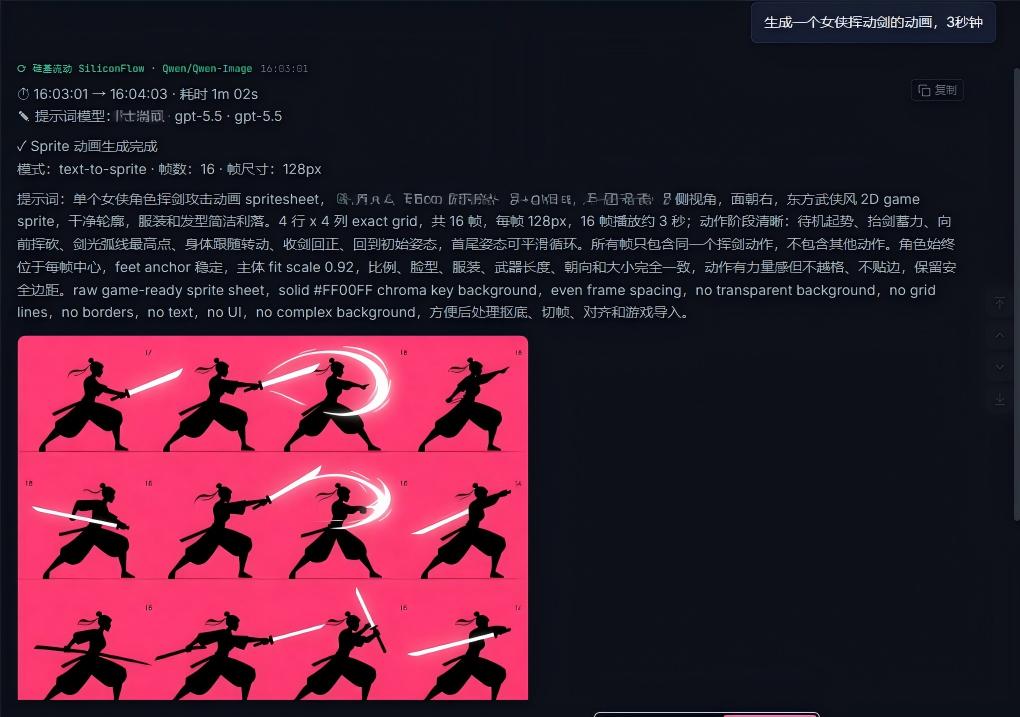
Image, sprite, mesh, audio, rigging, and video — all managed through one coding agent
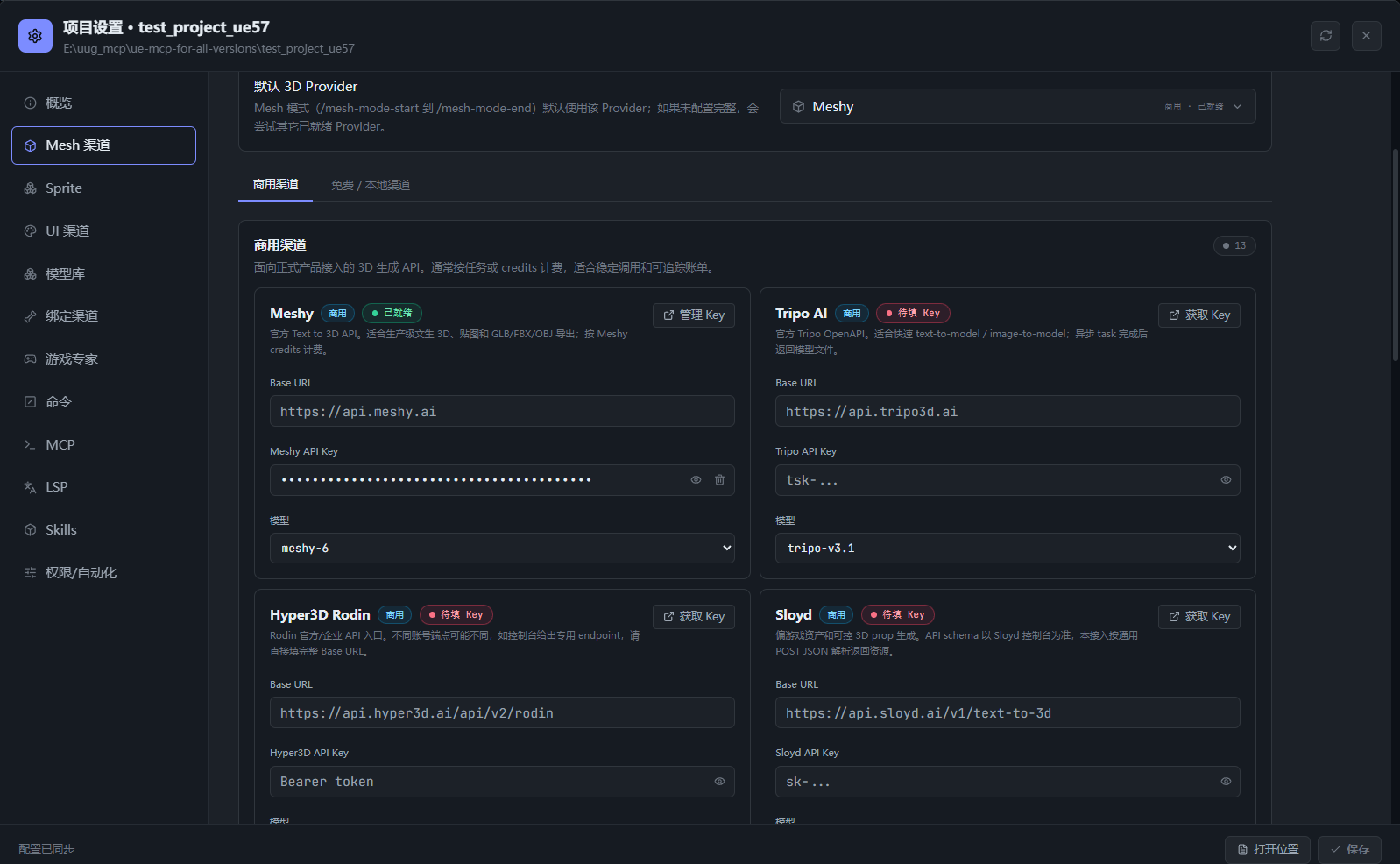
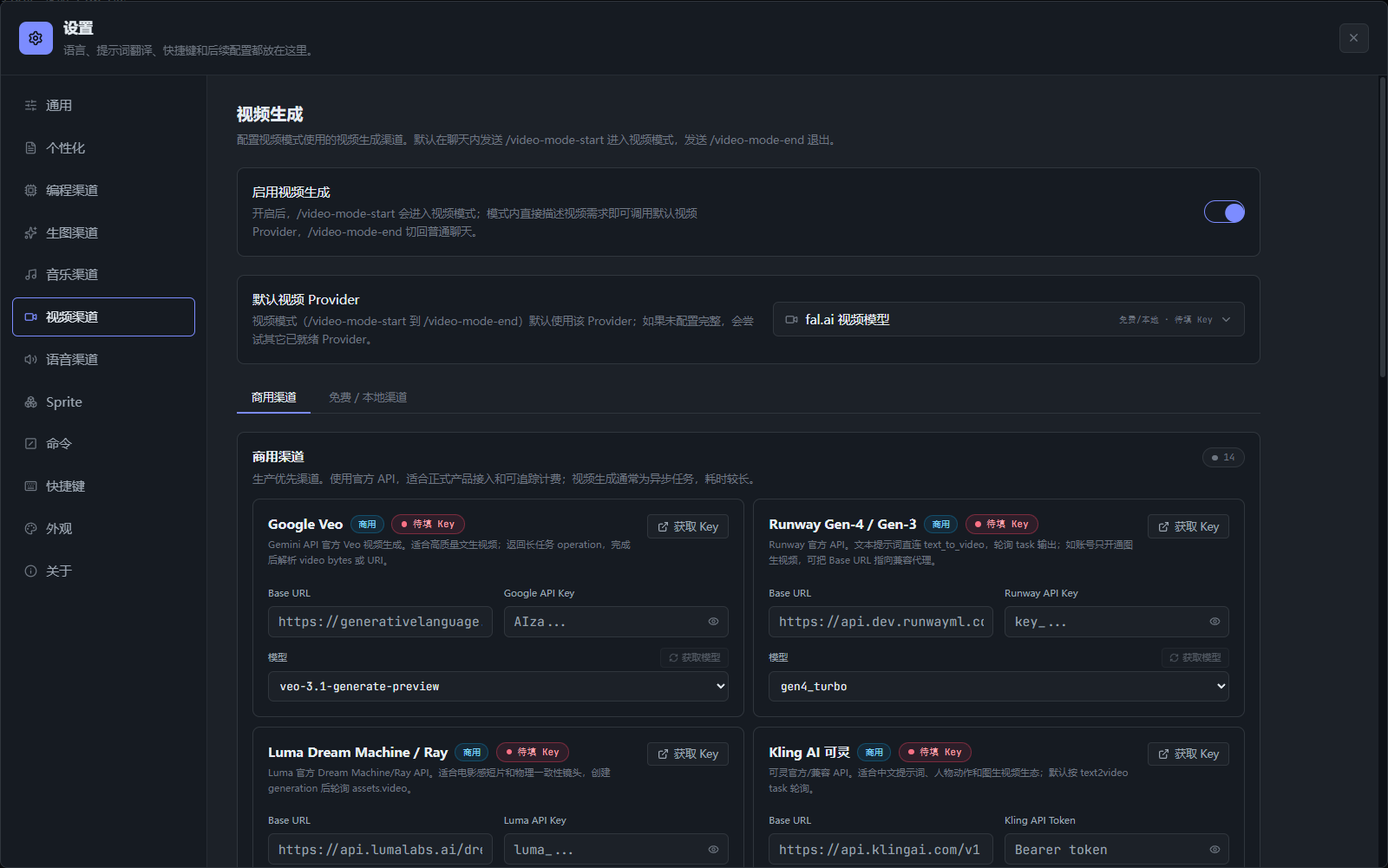
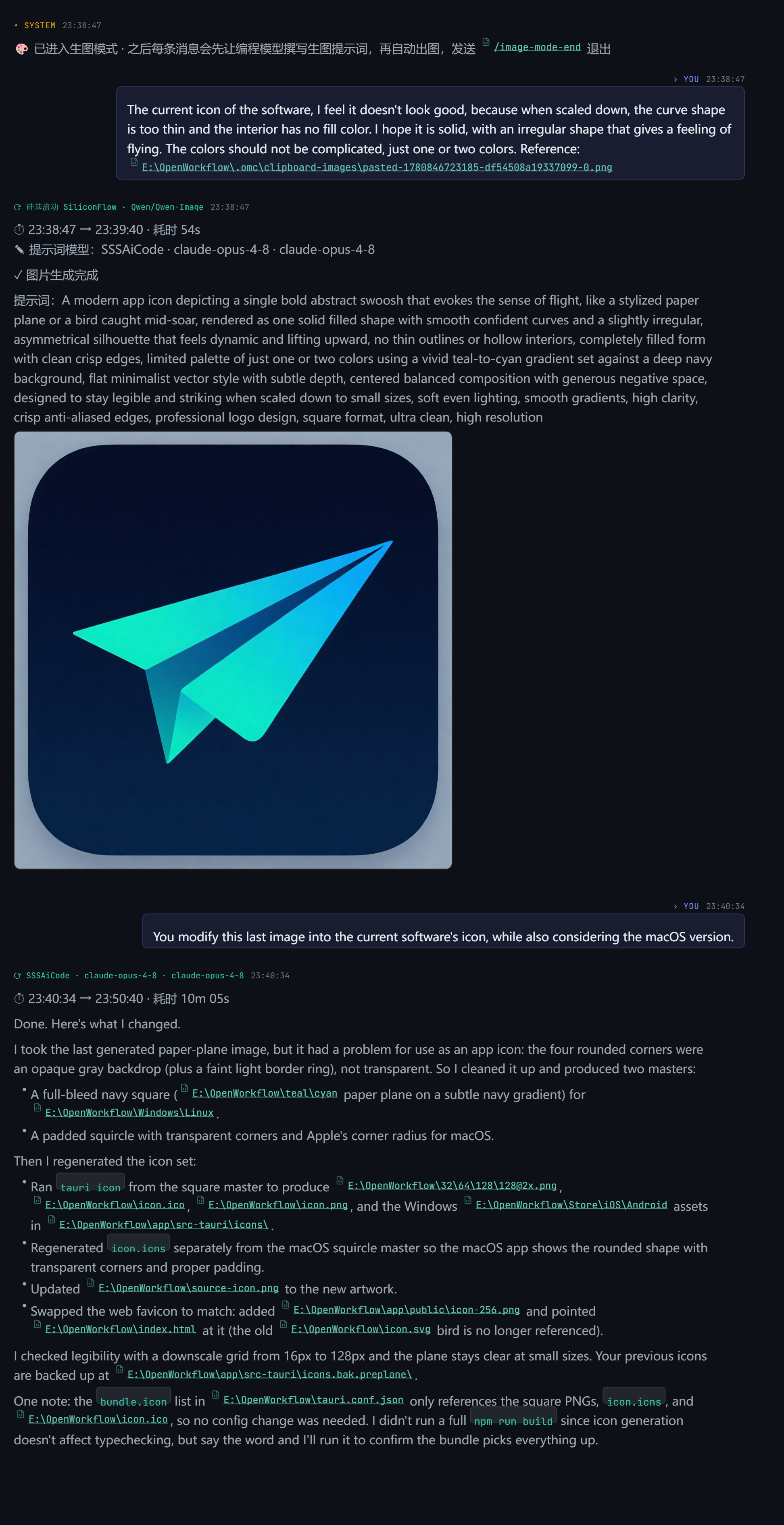
Game-asset generation in the same session as your code
Important
Community · 加入社区 — join the UltraGameStudio Discord or QQ group for setup help, model routing ideas, and contributor coordination. Discord: https://discord.gg/2C9ptSEFG · QQ Group: 149523963
AI is now good enough to write most of the code on its own. In practice the programmer's role is shifting toward describing intent, verifying output, and orchestrating agents. But a game is not just code. A game engine is full of materials, blueprints, terrain, sky, UI, skeletal animation, packaging, and performance tuning — and most general coding agents have no idea what any of that means.
UltraGameStudio takes a Claude Code / Codex / Gemini style agent and customizes it deeply for game development:
Every asset type a game needs can be generated from the same chat surface and applied to your project, then handed back to the coding model — all in one session history. Each generator runs through your configured provider.
| Asset | What it makes | Enter mode |
|---|---|---|
| Images | Concept art, UI mockups, icons, posters, textures, references | /image, /img, /draw, /生图, or /image-mode-start |
| ComfyUI graphs | Node-based, editable image pipelines | /comfyui-mode-start |
| 2D sprites | Game sprites, sequence frames, spritesheets | /sprite or /sprite-mode-start |
| 3D models | Props, characters, scene meshes, blockouts | /mesh-mode-start (search the library with /mesh-search) |
| Music | BGM, score, music clips | /music or /music-mode-start |
| Speech | Voice lines and narration | /speech-mode-start |
| Video | Video clips and motion assets | /video or /video-mode-start |
The agent first polishes your prompt, sends it to the configured provider, and shows the result in the chat stream with the prompt and provider details. Leave any mode with its matching *-mode-end command.
UltraGameStudio ships a roster of 40+ game-development specialists that the agent can draw on automatically based on the task:
Configure the active engine, council mode, and which experts are enabled in Settings.
Free channel routing
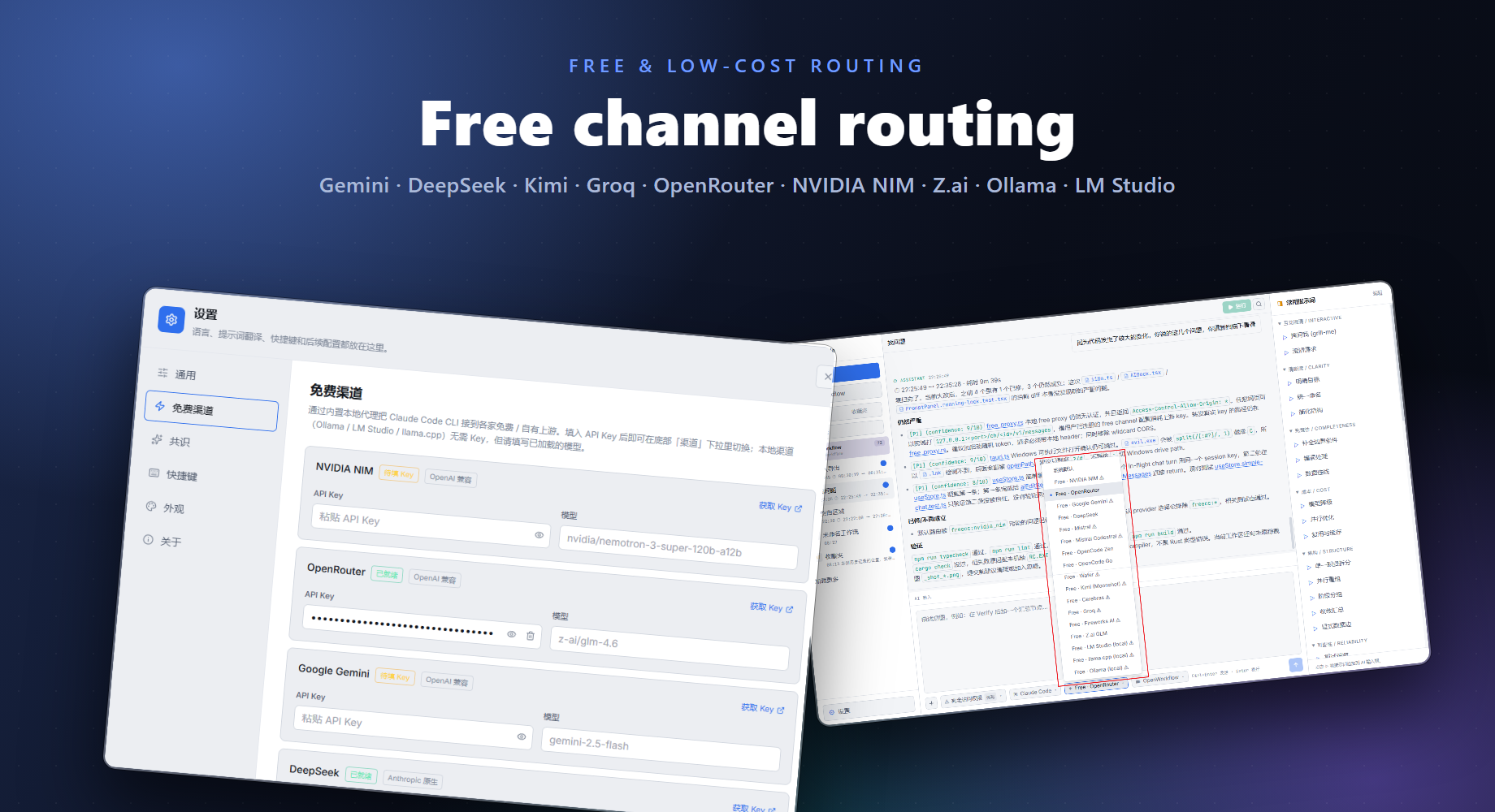
Current default coding-oriented models:
| Channel | Default model |
|---|---|
| GitHub Models | openai/gpt-4.1-mini |
| Hugging Face Router | deepseek-ai/DeepSeek-V4-Pro |
| SambaNova Cloud | DeepSeek-V3.1 |
| Together AI | Qwen/Qwen3-Coder-480B-A35B-Instruct-FP8 |
| Kilo Gateway | poolside/laguna-xs.2:free |
| LLM7 | codestral-latest |
For complex multi-step coding tasks, /studio <task> generates a purpose-built execution harness on the fly and runs it immediately — no visual canvas needed.
.ugs-run/<run-id>/ with a task ledger, events, verdict, and final result.ugs studio "<task>" --json --interactive --cwd <workspace>.claude CLI login credentials.The Auto channel (freecc:auto in the Channel menu) routes each request through the best currently available free channel without manual switching.
When using /studio, the harness can chain multiple providers across plan steps automatically. A typical pattern: let DeepSeek produce responsive drafts with low cost, then let CodeX pick up and refine the output for final quality.
model overrides — assign DeepSeek to brainstorming/classification steps and CodeX/Gemini to implementation/verification steps.cc-switch CLI config so any provider already configured for Claude Code routing is immediately available for studio steps.The free proxy auto channel prioritizes channels based on real-world availability signals:
These features work together so /studio harness runs stay resilient even when individual free providers are slow, rate-limited, or temporarily unavailable.
Run the web app from app/:
cd app
npm install
npm run dev
Vite starts at http://localhost:5173.
Run the desktop app:
cd app
npm run desktop
Build a production desktop package:
cd app
npm run package
From the repository root:
./run.sh        # macOS/Linux: rebuild if needed, then launch
./package.sh    # macOS/Linux: build native bundles (.dmg on macOS)
run.bat         # Windows: rebuild if needed, then launch
build.bat       # Windows: package the NSIS installer
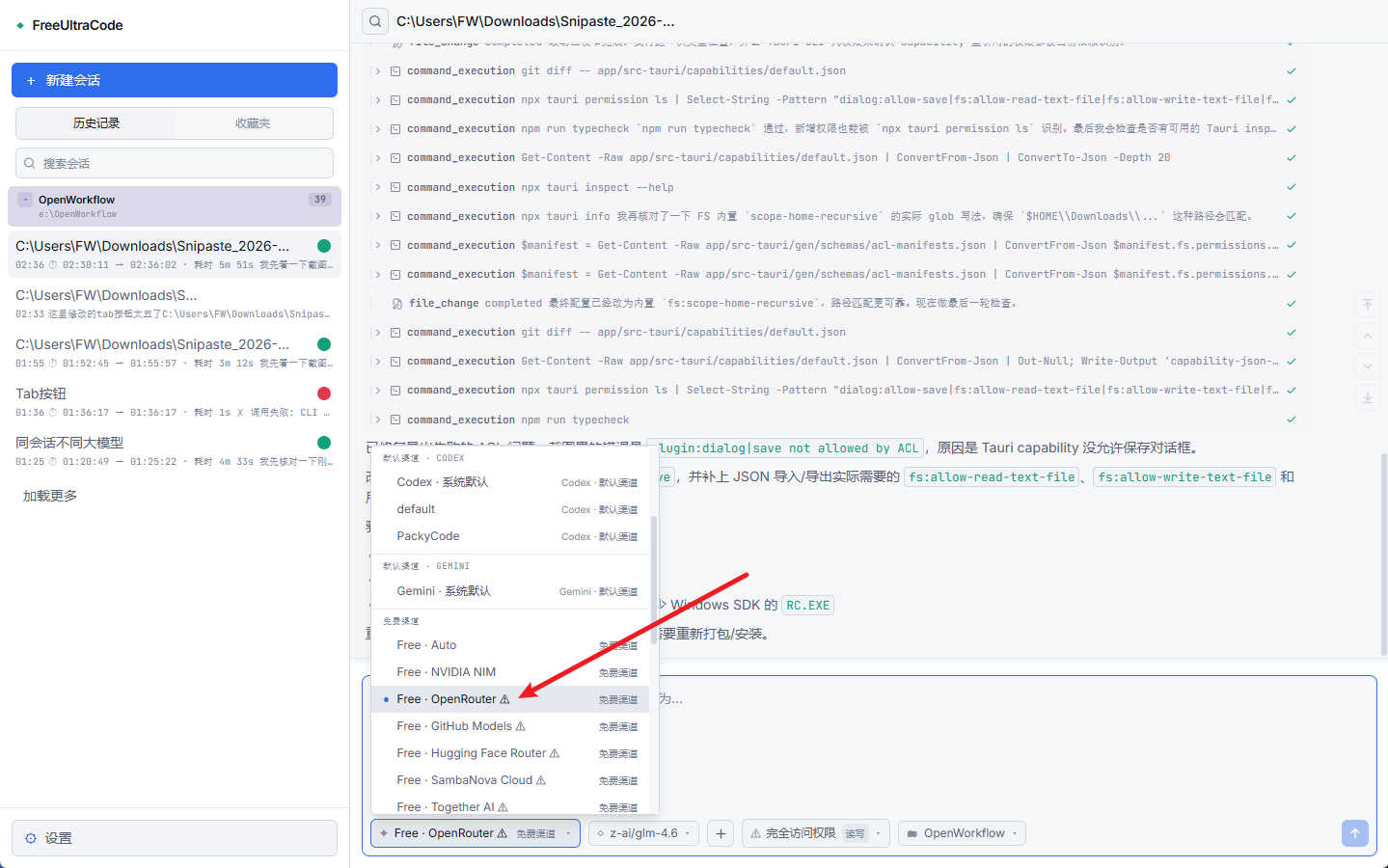
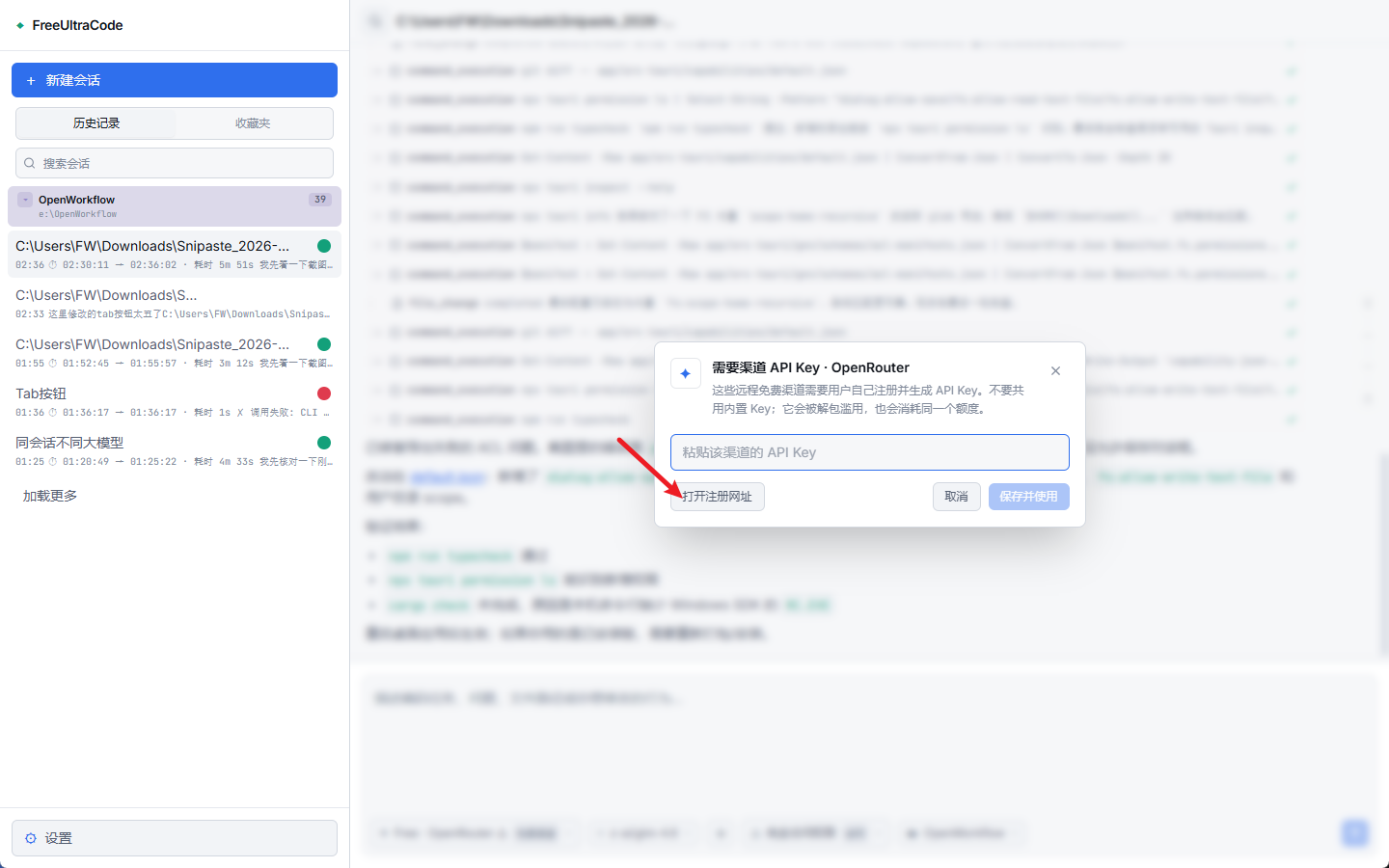
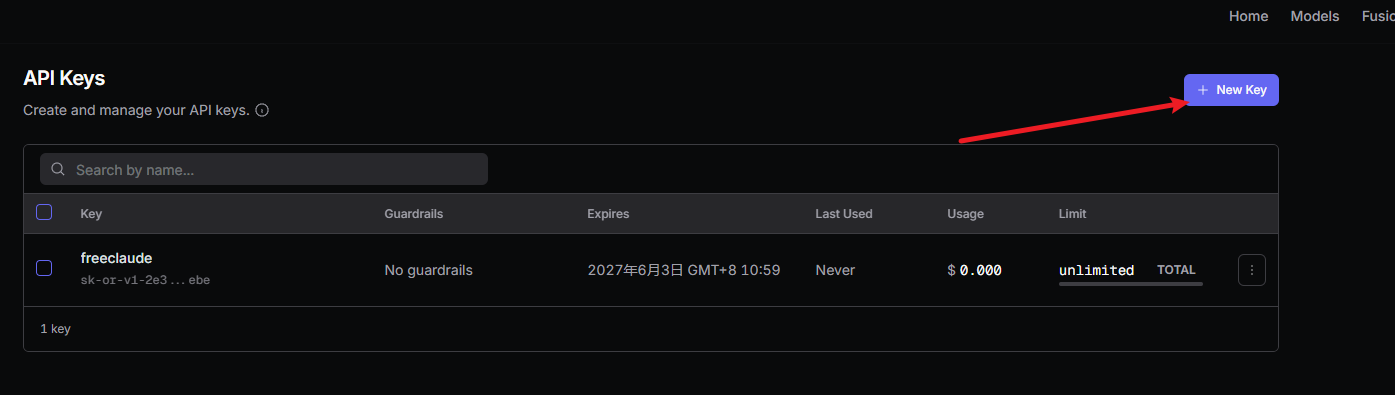
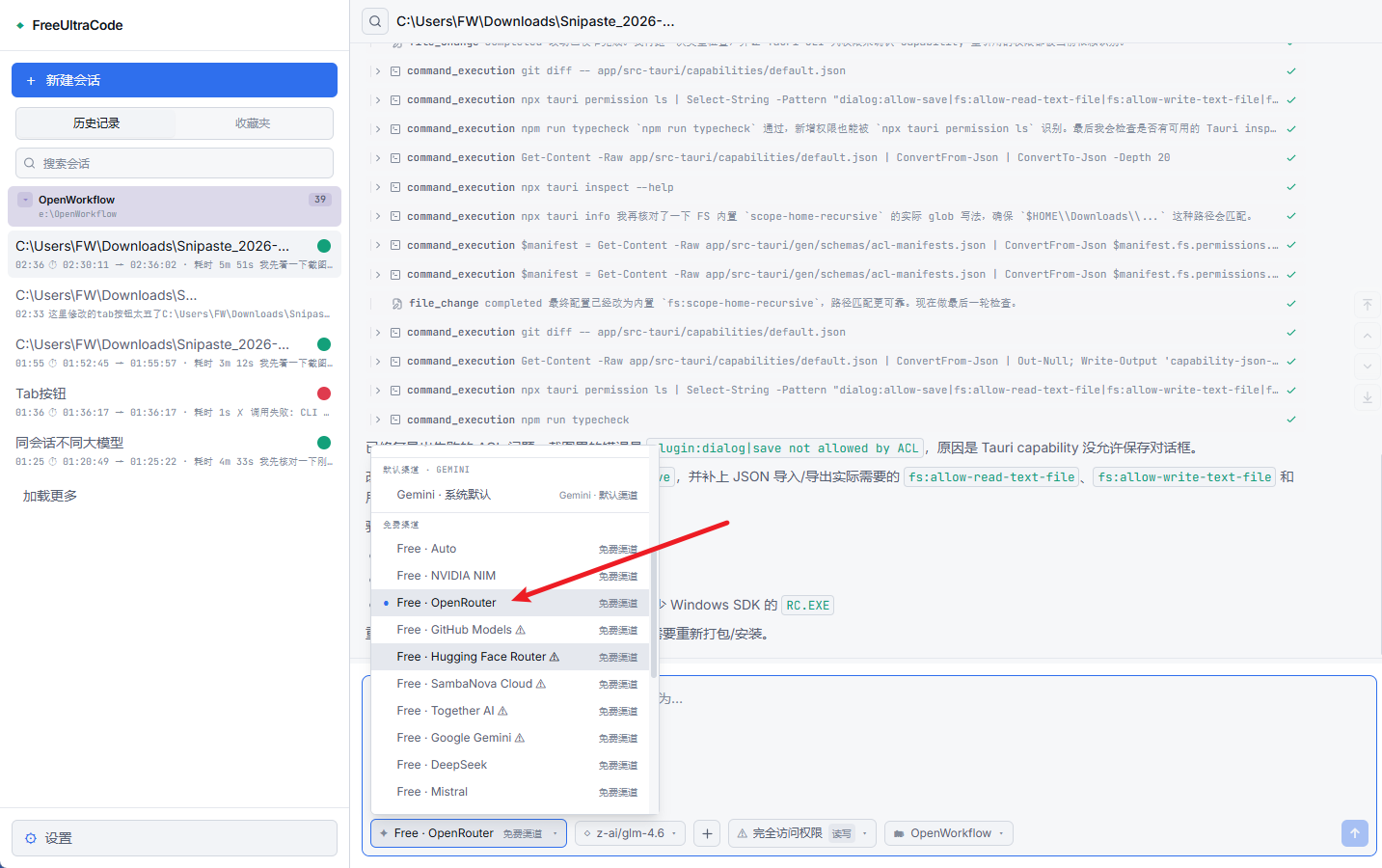
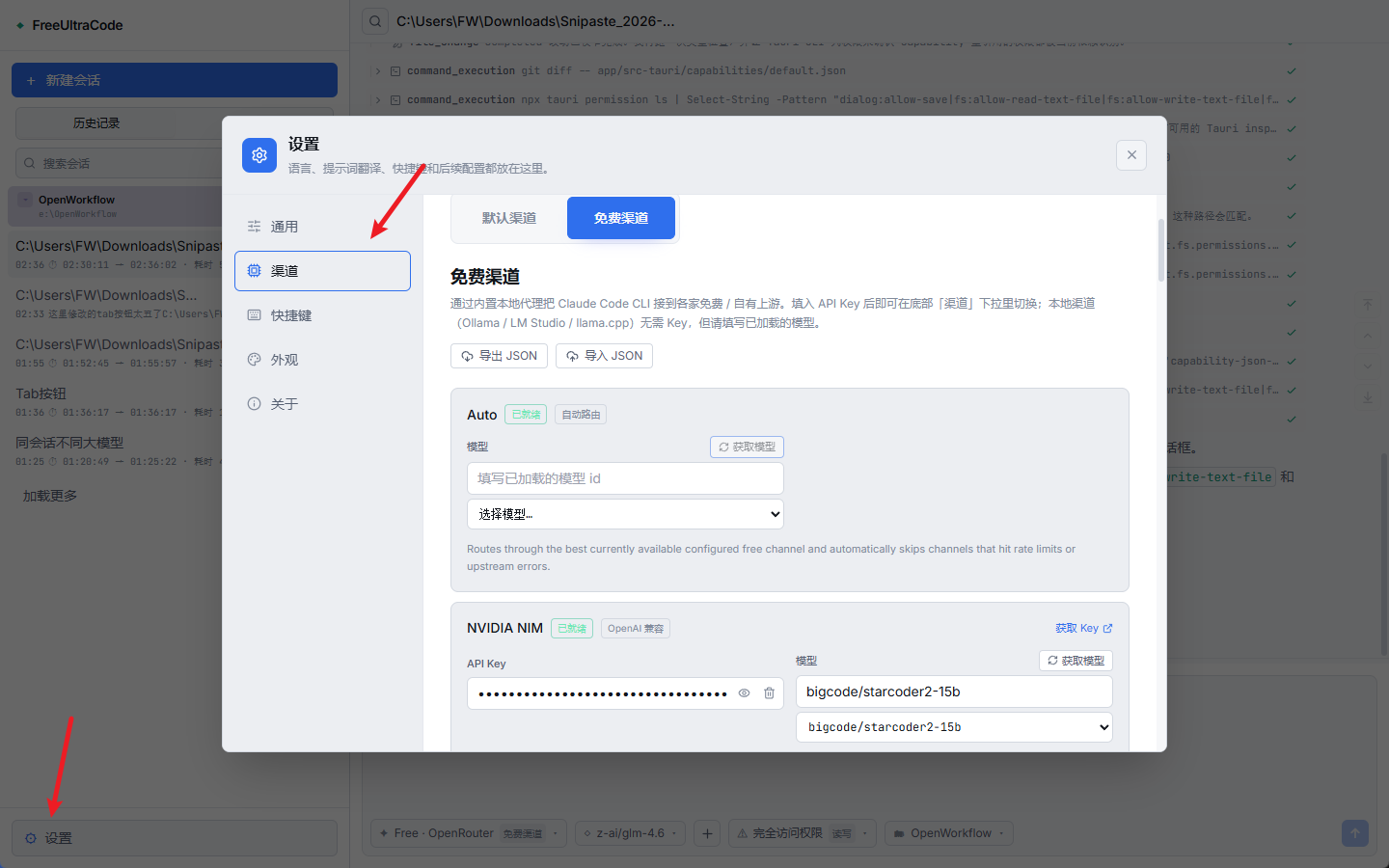
After the channel is ready, use the bottom input to chat through that route. See the free channel registration guide for the full Chinese walkthrough.
Asset modes turn the chat composer into an asset-generation surface while keeping the same session history. They are useful for producing UI mockups, icons, textures, sprites, 3D models, audio, and video, then switching back to coding in the same conversation. Image mode is the example below; sprite, mesh, music, speech, and video modes work the same way with their own *-mode-start commands.
Open Settings -> Images (or the matching asset section), choose a default provider, and fill in the required API key, account ID, base URL, or local ComfyUI endpoint. Providers with complete configuration are available from the composer in that mode.
Start a chat session and type /image-mode-start. You can also start and generate in one message, for example:
/image-mode-start a stylized stone-wall texture for a fantasy dungeon, tileable, 1024x1024
While the mode is on, ordinary messages generate assets instead of running coding edits. The bottom Channel selector switches to asset providers, and the model selector appears when model selection is enabled.
Describe the asset you want. UltraGameStudio first asks the coding model to polish the prompt, then sends it to the configured provider. The result appears in the chat stream with the prompt and provider details.
Send /image-mode-end to return to the normal coding channel and model. If you only need one asset without staying in a mode, send a one-shot command such as /image, /img, /draw, /生图, /sprite, /music, or /video followed by the prompt.
User request
    |
    v
Chat composer
    |
    +--> selected runtime / channel / permission / workspace
             |
             +--> direct provider API, local CLI, or local free-channel proxy
                        |
                        +--> streamed assistant output, tool log, and chat history
Free-channel proxy:
127.0.0.1:<port>.http://127.0.0.1:<port>/ch/<channelId>.| Area | Technology |
|---|---|
| Desktop shell | Tauri 2, Rust |
| Frontend | React 18, Vite 5, TypeScript 5 |
| State | Zustand |
| Styling | Tailwind CSS, CSS variables |
| Icons | lucide-react |
| Provider routing | Claude Code, Codex, Gemini, extensible provider settings |
| Free-channel proxy | Rust tiny_http + ureq, Anthropic/OpenAI protocol translation |
app/
  src/
    components/  Shared UI and rich assistant-message rendering
    lib/         Provider settings, free-channel routing, asset generation
                 (image, sprite, mesh/3D, music, speech, video, ComfyUI),
                 game-dev expert roster, persistence helpers
    panels/      Sidebar, chat dock, settings, scheduling UI
    store/       Zustand state and local history
  src-tauri/
    src/
      free_proxy.rs    Rust reverse proxy + Anthropic/OpenAI translation
      lib.rs           Tauri commands, filesystem/history bridge
  doc/                 Tutorials, localized READMEs, screenshots
backend/              Remote execution backend for cloud Runner jobs
packages/protocol/    Shared remote API types, status constants, Runner HTTP/SSE SDK
docs/                  Research notes, static docs, assets
pencil/                Pencil design files
Useful commands from app/:
npm run dev        # Vite dev server
npm run typecheck  # TypeScript check without emitting files
npm run lint       # ESLint for .ts and .tsx files
npm run test       # Vitest suite
npm run desktop    # Tauri development mode
npm run package    # Production Tauri build
149523963Pull requests should describe the behavior change, list verification commands, link related issues, and include screenshots or short recordings for UI changes.
MIT. See LICENSE.
more like this
Comprehensive analytics dashboard for AI coding agents — Cursor, Windsurf, Claude Code, VS Code Copilot, Zed, Antigravi…
Skill Claude Code de veille tech francophone. Agrège les flux RSS (Journal du Hacker, Human Coders News…) et produit un…
A to-do list that runs your Claude Code agents — capture anywhere, dispatch in parallel, review from your phone.
本地优先的 macOS AI Agent 信号灯:状态栏 + 桌面悬浮信号灯,自动监控 Codex / Claude Code。Local menu bar and floating desktop status lights for A…
search projects, people, and tags