perplexity-cli
🧠 A simple command-line client for the Perplexity API. Ask questions and receive answers directly from the terminal! 🚀🚀🚀
Python★ 176
RaspberryPI CPU fan tuner with a s8050 Triode
 winkidney
git clone https://github.com/winkidney/PIFanTuner.gitwinkidney/PIFanTunerRaspberryPI CPU fan tuner with a s8050 triode.
This project enables a daemon which manage a CPU fan for you, it will start after system bootstrapping automatically.It enables CPU fan while its temperature is more than 45°(or defined by you), else the fan will be turned off.
You can also view your cpu temperature within this project or turn on/off a given GPIO port by simple commandline tool.
Hardware
Software
At first , follow the diagram below and connect your triode and fan together.
Your triode may be like this one:

The circuit diagram is like this one:
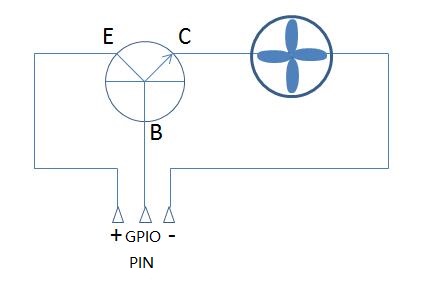
About Raspberry Pi PIN number
Use gpio readall to get map like following image.
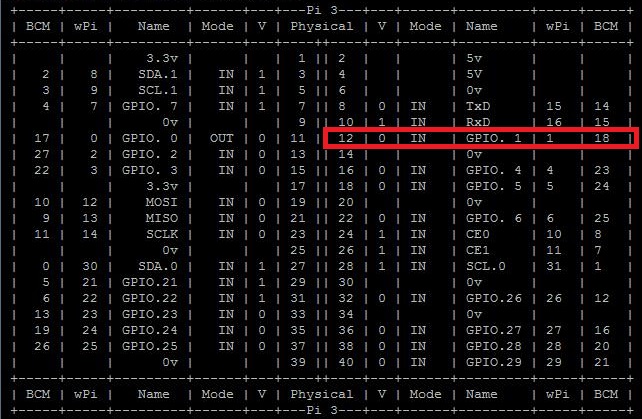
Enter console of your Raspberry Pi then start with
git clone https://github.com/winkidney/PIFanTuner.git
Or just download the zip file zipped by Github.
Then enter the project directory:
sudo python setup.py install
Now use following command to run fan-control daemon:
➜  ~ pi-fan-tuner fan simple --debug
DEBUG:root:Temperature 45.084 CPU fan on.
With raspbian or any system works well with systemd, you can use systemd
service script to make pi-fan-tuner a daemon which automatically manage
your fan.
After installation of the python package, you could run
./install-systemd-file.sh
to setup the systemd script for pi-fan-tuner.
Monitoring CPU temperature
pi-fan-tuner cpu-show --loop
For other usage, please run:
pi-fan-tuner --help
more like this
🧠 A simple command-line client for the Perplexity API. Ask questions and receive answers directly from the terminal! 🚀🚀🚀
search projects, people, and tags