chili3d
A browser-based 3D CAD application for online model design and editing
 xiangechen
Chili3D
A browser-based 3D CAD application for online model design and editing.
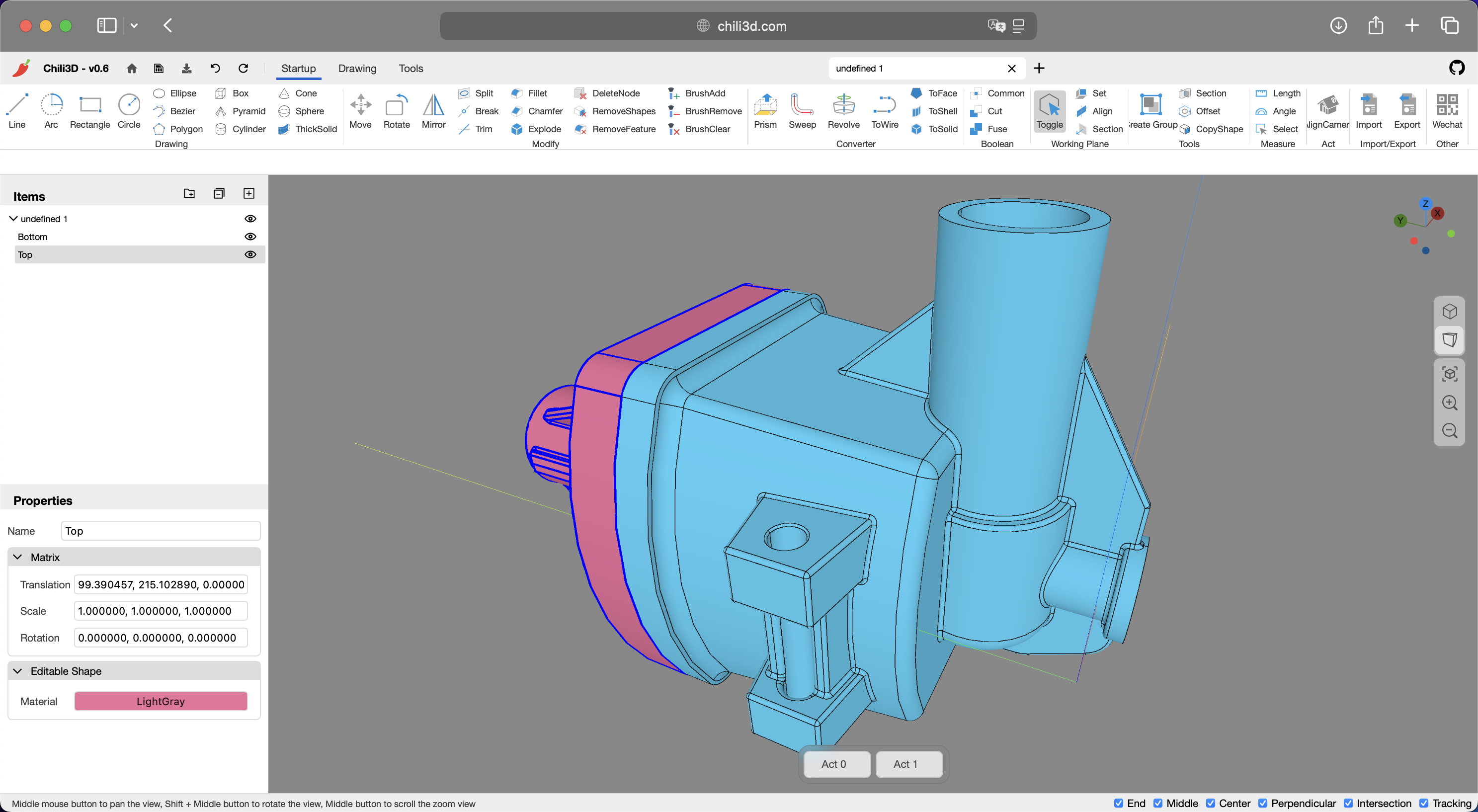
Overview
Chili3D is an open-source browser-based 3D CAD (Computer-Aided Design) application built with TypeScript. It achieves near-native performance by compiling OpenCascade (OCCT) to WebAssembly and integrating with Three.js, enabling powerful online modeling, editing, and rendering — all without requiring local installation.
You can access Chili3D online at:
- Official website: chili3d.com
- Cloudflare deployment: chili3d.pages.dev
Features
Modeling Tools
- Basic Shapes: Create boxes, cylinders, cones, spheres, pyramids, torus, and more
- 2D Sketching: Draw lines, arcs, circles, ellipses, rectangles, polygons, and Bézier curves
- Advanced Operations:
- Boolean operations (union, difference, intersection)
- Extrusion and revolution
- Sweeping and lofting
- Offset surfaces and thick solid
- Linear and circular arrays
- Shape checking and repair
Snapping and Tracking
- Object Snapping: Precisely snap to geometric features (points, edges, faces)
- Workplane Snapping: Snap to the current workplane for accurate planar operations
- Axis Tracking: Create objects along tracked axes for precise alignment
- Feature Point Detection: Automatically detect and snap to key geometric features
- Tracking Visualization: Visual guides showing tracking lines and reference points
Editing Tools
- Modification: Chamfer, fillet, trim, break, split, sew, simplify
- Transformation: Move, rotate, mirror, linear array, circular array
- Advanced Editing:
- Feature removal
- Sub-shape manipulation
- Explode compound objects
Measurement Tools
- Measure angles and lengths
- Calculate the sum of length, area, and volume
Document Management
- Create, open, and save documents
- Full undo/redo stack with transaction history
- Import/export of industry-standard formats (STEP, IGES, BREP, STL)
User Interface
- Office-style ribbon interface with contextual command organization
- Hierarchical assembly management with flexible grouping capabilities
- Dynamic workplane support
- 3D viewport with camera controls and camera position recall
- Command context panel integrated into the viewport
Plugin System
Chili3D supports a runtime plugin system with dynamic loading via URL parameters (?plugin=). Example plugins include:
- helloworld-js / helloworld-ts — Demo plugins showcasing the plugin API
- macro — Create, edit, and run macros to automate repetitive tasks
- visual-programming — Visual programming with a node-based editor (powered by Rete.js)
Localization
- Multi-Language Support: Built-in internationalization (i18n) with seamless locale switching
- Current Languages: Chinese (zh-cn), English (en), Portuguese — Brazil (pt-br)
- Contributions for additional languages are welcome
Architecture
Chili3D uses an npm workspace monorepo under packages/ with an interface-driven, pluggable backend architecture:
web ──> builder ──> app ──> core
                  ──> i18n ──> core
                  ──> three ──> core
                  ──> ui ──> core + element
                  ──> wasm ──> core
                  ──> storage ──> core

element ──> core
core— Abstract interfaces (IShape,IShapeFactory), math (XYZ,Matrix4,Plane), document model, reactive data (Observable,Binding,PubSub),Result<T,E>, transactions/undo/redo, commands, serialization, plugin system, service container, UI abstractionswasm— ConcreteShapeFactorycalling into OCCT via Emscripten bindingsthree— Three.js viewport, camera controller, visual objects, highlighter, outline pass, gizmo, mesh exportelement— Custom reactive DOM elements (radio groups, expanders, data converters)ui— Application chrome: main window, ribbon/toolbar, property panels, project tree, dialogs, toast, status barapp— ConcreteApplication, body node classes, command implementations,CommandService,HotkeyServicebuilder—AppBuilderwith a fluent.useIndexedDB().useWasmOcc().useThree().useUI().build()chain and default ribbon layouti18n— Locale data (en, zh-cn, pt-br)storage— IndexedDB persistence layerweb— Entry point: callsAppBuilder, shows loading screen, parses URL parameters
Technology Stack
- Frontend: TypeScript, Three.js (0.184)
- 3D Kernel: OpenCascade 8.0.0 (OCCT) compiled to WebAssembly via Emscripten
- Bundler: Rspack 2
- Linting & Formatting: Biome (TypeScript), clang-format (C++)
- Testing: Rstest + Happy-DOM
- Package Manager: npm workspaces
Changelog
You can view the full changelog here.
For Chinese users, you can also browse the media.
Getting Started
Prerequisites
- Node.js
- npm
Installation
-
Clone the repository
git clone https://github.com/xiangechen/chili3d.git
cd chili3d
-
Install dependencies
npm install
Development
Start the development server:
npm run dev # Launches at http://localhost:8080
Building
Build the application:
npm run build
WASM Build (Optional)
The prebuilt WASM module is included in the repository. If you want to build it from source:
-
Set up WebAssembly dependencies (one-time setup):
npm run setup:wasm
-
Build the WebAssembly module:
npm run build:wasm
Testing & Linting
npm run test    # Run all tests (Rstest + Happy-DOM)
npm run testc   # Tests with coverage
npm run check   # Biome lint + auto-fix
npm run format  # Biome + clang-format across all files
Docker
You can also deploy with Docker:
docker compose up -d # Builds and serves the app at http://localhost:8080
Code Style
- TypeScript: Biome for linting and formatting — 4-space indent, 110-char line width, double quotes, semicolons always
- C++: clang-format with WebKit style
- Interfaces prefixed with
I(IShape,ICommand) camelCasefunctions/variables,PascalCaseclasses,UPPER_SNAKE_CASEconstants- Type-only imports:
import type { IFoo } from "..." - Pre-commit hooks via simple-git-hooks + lint-staged
Contributing
We welcome contributions! Please feel free to submit pull requests or open issues.
Before submitting a PR, run npm run check to ensure your code passes linting.
Contact
- Discussions: Join our GitHub discussions for general chat or questions
- Issues: Use GitHub issues to report suggestions or bugs
- Email: Contact us privately at xiangetg@msn.cn
License
Distributed under the GNU Affero General Public License v3.0 (AGPL-3.0). For commercial licensing options, contact xiangetg@msn.cn.
Full license details: LICENSE
The C++ WASM module (cpp/) is licensed under LGPL-3.0.
Analytics Notice
Chili3D uses Microsoft Clarity for growth analytics. To disable data collection, remove the Clarity script from public/index.html.
Disclaimer
This software is provided "AS IS," and the authors and contributors hereby disclaim all express and implied warranties. The user shall bear full responsibility for any and all risks and potential consequences arising from the use of this software. Such risks and consequences include, but are not limited to:
- Data loss, system failures, or any direct or indirect damages;
- Conduct violating applicable laws or regulations resulting from software usage and its consequences;
- All liabilities arising from the software's use for illegal purposes or activities.
more like this
purecutcnc
PureCutCNC is a 2.5D CAD / CAM workspace for designing parts, defining machining operations, previewing toolpaths, and…