ARM-VO
Efficient monocular visual odometry for ground vehicles on ARM processors
 zanazakaryaie
git clone https://github.com/zanazakaryaie/ARM-VO.gitzanazakaryaie/ARM-VOARM-VO
ARM-VO is a monocular visual odometry algorithm designed for on-road vehicles. It is highly optimized for ARM CPUs as it uses NEON C intrinsics and multi-threading to accelerate keypoint detection and tracking.
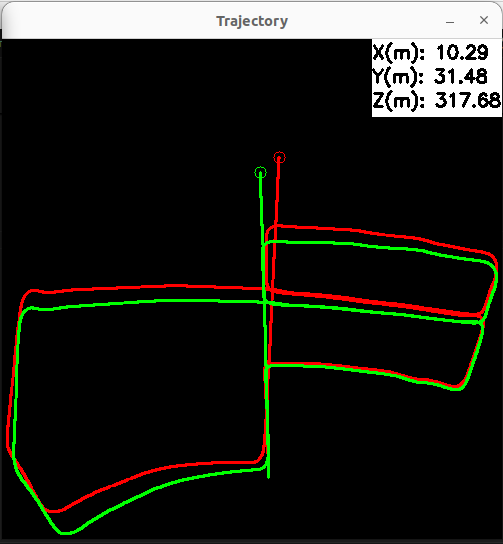
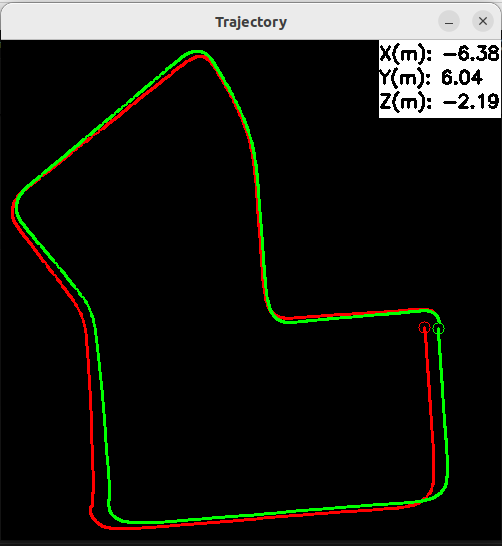
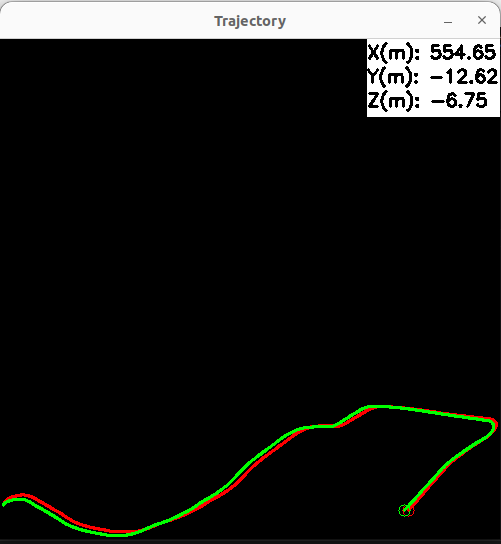
Results on KITTI dataset
| Sequence 05 | Sequence 07 | Sequence 10 |
|---|---|---|
 |
 |
 |
What's new in v2?
- Results are deterministic
- Scale estimation is more accurate (but slower)
- Camera pitch angle is no longer required (providing camera height is enough)
- RGB and BGR inputs are supported
- Distorted images are supported
- Keypoint tracking is faster by re-using KLT pyramids
- Motion estimation is more robust in dynamic environments
- The API and the implementation are much cleaner
- Enabled compilation on x86 machines to simplify development
- Removed ROS node examples (will be back in future)
Dependencies
-
C++17 (or above)
-
CMake >= 3.20 and build essentials
sudo apt install build-essential git cmake pkg-config
-
OpenCV
git clone --branch 4.10.0 --depth 1 https://github.com/opencv/opencv.git
cd opencv
mkdir build && cd build
cmake -DCMAKE_BUILD_TYPE=Release -DCMAKE_INSTALL_PREFIX=/usr/local -DBUILD_TESTS=OFF -DBUILD_PERF_TESTS=OFF -DBUILD_DOCS=OFF -DBUILD_EXAMPLES=OFF -DENABLE_NEON=ON -DBUILD_opencv_python2=OFF -DBUILD_opencv_python3=OFF ..
make -j$(nproc)
sudo make install
sudo ldconfig
-
ncnn
git clone --recursive --depth 1 --branch 20241226 https://github.com/Tencent/ncnn.git
cd ncnn
mkdir build && cd build
cmake -DCMAKE_BUILD_TYPE=Release -DCMAKE_CXX_STANDARD=17 -DCMAKE_INSTALL_PREFIX=/usr/local -DNCNN_BUILD_TESTS=OFF -DNCNN_BUILD_EXAMPLES=OFF -DNCNN_BUILD_BENCHMARK=OFF -DNCNN_THREADS=ON -DNCNN_OPENMP=OFF -DNCNN_VULKAN=ON  -DNCNN_ENABLE_LTO=ON ..
make -j$(nproc)
sudo make install
sudo ldconfig
-
Catch2 (only if you want to build tests as well)
git clone --branch v2.13.10 --depth 1 https://github.com/catchorg/Catch2.git
cd Catch2
mkdir build && cd build
cmake -DCMAKE_BUILD_TYPE=Release -DCMAKE_CXX_STANDARD=17 -DCMAKE_INSTALL_PREFIX=/usr/local -DCATCH_BUILD_STATIC_LIBRARY=ON -DCATCH_BUILD_TESTING=OFF -DCATCH_INSTALL_DOCS=OFF -DCATCH_INSTALL_HELPERS=ON ..
make -j$(nproc)
sudo make install
sudo ldconfig
How to build?
git clone https://github.com/zanazakaryaie/ARM-VO.git
cd ARM-VO
mkdir build && cd build
cmake -DCMAKE_BUILD_TYPE=Release ..
make -j$(nproc)
sudo make install
sudo ldconfig
Build Options
| Option | Default | Description |
|---|---|---|
BUILD_TESTS |
OFF |
Build unit tests |
Run on KITTI dataset
Download the odometry dataset from here. Open a terminal, navigate to build/cli folder and run:
./run_armvo --image_folder=path/to/downloaded/images/folder --config=path/to/config.yaml
To compare ARM-VO's accuracy with ground-truth poses, first download the ground-truth data from here. Then navigate to build/cli folder and run:
./run_armvo --image_folder=path/to/downloaded/images/folder --config=path/to/config.yaml --gt_poses=path/to/ground-truth/poses/foo.txt
How to use ARM-VO in your project?
If your project uses CMake, you can find the installed ARM-VO package and link against the core visual odometry library:
find_package(armvo REQUIRED CONFIG)
target_link_libraries(my_app PRIVATE armvo::ArmVO)
The package also exports armvo::ArmVOtools for helper utilities. Link it if
your application needs the tools API:
find_package(armvo REQUIRED CONFIG)
target_link_libraries(my_app PRIVATE armvo::ArmVO armvo::ArmVOtools)
Limitations
- ARM-VO recovers the scale if 1) the camera height is fixed and 2) the scene contains road. Thus, it is NOT applicable for drones, hand-held cameras, or off-road vehicles.
- The algorithm detects small inter-frame translations and pure rotations using GRIC but it doesn't decompose the estimated homography matrix. Track is lost if the camera rotates too much without translation.
Notes
- If you get low FPS on single-board computers (e.g. Raspberry Pi), check your power adapter.
- ARM-VO 2.0 leverages a low-resolution (320x640) BisenetV2 segmentation model to 1) estimate scale, and 2) perform better in dynamic scenes. You can increase or decrease the resolution to trade-off between accuracy and FPS. Check here to read more and go through the required steps.
- If you use ARM-VO in an academic work, please cite:
@article{nejad2019arm,
  title={ARM-VO: an efficient monocular visual odometry for ground vehicles on ARM CPUs},
  author={Nejad, Zana Zakaryaie and Ahmadabadian, Ali Hosseininaveh},
  journal={Machine Vision and Applications},
  volume={30},
  number={6},
  pages={1061--1070},
  year={2019},
  publisher={Springer}
}
For Developers
Repository Layout
.
├── cli/             Command-line tools for running ARM-VO
├── cmake/           CMake scripts
├── docs/            Documentation and README assets
├── lib/             Core ARM-VO implementation
├── model/           BiseNetv2 model
├── tools/           Utilities for visualization, evaluation, etc.
└── CMakeLists.txt   Main CMake build file
Running Tests
If you build ARM-VO with -DBUILD_TESTS=ON, you can run tests from the repo root by:
ctest --test-dir build --output-on-failure
Alternatively, you can navigate to build/lib/tests or build/tools/tests and run test_* executables one by one.
TODOs
- Add TensorRT backend
- Increase test coverage
- Add ROS 1 and ROS 2 examples
- Add redundancy for scale estimation (e.g. object priors)
- Support Bazel
- Add Python bindings
more like this