ForwardWidgets
Widgets for Douban and Trakt watchlists plus personalized recommendations, live TV streaming including PlutoTV, Yatu ra…
JavaScript★ 247
Calendar Week & Day View in iOS Swift
 zjfjack
git clone https://github.com/zjfjack/JZCalendarWeekView.gitzjfjack/JZCalendarWeekView
iOS Calendar Week/Day View in Swift
Inspired from WRCalendarView
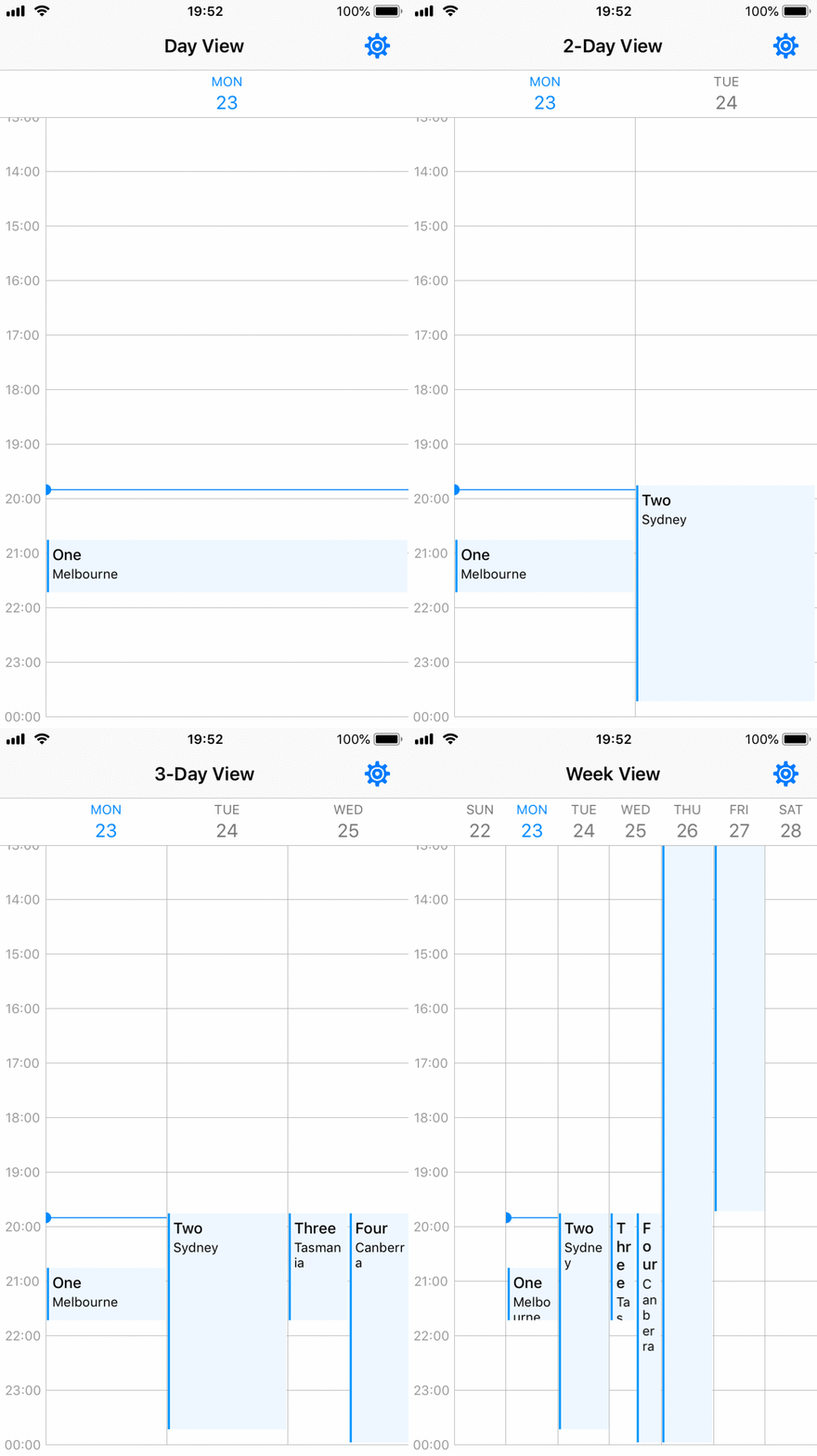
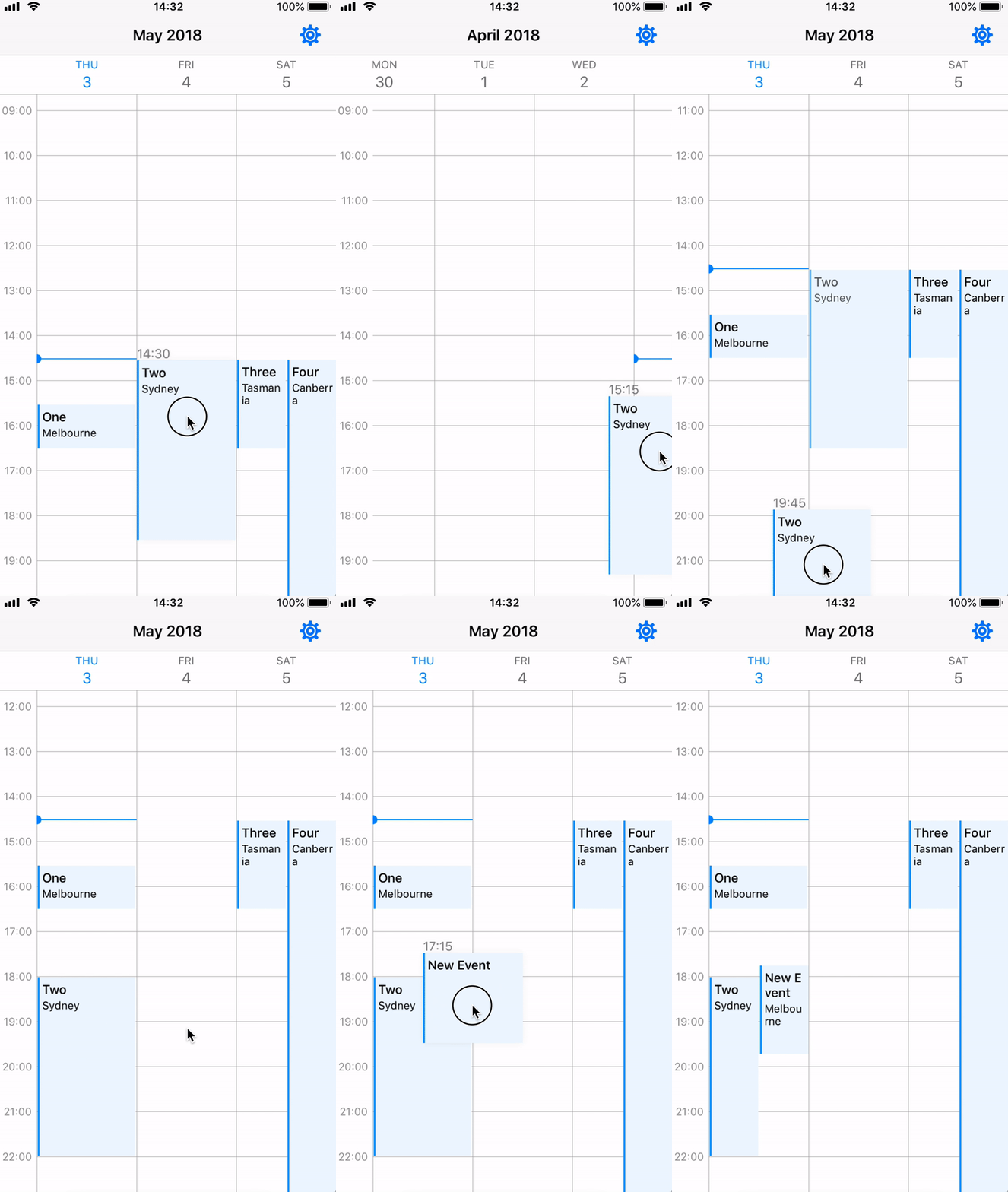
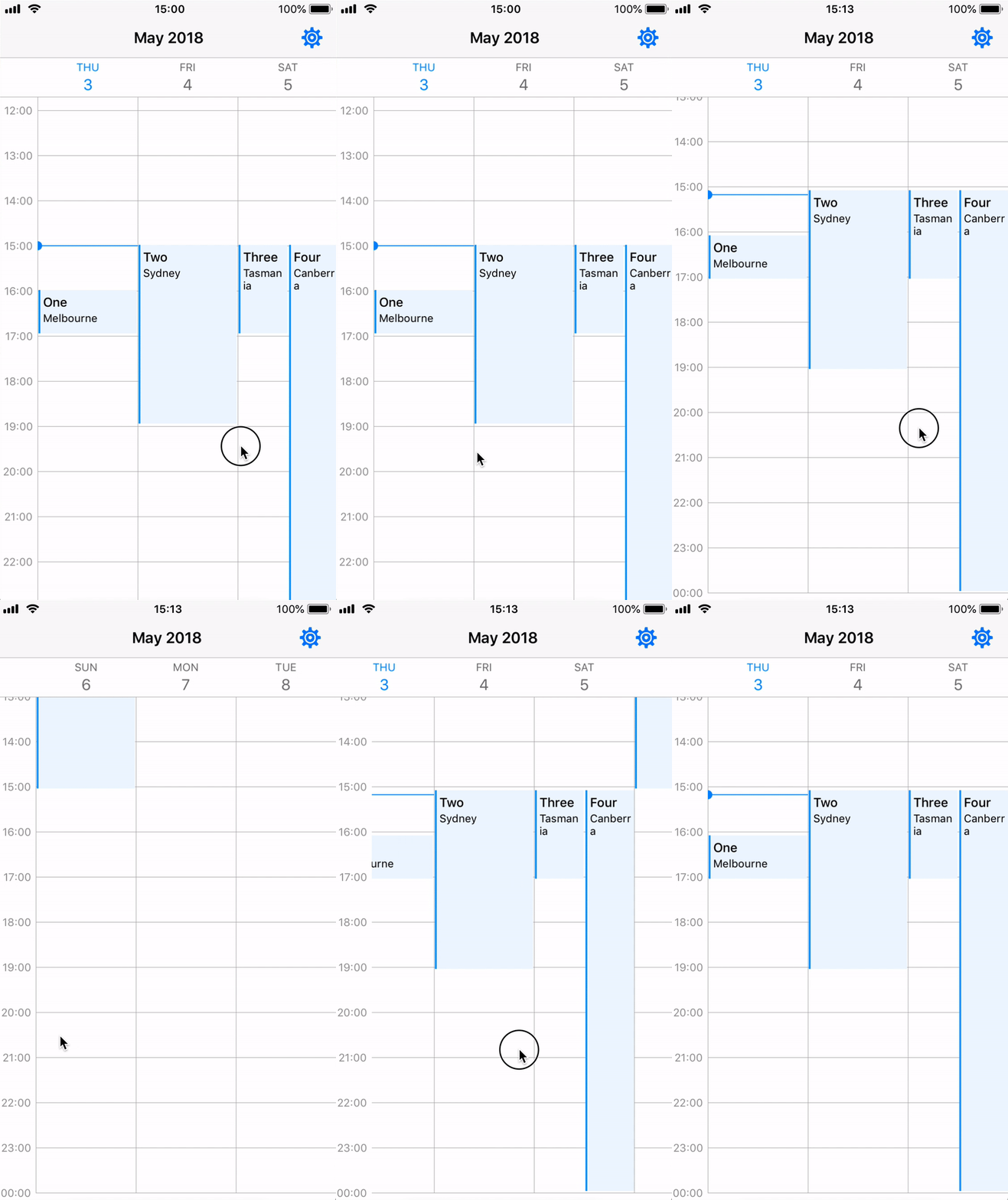
In your viewController, you only need do few things.
viewDidLoadcalendarWeekView.setupCalendar(numOfDays: 7,
setDate: Date(),
allEvents: JZWeekViewHelper.getIntraEventsByDate(originalEvents: events),
scrollType: .pageScroll,
firstDayOfWeek: .Monday)
viewWillTransition and call viewTransitionHandler in JZWeekViewHelper to support all device orientationsoverride func viewWillTransition(to size: CGSize, with coordinator: UIViewControllerTransitionCoordinator) {
JZWeekViewHelper.viewTransitionHandler(to: size, weekView: calendarWeekView)
}
viewDidLoad (optional)calendarWeekView.updateFlowLayout(JZWeekViewFlowLayout(hourHeight: 50, rowHeaderWidth: 50, columnHeaderHeight: 50, hourGridDivision: JZHourGridDivision.noneDiv))
Create your own WeekView class inheriting from JZBaseWeekView, and you should override the following functions.
UICollectionReusableView here. (CollectionViewCell, SupplementaryView or DecorationView)override func registerViewClasses() {
super.registerViewClasses()
// Register CollectionViewCell
self.collectionView.register(UINib(nibName: "EventCell", bundle: nil), forCellWithReuseIdentifier: "EventCell")
// Register DecorationView: must provide corresponding JZDecorationViewKinds
self.flowLayout.register(BlackGridLine.self, forDecorationViewOfKind: JZDecorationViewKinds.verticalGridline)
self.flowLayout.register(BlackGridLine.self, forDecorationViewOfKind: JZDecorationViewKinds.horizontalGridline)
// Register SupplementrayView: must override collectionView viewForSupplementaryElementOfKind
collectionView.register(RowHeader.self, forSupplementaryViewOfKind: JZSupplementaryViewKinds.rowHeader, withReuseIdentifier: "RowHeader")
}
If you want to use your own supplementryView (including your current timeline), you should register it and override the following function
override func collectionView(_ collectionView: UICollectionView, viewForSupplementaryElementOfKind kind: String, at indexPath: IndexPath) -> UICollectionReusableView
cellForItemAt: Use your custom collectionViewCelloverride func collectionView(_ collectionView: UICollectionView, cellForItemAt indexPath: IndexPath) -> UICollectionViewCell {
let date = flowLayout.dateForColumnHeader(at: indexPath)
let cell = collectionView.dequeueReusableCell(withReuseIdentifier: EventCell.className, for: indexPath) as! EventCell
cell.updateView(event: allEventsBySection[date]![indexPath.row] as! Event)
return cell
}
This view is inheriated from JZBaseWeekView and implements the long press gestures. You can simply follow the setup rules of JZBaseWeekView.
In order to achieve the long press gestures, you should implement the JZLongPressViewDelegate and JZLongPressViewDataSource in your ViewController.
public protocol JZLongPressViewDelegate: class {
    /// When addNew long press gesture ends, this function will be called.
    func weekView(_ weekView: JZLongPressWeekView, didEndAddNewLongPressAt startDate: Date)
    /// When Move long press gesture ends, this function will be called.
    func weekView(_ weekView: JZLongPressWeekView, editingEvent: JZBaseEvent, didEndMoveLongPressAt startDate: Date)
    /// Sometimes the longPress will be cancelled because some curtain reason.
    func weekView(_ weekView: JZLongPressWeekView, longPressType: JZLongPressWeekView.LongPressType, didCancelLongPressAt startDate: Date)
}

public protocol JZLongPressViewDataSource: class {
    /// Implement this function to customise your own AddNew longPressView
    func weekView(_ weekView: JZLongPressWeekView, viewForAddNewLongPressAt startDate: Date) -> UIView
    /// Implement this function to customise your own Move longPressView
    func weekView(_ weekView: JZLongPressWeekView, movingCell: UICollectionViewCell, viewForMoveLongPressAt startDate: Date) -> UIView
}
Also, you should provide the long press types and there are some other properties you can change.
calendarWeekView.longPressDelegate = self
calendarWeekView.longPressDataSource = self
calendarWeekView.longPressTypes = [.addNew, .move]

// Optional
calendarWeekView.addNewDurationMins = 120
calendarWeekView.moveTimeMinInterval = 15
If you want to use the move type long press, you have to inherit your UICollectionViewCell from JZLongPressEventCell to allow retrieving editing JZBaseEvent because of UICollectionView reuse problem. Also, remember to set your cell backgroundColor in cell contentView.
In JZCalendarWeekView, the data model is using [Date: [Event]] dictionary because for each day (a section in collectionView), there might be some events.
A static function called getIntraEventsByDate provided in JZWeekViewHelper allow you to tranform your events list into [Date: [Event]] dictionary.
open class func getIntraEventsByDate<T: JZBaseEvent>(originalEvents: [T]) -> [Date: [T]]
In order to call this function, you should create a subclass of JZBaseEvent and also implement the NSCopying protocol.
For the intraStartDate and intraEndDate in JZBaseEvent, it means that if a event crosses two days, it should be divided into two events but with different intraStartDate and intraEndDate.
eg. startDate = 180329 14:00, endDate = 180330 03:00, then two events should be generated: 1. 180329 14:00(IntraStart) - 23:59(IntraEnd) 2. 180330 00:00(IntraStart) - 03:00(IntraEnd)
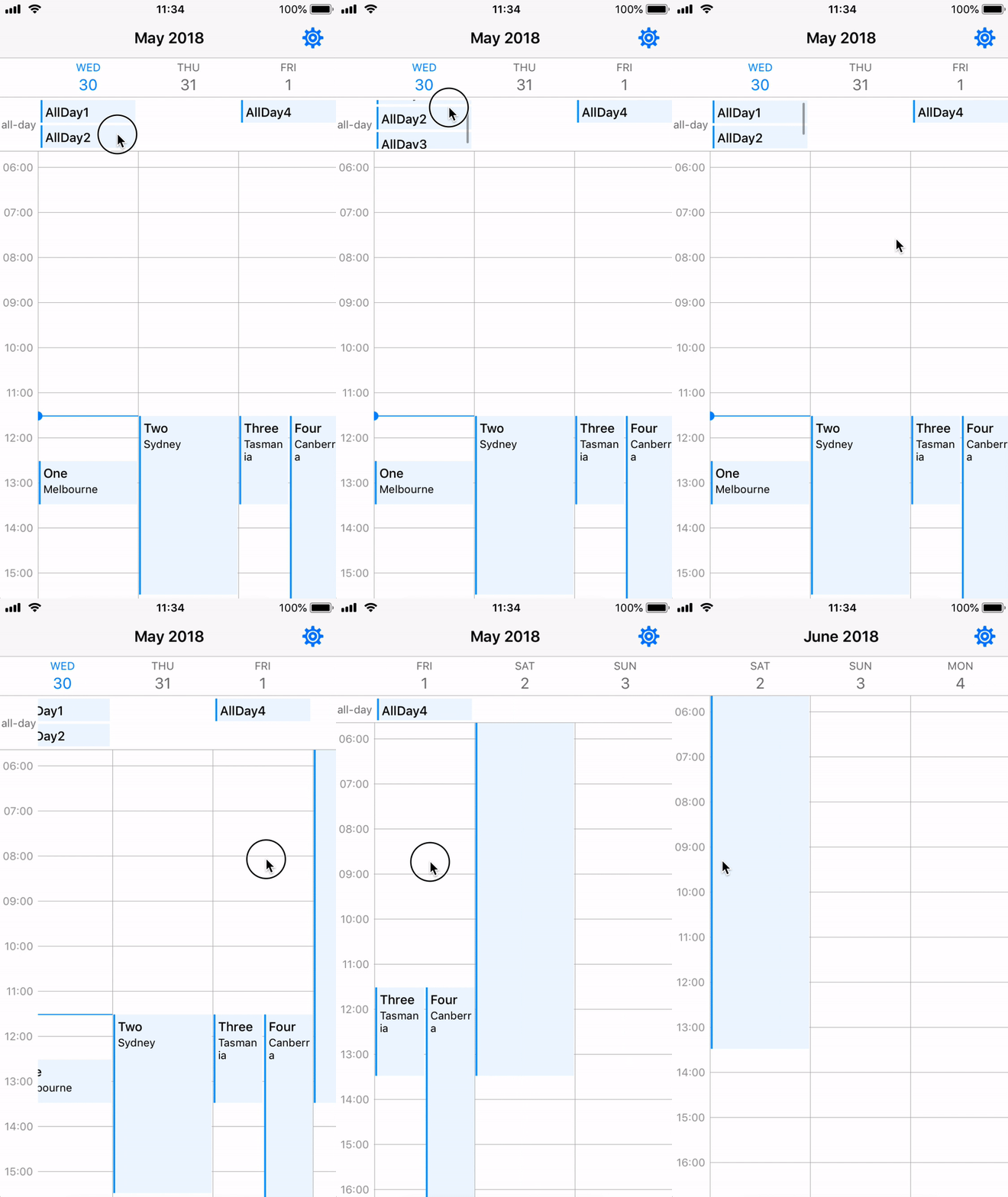
All-Day feature is aimed to display all-day events separately, but only events tagged isAllDay true can be shown. For those events crossing few days would better keep them isAllDay false. (Refer to Apple Calendar & Google Calendar)
In order to active all-day feature, there are only two things you need to do.
JZAllDayEvent to ensure the isAllDay variable added.viewForSupplementaryElementOfKind and use updateView in AllDayHeader to update your all-day view with your own views. ExampleHorizontal scrollable range dates allow you to set your preferred scrollable range. CalendarWeekView can only be horizontal scrollable between startDate(including) and endDate(including). nil means no limit.
scrollableRange when you call setupCalendar() or simply change this variable.scrollType without calling forceReload(), you should call setHorizontalEdgesOffsetX() to reset the edges, because for different scroll types, the edges are different.JZCalendarWeekView can be added to your project by adding the following dependency to your Package.swift:
.package(url: "https://github.com/zjfjack/JZCalendarWeekView.git", .upToNextMajor(from: "0.7.2"))
JZCalendarWeekView can be added to your project by adding the following line to your Podfile:
# Latest release in CocoaPods (recommend to use latest version before v1.0.0 release, optional: provide version number)
pod 'JZCalendarWeekView'
JZCalendarWeekView can be added to your project by adding the following line to your Cartfile:
# Latest release on Carthage (recommend to use latest version before v1.0.0 release, optional: provide version number)
github "zjfjack/JZCalendarWeekView"
Jeff Zhang, zekejeff@gmail.com
If you have any questions and suggestions, feel free to contact me.
JZCalendarWeekView is available under the MIT license. See the LICENSE for more info.
more like this
Widgets for Douban and Trakt watchlists plus personalized recommendations, live TV streaming including PlutoTV, Yatu ra…
Vibe-coded, but not slop. A mobile-first SDR receiver for iOS, Android & Apple Watch — the live waterfall on your wrist…
A lightweight, simplified, RedNotebook-inspired journal/diary app. Built with Electron. Makes dated text files.
search projects, people, and tags